Incorrect mappings for Stadia controller in Bluetooth mode
Hello @hateball, this reads more like an SDL controller mapping issue than a Steam client issue. It might be worthwhile to report this issue upstream.
@kisak-valve thanks I will look into that.
As for right now, it seems that I can actually change the mapping for the controller through Steams GUI and it persists across reboots. The controller behaved as expected while playing Detroit: Become Human.
Hello @hateball, this reads more like an SDL controller mapping issue than a Steam client issue. It might be worthwhile to report this issue upstream.
So I've ran into this issue but it seems to be more in depth than it could be. I've used a few controllers and I'm running Steam (non-beta) on Ubuntu 22.04.1 LTS. When I have the controller connected and steam NOT running I only see the controller. When I have a controller connected and run steam there is a non-functioning Xbox 360 controller that is generated and is setup at Player 1. I'm not sure why this is happening.
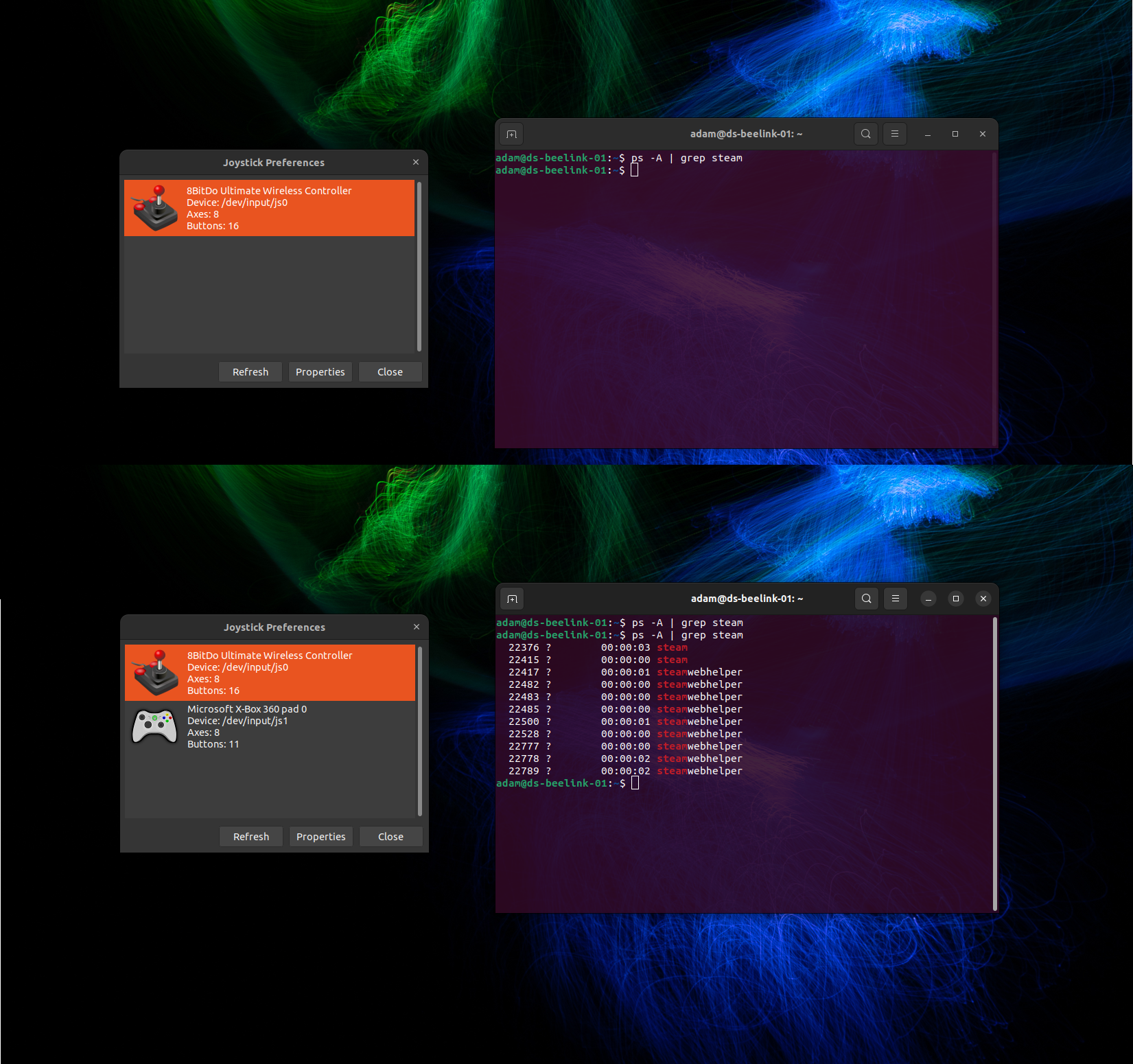
I have run into the same issue on Fedora 37. Though it could be SDL issue for not detecting the keys properly at the start - there is a way to get SDL to map to config using environment variable - but my experience that hasnt solved issue on Steam for Linux.
If I could chime in here, there could still be an issue w/ Steam Linux controller configurator that would not take/save user modified config properly and keeps reverting to default (broken config).
Here’s my thread on reddit for my report.
https://www.reddit.com/r/SteamController/comments/10njxy3/stadia_controller_right_stick_and_trigger_buttons/
Here is steps on how I manage to finagle Steam Linux Controller config to take my override config, mind you it is convoluted.
From Steam controller setting:
- Click “Preference” on detected Generic Controller
Name something new, dont re-use previous name. Eg: “My fixed version 2 or 3 or 4… ” - Click submit
- Click “Define Layout” and remap those 4 buttons (right stick axis, l/r triggers)
- Click save and DO NOT submit to community. Click “No” when asked to submit config. If you submit, it seems to revert the settings.
- Use the “calibration” button to confirm your setting takes, DO NOT go back to ”Define Layout” as that would revert your settings.
I was able to get this sequence working 2 out of 3 tries.
I'm on Fedora 37. The controller mapping was fine out of the box except for the R1 button. It simply won't detect how ever pressing R2 triggers both R1 and R2. I can complete the layout configuration just fine including R1. However, when I try a game or Big Picture test screen, the R buttons still misbehave.
R1=Right shoulder
R2=Right trigger
Of course, these are happening on Bluetooth. USB works great. Well, except for the rumble.
Launch options
SDL_Gx1 2023-01
Your system information
Please describe your issue in as much detail as possible:
After converting the Stadia controller to BT mode via https://stadia.google.com/controller the controller pairs up and shows up in Steam, but it's not mapped properly. Eg trigger buttons are not mapped at all.
Testing the gamepad on https://gamepad-tester.com/ shows it working properly.
I found this Reddit post describing how to fix the issue https://www.reddit.com/r/linux_gaming/comments/10erpmc/just_updated_my_stadia_controller_with_the_google/
However it only persisted through one restart of Steam for me. If I try doing the manual changes now, Steam overwrites the config with the broken defaults. If I keep trying to save the modifications they still seem to be ignored.
I'll paste the gamepad bits from config.vdf, BT variant being the bottom one:
"SDL_GamepadBind" "03000000de280000ff11000001000000,Steam Virtual Gamepad,a:b0,b:b1,back:b6,dpdown:h0.4,dpleft:h0.8,dpright:h0.2,dpup:h0.1,guide:b8,leftshoulder:b4,leftstick:b9,lefttrigger:a2,leftx:a0,lefty:a1,rightshoulder:b5,rightstick:b10,righttrigger:a5,rightx:a3,righty:a4,start:b7,x:b2,y:b3,platform:Linux 03000000d11800000094000011010000,Google Stadia Controller,a:b0,b:b1,back:b6,dpdown:h0.4,dpleft:h0.8,dpright:h0.2,dpup:h0.1,guide:b8,leftshoulder:b4,leftstick:b9,lefttrigger:a5,leftx:a0,lefty:a1,rightshoulder:b5,rightstick:b10,righttrigger:a4,rightx:a2,righty:a3,start:b7,x:b2,y:b3,platform:Linux 03000000de280000fc11000001000000,Steam Controller,a:b0,b:b1,back:b6,dpdown:b14,dpleft:b15,dpright:b13,dpup:b12,guide:b8,leftshoulder:b4,leftstick:b9,lefttrigger:a2,leftx:a0,lefty:a1,rightshoulder:b5,rightstick:b10,righttrigger:a5,rightx:a3,righty:a4,start:b7,x:b2,y:b3,platform:Linux 05000000d11800000094000000010000,StadiaYMD7-3e81,a:b0,b:b1,x:b2,y:b3,back:b6,guide:b8,start:b7,leftstick:b9,rightstick:b10,leftshoulder:b4,rightshoulder:b5,dpup:h0.1,dpdown:h0.4,dpleft:h0.8,dpright:h0.2,leftx:a0,lefty:a1,lefttrigger:a2,righttrigger:a3,crc:3125,platform:LinuxSteps for reproducing this issue: