Missing "Controllers" tab in game properties | Steam Deck Desktop Client
Hello @yacinbm,
Steam Input only supports joysticks and game pads. Racing wheels are not supported, so it is expected that nothing would show up under Controllers. If the game you are running has support for racing wheels then it should be able to configure and use it as normal however. If that is not happening then it is a bug.
Re-reading through this with @kisak-valve's help, I think I misunderstood what the issue being reported is on here. This behavior of not showing the controllers tab in desktop mode is intentional.
Try running without the -steamdeck option and it should come back. Be aware that this tab exposes some settings that are not available under gamescope, so you may break things in gamescope that you'll have to come back to desktop to fix.
If you add oversteer or fftest as a non-steam shortcut and run them (from desktop mode), is the wheel still detected? And is there a specific steam game you tested in turn that the wheel is not detected with? Rather than disabling Steam Input we should identify and fix why having it enabled is causing issues.
Hi @TTimo, so far, I have tested Dirt Rally, F1 2019 and Assetto Corsa, all three of which do not detect the wheel. The wheel also doesn't appear when running proton control as a launch option. That being said, upon replacing steam-jupiter-stable with the default Arch client, the wheel now appears in proton control, when disabling Steam Input (but the games wont run anymore).
I'll try to add oversteer as a non steam command ASAP and launch steam without the -steamdeck tag and report back. I'm ok with this not working in gaming mode, as I'm only using the wheel when I'm docked with a KB and mouse.
Quick update. Adding oversteer as a non steam game and launching it works as intended. The wheel is detected and works properly with force feedback and all.
You are also correct that launching steam.sh with no argument makes the Controller sub menu available. An interesting side note is that by looking at the steam startup logs, I can see that it correctly identifies my racing wheel, regardless of the -steamdeck parameter:
Local Device Found
  type: 044f b66e
  path: sdl://1
  serial_number:  - 0
  Manufacturer:
  Product:      Thrustmaster T300RS Racing wheel
  Release:      100
  Interface:    -1
After attempting to launch Dirt Rally in non-steamdeck mode, I noticed that it actually downloaded an additional ~2GB of data and it actually switched to the Native Linux version of the game. I don't know why the Deck doesn't use that version by default but w/e. I got an error 127 which was promptly fixed by installing the missing libxcrypt-compat with pacman -S libxcrypt-compat. And voila! The game works and recognizes the wheel properly! That bein said, I feel like instead of fixing the issue, we just circumvented it, since Dirt Rally doesn't use Proton in this version, it just runs natively.
This is why I'll get back to you once I get Assetto Corsa running, which uses Proton. I had a working install of AC in Deck mode, but it doesn't want to run in non-deck mode. There are a few tutorials to get AC running on Linux PCs, so I'll report back if I can get it working. It's weird to me that a working install in deck mode would stop working, but hey.
Let me know if you need any more logs/tests on my side!
Thanks for the info, very useful. We suspect the problem may be coming from SDL2 ignoring the racing wheel due to the SDL_HINT_GAMECONTROLLER_IGNORE_DEVICES environment variable being set when Steam Input is enabled.
This variable is set by the Steam client and tells SDL2 to ignore gamepads and joysticks and use the Steam Input virtual one instead. It should not ignore non-gamepad things like a racing wheel but what you describe sounds like maybe it does.
In order to test this, you'd need to wrap the launch of Dirt Rally in a shell script (or edit the launch shell script if it already has one), and unset the variable with something like unset SDL_HINT_GAMECONTROLLER_IGNORE_DEVICES.
So I tried to unset the specified variable in a few ways, but in all cases, it did not make the wheel available in game while running Steam with -steamdeck.
To unset the variable, I modified that launch command of my game to :
/home/deck/.local/share/Steam/ubuntu12_32/reaper SteamLaunch AppId=310560 -- /home/deck/.local/share/Steam/ubuntu12_32/steam-launch-wrapper -- /home/deck/.local/share/Steam/steamapps/common/SteamLinuxRuntime_soldier/_v2-entry-point --verb=waitforexitandrun -- unset SDL_HINT_GAMECONTROLLER_IGNORE_DEVICES -- /home/deck/.local/share/Steam/steamapps/common/Proton 7.0/proton waitforexitandrun /run/media/mmcblk0p1/SteamLibrary/steamapps/common/DiRT Rally/drt.exe
This command was extracted from printing %command% to a file, and by inserting unset SDL_HINT_GAMECONTROLLER_IGNORE_DEVICES inside. I also tried
unset SDL_HINT_GAMECONTROLLER_IGNORE_DEVICES; %command%
but again, no change.
Let me know if this would be an acceptable way of disabling the variable. Don't hesitate if there are any other test that I can help you with!!
Did a little more testing, and I modified my Dirt Rally launch options to:
unset SDL_HINT_GAMECONTROLLER_IGNORE_DEVICES; "/home/deck/.local/share/Steam/steamapps/common/Proton 7.0/dist/bin/wine" control; %command%
which opens my Proton's Wine's control applet. As you can see, the wheel does appear in the list of devices, and the inputs work!
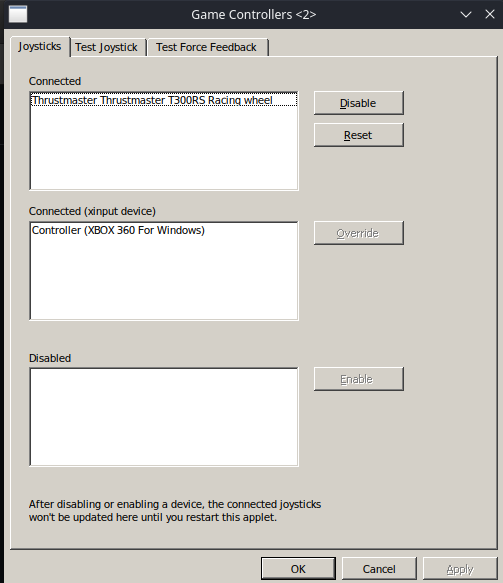
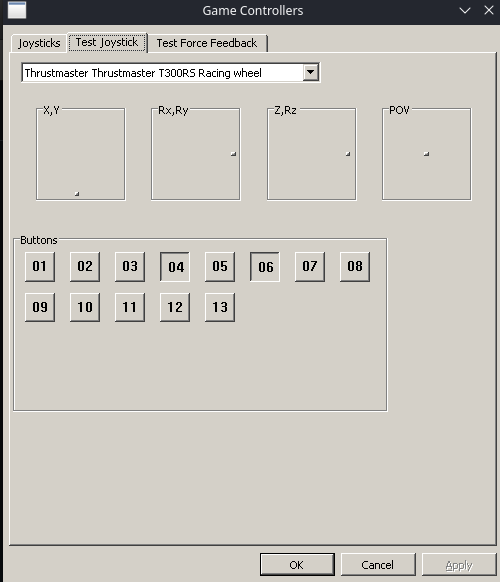
That being said, the wheel is still not recognized in game, and no input is detected when trying to update my key binds. Note that the wheel appears in the applet regardless of the unset SDL_HINT_GAMECONTROLLER_IGNORE_DEVICEScommand.
EDIT
This was misleading, as I was actually launching wine on its own, and not using the compatibility data of Dirt. To make sure I was actually using my game's environment, I installed protontricks.
By running protontricks -c "unset SDL_HINT_GAMECONTROLLER_IGNORE_DEVICES && wine control", I got to the same applet as before, but the wheel would no longer respond to inputs (which is what happens in game, so I think this will help me test out other theories). Also note that the Deck's buttons also do not cause any sort of response in control, since they are seen as mouse inputs.
Let me know if you want me to test anything else!
Dirt Rally doesn't use Proton in this version
I thought you were using the native version of Dirt Rally. Incidentally it doesn't seem to be available on the store anymore. Do you have / have you tested with DiRT 4 native? (that one seems available on the store).
I'm not sure the way you are disabling SDL_HINT_GAMECONTROLLER_IGNORE_DEVICES is correct .. I'll need to noodle the info you provided some more .. thanks!
I thought you were using the native version of Dirt Rally.
I know, it gets super confusing. When I start steam.sh with -steamdeck, Steam automatically launches an update for Dirt Rally and installs Windows + Proton version. If I don't specify the argument, an update starts and the native version get installed instead.
To be honest, I'd like if we could find a fix for my Windows + Proton games, as most of my sim games are non-native games. Thanks again for your help!
EDIT
Make sure you check my previous comment, I wasn't using the correct environment to launch my control applet, but I can now. The applet seems to behave just like the game, meaning that pressing any button on the wheel does not result in any response in the Test Joystick submenu.
Quick update,
After having a search in the hid_tmff2 github issues, I stumbled upon this thread where users have reported issues with Proton versions more recent than 5.0-10.
To test this, I installed Assetto Corsa with Proton 5.0-10 and my steering wheel is indeed detected when executing protontricks -c "wine control" 244210, I can see that my wheel's inputs work as intended. I can even get to AC's main menu and set my controls to use the wheels and pedals, great! All of this was done with the default Steam Deck's client (so with the -steamdeck parameter).
That being said, when I get to driving in game, my steering wheel and pedals don't work, as the game is still only recognizing the inputs from my Deck's controller, which I think is related to Steam Input.
I'll try to find a way to unset the SDL_HINT_GAMECONTROLLER_IGNORE_DEVICES parameter correctly and report back ASAP. Thanks!
After even more tinkering, it seems that the issue appears with any version of Proton greater than 5.13. The wheel is recognized by Proton (I ran protontricks -c "wine control joy.cpl" <my game id> and the wheel is listed) but the inputs are not recognized.
A similar issue has been reported on the hid-tmff2 GitHub page, where some users have reported that adding a udev rule for the wheel fixed their issue. Unfortunately, it did not for me.
Side note: I was able to make my wheel work with Assetto Corsa on the Deck with Proton 5.13, but I had to disable the Deck's controller, or else the game would read the controller's inputs instead of my wheel.
After having tinkered with this for two whole weeks, I don't think the missing menu is the issue. Will re-open a ticket with a more descriptive title.
Thanks @TTimo I opened a ticket with a little more focused info with my findings, I hope this is ok.
Proton versions
proton 5.13x2 2023-04proton 5.0-10x1 2023-04proton 7.0x2 2023-03
Launch options
SDL_HINT_GAMECONTROLLER_IGNORE_DEVICESx5 2023-04
Upstream links
- ValveSoftware/Proton/issues/6674x1 2023-04
Your system information
Please describe your issue in as much detail as possible:
I just installed the (hid-tmff2) driver for the Thurstmaster T300RS racing wheel. The wheel is correctly recognized by the OS, and was tested with oversteer and fftest.
That being said, whenever I try to launch a game with the default Steam Deck Steam client, my wheel is not recognized. After some diagnosis, I figured out that the issue came from an incompatibility with Steam Input. That being said, the default Steam Deck client does not allow the user to disable Steam Input in the properties of a game. The
Controllerstab in the game properties is not there for the user to configure.In order to fix this, I had to overwrite the default Steam client with the one found on pacman, which is less than ideal. I think this option should be added to the Steam Deck default client.
(All of this was made in Desktop mode of course)
Steps for reproducing this issue:
Controllerstab