Notifications render in the wrong place with multiple monitors
Same for me.
Yep, seems it.
After taking a screenshot of the issue as well, I tried just adjusting the position of the primary monitor in an image-editing tool. By only adjusting the Y-coordinate, the position of the notification ended up being exactly where you expect it to.
Is position calculated from the top-left position?
before/after image-manipulation screenshots;
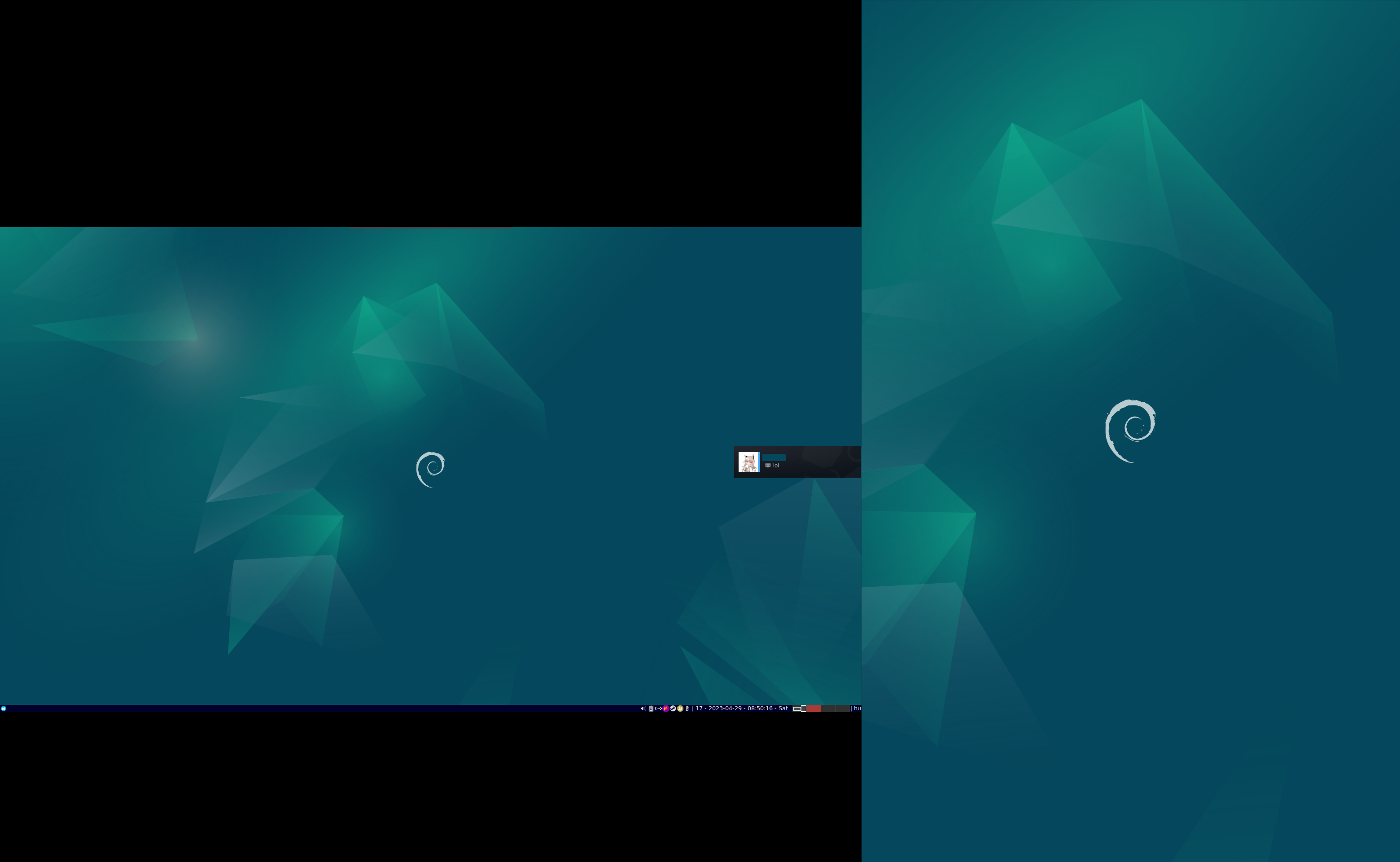
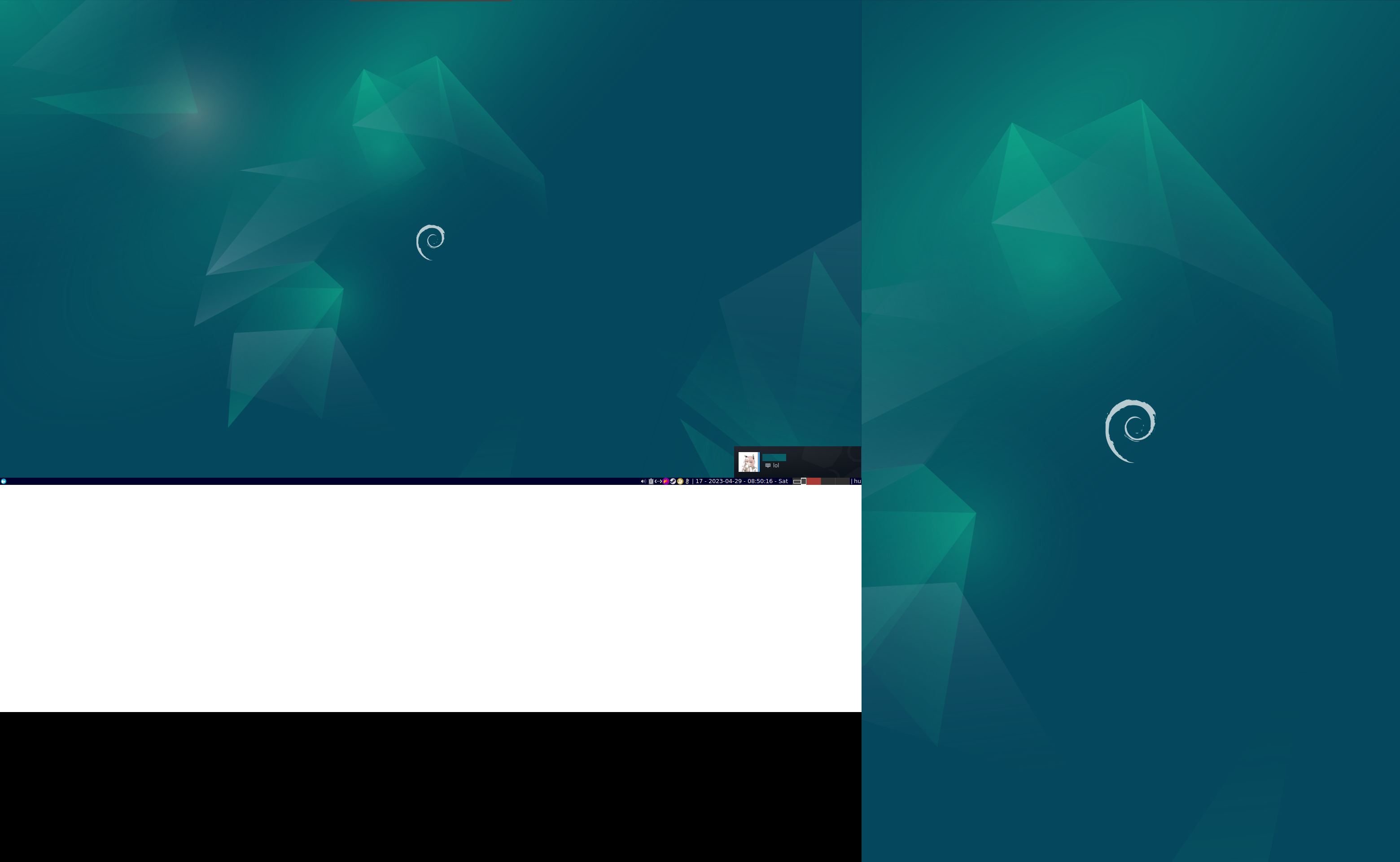
This issue occurs in a Plasma 5.27 Wayland session as well.
Can confirm.
Plasma 5.27 wayland on fedora 37.
Running steam beta.
Can confirm it's happening here too.
I'm on Arch, kernel 6.2.9, using i3 4.22 as the WM.
Here's my monitor setup:
Screen 0: minimum 8 x 8, current 4480 x 1440, maximum 32767 x 32767
DP-2 connected 1920x1080+0+180 (normal left inverted right x axis y axis) 543mm x 302mm
   1920x1080     60.00 + 165.00*  143.98   119.98    84.90    59.94    50.00
DP-4 connected primary 2560x1440+1920+0 (normal left inverted right x axis y axis) 597mm x 336mm
   2560x1440    165.00*+ 144.01   120.00    99.95    59.95
can also confirm that it happens for me
for me the notifications appear slightly off-center to the left on my middle (primary) screen (directly above the task-bar instead of like other users somewhere in the middle of the screen) and not the bottom right corner like the old client did
steam version: 1683253302
Display Layout Screenshot & System Information
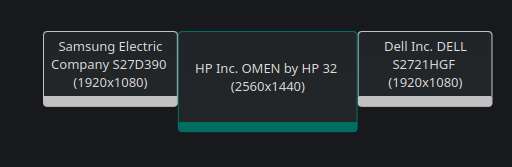
Operating System: Manjaro Linux
KDE Plasma Version: 5.27.4
KDE Frameworks Version: 5.104.0
Qt Version: 5.15.8
Kernel Version: 6.2.12-1-MANJARO (64-bit)
Graphics Platform: Wayland
Processors: 16 × AMD Ryzen 7 5800X 8-Core Processor
Memory: 15.5 GiB of RAM
Graphics Processor: AMD Radeon RX Vega
Manufacturer: ASUS
can also confirm that it happens for me
for me the notifications appear slightly off-center to the left on my middle (primary) screen (directly above the task-bar instead of like other users somewhere in the middle of the screen) and not the bottom right corner like the old client did
steam version: 1683253302
Display Layout Screenshot & System Information
Can confirm this happens to me as well on X11 using i3 with the same monitor setup(1080p,1440p,1080p).
Notification renders like it's trying to render for one of my 1080p monitors which causes it to be to the left of center on my main monitor(1440p).
steam version: 1683314987
Also happening under GNOME 44 Wayland on Manjaro. Seems to be rendering on my 4K monitor in the location it should be if it was rendering on my main 1440p monitor.
Hi,
Same here with sway and arch linux.
I have three monitors, and notifications appear to my left monitor.
xrandr is configured with my middle screen as primary.
DP-1 connected primary 1920x1080+1920+0 (normal left inverted right x axis y axis) 530mm x 300mm
   1920x1080     59.96*+
DP-2 connected 1920x1080+3840+0 (normal left inverted right x axis y axis) 530mm x 300mm
   1920x1080     59.96*+
HDMI-A-1 connected 1920x1080+0+0 (normal left inverted right x axis y axis) 530mm x 300mm
   1920x1080     59.96*+
Same here, on Steam Version: 1684372665
OS: Fedora release 38 (Thirty Eight) x86_64
Kernel: 6.2.15-100.fc36.x86_64
Resolution: 1920x1080, 1920x1080, 1920x1080
DE: Plasma 5.27.4
WM: KWin
[pointy@pointy ~]$ xrandr --listactivemonitors
Monitors: 3
 0: +*DP-0 1920/521x1080/293+1920+0  DP-0
 1: +DP-2 1920/521x1080/293+0+0  DP-2
 2: +DP-4 1920/521x1080/293+3840+0  DP-4
Same for me, they are always shown on the bottom right of the left monitor, instead of the primary right monitor. Steam Version: 1684535786
System info: https://gist.github.com/NoXPhasma/750786dfa16923f9037c9b7f25493faf
On a related note, on my laptop with only one monitor, the notifications show up floating a bit above the bottom of the screen. I'm using GNOME, so my guess is that the notifications are hard-coded to compensate for the bottom bar on KDE. Since GNOME has nothing at the bottom, it just floats.
Latest beta seems to have fixed this on my end:
Despite this bulletpoint, it seems it wasn't actually only fixing it for Windows 10:
- Fixed toasts positioning correctly on windows when the task bar is moved to the top of the screen (Windows 10).
Fixed for me, too, both the GNOME problem and the multi-monitor problem.
Can also confirm that the behaviour I previously experienced is fixed, tested on Steam 1686630523 using a virtually identical system configuration.
Same for me, fixed.
Not sure if this should be a separate issue, but my notifications are still misplaced. I assume it's because I'm using 2.0x scaling and the notifications' dimensions are being scaled, but not the position. My client is version 1686779606 (Wed, Jun 14 14:18 UTC -08:00)
can confirm that for me it is also fixed (Manjaro KDE Plasma Wayland) (same display config as in https://github.com/ValveSoftware/steam-for-linux/issues/9374#issuecomment-1537092220)
KDE Versions
Operating System: Manjaro Linux
KDE Plasma Version: 5.27.5
KDE Frameworks Version: 5.106.0
Qt Version: 5.15.9
Kernel Version: 6.3.5-2-MANJARO (64-bit)
Graphics Platform: Wayland
Processors: 16 × AMD Ryzen 7 5800X 8-Core Processor
Memory: 15.5 GiB of RAM
Graphics Processor: AMD Radeon RX Vega
Manufacturer: ASUS
After some more time has passed, this doesn't seem to be completely fixed. Notifications seem to work about 90% of the time, but every once in a while a notification just shows up in the middle of one of my monitors somewhere. It doesn't seem to be related to differing monitor resolutions anymore, but I'm not entirely sure as it doesn't happen consistently and the location seems to change a bit.
Hello @DeedleFake, please open a new issue report so that your follow up issue can be tracked properly.
Your system information
Please describe your issue in as much detail as possible:
Notification coordinates are handled incorrectly. This started with the latest beta update which overhauls the UI and notifications. It seems to calculate the coordinates based on the primary monitor, but then proceeds to render using absolute coordinates.
This is a standard xrandr multiple monitor setup.
Apologies for the massive screenshot, but it's the only way to showcase the issue.
Steps for reproducing this issue: