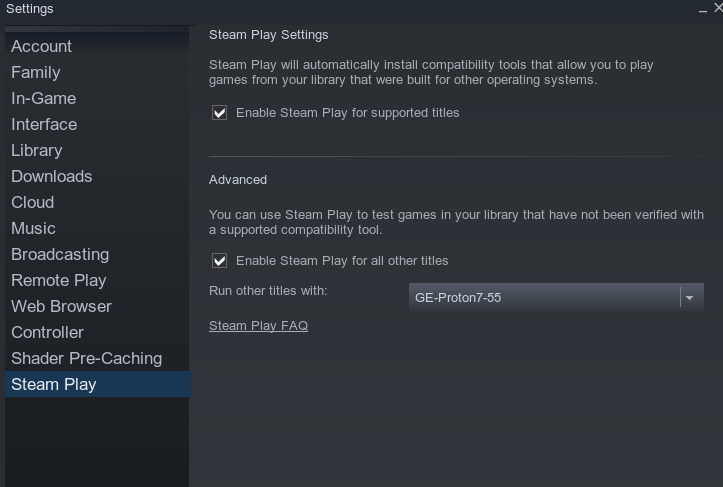
New compatibility tab doesn't allow setting the default Proton version
Hmmm. Mine is showing?
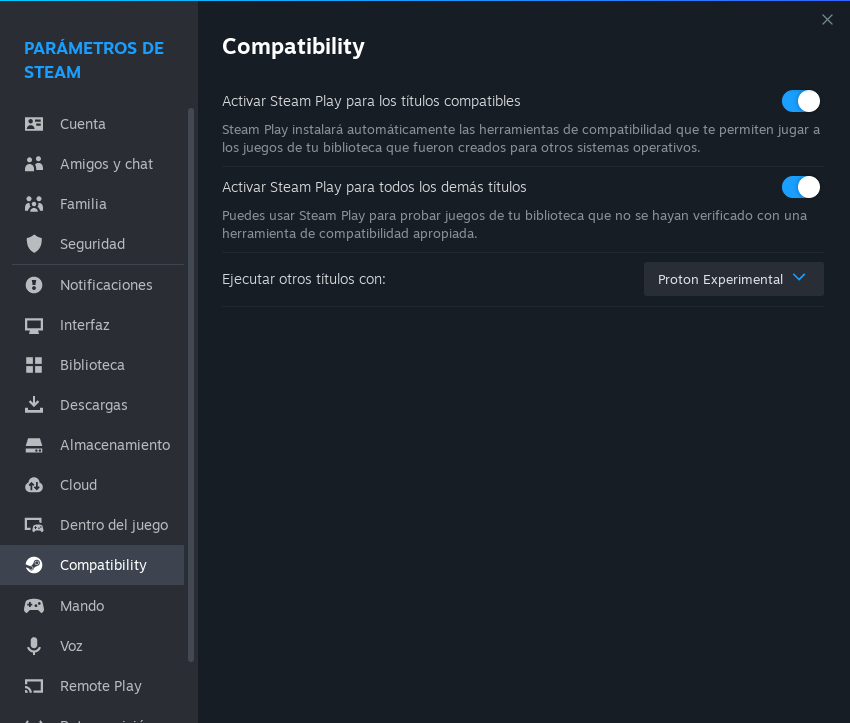
Hmmm. Mine is showing?
Thanks for the reply. Very strange. Could it be because of custom Proton versions like Proton-GE in the ~/.steam/root/compatibilitytools.d/ directory?
I don't have anything there,. In fact, I just clean reinstalled Steam this morning because I had too many things and was easier.
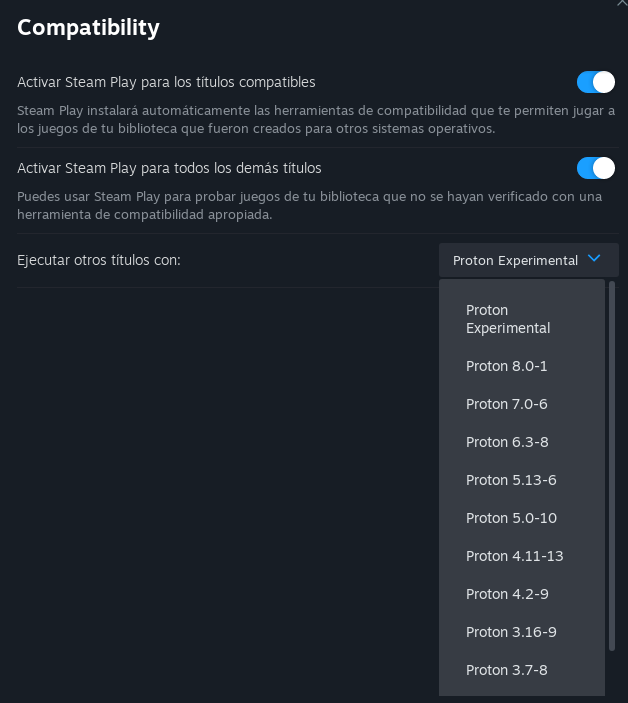
Can confirm that when trying to toggle on "steam play for all other titles" and restarting the client, it resets back to off. Removing custom versions of proton that are in the compatibilitytools.d dir does not fix the problem.
I can confirm that having custom proton versions in the compatibility folder breaks the menu, having an empty /compatibilitytools.d/ folder fixes the menu after a client restart but adding the custom proton version back will break it again on the next restart.
Thank you, this will be fixed in the next beta update.
I don't know if the next beta update has been released yet, but I'm having the same problem. Additionally, I can't even disable "Enable Steam Play for supported titles". I hope that doesn't mean it will try to use Proton instead of the native versions because as far as I know Proton requires Vulkan, and Vulkan is very much experimental on my hardware.
Steam Version: 1690583737
Steam Client Build Date: Fri, Jul 28 8:44 PM UTC -08:00
Steam Web Build Date: Sat, Jul 29 12:21 AM UTC -08:00
Steam API Version: SteamClient020
I'm also having this issue. I cannot toggle off proton support for supported titles and there's no option to set a default proton version.
Steam Version: 1695334486
Steam Client Build Date: Thu, Sep 21 8:13 AM UTC -08:00
Steam Web Build Date: Thu, Sep 21 2:49 PM UTC -08:00
Steam API Version: SteamClient020
OS: Arch LinuxKERNEL: 6.5.3-arch1-1
CPU: Intel Core i7-8700K @ 3.70GHz
GPU: NVIDIA GeForce RTX 2080 Ti
GPU DRIVER: NVIDIA 535.104.05
RAM: 32 GB
Hello,
Do you have locally installed compatibility tools? (e.g. Proton-GE)? Does the problem go away if you remove them? Is the problem you have actually https://github.com/ValveSoftware/steam-for-linux/issues/9957 instead maybe?
same here
I'm having the same issue as mmoore7 and #9957. Please fix this immediately so I can play games, not a single game works for me now 😭
Can confirm that when trying to toggle on "steam play for all other titles" and restarting the client, it resets back to off.
I'm experiencing this for at least a year now but it's only cosmetic, i.e. the settings window shows "off" but the functionality stays enabled and after the client restarts you can go to any title in your Steam Library that isn't officially supported and indeed run it with Proton. Due to this cosmetic bug to disable Proton for unsupported titles I have to switch it twice (on, cancel restart, then off again, restart). It seems to be a separate thing that doesn't have anything to do with the drop-down list with Proton versions.
This current issue doesn't affect me - I do have the drop-down list allowing me to select Proton version for unsupported titles. I have custom Proton versions installed and they show correctly - said list is only available when the setting is turned on.
I cannot toggle off proton support
This is a separate issue: https://github.com/ValveSoftware/steam-for-linux/issues/9957
Thank you, this will be fixed in the next beta update.
So this issue was fixed for me with a Steam update shortly after TTimo's reply (Thanks!).
However it seems at least 3 commenters still have had a form of this issue. Not sure if they still have.
I'll close this ticket for now. If there's a need from other people, then I'll re-open it.
Your system information
Please describe your issue in as much detail as possible:
As a follow up of #9385, the new compatibility tab in the Steam settings doesn't allow me setting the default Proton version. When I select "Enable Steam Play for all other titles", no additional options appear like they did in the old version. I want to set the latest Proton-GE to be the default version.
Also the restart option when enabling the setting only exits Steam and doesn't restart it.
Steps for reproducing this issue:
Compared to the old version: