Divinity: Original Sin 2 - Definitive Edition (Steam AppID 435150)
Does this problem also occur with wined3d?
Also, your apitrace is basically empty. What's SupportTool.exe anyway? Doesn't sound like a game executable.
No. Only DXVK.
With parameters PROTON_USE_WINED3D=1 works fine, but performance is poor.
About Your question:
mv bin bin.bak
ln -s DefEd\bin bin
cd bin
mv SupportTool.exe SupportTool.bak
ln -s EoCApp.exe SupportTool.exe
without this manipulation, the game does not start
Looking at ProtonDB entries for this game, it seems that this issue is specific to your setup.
Anyway, can't debug that right now until I get my hands on that game, but chances are very high that I won't be able to reproduce this at all and won't be able to do anything about it.
You could try playing around with the config options, taking this as a starting point:
dxgi.syncInterval = 0
dxgi.numBackBuffers = 3
dxgi.maxFrameLatency = 3
It sounds like your issue is somehow related to presentation, which isn't really something I can fix in DXVK.
I'm not the only one with a problem:
https://www.reddit.com/r/SteamPlay/comments/a1ytqd/divinity_original_sin_2_audio_issues_fps_drops/
I prepared the dxvk.conf file and put it in the folder with the game file. I set suggested parameters. Problem still occure.
Thx.
The person on Reddit wasn't using DXVK, which indicates that this isn't really my bug. No idea what is causing it though.
I see.
Anyway, thank you for trying to help.
From my observation that the problem may have something to do with rendering shadows. As suggested by one of the players, lowering the quality of shadows reduces the number of fps drops
That a) doesn't really help since I don't know how the game renders shadows, and b) doesn't really explain why it only happens after a save.
What does DXVK_HUD=memory show? There's a chance you're running out of VRAM.
FYI

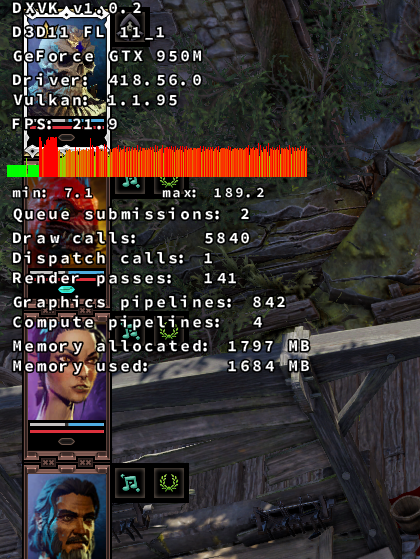
How much VRAM does your 950m have?
According to the DXGI log it's 2GB, which.... is a bit questionable, since neither DXVK nor the Nvidia driver have great memory management and background apps (browser, compositor etc.) eat some of that as well. I wonder if lowering texture and shadow quality fixes things for you.
Yes, I have 2048/5Ghz, and yes, lowering the texture quality helps for a while.
Thanks guys. Conclusion - replacement of equipment, or playing on low settings.
Launch options
DXVK_HUD=memory`x1 2019-04PROTON_USE_WINED3D=1x1 2019-04
Dramatically drop FPS (7-11fps) after QuickSaveGame or SaveGame. After that only game restart helps (Alt+Tab sometimes)
Software information
Divinity: Original Sin 2 - Definitive Edition (Steam AppID 435150)
System information
Apitrace file(s)
SupportTool.trace.zip
Log files
d3d11.log:
SupportTool_d3d11.log
dxgi.log: SupportTool_dxgi.log
steam-435150.log