Superposition crashes when VRAM is full
@pchome
Cannot reproduce with nVidia 970 4GB card (w/390.25 driver)
After changing shader quality to high - GPU mem usage: just above 3GB.
@pchome
If you are still on the 387 branch, it might be related to the nVidia memory bug?
We've been tracking it internally as bug 1963500. There was a change, introduced in our r378 branch, to the logic of allocation of certain textures, but it apparently exposed a bug in our memory manager.
Our next release branch, r390, will carry a workaround, and we're still working on finding and fixing the root cause.
https://devtalk.nvidia.com/default/topic/1026874/
Link from something you posted on a different thread :)
https://www.phoronix.com/scan.php?page=news_item&px=NVIDIA-Memory-Problem
Some testing indicating higher memory usage with 387.34 driver.
@SveSop
4GB card
Use 1080p High preset, launcher suggests 3320 MB required and than try Extreme setting.
Mon Feb 26 22:25:32 2018
+-----------------------------------------------------------------------------+
| NVIDIA-SMI 390.25                 Driver Version: 390.25                    |
|-------------------------------+----------------------+----------------------+
| GPU  Name        Persistence-M| Bus-Id        Disp.A | Volatile Uncorr. ECC |
| Fan  Temp  Perf  Pwr:Usage/Cap|         Memory-Usage | GPU-Util  Compute M. |
|===============================+======================+======================|
|   0  GeForce GTX 970     On   | 00000000:01:00.0  On |                  N/A |
| 50%   66C    P0   167W / 220W |   3414MiB /  4039MiB |    100%      Default |
+-------------------------------+----------------------+----------------------+
This is after starting the "Game" mode with 1080p High, and switching to "Extreme".
12'ish fps, so nothing to brag about... heh
nVidia memory bug
yes, but not related to this issue (I think so)
This is after starting the "Game" mode with 1080p High, and switching to "Extreme".
Huh, Extreme and High differs less for your GPU than High and Medium for my.
Try Extreme than 4k Optimized :)
Memory usage between the "4K Optimized" textures and "8K Optimized" show less usage on the 8K..
The only way i can get OVER 3.3GB gpu memory usage is selecting a 4K or 8K display.. but i only have a 1080p display, so that wont work.
It is the "Textures Quality" that really have a memory impact while keeping my display at 1080p.
1080p - Medium/medium = 1299MB.
1080p - Medium/High = 3212MB
1080p - High/High = 3320MB
1080p - 8K/High = 3155MB (Less!)
8K - 8K Optimized/High = 6241MB (Not doable)
Same in Linux OpenGL native version as in wine, xept wine lists "N/A" for available memory.. so might be a problem cos wine cant really figure out if it uses more gpu mem than possible? Linux native spits out a "Settings too high" message if i try... Wine version just started loading and crashed when my nvidia-smi showed:
Mon Feb 26 22:43:51 2018
+-----------------------------------------------------------------------------+
| NVIDIA-SMI 390.25                 Driver Version: 390.25                    |
|-------------------------------+----------------------+----------------------+
| GPU  Name        Persistence-M| Bus-Id        Disp.A | Volatile Uncorr. ECC |
| Fan  Temp  Perf  Pwr:Usage/Cap|         Memory-Usage | GPU-Util  Compute M. |
|===============================+======================+======================|
|   0  GeForce GTX 970     On   | 00000000:01:00.0  On |                  N/A |
|  7%   59C    P0    70W / 220W |   4011MiB /  4039MiB |      0%      Default |
+-------------------------------+----------------------+----------------------+
Ran out of memory = crash. Wine does not understand when that happens. Not sure that is a dxvk bug really, cos wine would let me choose 8K display with OVER 6GB mem usage and just load.. until it stuttered and crashed with dropping me out of xorg.. In OpenGL mode too. I think its due to wine not being 100% when it reports gpu memory to apps.
I changed Steps to reproduce to simpler version.
Again I think you misunderstand what the actual issue is. The exception is thrown for a reason, and it is handled in the D3D11Device methods - resource creation will fail if the memory allocation fails. We cannot just work around that by magically creating more RAM inside the exception handler however, that's not how it works.
I'll check if the allocator properly falls back to host memory if the device-local memory is full; that's what it should be doing. But even that is not guaranteed to solve your problem and if the host memory allocation fails as well, we're just hitting the maximum amount of memory that the driver allows us to allocate.
@SveSop
No difference noticed in memory usage with 390.25 . Also "Memory bug" was not reported as fixed in 390.12/390.25 release announcements so I believe it's still there.
@doitsujin
- Firs of all this issue is FYI and do not forces you to any action.
- Why do you believe I'm asking you to create some "magic" resources?
- I don't think throwing custom exceptions "into the wild" is a good idea. That's why I'm reported. But it's your code and you understand much more better than I how it works an how it should be.
- I understand that there is no much to do with OOM but maybe there is a way to report this problem to "caller". Otherwise it's called "unhandled" and that's why I named this issue "Unhandled exceptions" (s to collect reports. Rare but happen.) And
Superpositionas an tool to reproduce but not the only target I need to be fixed. - Misunderstanding. My bad English. Sorry.
Meant something like this:
      try{
        this->InitTexture(texture->GetTextureInfo()->image, pInitialData);
        *ppTexture2D = texture.ref();
      } catch (const DxvkError& e) {
        Logger::err(e.message());
        return E_OUTOFMEMORY;
      }
or so. Still not much changed cause it's stopped on Loading ... with full loaded GPU memory. But not crashed.
Sorry, the way the issue was phrased (especially the "expected behaviour" part) I assumed you were mostly complaining about the allocator not behaviing correctly.
Of course the CreateTexture* and CreateBuffer methods should handle the exceptions like all the other D3D11Device methods already do, I just noticed that they for some reason don't do that yet.
In any case, it's better to report such issues separately rather than collecting them, because they will be fixed eventually.
EDIT: wrong code example
And output with code changed as above :
fixme:dxvk:debug "Compiling graphics pipeline..."
fixme:dxvk:debug   vs  : VS_50dbfbd6521351958857579f020ac5470069ec8d
fixme:dxvk:debug   fs  : PS_6e630ec6be733280c3d19f47506ca3cdc9d69334
err:dxvk:err DxvkMemoryAllocator: Failed to allocate 2864128 bytes
Direct3D11 error: out of memory
D3D11Texture::create(): can't create DXT1 2048x2048 2D texture
Please test if e5c0030f0678ead5635d5d5ce26aaf514f36b263 fixes the issue.
@doitsujin @pchome Much of this problem could possibly be "fixed" if wine in itself was able to report the correct videomemory to apps.
I am not sure what happened with d3d11 in wine, but there are SOME instances where wine manages to report the correct videomem, and some not. Using the Video Memory override (dont remember the reg key atm), does really not work that well for d3d11.
Have not tested this with 3.2 branch, but there is a simple videomemory app someone made that i found, that had both dx9 and dx11 version.. It reports (for me atleast) around 1800'ish mb for dx9, and 3800'ish for dx11. Testing the videomemorysize override in wine, setting higher than 2GB for dx9 test produced no changes, but lowering it below 1800, made the number less.. Ie. setting it to 512MB showed something like 490MB or thereabouts.
Changing this override for the DX11 test showed absolutely no change in detected videomemory whatsoever.
I do not know if dxvk/dxgi polls "wine" for vramsize, or polls hardware directly, or how it wine/dxvk reports this to apps, but i may (i say "may") suspect that windows programs uses different methods of polling videomemory, especially since dx11 supports "shared memory pools" and stuff like that where you would have 4GB vram + x amount of GB system ram allocated to PCIe and gpu. This function afaik does not work the same way (or at all) in wine.
Possibly why many apps fail to report/detect correct amount of VRAM under wine. If a windows app like Superposition thinks you have "unlimited" amount of vram, it will try to load. Adding a "no-crash-if-you-do" fix to dxvk should avoid the crash, but i think wine also should have a better way to detect videomemory to avoid apps trying unsupported possibilities :)
@doitsujin
It looks like there is some attempts to use system memory. Not crashed but stalled on Loading... screen.
Mem usage before launch
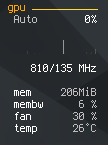
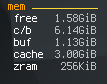
Mem usage after stalled
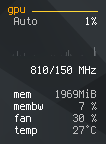
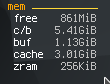
Memory reported by engine itself
...
GPU: G 1.0 x1
System memory: 4095 MB
Video memory:  2048 MB
...
---- Render ----
Renderer: Unknown 2048MB
Direct3D11 desc: G
Maximum texture size:    16384
Maximum texture units:   16
Maximum texture renders: 8
@SveSop
To detect GPU properties Launcher uses nvapi which not implemented outside wine-staging, almost not implemented in wine-staging and requires d3d11 to be loaded which is disabled for me as temporary bug fix for launcher to be loaded. So N/A memory on screenshots.
But engine uses its own methods to detect system properties.
p.s. I tried workaround with MaxShderModel* set to 3 with builtin d3d11.dll but even launcher and nvapi loaded there is many unimplemented functions reported and still N/A memory.
@pchome Superposition launcher works without d3d11.dll disabling, but when using the menus the text bugs out.
Can still USE it if you remember what to press :) The "Just a black box" bug is gone.
@doitsujin
Please test if e5c0030 fixes the issue.
I'm sure memory allocated but have no idea why it's not used.
Some debug info:
...
DxvkMemoryAllocator::tryAlloc: Req size: 2864128, typeBits: 130
DxvkMemoryAllocator::tryAlloc: Used memTypeId: 7 of 11
DxvkMemoryAllocator::tryAlloc: Not allocated. Flags: 1, MemPropFlags: 1

DxvkMemoryAllocator::tryAlloc: Req size: 2864128, typeBits: 130
DxvkMemoryAllocator::tryAlloc: Used memTypeId: 1 of 11

DxvkMemoryAllocator::tryAlloc: Req size: 766976, typeBits: 130
DxvkMemoryAllocator::tryAlloc: Used memTypeId: 7 of 11

DxvkMemoryAllocator::tryAlloc: Req size: 512, typeBits: 1665
DxvkMemoryAllocator::tryAlloc: Used memTypeId: 9 of 11
NOTE:
11- memory types count,7,9,1- index- memory types for 750 Ti are listed here : http://vulkan.gpuinfo.org/displayreport.php?id=2596#memorytypes
- after
Not allocatedthere is successful allocation with memory type 1 and disabled VK_MEMORY_PROPERTY_DEVICE_LOCAL_BIT
Diff with successfully started app log shows it's stopped right before
Unigine~# render_show_number 6
Unigine~# video_extension 2
Loading "xinput1_4.dll"...
Benchmark running
I think it's that moment when Loading... starts show progress by filling Loading... characters.
Also with 2GB VRAM it's easy to test this issue by setting Texture Quality on maximum in any recent AAA game. So it's not unigine superposition specific cause I able to reproduce same behaviour in TW3 - everything just stopped, CPU/GPU usage dropped to minimum but system itself remains responsive. No strange activity spotted in logs.
dbe3662bfc89c28748a32218f5fdbcfc543ba105 fixes a potential issue wit allocations when VRAM is full.
I've done some local testing by unconditionally reporting failed allocations for the device local memory type, and in that case it works fine. Still have to figure out how to test it properly though, 8GB VRAM aren't that easy to fill.
Maybe you could impose an arbitrary VRAM limiter that doesn't let the app
use over X MB of device memory. I don't know how hard that would be though.
@doitsujin
dbe3662 fixes a potential issue wit allocations when VRAM is full.
Superposition now shows me message box
Unigine fatal error
RenderManager::createTexture2D(): can't create texture
log contains
Unigine~# render_manager_create_meshes 1
Unigine~# render_manager_create_shaders 1
Unigine~# render_manager_create_textures 1
D3D11Shader::loadGeometry(): can't create geometry shader
D3D11Shader::loadGeometry(): can't create geometry shader
D3D11Shader::loadGeometry(): can't create geometry shader
...
Direct3D11 error: fail
D3D11Texture::create2D(): can't create RG11B10F 1920x1080 2D texture
I'll test further because it's takes definitely much more RAM than before but I have ~2GB free for now.
Ok, I have tested Superposition benchmark right after system reboot and this time it's started w/ 1953MB VRAM usage (vs 1581MB for High profile). FPS is lower as expected 8-10 (vs 15-20 for High profile) but still smoother and better than OpenGL mode.
So I think it's pretty match how it should be.
BTW: this time w/o "nvidia bug" mentioned in https://github.com/doitsujin/dxvk/commit/8bfd12067aaaaab34a1cd9036be1e66b99f12434#comments , tested on current master https://github.com/doitsujin/dxvk/commit/3dea58dabcd2f5d9e7b6b89046c1b2ca445a0ab6
Same for The Witcher 3: I set everything on maximum (except Motion Blur) and walked around for five min. with full VRAM and w/o any crashes/freezes. Than I exited game manually as usual.
p.s. I know it still WIP but FYI in case it can be potential bug (or it is): there is some kind of normal lightening now in TW3 but it blinking every few seconds returning to state it was before and than back to normal.
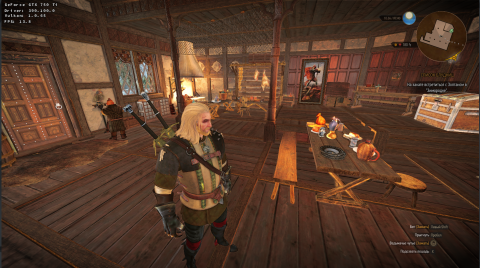
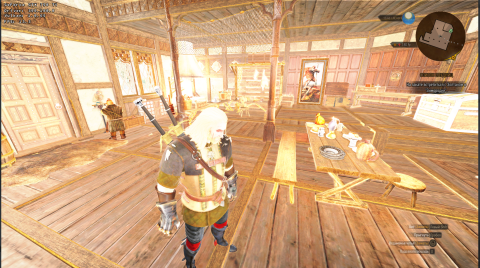
So I guess I can consider the memory issue as fixed?
Witcher 3 isn't supposed to work yet, there are a couple of features still missing from dxvk before that game will render anything meaningful.
@doitsujin
So I guess I can consider the memory issue as fixed?
Yes.
But there is probably "memory leek" bug now.
I have tested tw3 by lowering settings from "Ultra" to "Low" step by step to see what changing and even spending some time on "Low" I got all my VRAM, RAM and Swap full and had to do REISUB. At least I expected VRAM usage drop from 2GB to 1-1.5GB (like with native d3d11) but it almost not changed.
I'll create new issue later if I reproduce this, but maybe you know why this can happen. It's not for the firs time I noticed dxvk "too hungry" but I can't say it for sure.
DLLs
xinput1_4.dllx1 2018-02d3d11.dllx2 2018-02
There is some places in code where exceptions not properly handled.
Unigine Superposition
DxvkMemoryAllocator: Failed to allocate 22437376 bytesGAMEmode1080p High- 3320MB)Customand changeFullscreensetting to one of windowed modeNo usable backtrace produced for some unknown reason.
I traced manually a bit:
DxvkMemoryAllocator::alloc
DxvkImage::DxvkImage
one of
new DxvkImage(...)EDIT: simplified steps