The Witness: Unhandled page fault on read access to 0xffffffffffffffff at address 0x14036c740
What does this mean? The issue doesn't reproduce on Wine's stock DX11 impl.
That's literally the point. A trace that gets aborted because it crashes is the most useless thing on earth.
Can you please post the full wine stack trace? There's no indication in your log where exactly the crash occurs. +relay is not useful at all to debug DXVK issues.
I still have an apitrace of the game and it works just fine, renders correctly and does not crash.
Please try Proton, the game has been whitelisted there for quite a while. In general this game has been working with DXVK for well over a year now; it's definitely not expected to just crash.
Also, next time, please post the requested d3d11/dxgi logs that were requested in the issue template. I didn't make that thing for fun,, and the logs are usually somewhat useful and would e.g. tell me your driver version.
Are you sure it's going to be useful? I cannot even reproduce the crash reliably: it occurs randomly near certain places in game. When should i stop?
Do i get it right the logs also need to be produced using Wine's DX11 implementation?
Register dump:
 rip:000000014036c740 rsp:000000000023f690 rbp:000000000023f8d0 eflags:00010297 (  R- --  I S -A-P-C)
 rax:0000000000000008 rbx:000000007f813550 rcx:00007fb2fc000000 rdx:00007fb2fc1a0004
 rsi:00007fb32ccc3f90 rdi:0000000016500650  r8:ffffffffffe5fffc  r9:0000000000000000 r10:0000000000000000
 r11:0000000000000008 r12:0000000000000000 r13:000000000455b280 r14:0000000000000000 r15:0000000000000001
Stack dump:
0x000000000023f690:  0000000000000000 0000000000000000
0x000000000023f6a0:  0000000000000000 0000000000000001
0x000000000023f6b0:  0000000000000000 000000000023f6d0
0x000000000023f6c0:  00007fb2fc1a0004 0000100000000080
0x000000000023f6d0:  00007fb2fc000000 0000100000000080
0x000000000023f6e0:  0000000040e65b77 0000000000000000
0x000000000023f6f0:  000000003e4ccccd 0000000000000000
0x000000000023f700:  0000000006b4e830 0000000140283b5f
0x000000000023f710:  0000000004321390 00000000060b7408
0x000000000023f720:  00000000060b77a8 000000014008b9e8
0x000000000023f730:  000000003f800000 0000000000000000
0x000000000023f740:  0000000000000001 000000014008b781
Backtrace:
=>0 0x000000014036c740 EntryPoint+0xfff47044() in witness64_d3d11 (0x000000000023f8d0)
0x000000014036c740 EntryPoint+0xfff47044 in witness64_d3d11: movq	(%rdx),%mm2
Modules:
Module	Address					Debug info	Name (37 modules)
PE	          240000-          25f000	Deferred        anselsdk64
PE	          260000-          2af000	Deferred        openvr_api
PE	          2b0000-          2cf000	Deferred        amd_ags_x64
PE	        3b400000-        3b43d000	Deferred        steam_api64
PE	        7b420000-        7b5dd000	Deferred        kernel32
PE	        7bc20000-        7bc24000	Deferred        ntdll
PE	       140000000-       144700000	Export          witness64_d3d11
PE	       180000000-       180063000	Deferred        bink2w64
PE	    7fb32e1a0000-    7fb32e1a4000	Deferred        xinput1_3
PE	    7fb32e500000-    7fb32e503000	Deferred        winealsa
PE	    7fb32e550000-    7fb32e554000	Deferred        mmdevapi
PE	    7fb32eba0000-    7fb32ebf3000	Deferred        comctl32
PE	    7fb32efa0000-    7fb32efa4000	Deferred        uxtheme
PE	    7fb32f820000-    7fb32f823000	Deferred        usp10
PE	    7fb32f920000-    7fb32f92b000	Deferred        winspool
PE	    7fb3d1a60000-    7fb3d1a64000	Deferred        winex11
PE	    7fb3d1b10000-    7fb3d1b14000	Deferred        imm32
PE	    7fb3d1d70000-    7fb3d1d78000	Deferred        oleaut32
PE	    7fb3d1f00000-    7fb3d1f0f000	Deferred        setupapi
PE	    7fb3d1fb0000-    7fb3d1fb4000	Deferred        winevulkan
PE	    7fb3d2430000-    7fb3d2434000	Deferred        dwmapi
PE	    7fb3d2760000-    7fb3d2764000	Deferred        ws2_32
PE	    7fb3d27a0000-    7fb3d27a4000	Deferred        dbghelp
PE	    7fb3d2830000-    7fb3d2834000	Deferred        iphlpapi
PE	    7fb3d2860000-    7fb3d2863000	Deferred        shcore
PE	    7fb3d28a0000-    7fb3d28a8000	Deferred        shlwapi
PE	    7fb3d2960000-    7fb3d3236000	Deferred        shell32
PE	    7fb3d3390000-    7fb3d3394000	Deferred        dsound
PE	    7fb3d33f0000-    7fb3d33f9000	Deferred        msacm32
PE	    7fb3d3440000-    7fb3d3444000	Deferred        rpcrt4
PE	    7fb3d3510000-    7fb3d3538000	Deferred        ole32
PE	    7fb3d36d0000-    7fb3d374d000	Deferred        winmm
PE	    7fb3d37c0000-    7fb3d37c4000	Deferred        advapi32
PE	    7fb3d3870000-    7fb3d3877000	Deferred        gdi32
PE	    7fb3d3b20000-    7fb3d3c20000	Deferred        user32
PE	    7fb3d4990000-    7fb3d4994000	Deferred        hid
PE	    7fb3d49b0000-    7fb3d49b4000	Deferred        version
Threads:
process  tid      prio (all id:s are in hex)
0000000e services.exe
	00000021    0
	0000001a    0
	00000013    0
	00000010    0
	0000000f    0
00000011 plugplay.exe
	00000017    0
	00000016    0
	00000012    0
00000018 winedevice.exe
	0000001c    0
	0000001b    0
	00000019    0
0000001d explorer.exe
	00000028    0
	00000025    0
	00000024    0
	0000001e    0
0000001f winedevice.exe
	00000023    0
	00000022    0
	00000020    0
00000026 (D) Z:\home\l29ah\.wine\drive_c\GOG Games\The Witness\witness64_d3d11.exe
	00000042   15
	00000041    0
	00000040    0
	0000003f    0
	0000003e    0
	0000003d    0
	0000003c    2
	0000003b   15
	0000003a    0
	00000039    0
	00000038    0
	00000037    0
	00000036    0
	00000035    0
	00000034   -2
	00000033   -2
	00000032   -2
	00000031   -2
	00000030   -2
	0000002f    0
	0000002e    0
	0000002d    0
	0000002c    0
	0000002b    0
	0000002a    0
	00000029    0
	00000027    0 <==
System information:
    Wine build: wine-4.9
    Platform: x86_64
    Version: Windows 7
    Host system: Linux
    Host version: 5.1.8+
So it crashes in its own code for some reason. Which build of the game are you using (steam/gog/epic/whatever)?
Do i get it right the logs also need to be produced using Wine's DX11 implementation?
No, wine's DX11 implementation does not produce any logs. DXVK generates something like game_d3d11.log and game_dxgi.log usually next to the game exe, where game is the exe name.
Are you sure it's going to be useful?
This whole discussion would be significantly more productive if you just posted the files right away instead of asking whether the debug into THAT I ASKED FOR IN THE ISSUE TEMPLATE is useful or not. It might be, it might not be, how the hell am I supposed to know before seeing them?
GOG, its own logs say:
The Witness - x64 - D3D11 - Final (Steam)
Version 1.058M
Built 2018/01/31 13:27:59 from 172922
Okay, i got the impression those are supposed to be spawned by apitrace.
https://bpaste.net/show/308c28304aa4
https://bpaste.net/show/bd77dd17f95a
Have you tried stable Mesa?
The game crashed being traced in apitrace, but i couldn't crash it without. Dunno where to upload 400MB worth of a trace. Github doesn't let in anything more than 10MB.
I'm going to try mesa-19.1.0 now.
Crashes on 19.1.0 as well.
Does that crash while replaying for you? Works fine here.
Also, please test this with Proton rather than vanilla wine, 4.9 in particular is known to have some regressions.
It works on my end with Intel Gpu and Mesa 19.0.1 . Don't mind the FPS , everything is set to max. Probably low preset is suitable for this gpu.
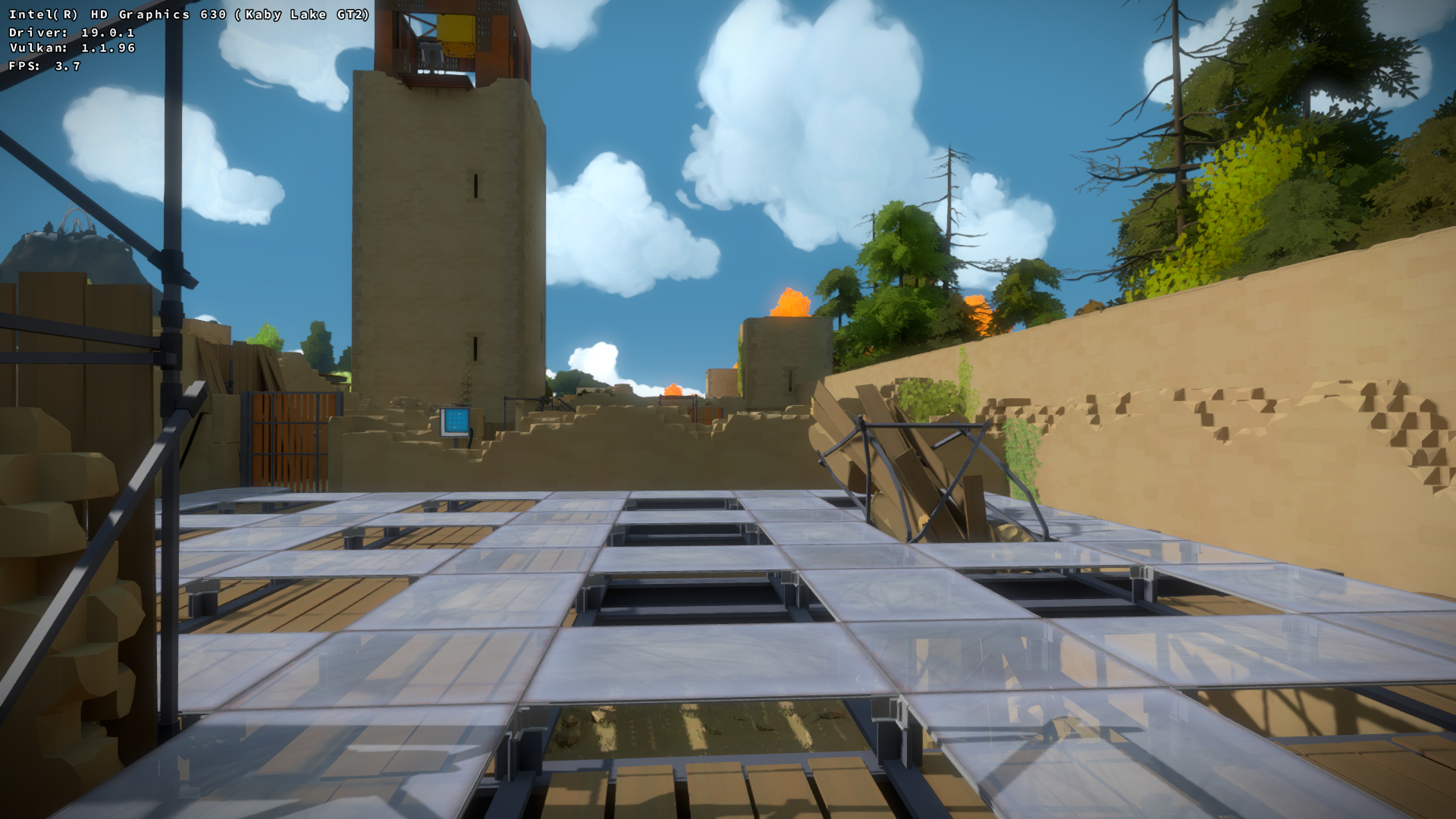
Wine build i'm using for that is : GE Protonified 4.9 from Lutris
It doesn't crash while replaying.
Thanks, will try Proton. Tested with both vanilla and staging 4.9 so far.
Couldn't easily grab anything protonified in my Gentoo, but reproduced the crashes on wine-3.20, 4.0 and 4.10.
Can't reproduce the problem with the actual game either. Any specific location where it crashes consistently?
Any chance your wine was built with GCC 9.1? That's known to be broken and will require a patch.
I don't know what this is but the issue seems very specific to your particular setup.
Lutris is available on here.
https://packages.gentoo.org/packages/games-util/lutris
After you get it , you can get Protonfied build also from Manage Runners section.
You can see the location in the apitrace dump, it's usually crashing when i walk behind the mountain, but sometimes crashes in other places as well.
Everything was built with 8.3.0.
Can you post your savegame?
Dunno where to grab it. Also i've reproduced it with a completely new game, beelining to that place.
Can't reproduce the problem at all no matter what I do in this game.
Hi guys.
I've tried to reproduce the issue on my KBL (Intel® UHD Graphics 620) on Ubuntu 18.04 and 5.1.2 Kernel with 19.1.0 version of mesa and 4.9 version of Wine, but with no luck. All looks good on my side.
@l29ah are you using the winelib build of DXVK from the DXVK overlay? I suspect the issue is due to winelib weirdness (or compiler flags), as I'm seeing a similar issue with GTA5, that doesn't occur with the binary releases.
I suggest trying a release build if you haven't already, which doesn't look like you have reading your comments so far.
@l29ah are you using the winelib build of DXVK from the DXVK overlay?
I'm not sure what do you mean. If you're talking about my distro, I'm using app-emulation/dxvk::tastytea, and i don't see any weird flags (although -mtune=generic -march=x86-64 kinda upsets me):
/usr/libexec/gcc/x86_64-pc-linux-gnu/8.3.0/cc1plus -quiet -I src/dxvk/1752c3e@@dxvk@sta -I src/dxvk -I ../dxvk-9999/src/dxvk -I ../dxvk-9999/./include -I . -I /usr/include/wine-staging-4.16 -imultilib 32 -MD src/dxvk/1752c3e@@dxvk@sta/hud_dxvk_hud_renderer.cpp.d -MF src/dxvk/1752c3e@@dxvk@sta/hud_dxvk_hud_renderer.cpp.o.d -MQ src/dxvk/1752c3e@@dxvk@sta/hud_dxvk_hud_renderer.cpp.o -D_GNU_SOURCE -D_REENTRANT -D WINE_UNICODE_NATIVE -D _REENTRANT -D WIN32 -D _WIN32 -D __WIN32 -D WIN32 -D __WINNT -D WINNT -D __stdcall=attribute((stdcall)) attribute((force_align_arg_pointer)) -D __cdecl=attribute((cdecl)) attribute((force_align_arg_pointer)) -D _stdcall=attribute((stdcall)) attribute((force_align_arg_pointer)) -D _cdecl=attribute((cdecl)) attribute((force_align_arg_pointer)) -D __fastcall=attribute((fastcall)) -D _fastcall=attribute((fastcall)) -D __declspec(x)=_declspec##x -D __declspec_align(x)=attribute((aligned(x))) -D __declspec_allocate(x)=attribute((section(x))) -D __declspec_deprecated=attribute((deprecated)) -D __declspec_dllimport=attribute((dllimport)) -D __declspec_dllexport=attribute((dllexport)) -D __declspec_naked=attribute((naked)) -D __declspec_noinline=attribute((noinline)) -D __declspec_noreturn=attribute((noreturn)) -D __declspec_nothrow=attribute((nothrow)) -D __declspec_novtable=attribute(()) -D __declspec_selectany=attribute((weak)) -D __declspec_thread=__thread -D __int8=char -D __int16=short -D __int32=int -D __int64=long long -D WINE -D _FILE_OFFSET_BITS=64 -D NOMINMAX -D __WIDL_objidl_generated_name_0000000C= -isystem /usr/include/wine-staging-4.16/wine/windows ../dxvk-9999/src/dxvk/hud/dxvk_hud_renderer.cpp -quiet -dumpbase dxvk_hud_renderer.cpp -m32 -msse -msse2 -mtune=generic -march=x86-64 -auxbase-strip src/dxvk/1752c3e@@dxvk@sta/hud_dxvk_hud_renderer.cpp.o -std=c++17 -fdiagnostics-color=always -fshort-wchar -fno-gnu-unique -fvisibility=hidden -fvisibility-inlines-hidden -fPIC -o -
I had a look at the overlay, and it's using a winelib build. See line 70 of dxvk-1.3.4.ebuild :
--cross-file=../${P}/build-wine${bit}.txt
The build-wine* cross-file indicates a winelib build. These work well most of the time, but occasionally they can cause issues. If it was a standard build, it would be using MingW, but it's not normally used in Gentoo since setting up a MingW tool chain is a lot more work and error prone, than just using wine to compile DXVK/D9VK.
The binary releases use MingW, so I suggest just using that (assuming that is the cause of your bug) for the particular games that exhibit problems.
Tested it with the dxvk binaries from github, and it crashes as well.
Reproduced exactly this error, running it through Proton Experimental on Steam on Ubuntu MATE 20.04. Same error occurs regardless of which Proton version I use.
wine: Unhandled page fault on read access to FFFFFFFFFFFFFFFF at address 000000014036CD70 (thread 00d8)
The crashes seem to occur when entering new areas, so I suspect they are related to trying to load something, clear something, or execute some kind of check. While I've experienced this crash multiple times, an easy way for me to reproduce it is by going to the end of the second castle puzzle and then going through the wall to look at the ocean on the catwalk. The crash will occur just after walking out onto the catwalk.
Operating System Version:
Ubuntu 20.04.1 LTS (64 bit)
Kernel Name: Linux
Kernel Version: 5.4.0-58-generic
Steam Runtime Version: steam-runtime_0.20201203.1
System information:
Wine build: wine-5.13-1208-ge112e54b65d
Platform: x86_64
Version: Windows 7
Host system: Linux
Host version: 5.4.0-58-generic
Video Card:
Driver: Intel Mesa Intel(R) UHD Graphics 620 (KBL GT2)
Driver Version: 4.6 (Compatibility Profile) Mesa 20.3.1 - kisak-mesa PPA
OpenGL Version: 4.6
Intel driver issue maybe? So far, no one has reported issues on non-Intel systems.
I also suspect it has something to do with Intel, though I'm in no position to diagnose it more directly.
It still crashes when i use my system wine-staging and the github dxvk-1.9 binaries, but curiously, this setup works fine for me: https://rutracker.org/forum/viewtopic.php?p=81732478
@l29ah Was this issue solved? The page you linked doesn't load for me so can't check it out.
Closing this because it's stale. Feel free to reopen if it still crashes.
Software information
The Witness, pretty much default settings.
System information
Apitrace file(s)
What does this mean? The issue doesn't reproduce on Wine's stock DX11 impl.
A couple of
+relayexcerpts: