Wolcen: Lords of Mayhem - Rendering issues in main menu
Apitrace? I can't debug the game by looking at screenshots.
warn: D3D11Device: Vertex input 'COLOR0' not defined by input layout
Could be an issue, but that's technically a game bug.
Unfortunately for this apitrace I have to install Windows for it's impossible to record it on Linux. I tested the game on Windows and I saw it runs with ~150 FPS. With DXVK it runs with ~70/75. Is there any obvious reason for such a big performance gap? Usually we expect 10-15% difference.
I don't have the game so I can't comment on that, especially with so little information given (are you CPU limited? GPU limited?)
Neither CPU, neither VRAM/RAM:
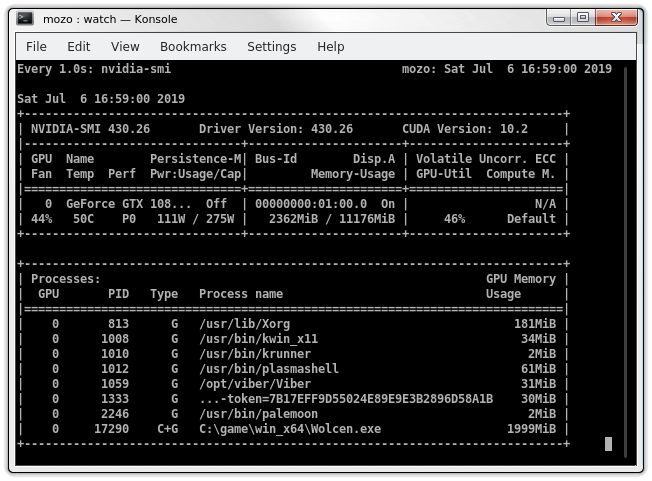

46% GPU -> CPU limit. It's normal for the Windows Nvidia driver to be much faster in that case.
I didn't understand you for english isn't my native language but if you say that's normal, ok :)
The game might not batch drawcalls and then some secret Nvidia D3D11 driver sauce kicks in. At least that seemed to be the case in Kingdom Come: Deliv., there you could enable batching via the game's console and it boosted CPU performance a lot for the AMD driver.
How do you do that?
Unfortunately DXVK 1.3 doesn't fix both the problems.
Hmm, lowering the settings to their minimum doesn't affect the performance in any way.
How do you do that?
Found this: https://www.youtube.com/watch?v=GruK4j-Rr3c
The console key was disabled at some point in Wolcen, dunno how current situation is and if there is a way to get it working. Seems it would be crazy if this wasn't enabled by default.
Thank you :)
To give you an update, the game uses counters for some inexplicable reason (they are primarily a debugging and profiling feature, not something you should be using in a release build in your game...) which are not and cannot be supported by DXVK in any meaningful way. This is usually not an issue, but causes apitrace to crash so I'll have to figure out a workaround for that.
Thank you very much for your kindness :)
@doitsujin
Can I ask you something?
You say my CPU is the bottleneck for this game. How Intel 9900K can be the bottleneck and why?
@mozo78 The fact you have an Intel 9900K has nothing to do with it. The thing restricting you from getting better performance is you aren't able to submit work to the GPU fast enough (in layman's terms.)
Thank you, Josh :)
Do you know what may be the reason?
Not off the top of my head, no.
I see. Thank you.
I tried the latest game version 1.1.5 with DXVK 1.3.2 but the problem is still here.
I worked around the counter problem with the apitrace, but I cannot reproduce the issue. There are also no Vulkan validation errors.
No problem, thank you for your efforts :)
I have this issue sometimes, in menu and in game. Usually in game on first load when disk activity is high. Just need restart the game and issue goes away. Can be a game bug or some synchronization issue.
Not have bug in menu but have see on Nvidia Driver sometimes player is invisible or monsters.
DXVK : 1.4.5
Driver Nvida : 435.21
GPU : RTX 2070
@liberodark Try updating your graphics driver first.
Problem apparently solved itself.
Nothing extracted yet.
Hello,


In general the game working well for me but when I exit from active game to the main menu there are color and rendering issues which aren't present in the initial start - only when returning to main menu from active game:
See the Player name at the lower middle, the color rainbow in the upper left corner, etc.
When I open settings and close them, I have this:
If I open them on initial start there isn't a problem and everything is working fine.
For reference, when I start the game for the first time and not played yet, the main menu looks like this:

In the log I saw the following error which I think may be a part of the problem:
warn: D3D11Device: Vertex input 'COLOR0' not defined by input layoutThis problem isn't present with WineD3D.
Since the game has very long loading times I'm afraid the apitrace should be enormous but if I have to I'll try to porovide it.
Software information
Wolcen: Lords of Mayhem
System information
Log files
d3d11.log:
Wolcen_d3d11.log
dxgi.log:
Wolcen_dxgi.log