Star Wars Battlefront (Detected AMD Radeon driver version UNKNOWN)
This is not a DXVK bug. The game might use some version of amdags in order to check the driver version, so your best bet might be to just spoof an Nvidia GPU (dxgi.customVendorId = 10de).
The same happens with Battlefront 2, I tried spoofing a Nvidia GPU, but it didn't work.
Hi,
make sure you store the dxvk.cfg inside your current wine prefix.
For example ~/.wine/drive_c/dxvk.cfg
(~) points to your home path.
make sure your Environment Parameter point to the correct wine prefix.
For example: DXVK_CONFIG_FILE=/home/userx/.wine/drive_c/dxvk.conf
Hope this will fix your probs.
Okay, after I added a device id, the game started.
dxgi.customDeviceId = 1C81
dxgi.customVendorId = 10DE
However it’s not in any state playable, I can get in a match just fine, but when it gets there it’s mayhem. It freezes for whole minutes, to unfreeze for 2 seconds and either freeze again or disconnect me to the menus.
I’m not sure if that happens due to shader caching, but I’ll keep trying to see if gets any better with time.
Just to be clear, I'm talking about Battlefront 2.
The game seems to play fine, but whenever I take heavy damage or die, it freezes for more than 10 minutes straight, and while at that the game window flickers with some crazy artefacts:
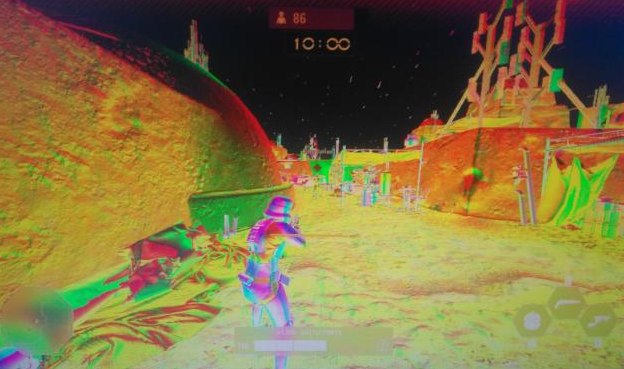
After that, the game unfreezes and become playable again.
There is always the possibility of it using D3D9 to check that... The functionality is exposed there -- but not in D3D11/DXGI.
I have seen games call through to D3D9 just to check some extra adapter info...
the game window flickers with some crazy artefacts
Looks like its outputting some gbuffer
Frostbite Engine is known not to work very well when spoofing a different GPU vendor.
You could always try Intel instead of Nvidia and see if that fixes the issue, but if that doesn't run either then you're screwed. Debugging the hang seems pretty much impossible.
Spoofing Intel didn't really work, the hang is still there. What is interesting is that it shows an outdated driver message, but unlike with AMD, I'm allowed to continue with this "outdated" version.

Nah, great.
Well, can't do very much about it. If there's a fast way to reproduce the hang, please record an apitrace, if not - well, as mentioned, you're screwed.
Hi,
i play many frostbite engine based games. Battelfield 3,4,1,and Battlefront 2 without any problems. But i used a nvidia gpu. The only thing what was different after initial Start on all mentioned games was, for starting Battlefront 2 successfully i had to set dxgi to the wine version.
It was funny, after the first start i switched back to the version which came with dxvk and... Battlefront 2 start successfully?
Maybe this can point in the right direction? Hope you can soon enjoy Battlefront 2 with the outstanding dxvk.
btw: Thanks to the team of dxvk and special thanks to doitsujin. You and your work are amazing. Sorry, out of scope, i know but i have to write it. Thank you.
If there's a fast way to reproduce the hang, please record an apitrace
Why fast? Wouldn't it work with the 10 minutes hang?
Notice that the only thing that hangs is the display, the game audio keeps playing (mostly) and the other audio sources keep playing along just fine. I can also switch to a tty and do stuff there without any problems.
Why fast? Wouldn't it work with the 10 minutes hang?
Well, yes, if you're going to play the game at ~1 FPS for probably a lot longer than 10 minutes and have enough patience to upload a 50GB trace file ;)
I see. Could that be related to hardware power? I tested it on a RX 550, maybe I don't have enough vram?
I tried again with Wine Staging 4.16 and DXVK 1.4.1 and the 10 minutes hangs are gone.
Main issue above AMD driver detection is fixed now with
dxgi.customDeviceId = 1C81
dxgi.customVendorId = 10DE
Feedback.
It really works! Thanks for the fix.
On first startup when using AMD GPU:
Error: Detected AMD Radeon driver version UNKNOWN
SIMPLE FIX:
Make hidden directories visible in file explorer.
Create a textfile and rename to dxvk.conf in /home/USERNAME/.steam/steam/steamapps/common/STAR WARS Battlefront/ and write this into the file:
dxgi.customDeviceId = 1C81
dxgi.customVendorId = 10DE
Save and hit play. Works like in Windows.
No other startup options required.
I'm happy.
This workaround does not work with Star Wars Battlefront II Celebration Edition, I still get this error:

These options work for me:
dxgi.customDeviceId = 10de
dxgi.customVendorId = 1c06
Launch options
DXVK_CONFIG_FILE=/home/userx/.wine/drive_c/dxvk.confx1 2019-09DXVK_CONFIG_FILE=/home/user/dxvk.confx1 2019-08DXVK_LOG_LEVEL=debugx1 2019-08DXVK_LOG_PATH=/home/user/dxvk_logsx1 2019-08WINEDEBUG=ALLx1 2019-08WINEESYNC=1x1 2019-08WINEPREFIX=/home/user/Games/originx1 2019-08
When attempting to launch this game I get an error prompt informaing that the radeon driver version was detected as "UNKNOWN" the game then refuses to start.
Full error text "Detected AMD Radeon driver version UNKNOWN"
I have attached all populated log files (most are empty at this point), I have attached an image for the error pop up.
I have tried having nvapi DLL's enabled & disabled with no luck, I have also tried with
dxgi.nvapiHack = Falseanddxgi.nvapiHack = TrueCommand I am using to launch origin (and the game after) is
DXVK_LOG_LEVEL=debug DXVK_LOG_PATH=/home/user/dxvk_logs WINEESYNC=1 WINEDEBUG=ALL DXVK_CONFIG_FILE=/home/user/dxvk.conf WINEPREFIX=/home/user/Games/origin wine ~/Games/origin/drive_c/Program\ Files\ \(x86\)/Origin/Origin.exeSoftware information
Star Wars Battlefront (2015) launched from origin
Wine Tricks Enabled :
System information
Log files
starwarsbattlefront_dxgi.log