Mass Effect Andromeda not loading. DXVK 1.3.3, Wine staging 4.14.
Please post logs, including wine logs, and if possible, bisect the problem.
What exactly is your problem anyway? The game works perfectly fine on my end, with DXVK's DXGI implementation.

Please make sure that your wine setup isn't broken.
Okay. Build from latest master commit works (DXVK: v1.3.3-1-gb0552751). The binary release 1.3.3 doesn't. Strange, because nothing relevant changed in the latest commit https://github.com/doitsujin/dxvk/commit/b0552751ada90b754568061c8c3f7e2bb810475a
In both cases I'm installing with the provided script.
But the DXGI issue remains. See the other bug https://github.com/doitsujin/dxvk/issues/1140 (I posted logs and a screenshot).
Well, can you please provide logs?
I tested this with Lutris using the 1.3.3 binaries and it works just fine on my end.
Here you have the logs. Naming convention:
- nodebug: without WINEDEBUG="warn+all"
- debug: with WINEDEBUG="warn+all"
- nodxgi: use Wine's DXGI -> the one that works with DXVK's master https://github.com/doitsujin/dxvk/commit/b0552751ada90b754568061c8c3f7e2bb810475a and DXVK 1.3.2 binary.
- with-dxgi: use DXVK's DXGI.
- git: DXVK compiled from commit https://github.com/doitsujin/dxvk/commit/b0552751ada90b754568061c8c3f7e2bb810475a
- binary: DXVK 1.3.3 binary release
There's also d3d11 logs when the games launches (only with DXVK master or DXVK binary 1.3.2) but fails to continue to main screen due to DXGI problem. I've attached only once because the output is the same. I've attached a screenshot with the error returned by Wine.
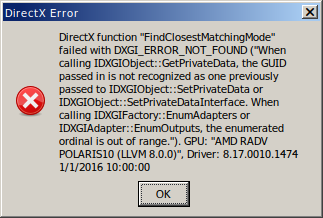
I'm not using Lutris. Just plain Wine staging 4.14.
binary-nodebug-nodxgi-output.txt
binary-debug-with-dxgi-output.txt
git-debug-nodxgi-output.txt
git-nodebug-with-dxgi-output.txt
git-nodebug-nodxgi-output.txt
git-debug-output.txt
binary-nodebug-with-dxgi-output.txt
binary-debug-nodxgi-output.txt
git-debug-with-dxgi-MassEffectAndromeda_d3d11.log
git-debug-with-dxgi-MassEffectAndromeda_dxgi.log
002a:err:module:import_dll Loading library d3d11.dll (which is needed by L"C:\Games\Mass Effect Andromeda\MassEffectAndromeda.exe") failed (error c000007b).
Well yeah that's definitely a problem on your end. I don't know what you're doing wrong, but clearly the way you set up dxvk didn't work out.
I'm not sure about the DXGI error, it's a known issue with all Frostbite games on some setups, but I cannot reproduce it at all and I don't think anyone managed to actually record a proper apitrace showing that problem.
Edit: I redownloaded DXVK 1.3.3 binary and it works now. Somehow the download got corrupted. I'll do an apitrace and report to the other bug. Thanks.
But then binary 1.3.2 nor DXVK master shouldn't work either. I have installed Mass Effect in a clean Wine profile and installed DXVK with the provided script.
The launch command is env LANG=ca_ES WINEPREFIX="/home/user/.wine-mea" /opt/wine-staging/bin/wine C:\\windows\\command\\start.exe /Unix "/home/user/.wine-mea/dosdevices/c:/users/Public/Escriptori/Mass Effect Andromeda.lnk"
I had no problems with DXVK 0.70 and Wine staging 3.xx. :S
I'll investigate more then. Places to look at would be welcome.
Launch options
WINEPREFIX="/home/user/.wine-mea"x1 2019-08WINEDEBUG="warn+all"x1 2019-08
Upstream links
- doitsujin/dxvk/issues/1140x2 2019-08
DLLs
d3d11.dllx1 2019-08
Wine fails to find and load DLLs with DXVK 1.3.3. DXVK 1.3.2 works without problems. No apitrace because this is not about graphics issues or misbehaviour of the application.
Wine reports it can't find DLLs.
Software information
Wine staging 4.14 from ubuntu repo (https://wiki.winehq.org/Ubuntu).
Mass Effect Andromeda.
d3d10, d3d10_1, d3d10_core, d3d11 override. nvapi64 disabled. xaudio2_7 (native, internal).
I have not installed DXGI, as it causes conflict with Wine staging 4.14. DXVK 1.3.2 would not work with that DLL provided by DXVK (this bug describes a problem with DXGI https://github.com/doitsujin/dxvk/issues/1140).
DXVK 1.3.3 does not run at all.
Other winecfg settings:
System information
I'm only using Ubuntu repositories. Mesa, kernel, etc. versions are the ones shipped with the distro.