Batman Arkham City GOTY - Low GPU/VRAM usage
I can't reproduce this issue, using the same settings my gpu is at 99% the whole time:

Specs:
- CPU: 8700k
- GPU: 1080
- Driver: 435.24.02
- Wine version: Proton 4.11-6
- DXVK version: 1.4.1
Higher CPU overhead than on Windows is expected and not a bug, although this sounds like somethig is screwed on your setup. Did you disable esync?
Also please try running the game with DXVK on Windows since you seem to have access to that, and compare your numbers.
Reinstalled with vanilla arch and driver 435.24.02, issue persists. Will test windows 10 in a bit and get back with my results.
Going to try steam-native as well.
Edit:
The game on steam-native errors out on launch with a ntdll.dll not found. I have verified the new dxvk is installed in the directories. Dunno.
PROTON_NO_ESYNC=1 ...cut fps in half.
I can't verify this on Windows. DXVK either doesn't work on this game or it needs to be in the windows/system32 directory. Unfortunately even in safemode I can't replace those files and placing them in the games folder doesn't work.
When I get home I'll test older versions of dxvk to see if it's a regression. This game ran fine a few months ago on my setup and I'm seeing normal fps in games like csgo and Dishonored. Still doesn't hurt to check.
If it is a problem specifically with 1.4.1 then it's likely Turing specific since the 1080 above shows normal performance.
I dunno why I'm getting such poor performance. Can't find a DXVK version this doesn't happen on. D9VK gets better FPS but only by about 10-15. Also uses more VRAM.
CSGO runs at 215 FPS @ 4k max settings and that's OpenGL. I'm starting to think this might be a wine issue, but older versions don't run well either...

Batman Arkham City has an arbitrary frame limiter at 62 fps.
Disabling this, and in D9VK, I can easily push 129fps at 4K with near to full GPU load.
Pretty sure this is a setup issue on your end.
Batman Arkham City has an arbitrary frame limiter at 62 fps.
Disabling this, and in D9VK, I can easily push 129fps at 4K with near to full GPU load.
Pretty sure this is a setup issue on your end.
Thanks, but other DXVK games don't have this issue. I'll look into the arbitrary frame limiter, but it hits ~99 FPS max with D9VK so that's probably not it.
I've also already done a full reinstallation and it didn't change anything.
I can't reproduce. I tested the game with DXVK 1.4.1 on Windows and got between 80 and 90% of the performance I'd get with the Nvidia D3D11 driver (which what you'd expect). A lot of the time I'm CPU bound but that's just the game being stupid.
Does the game run better with older DXVK versions?
I'm maxing out @ 200 FPS on bad company 2 with 4k, so the GPU can go over 30% usage with DXVK. Would an apitrace or anything help with this?
No, it doesn't run better with older DXVK versions. How did you test this game with DXVK on windows? It wouldn't start after adding the binaries to the game folder.
Are the PhysX effects turned off? If they're not, turn them off.
Yes.
When testing on Windows, make sure you don't have any overlays enabled (Steam/EGS/whatever), and close stuff like MSI Afterburner and RTSS if you have that running. The latter prevents DXVK from working at all on Windows.
Works fine, so probably a wine issue. Time to go file a bug upstream.
It's just weird since I've never seen wined3d perform on par or better then DXVK.
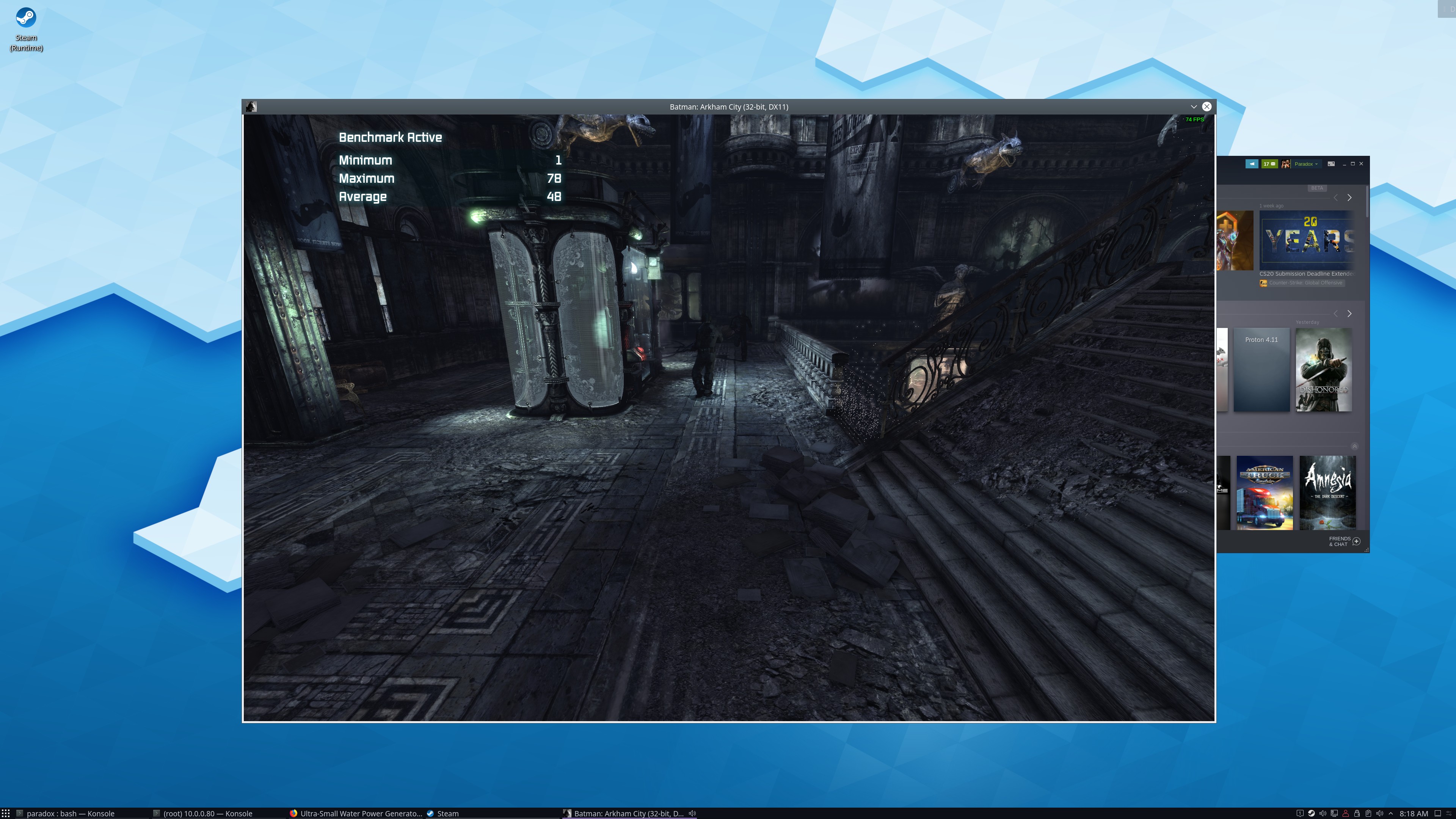
EDIT: My bad, second time through the benchmark - it outperforms DXVK.

Update: I don't know what was causing the issue. It happened on Ubuntu/Popos, Arch and all arch based distros.
It does not happen on Gentoo. And that's not me being a Gentoo fanboy. I'd love to know what the problem was and what introduced the regression but it's outside of my scope to troubleshoot.
Thank you for your patience @doitsujin

Proton versions
proton 4.11-6x2 2019-09
Launch options
PROTON_NO_ESYNC=1x1 2019-09
DLLs
ntdll.dllx1 2019-09
This game is obviously CPU bound as it's stuck at 200% usage. However, the GPU usage is under 30% (even at 4k) and the VRAM doesn't exceed 1.2GB (even at 4k).
This game gets 170 FPS on Windows 10 and uses around 3.2GB VRAM @ 4k.
Wined3d is also getting similar FPS to DXVK. The average FPS is more or less identical. The only problem is wined3d stutters a lot more. It also doesn't hit the same highs.
However, wined3d is also using 60%+ of the GPU at times. This doesn't happen with DXVK.
CPU is a i7-8700k clocked at 4.8Ghz, with enhanced turbo so the cores stay at 4.8Ghz under load.
kwin is disabled. The feral gamemode script doesn't change the results.