BeamNG.drive abysmal performance with DXVK enabled
Sorry I did not mentioned it earlier, I am Pop OS 19.10 with the the pre-installed proprietary nvidia drivers
I know others had this problem before and wasn't a DXVK issue. No idea how to fix it though.
What's the rest of your hardware anyway? Could be an issue with poor CPU, not having enough RAM or something like that. The game is known to run fine with DXVK for some people at least.
Also, check VRAM utilization and try reducing settings.
My specs are as follows:
- CPU: Intel i5 7400
- GPU: GTX 1060 3GB
- RAM: 16GB 2400HZ Single Channel
I think this more than enough for this game to perform decent as it works fine in windows
As I said before this only occurs when dxvk is enabled, with it disabled I atleast get stable fps albeit lower. Also i tried to drop the settings to minimum, max fps increases but same issue...
This frametimes graph pretty much describes my problem....
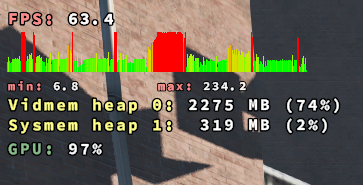
Can you try lowering texture quality or something to reduce VRAM utilization?
wined3d benefits from very sophisticated memory management in OpenGL drivers, whereas DXVK's memory management is fairly stupid, and on Nvidia, there's the added difficulty that the amount of VRAM allocated by other applications (Steam, web browser running in the background) is not available to DXVK either, so 2.2GB could be too much already.
ok it seems that I have solved the issue. The culprit was IRQBALANCE which is enabled by default in Pop OS (dunno about other distros). TBH I stumbled upon this by pure luck while looking into cpufreq gnome extension.
I removed irqbalance using sudo apt-get remove irqbalance
Rebooted once and the issue is COMPLETELY gone !!
I am a happy man now :)
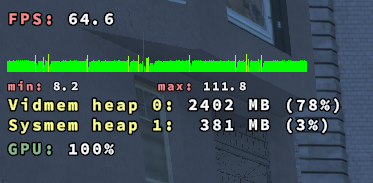
I suggest you put this info in the FAQ section, might help some other people...
Some some threads regarding this...
http://konkor.github.io/cpufreq/faq/#irqbalance-detected
https://github.com/konkor/cpufreq/issues/48
https://github.com/pop-os/default-settings/issues/60
Huh, interesting. This sounds like a very system-specific problem however, even on systems with irqbalance active.
You might still be running out of VRAM however, 381MB sysmem seems a bit high just for constant buffers + staging buffers alone. Just in case performance still isn't where you'd expect.
I am certainly not the only one having this problem, someone on Ubuntu 18.04 was having the same problem..
https://askubuntu.com/questions/1067866/ubuntu-18-04-steam-games-frame-rate-drop
Anyways thanks for trying to help, dxvk works great too !!
Proton versions
proton 4.11x1 2020-01
I get stable 25-30 fps when running the game without DXVK. With DXVK enabled max fps triples (depends on map) but the game freezes and drop frames every second making it literally unplayable. I tried with some other wine version and the results were similar.
Something I noticed is when the game is running fine the gpu usage is around 90-100%, and when it freezes gpu usage drops to 10-20%.
Software information
BeamNG.drive, 1980x1080 high preset
System information
Apitrace file(s)
Log files
d3d9.log: [Empty file]
d3d11.log:
BeamNG.drive.x64_d3d11.log
dxgi.log:
BeamNG.drive.x64_dxgi.log