[d3d9] World of Warcraft 3.3.5a: all texts missed
Your hardware/driver doesn't support the format the game is trying to use:
https://vulkan.gpuinfo.org/displayreport.php?id=7904#formats
Actually, I think I can workaround this and perhaps simplify the existing implementation of this format, one moment.
Please try with this build https://git.froggi.es/doitsujin/dxvk/-/jobs/1158
Hi Joshua-Ashton,
It works better, thanks!
the text of some areas appeared by running a6d5546.


-
Apitrace file(s)
https://drive.google.com/file/d/1EOLEGhdgvtss4H8RgrtxguhIrhZiSXEQ/view?usp=sharing -
Log file(s)
https://drive.google.com/file/d/1ENm9_dKsUtcd085Rhhe35bgogKHuyC8x/view?usp=sharing
no more "err: D3D9: Cannot create texture:..." message in this file.
This should be completely fixed as of master now.
i can confirm that 4cf3ef5 works flawless for me.
Joshua-Ashton and doitsujin, thank you!
Nothing extracted yet.
wined3d

dxvk 1.5.1 and below (d9vk included)
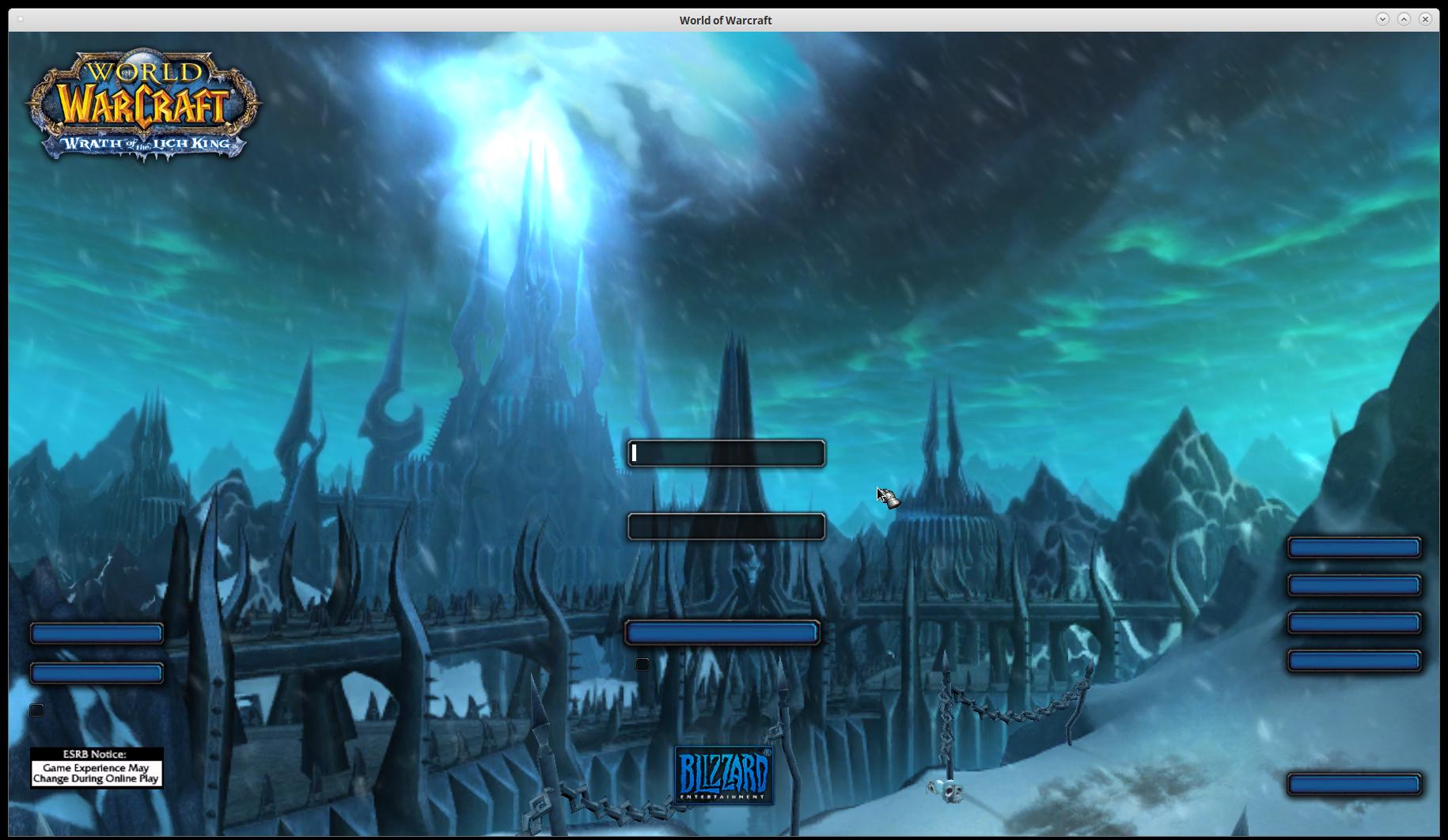
dxvk 1.5.2 and above (print screen with dxvk 1.5.4)


some extra stuffs may off-topic:


Wow 5.4.8 dxvk 1.5.4 with d3d9 mode
Wow 5.4.8 dxvk 1.5.4 with d3d11 mode
If you need any further information, please feel free to contact me. thanks.
Software information
World of Warcraft 3.3.5a
System information
Apitrace file(s)
https://drive.google.com/file/d/1cdhT87PGL5kA9dZkCFSiR6wTn6a1msfk/view?usp=sharing
Log files
https://drive.google.com/file/d/1aCalXWOGnkTUcuAuV0nAqDRNNGXUXhY2/view?usp=sharing
this file will keep increased by the "err: D3D9: Cannot create texture:..." message.
vulkaninfo outputs
https://drive.google.com/file/d/1pUuMRn3G17t8mbJUmttViyCuNt4xL87d/view?usp=sharing