[d3d9] Beyond Good & Evil
@Riesi Does the BGE SettingsApplication work for you with DXVK? For me it crashes, though it seems to work just fine with WineD3D. I think the problems are related.
In my case the game does not use the resolution I set, though it seems to switch to something close to it. For example, when configured (via the settings app using WineD3D) to run at 1280x1024, it runs at 1280x1024 in WineD3D, but at 1280x800 in DXVK.
Here's a trace of the crash captured while trying to launch the SettingsApplication with DXVK (for some reason it doesn't capture a trace with WineD3D): SettingsApplication.trace
And here's a trace with WineD3D: SettingsApplication_wined3d.trace
Edit: I've noticed something interesting in the logs:
warn:  D3D9InterfaceEx::QueryInterface: Unknown interface query
warn:  02177241-69fc-400c-8ff1-93a44df6861d
Here are the logs as well: SettingsApplication_d3d9.log
With the steam version i have not been able to reproduce this with my 960 with 470.103 driver.
Tried with both dxvk 1.6 & 1.6.1 through proton.
I couldn't reproduce a settings app crash either. Tho for the current steam version you have to edit a registry entry in the prefix because either the games install script or proton does something wrong. Else it won't launch cuz it says the game isn't installed properly.
To update things:
- The SettingsApplication still crashes with dxvk and works fine with wined3d.
- The game seems to pick the resolution correct now even with dxvk. Not sure if that was fixed somehow or if my old prefix had broken registry entries.
- There is a regression from the following commit that reproduces with the attached wined3d trace of the report.
c12cd1952cf8593f3f6064f7b785c7fc7bcf1c74 is the first bad commit
commit c12cd1952cf8593f3f6064f7b785c7fc7bcf1c74
Author: Robin Kertels <[email protected]>
Date:   Wed Feb 2 19:39:46 2022 +0100

    [d3d9] Handle different mip chain lengths in UpdateTexture
https://github.com/doitsujin/dxvk/pull/2553
fixes the regression
the SettingsApp crash also happens with dgVoodoo and galliumNine
so its either something all 3 implementations are doing wrong or maybe some interaction between d3d9 and another api that only works with wined3d
I will try on my Nvidia system when i have time.
At least for the steam version with my AMD setup i couldn't reproduce the crash after i had fixed the registry bug.
Tho something else might be different compared to the cd version.
Edit: oh wait my bad i see was already on the Nvidia system when i tested this. I'm mixing things together.
None the less i will try again
Maybe Proton is disabling DXVK for the Settings Application?
Its clearly not working with my non steam version running in wine.
Oh derp ye you are running wine not proton. Excuse my slow head.
Will keep that in mind when i test it.
Just checked on my amd system through wine (still steam version) and still no crash. Will try the same when with nvidia when i have time.
@Riesi Just tried on my Nvidia 960 with 510 driver on wine and i still can't reproduce a crash with dxvk.
Can you upload your SettingsApplication.exe & CheckApplication.exe ? Maybe steam uses a different version than the cd one.
Uploading copyrighted contend is a big no go.
I can at best share a hash at some point.
Hash will have to do then.
these are all SHA256
4520a3fac8be76854acfae7f98a25bf3876d4082ea48256064eeed0e1e630630  CheckApplication.exe
ed02902cb2c57e3184bba6353ab07b1b4c6ef85c287c5a952a68fe750f750298  SettingsApplication.exe
fc8bd732acfdadc7c72070c85b9f8bb0811ead2cbb5dff842e993d96feb1993b  BGE.exe
aaccb80946ccb8daa6e614e4f00fb0e04c30cb2d0b860742528741555e2eb4a6 CheckApplication.exe
b6d8fb7b7a65de0a4060fbf7b2051ee6d307f005f02e985d4eef355782989d1e SettingsApplication.exe
70ae232d58bafe5cbf5c27712538af91e8b13a98104ae1bf6aea6dcf3506f5db BGE.exe
It would seem they are not the same.
If this is anything to go by maybe that is why i can't reproduce the issue.
FYI, the GOG version of the game has:
8943ac6044d07b1df0e9ca1a072be69497b6c7bf0c2e46c1960ba55300c4057b  CheckApplication.exe
a7d977dc59ccaa09afdee7fadb09a072156f01e7619b7894d5447be35d349675  SettingsApplication.exe
fc8bd732acfdadc7c72070c85b9f8bb0811ead2cbb5dff842e993d96feb1993b  BGE.exe
... and it (SettingsApplication.exe) also crashes with dxvk, while working fine with WineD3D. I can confirm the resolution problem seems to have gone away though, it's now using the proper resolution - namely the one set via the settings app, using WineD3D.
Oh there is a gog version. Don't trust google i guess :grin:
I will check it out.
Edit: Okay yes i can also reproduce with the gog version.
Hate to be the bearer of bad news, but I was planning to start a new playthrough and noticed the sun and bloom effect (planetary glow) are again missing with dxvk-1.10.1... See here for more details on what I mean by that. Can someone confirm this on AMD, just to rule out who-knows-what Nvidia jank?
Edit: Tried it on Intel and I'm getting the same. Looks like a regression.
.. sigh... guess a lot of people play this game on a regular basis, since the sun broke somewhere between dxvk 1.5.1 and 1.5.2, lol. Should I... do a bisect? Would that even help at this point?
P.S.: According to the d9vk issue, this commit was the one that fixed the problem in the first place.
A bisect would be useful.
A bisect would be useful.
6fa28bf9371ee40eb350d8e296adfae77c8236de is the first bad commit
commit 6fa28bf9371ee40eb350d8e296adfae77c8236de
Author: Joshua Ashton [email protected]
Date: Fri Jan 24 05:32:01 2020 +0000
[d3d9] Don't block on GetRenderTargetData

Fixes perf in [#1363](/issue/doitsujin/dxvk/1363)
@K0bin I've been looking deeper into this issue (and at the affected bits of code, but as a graphics API noob), trying to figure out what is going on here. Looks like d3d9.allowDoNotWait = False brings back the sun and "god rays". I've been playing the game for 2 hours and noticed no ill effects so far with this workaround. Should I submit a PR, or is this something which should be fixed some other (better) way? I mean, it used to work without any workarounds until the above commit... and this config option sure has been getting more use lately :sweat_smile:.
Sounds good, I'm looking forward to your PR. :)
@K0bin There's one more issue with the game, but I'm not sure if it warrants a separate bug report.
I'm certain it has something to do with desktop compositing because when I disable it the randomly occuring weird geometry clipping goes away (recording is done with compositing enabled, when it's at its worst with dxvk). It also goes away with an alt+tab when compositing is enabled, but always starts acting up again soon afterwards... and I haven't been able to capture it in a trace, which means rasterization is doing its job just fine, I guess.
Disabling compositing mostly fixes things. I briefly see some clipping when an area transition loads or very rarely in other places, but it's gone after a few frames and doesn't consistently resurface. It's rather rare, minimal and hard to reproduce in this case.
Any idea what's going on here and why WineD3D doesn't seem to care about compositing at all? I'm not even getting the above described minimal clipping with WineD3D, even with compositing on (which causes clipping havoc in dxvk, as per the recording).
Could be a case where we're not synchronizing with the GPU in some place where we should. That would make it essentially a race condition and desktop compositing could impact the timings.
Can you make an apitrace of the area please? (Regardless of whether the issue shows up with that or not.)
Can you make an apitrace of the area please? (Regardless of whether the issue shows up with that or not.)
I'm glad I never deleted it. The outside area, usually around the lighthouse, triggers the problem with compositing enabled.
Regarding the crash in the SettingsApplication, what makes it work in WineD3D seems to boil down to the D3DFMT_X1R5G5B5 format not returning any display modes. If it does, that will cause a crash.
With WineD3D:
IDirect3D9::GetAdapterModeCount(this = 0x745940, Adapter = D3DADAPTER_DEFAULT, Format = D3DFMT_X1R5G5B5) = 0
With DXVK:
IDirect3D9::GetAdapterModeCount(this = 0x15369d0, Adapter = D3DADAPTER_DEFAULT, Format = D3DFMT_X1R5G5B5) = 40
Ensuring no modes get cached with this format, for example by altering the behavior of D3D9Adapter::CacheModes, gets the SettingsApplication going with dxvk. Not saying that would be a proper way to handle things, but it's how I makeshift tested the "fix".
Hmm, I guess we should find out what native drivers are returning here for D3DFMT_X1R5G5B5 and D3DFMT_A1R5G5B5, and see if we should app profile this or just remove it.
Windows trace from my laptop intel uhd3000 igpu
SettingsApplication.trace.zip
Confirmed here too works in my uhd 630 but in my case use d3d9 as native and dxgi as internal because without this show directx9 dont installed error (occur in various games) however directx installation works ok
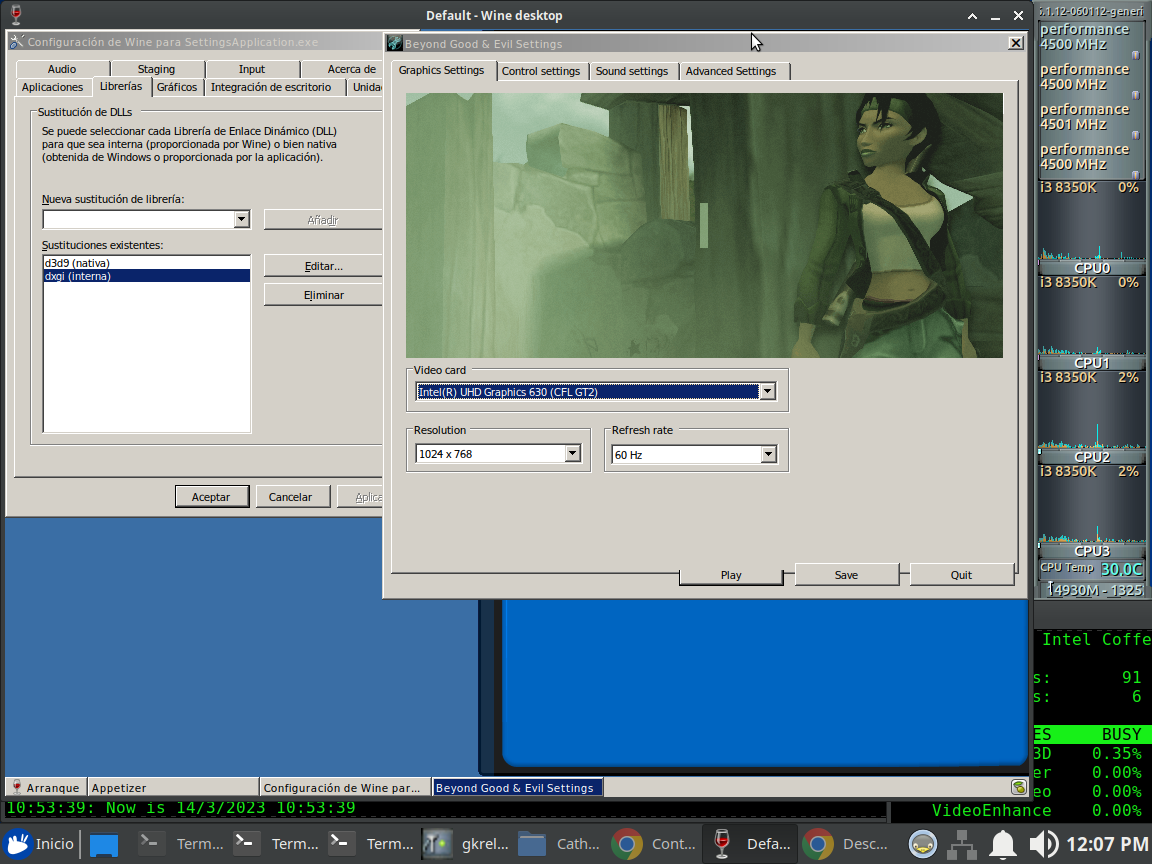
Many thanks Winter!
Upstream links
- doitsujin/dxvk/pull/2553x1 2022-03
Only remaining issue is the Settings Application crashing when running through dxvk, galliumNine, or dgVoodoo.
Not sure if this is really a dxvk issue or a wine interaction issue though
With dxvk the game stays in a really tiny window with 320x200. This does not happen with wined3d, which renders the game at full 1080p. Apitraces with dxvk and wined3d attached.^This has been fixed
Software information
Beyond Good & Evil CD Version
System information
Apitrace file(s)
BGE_dxvk.trace.zip
BGE_wined3d.trace.tar.gz
Log files