StarCraft 1 not running
You can find the the Windows version of Apitrace on their website: https://apitrace.github.io/
The DLL should be inside the wrappers folder.
You can find the the Windows version of Apitrace on their website: https://apitrace.github.io/
The DLL should be inside the wrappers folder.
For d3d9 another utility, this one wrote an API error for me.
What do you mean? What wrote an error? You should use the DLL.
What do you mean? What wrote an error? You should use the DLL.
I don't understand how to use them.
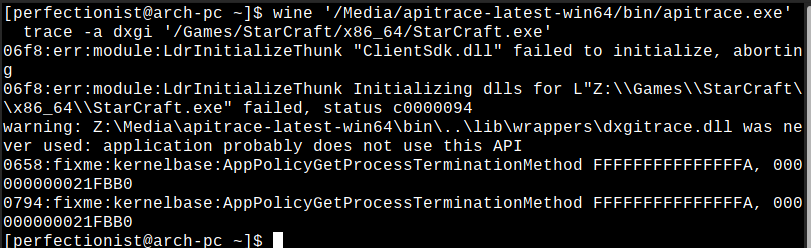
Follow this guide: https://github.com/Joshua-Ashton/d9vk/wiki/Making-a-Trace but use the DLL you got from the apitrace download because the download link inside that guide is dead.
Follow this guide: https://github.com/Joshua-Ashton/d9vk/wiki/Making-a-Trace but use the DLL you got from the apitrace download because the download link inside that guide is dead.
This is what I did. But perhaps this is due to the fact that the games are used in the D3DX9_42.dll folder
Don't confuse D3DX9_42.dll with d3d9.dll. D3D9X is a helper library that sits on top of D3D9 and just normal D3D9 calls just like a game would.
You launched apitrace.exe with Wine, which shows that you clearly didnt follow the guide. Which has you put the wrapper dll next to the games exe and just launch the game itself.
Don't confuse D3DX9_42.dll with d3d9.dll. D3D9X is a helper library that sits on top of D3D9 and just normal D3D9 calls just like a game would.
You launched apitrace.exe with Wine, which shows that you clearly didnt follow the guide. Which has you put the wrapper dll next to the games exe and just launch the game itself.
That's what I did every now and then according to the guide, I don't understand to take a video for you. The file is in the folder, changed the settings in winecfg, the launch command is in the screenshot.
No one wants a video.
You play the game with the wrapper dll placed next to the games exe. Then you should find a .trace file in the Desktop folder of the Wine prefix you used. Upload that .trace file.
So I don't know how to prove to you that I am doing exactly according to the instructions.
What exactly is the problem then?
What exactly is the problem then?
Screenshot error. And this is after following the instructions. I repeat to you.
Please follow this exact guide: https://github.com/Joshua-Ashton/d9vk/wiki/Making-a-Trace
What you're doing in that screenshot is wrong.
I was just playing StarCraft 2, works fine and I just downloaded the original StarCraft and that works fine too... I don't have the Remastered to test.
I am using an older wine version than you (lutris-5.7)
After upgrading to wine-staging 5.14-2, the problem disappeared.
DLLs
d3dx9_42.dllx3 2020-08d3d9.dllx2 2020-08
The game stopped working on the last update when new APIs were added (10/11), but there may be a coincidence. Was able to run in OpenGL mode using PortBattleNET. So the problem is clearly Vulkan mode. There are no problems with another game(Lineage2). But StarCraft 2 didn't work either.
Software information
Star Craft 1/2
System information
Apitrace file(s)
Link for file d3d9 is dead
Log files
winedebug.log
Agent_dxgi.log