Dxvk 1.7 fulscreen issues in some games
DOOM does not use DXVK.
Also I am aware of the fullscreen issue -- there is just no clean way around it right now.
Please provide an apitrace so I can take a look at Torchlight 2
Hello @Joshua-Ashton thank you for your comment, I was wondering if i can use this apitrace software> https://gpuopen.com/archived/api-trace/ for Windows 10?
Or should I try the https://github.com/apitrace/apitrace/wiki/Steam
Cause I own Torch Light 2 in Epic-games
But I will be buying the Torch Light 1/2 bundle as it is in 3$ for steam
So meanwhile i thought by using the Api-trace GPU would work? or nope.
Edited: I will download this one> https://apitrace.github.io/
for Windows 10 64 bit and Test with Torch Light II then i will provide you the apitrace.
Thanks for your time.
@Joshua-Ashton I'm quite noob at this, how to properly use apitrace?
This is the steam folder Torch Light II which i haven't yet tested on the steam version>

At this point I'm quite lost, wanted to apitrace torchlight II with their default d3d9 (edited putted the 32 bit vulkan d3d9 provided by version 1.7 dvk)
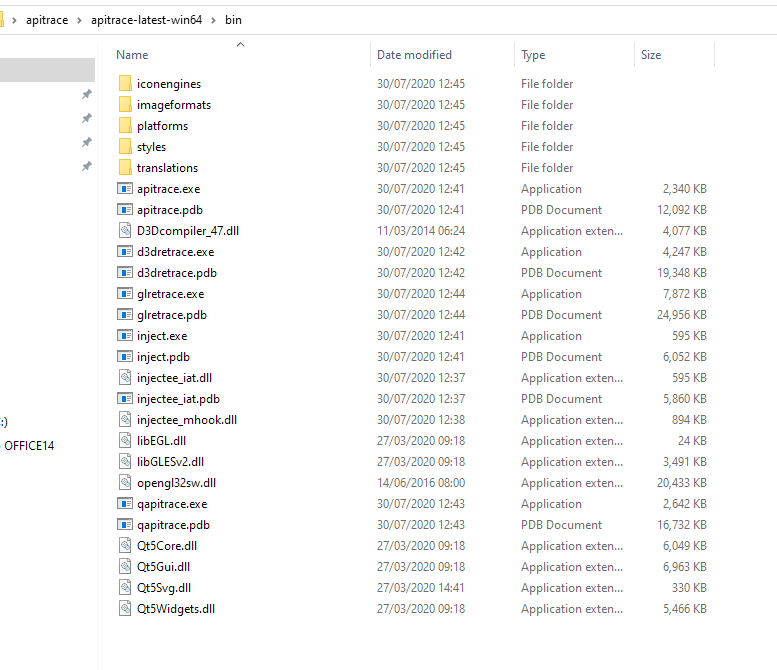
PD I realize i made a mistake as this game use 32 bit executable so I needed to download the apitrace for 32 bit in order to run the trace.
Today I went to Microsoft Catalog and I decided to try old drivers for my GTX 1060 according to catalog of Windows was: Amd64 architecture and drivers 369.09 for some reason this drivers work good (they are called generic driver i guess) and voilah Torch Light II now run much better and allow me to thick (vsync in game) now the vsync works.
But for some reason now i cannot run the Dxvk anymore. probably because old nvidia driver?
@Joshua-Ashton
Btw does anyone here know a way to improve fps in torch light II by fixing a bit the cpu bound 100% one core? and gpu low usage 5-15%? thank you
I tried Torchlight 2 (played for 10 minutes) and there doesn't seem to be anything wrong with it. It's just a single threaded game that doesn't do anything particularly demanding when it comes to graphics. I'm getting the same performance with DXVK as with Nvidias Windows D3D9 driver.
@K0bin Thanks for your comment, did you went into battles of 5-10 monsters? like in the Act 2?
Also for some reason the Nvidia graphics 451.67 is causing poor performance on my on gtx 1060, but even that, i will try the apitrace32 bit, all i know is that i need to open command prompt in the apitrace32 bit (binaries) then make a path to where is the executable game right?
something like apitrace --d3d9 patch torchlight2.exe? cause im having in all games using dxvk (fullscreen issues)like i cannot minimize or maximize.
Thanks for your comment, did you went into battles of 5-10 monsters? like in the Act 2?
I just clicked on New Game and ran around for 15 minutes. That's it.
all i know is that i need to open command prompt in the apitrace32 bit (binaries) then make a path to where is the executable game right?
https://github.com/Joshua-Ashton/d9vk/wiki/Making-a-Trace
Follow this guide (except for the dead link, just use the one you already downloaded instead.)
I still suspect that the game itself is just slow rather than DXVK. Is the game actually slower with DXVK than with the normal D3D9 driver?
Thanks @k0bin
I did read the guide he mention to copy the appropiate dll, which of course torch light II is 32 bit, i have apitrace binaries 32bit
I tried to copy this file only this one the apitrace.exe in the torch light II steam route.
Now my game opens with 60 frames 16 ms (in green) by it the apitrace, i played a bit and save/ alt f4 but there is not trace file in desktop nor in the torchlight 2 game folder.
Do i need to move more files?
You need to read the guide again. Put the .dll file into the game folder, not an exe.
And can you please answer my question: does the game run slower with DXVK than without it?
Sorry im lagging i will provide in a moment the apitrace32 binaries picture.
@K0bin
The thing is that i'm having visual lag in most games, but.. the idea of using this dxvk vulkan implementation on d3d9/10/11 games was because Torch Light II as it is an old engine with one core from 2012, I wanted to know if by using Dxvk i would be able to improve the gpu usage a bit more cause before using the driver 451.67 for some reason the gpu was 4% at 60fps, 15% at 120, but yesterday by running that old nvidia drivers 369.89 or something like that i noticed in steam torch light 2 was somehow using 25% gpu usage to 40% in with frames 120-150 very interesting, and i was able to put vsync on as my monitor is 60hz, i finally can reduce a bit the (visual lag, choppy framerate) even with that old driver i was still seeing a bit of annoying visual lag/choppy on 60 frames
But i had to move back again to this 451.67 i noticed is a bad driver in the current nvidia forum many people are having issues, right now i will try the nvidia driver 446.14 and see if by using Dxvk 1.7 with d3d9 I don't have any more the bug of dxvk which is the fullscreen bug, i cannot minimize or open the minimized files (thats why i also open this thread)
But Josh appear asking for the apitrace, and thanks to you Kobin i'm learning how to actually trace the game
For some reason this github is not letting me upload the picture of apitracebinaries
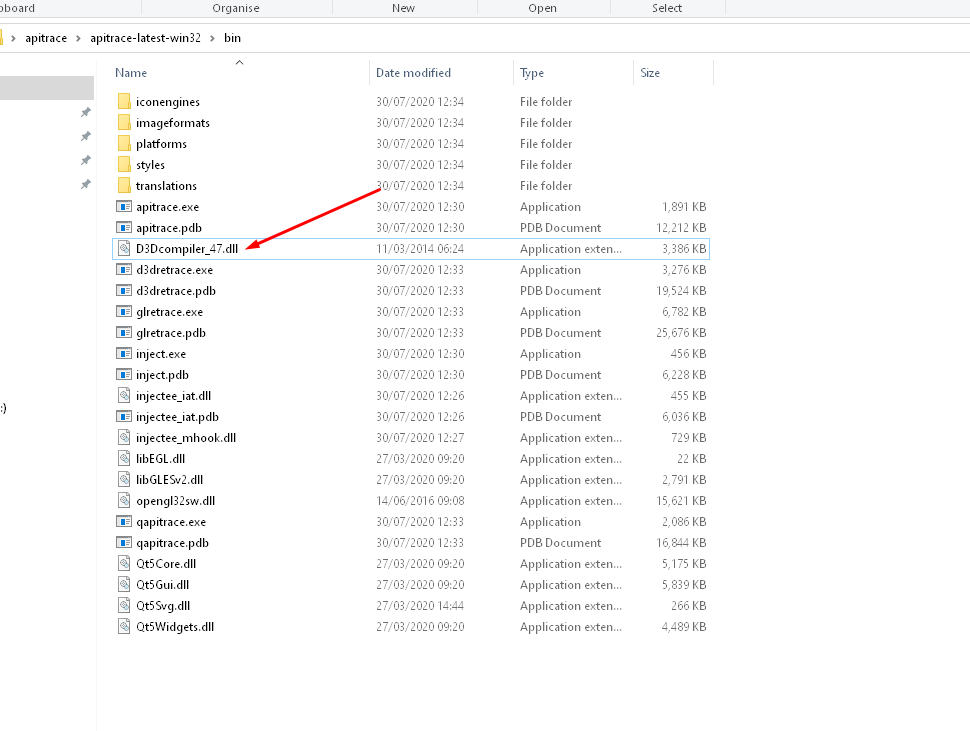
If you see upper, was wondering which of those files i should put in the Torch Light II folder, if that D3dcompiler_47.dll? cause i put it and opened the game, and i had 0 trace in desktop nor in the torch light II folder.
Another Issue with the Dxvk is that in fullscreen i cannot alt/tab i just can press (windows key) and it don't fully minimized, and it doesn't lemme open folders or files, confirmed on this nvidia driver 446 too, was using 451 same issue.
so for this reason i wanted to do a proper apitrace, another situation is that, if i tried windowed/borderless its fixed the alt+tabbing and i can open files and so on. but guess what, if I try to use Light-shot or Greenshot (to capture pictures)
Lets say I'm in a part of the map standing like with 150 fps, and if i press to capture the game position, it will like take a picture of myself but like 30 seconds behind with different fps, (VERY weird) thats why i wanted to post here an apitrace.
Ah lol I didn't see this part of the binaries> (WRAPPERS) sorry Kobin for make you lost time....
but how then i will be able to use Dxvk d3d9.dll vulkan +this apitrace which the dll is d3d9 :O?

Finally I need only to put the d21trace.dll +d2d1trace.pdb <-- in the torchlight 2 folder , also i put the dvxk 1.7 d3d9
So i was able to play with the vulkan implementation in fullscreen (i just play 5-6 seconds) and the file itself is 200 MB
I will upload here in a bit (sorry for many comments )
Please just put the d3d9.dll you found inside the apitrace/x86/wrappers folder into the game folder. No dxvk or anything else.
Then you start the game and play for a bit. The trace should be on your desktop. It really isn't that difficult.
It would probably be easier if you'd just upload your save file. I have the game.
The fullscreen thing is a known issue.
About Torchlight 2 performance. I profiled the game and it spent next to no time in DXVK code. If the game itself is slow there is nothing we can do on the DXVK side.
Oh got it :(
Well this is the save <-- is actually a mod-save i was playing the game with some mods that don't kill the performance, cause as with no mods is the same.
Here is the save: this save should be put in the modsave
https://www.mediafire.com/file/w34gr7819sg6awt/save.7z/file
And this is the 10x mods i used>

Meanwhile i will try to follow your advise of putting the d3d9.dll in the game folder and play like 10-15 minut with no dxvk or any stuff. ty again K0bin.
Okay finally I was able to create a proper trace file i played 3-4 minute file is 1.5 gb I compressed as 7z now file is 330 MB it will take like 1-2 hours to upload the file because here internet in Venezuela is so terrible. So probably tomorrow i will up here the File.
Good morning/noon this is the trace>
http://www.mediafire.com/file/r4fvrr42n9qk0ij/Torchlight2.7z/file
As expected, it's the game itself that is slow, not DXVK.
Also I noticed that, by using that D3d9.dll from the Apitrace32 binaries on the torchlight II, the game has fps drops from 60-40 but is good that, that happens, cause normally the game will have fps drops too.
Also i'm trying to figure what is causing (blurryness, like frame skipping in games) even by not playing games, i can see like not crispy the videos.
Very annoying u.u
Also I noticed that, by using that D3d9.dll from the Apitrace32 binaries on the torchlight II, the game has fps drops from 60-40 but is good that, that happens, cause normally the game will have fps drops too.
You should delete that dll now that you've made the apitrace.
Yes I did, also its very annoying cause even playing at constant frame rate 60fps with vsync on, and frame time 16.7 ms, by moving/running or entering in a foes-fight (a group of 5) even with the constant frame rate, I lost easily my character in that small density of monster spamming skills, is like become choppy, is like that sensation of a fast car passing through and you cannot detail properly their serial/brands or what so ever. Is like gosh i want to be able to see properly the image moving with not frame skip.
And yes i already deleted that .dll
The game looks with DXVK exactly the same as it does without.
So there is not like an improve with the DXVK, also the Fullscreen dvxk issues this only happens in Windows 10 right?
Also do you know any good software to properly monitor/monitord the hard drives /ssd writtings I/O so i can see if that cause issues to, cause i have a SSD but somehow people say that even a SSD with some games may cause pagefile issues or something like that.
So there is not like an improve with the DXVK, also the Fullscreen dvxk issues this only happens in Windows 10 right?
Pretty sure that happens on Linux too.
Also do you know any good software to properly monitor/monitord the hard drives /ssd writtings I/O so i can see if that cause issues to, cause i have a SSD but somehow people say that even a SSD with some games may cause pagefile issues or something like that.
Your disk is almost certainly not the problem in a simple game like Torchlight 2. If you're seeing stuttering, then thats probably caused by DXVK compiling shaders and can't be fixed.
Oh no no, even without the Dvxk by native, I feel like quite choppy the framerates while moving fast with the character like the main character becomes slight blurry or choppy to perfectly detail, and this happen too by seeing movies in vlc media player at 24 fps not as much as i do in games but gosh very annoying ..
Well K0bin thanks a lot for your time, you were so helpful I really appreciate. Seems like i will close this, Thank you again.
DLLs
d3d9.dllx5 2020-08d21trace.dllx1 2020-08d3dcompiler_47.dllx1 2020-08
I'm running windows 10 last build and when playing some games like DOOM, and Torch Light II if I go fullscreen, d3d9, I cannot minimize or alt tabbing the only solution is; to run the game in windowed-borderless)
dxvk; 1.7
Direct; d39
Nvidia drivers: 451.67
Windows 10: 18363
Btw does anyone here know a way to improve fps in torch light II by fixing a bit the cpu bound 100% one core? and gpu low usage 5-15%? thank you