Issues with DXVK and Blish HUD on GW2
Try the
d3d9.enableDialogMode = True
dxvk.conf option
Try the
d3d9.enableDialogMode = True
dxvk.conf option
Sorry to be a pain - how do I set this option?
Edit: Just poking around and I don't seem to have a dxvk.conf. I have checked the directory where the game exe is kept and just the log file is there.
I read those links and tried to set the environment variable to save dxvk.conf in a folder but it didn’t work. I tried using command prompt, is this not the best way to do that?
Edit 1:
@iglu47 - Have I missed something here? It still doesn't show up.
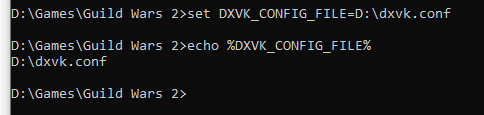
Edit 2: I believe I've set it up now. I didn't realise the .conf was something you had to download. I set it to true and the issue persists - I removed the # and set dxvk_config_file appropriately. @Joshua-Ashton
Edit 3: I was able to get the .conf working, tested by the HUD showing up when I set it to do so. However, I also set dialogmode to True and the issue continues.
Gw2-64_d3d9.log
Apologies just want to bump this to see if anyone has any fresh ideas?
As previously explained:
With DXVK active, Blish HUD or TaCO only appear when in Windowed mode
However, as asked I also did an API trace and under the recording conditions the interfaces of Blish HUD shows up in Windowed Fullscreen - however they obviously don't appear on the trace.
@MattJC7 Friendly ping. Are you still having this issue with newest dxvk and game version?
Hi there. I have stopped using this plugin as now use the dx11 feature in
game. Thanks for following up and apologies if I left this active as I
don’t use GitHub at all.
On Sun, 24 Jul 2022 at 00:34, Blisto91 @.***> wrote:
@MattJC7 https://github.com/MattJC7 Friendly ping. Are you still having
this issue with newest dxvk and game version?—
Reply to this email directly, view it on GitHub
https://github.com/doitsujin/dxvk/issues/1783#issuecomment-1193206233,
or unsubscribe
https://github.com/notifications/unsubscribe-auth/ARF7T2DLJ7A26WGR5BWZRPDVVR6QLANCNFSM4R54E3GQ
.
You are receiving this because you were mentioned.Message ID:
@.***>
My issue is that when I run GW2 with Blish HUD and DXVK, I'm unable to see the Blish HUD overlay when in windowed fullscreen mode. It reappears when I go into windowed mode and again disappears when I switch back to windowed fullscreen. This also occurs with taco.
Please accept my apologies if this is the wrong place to ask these questions and kindly direct me to the best place. I am a noob.
What I've tried so far:
-add _test to d3d9.dll and the issue goes away (presumably dxvk isn't loaded when I do this)
-update dxvk and Blish HUD to latest files
-update Radeon drivers
-fresh GW2 install
-looked at dxvk HUD and log file, it appears to be running except a couple of warnings
-checked log file for Blish HUD
blishhud.20200929-140131.log
-shared log file with Blish HUD dev, in the time between 14:01:48 and end of logs, I change from windowed to windowed fullscreen and there is no log recorded
-asked around the Blish HUD community - others have successfully used Blish HUD with DXVK in windowed fullscreen mode
-disabled common overlays I can think of: discord, spotify, gamebar and Radeon
Software information
Name of the game, settings used etc.
Guild Wars 2 - Windowed and Windowed Fullscreen
System information
Apitrace file(s)
Not sure how to do this on Windows - sorry.Worked out apitrace. Oddly enough, with apitrace loaded I can see Blish HUD perfectly fine in windowed and windowed fullscreen. However, it doesn't appear on the trace when I look into it. I used d3d9 as the API. The file is 1gb, I'm not sure how best to upload this.
Log files
Gw2-64_d3d9.log
Kind regards,
Matt