How to run DXVK on wine-staging?
@laichiaheng Yes, you need to do a wee bit more, if you have not set up vulkan.
The "original" readme and instructions to configure vulkan in wine-staging-3.4 is found on the bottom of this github: https://github.com/roderickc/wine-vulkan
WineHQ guys are working on a way to include the ICD loader with wine, and there has been talks about doing this the same way they do wine-mono... but not implemented yet, so the ICD loader has to be installed manually (easiest using the SDK)
Once you have set this up, you should test that vulkan is working by running the cube and cube32 apps installed by vulkansdk. If those run, vulkan is working, and you can proceed with setting up dxvk.
You can get the latest DXVK compile from: https://haagch.frickel.club/files/dxvk/ (Newest date).
And then follow the instructions on this site for setting up dxvk.
There is no vulkansdk in winetricks, why?
Name            : winetricks
Version         : 20180217-1
Description     : Script to install various redistributable runtime libraries in Wine.
Architecture    : any
URL             : http://wiki.winehq.org/winetricks
Licenses        : LGPL
Groups          : None
Provides        : None
Depends On      : wine  cabextract  unzip  xorg-xmessage
Optional Deps   : zenity: GUI for GNOME desktop [installed]
                  kdialog: GUI for KDE desktop
Required By     : None
Optional For    : None
Conflicts With  : None
Replaces        : None
Installed Size  : 737.00 KiB
Packager        : Felix Yan <[email protected]>
Build Date      : Sun Feb 18 22:18:20 2018
Install Date    : Tue Feb 20 01:22:02 2018
Install Reason  : Explicitly installed
Install Script  : No
Validated By    : Signature
Although I have downloaded the vulkan-sdk from the page, and run the .sh file, but I still can't find the winevulkan.json
You have to create the winevulkan.json file and the required registry keys as per the wine-vulkan instructions: https://github.com/roderickc/wine-vulkan
If your winetricks does not have "vulkansdk", that means it's outdated.
It is the latest version that I can find on the internet.
I found it on the WineHQ wiki page, thanks.
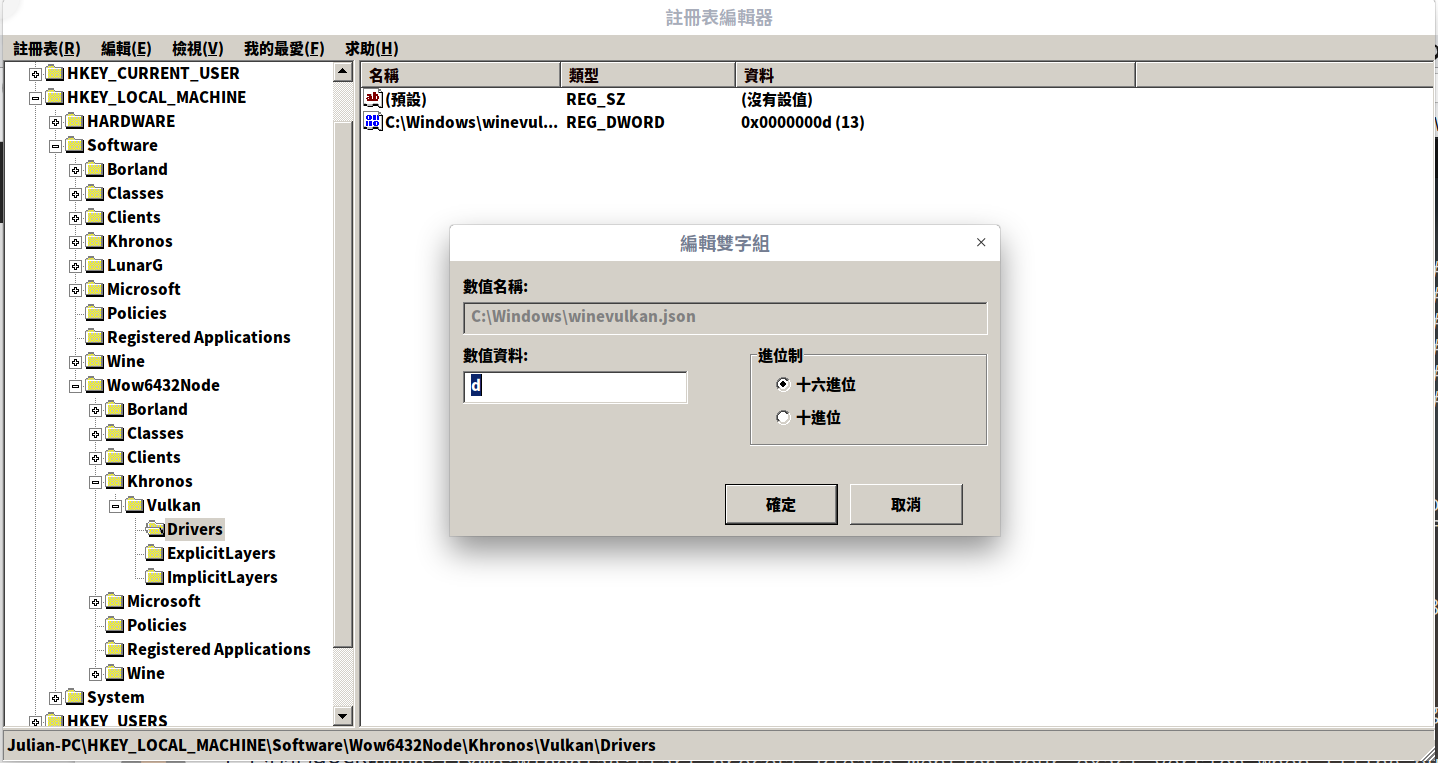
Is my register settings correct?
You can also use this script https://gist.github.com/therealfarfetchd/8dd1a3d908d8ec4330f29e083e463721
And no it is not right. The value should be 0. I don't actually know if it really matters.
Install wine/wine-staging/wine-vulkan-staging 3.4
WINEPREFIX=~/.wine winecfg and set it to Windows 7 (I also remove desktop integration), close it
If you'll do it manually then follow the instructions on wine-vulkan github page
If you'll use the script hilpara posted:
download it and chmod +x ~/Downloads/setup-vulkan-wine.sh
WINEPREFIX=~/.wine ~/Downloads/setup-vulkan-wine.sh
Last step: Not sure where dxvk-bin stores it but you will need to do WINEPREFIX=~/.wine /wherever/your/dxvk/is/x64/setup_dxvk.sh
You will have to do this to all preffixes you want to use DXVK on. Since I compile DXVK I normally don't set it up on the main .wine preffix, not sure if it really affects anything though.
In some cases you can simply copy
d3d11.dll
dxgi.dll
vulkan-1-1-0-65-1.dll
@vulkan-1.dll simlink to vulkan-1-1-0-65-1.dll
winevulkan.json
to the game root and use $ cat /path/to/wine-vulkan.reg
REGEDIT4

[HKEY_LOCAL_MACHINE\SOFTWARE\Khronos\Vulkan\Drivers\]
"winevulkan.json"=dword:00000000

[HKEY_LOCAL_MACHINE\SOFTWARE\Wow6432Node\Khronos\Vulkan\Drivers\]
"winevulkan.json"=dword:00000000

[HKEY_CURRENT_USER\Software\Wine\DllOverrides]
"d3d11"="native"
"dxgi"="native"
winevulkan.json :
{
    "file_format_version": "1.0.0",
    "ICD": {
        "library_path": "c:\\windows\\system32\\winevulkan.dll",
        "api_version": "1.0.51"
    }
}
edit: add "native" dlls to [HKEY_CURRENT_USER\Software\Wine\DllOverrides]
Closing due to inactivity. Basically, current staging works just like the old wine-vulkan branch.
Launch options
WINEPREFIX=~/.winex1 2018-03
DLLs
d3d11.dllx1 2018-03dxgi.dllx1 2018-03vulkan-1-1-0-65-1.dllx1 2018-03vulkan-1.dllx1 2018-03winevulkan.dllx1 2018-03
I know it's a silly question, I have installed wine-staging3.4 ,dxvk-bin0.31 and mesa-git on my Antergos Linux, do I need to do something else?