Spec Ops: The Line - God Rays rendering issue
Apitrace uploaded
The issue seems releated to a particular fog effect too, post-processing stuff I guess, later in that level, that diagonal line was still there, acting as "saturation" thing
The apitrace renders fine on my Polaris card as far as I can tell. Not sure if the Nvidia driver is screwing up somewhere but it doesn't look like we're doing anything wrong.
The apitrace renders fine on my Polaris card as far as I can tell. Not sure if the Nvidia driver is screwing up somewhere but it doesn't look like we're doing anything wrong.
Today my pop_os updated the nvidia driver to its nvidia driver made for that distro... I'll test again
Initially this kind of looked like yer' old Nvidia Optimus diagonal screen tearing to me, based on the above screenshots. But I played back the api trace on my (desktop) GTX 1080, and I'm seeing the same thing (with 460.32.03) . So yes, probably an Nvidia issue, since AMD seems fine as per the above.
Initially this kind of looked like yer' old Nvidia Optimus diagonal screen tearing to me, based on the above screenshots. But I played back the api trace on my (desktop) GTX 1080, and I'm seeing the same thing (with 460.32.03) . So yes, probably an Nvidia issue, since AMD seems fine as per the above.
Yeah I confirm, updated everything... I even converted my NTFS SSD to a BRTFS one so windows can read it and linux too...
Guess what? Now Deep Rock Galactic finally starts but crashed after you press "escape" and your player shows up... but that's not releated to this bug report.
Though I have to disable the game's motion blur, maybe one post-processing effect less causes some benefits (aside from more FPS)
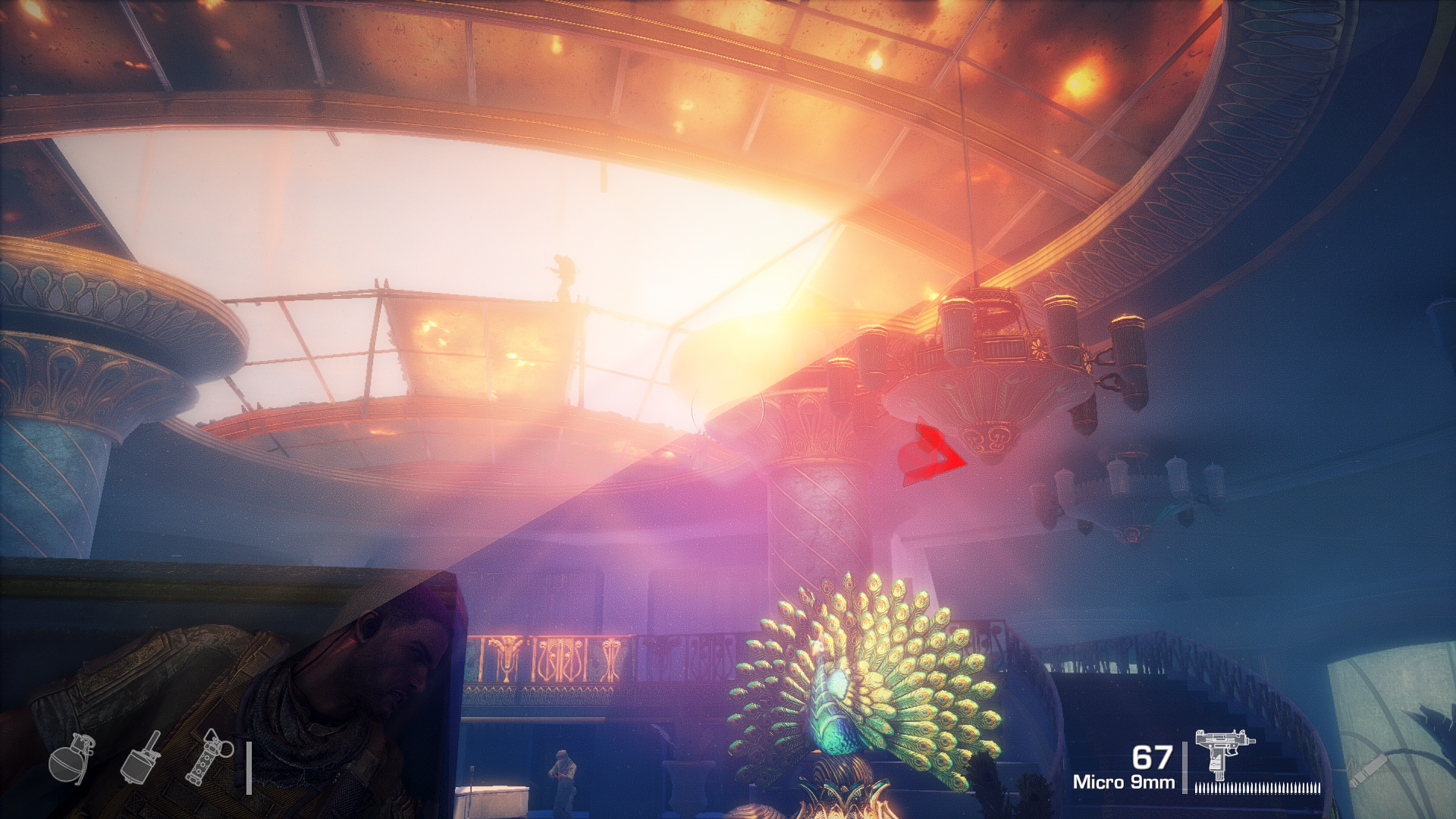
Ok so here you can see better that on the upper level the god rays are rendered... on the other side no godrays are rendered, but the lens flares are rendered...
Curious enough, motion blur is disabled in engine.ini, on windows no motion blur is present, though on linux it's still on, and I wonder why
Bug still present on wine 6.2 staging + dxvk 1.8
Bug still present on wine 6.3 staging + dxvk 1.8 and also on dxvk git - commit 7410707
It will be present until someone find that "broken" shader file between huge lot of other shader files used by the game, then ping people from Nvidia to look at it. This could be easier if something will fail validation, but both vulkan and spirv validations are ok here.
Use DXVK_SHADER_DUMP_PATH=/path/to/dir to get shaders and have fun.
EDIT: This thing (shader) somehow involved in drawing "the sun", because "the sun" only visible inside the upper part. In case it will help to narrow down possible suspects.
p.s. Damn CEG. Anyway ...
Launch options
DXVK_SHADER_DUMP_PATH=/path/to/dir`x1 2021-03
Software information
Spec Ops: The line - DXGI latest release
System information
Trace files:
https://mega.nz/file/tp10QCQT#uoaTnly6UzNyR0U-JPQ6PrwrHndprgRFmH0L9C8vC-M
Log files