I can't reproduce the problem. That dialog scene with Anderson at the beginning of ME1 still manages ~120fps on my 1070 at 1440p.
Sign, that's what I was afraid of. You GPU is ~2.5x faster then my 960, so it's steamrolling through issue, and my just trips on. Maybe it's Maxwell 2 issue, but I doubt it (press X to doubt).
I made a video with my phone (sorry OBS tanks fps too much), for better video quality you need to download video file.
Conversation with Presley:
https://drive.google.com/file/d/1Cx1EGaPrQY1kQhRGbXdpJ194xkPi-7fG/view?usp=sharing
Conversation with Anderson:
https://drive.google.com/file/d/1w-J203B2SiLAK4FJoNqehCf9-kw7O7iC/view?usp=sharing
You only have 2GB of VRAM so if there's something running in the background the game might be hitting the limit there and be forced to put something performance critical into slow system memory. DXVK does notoriously poorly in these conditions, especially so on Nvidia GPUs.
Try reducing texture quality and see if that helps.
You only have 2GB of VRAM so if there's something running in the background the game might be hitting the limit there and be forced to put something performance critical into slow system memory. DXVK does notoriously poorly in these conditions, especially so on Nvidia GPUs.
Try reducing texture quality and see if that helps.
I know all about DXVK memory management issue.
When you can see dude is playing with (GTX 650 Ti, 1GiB VRAM) and getting better experience then me. Kinda sad, but oh well. https://www.youtube.com/watch?v=pdPGlx9wSSI
So leave the ticket opened or close?
The game doesn't exceed 1.2-1.7 GiB VRAM on my end. But the FPS still tanks.
200mb-500mb of VRAM is pretty expected for a desktop environment.
When you can see dude is playing with (GTX 650 Ti, 1GiB VRAM) and getting better experience then me.
That peron on YT is running it on Windows. Windows WDDM + Nvidias Windows driver have way better memory management than DXVK + the Nvidia Linux driver so it can make sure the performance critical stuff stays in VRAM while some of the less important stuff gets moved out.
So leave the ticket opened or close?
I'll take another look later today but I strongly suspect this is the problem.
This does indeed look like a vram issue like with mafia 3
I can take a look on both linux and windows here when i have time on our 960 rig.
Omg how the hell did you manage to run this on linux with a 960 2GB :grin: Were you not using a DE or running it through origin steam? (EA play through steam here)
+-----------------------------------------------------------------------------+
| NVIDIA-SMI 510.60.02    Driver Version: 510.60.02    CUDA Version: 11.6     |
|-------------------------------+----------------------+----------------------+
| GPU  Name        Persistence-M| Bus-Id        Disp.A | Volatile Uncorr. ECC |
| Fan  Temp  Perf  Pwr:Usage/Cap|         Memory-Usage | GPU-Util  Compute M. |
|                               |                      |               MIG M. |
|===============================+======================+======================|
|   0  NVIDIA GeForce ...  Off  | 00000000:01:00.0  On |                  N/A |
|  0%   68C    P0    46W / 120W |   1998MiB /  2048MiB |    100%      Default |
|                               |                      |                  N/A |
+-------------------------------+----------------------+----------------------+

+-----------------------------------------------------------------------------+
| Processes:                                                                  |
|  GPU   GI   CI        PID   Type   Process name                  GPU Memory |
|        ID   ID                                                   Usage      |
|=============================================================================|
|    0   N/A  N/A     12422      G   /usr/lib/Xorg                      33MiB |
|    0   N/A  N/A     12492      G   /usr/bin/kwin_wayland             217MiB |
|    0   N/A  N/A     12507      G   /usr/bin/Xwayland                   2MiB |
|    0   N/A  N/A     12550      G   /usr/bin/plasmashell              199MiB |
|    0   N/A  N/A     13009      G   ...e/Steam/ubuntu12_32/steam       35MiB |
|    0   N/A  N/A     13062      G   ...ef_log.txt --shared-files       70MiB |
|    0   N/A  N/A     16975    C+G   ...s (x86)\Origin\Origin.exe      334MiB |
|    0   N/A  N/A     17373    C+G   ...er\MassEffectLauncher.exe      415MiB |
|    0   N/A  N/A     17448    C+G                                     623MiB |
+-----------------------------------------------------------------------------+
My lord look at how much origin and the launcher gobbles up of vram. The last nameless one is the game i think.
Both the origin client and launcher run through dxvk
I'm pretty sure even people with a 1GB gpu are able to play the game (natively, that is).
If there are any problems here, it's probably the usual big memory footprint issue.
Gonna check on my AMD system which has 4GB vram the memory usage of the game in play vs dialogs, just for good measuere. Can also check on windows.
But yes the memory issue is known on linux i would think. Getting a light DE or a window manager that can easily be switched off might help. Dunno if less gpu acceleration in background apps could help.
Wonder how good gamescope on the steam deck is at handling background memory while gaming. I guess it's seperate from the KDE desktop mode so maybe not much else is running while gaming
it's probably the usual big memory footprint issue.
DXVK doesn't really use more memory than Windows D3D11 drivers.
I'm pretty sure even people with a 1GB gpu are able to play the game (natively, that is).
Windows has better memory management for GPUs which helps a lot. FWIW the minimum requirements also list 2GB GPUs, so I don't think it's a great experience on 1GB GPUs on Windows either.
So it shouldn't hurt vram or anything that origin and the launcher (which for some stupid reason needs to run in the background) is running through dxvk? Sorry if it's a stupid question. Relative to native windows that is without dxvk.
DXVK doesn't really use more memory than Windows D3D11 drivers.
#1318 tells another story
so I don't think it's a great experience on 1GB GPUs on Windows either.
That issue is about system memory, not vram.
Anyway, i still plan on checking the memory usage on my amd system when i have time. Dialog vs no dialog.
Hi,
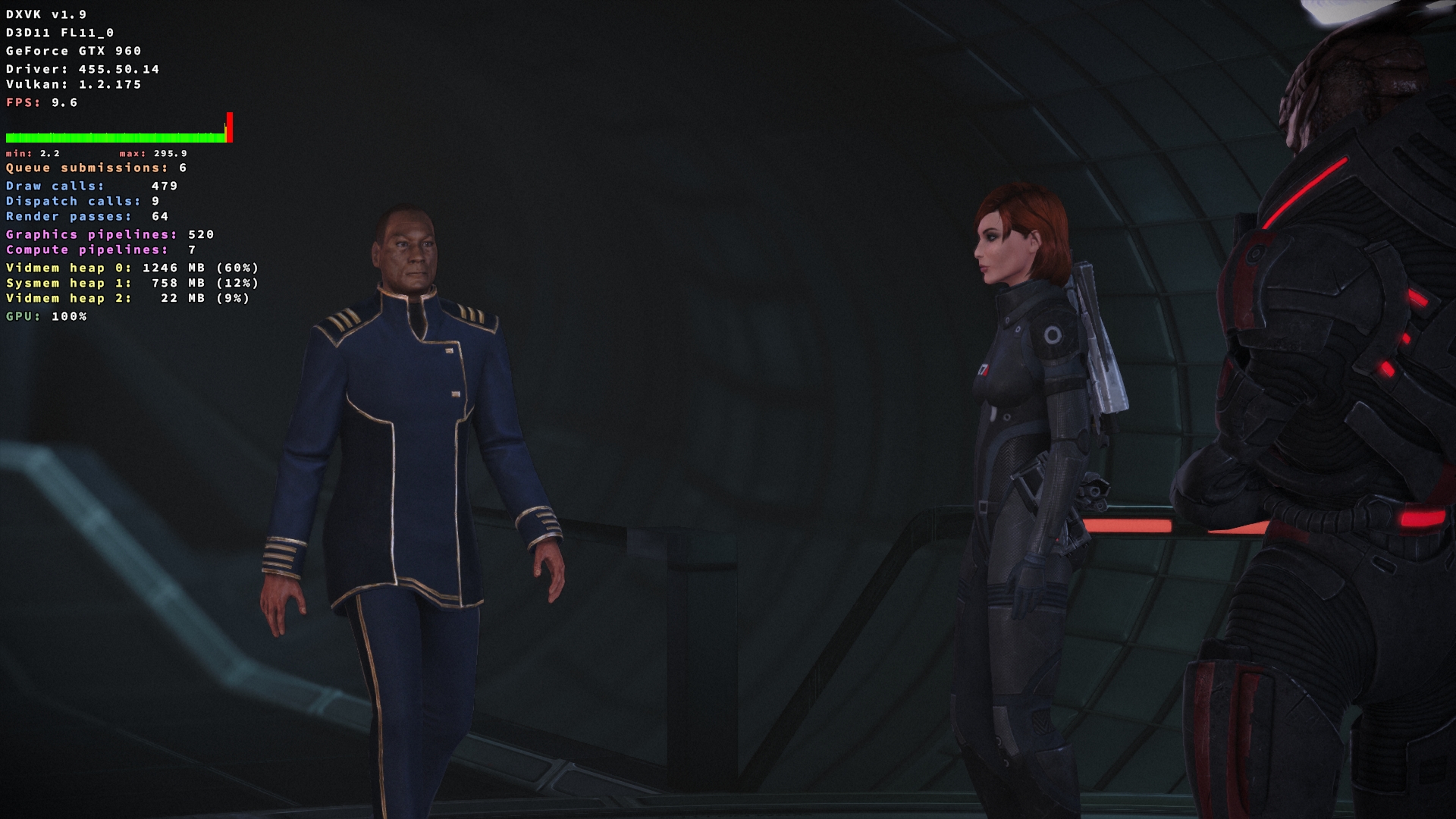
The game runs great with D3D11 or DXVK. The issue arise then you interact with the character and the conversation
starts (it could be seen in the provided screenshots below). On D3D11, during the conversation the game engine locks the fps to 60 and it brings it back to normal speed afterwards (vsync / unlocked). But with DXVK the FPS tanks to low 30-sh, or single digits and never returns to normal speed.
P.S. With wined3d (opengl) the game runs much slower (30-70 fps) without the issue described above.
Windows (D3D11)

Linux / Windows + DXVK (1.9 / master)
Software information
Mass Effect Legendary Edition
System information
Apitrace file(s)
Log files