DXVK for GTA 5 on Windows doesn't work
You need DXGI, or if the game loads system DXGI, it will not work on Windows.
You need DXGI, or if the game loads system DXGI, it will not work on Windows.
So that's your answer? "It will not work on Windows"?. I know it doesn't work. I need to know if there is a solution to MAKE it work
Did you copy over dxgi.dll?
Did you copy over dxgi.dll?
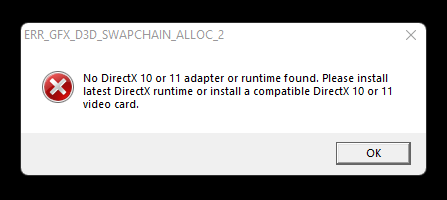
Of course. This is the error i get when i launch the game
GTA5_dxgi.log is completely empty
In that case, it doesn't work on Windows and there's nothing you can do.
I know this issue is close but wanted to share a workaround for those googling the issue.
The problem is that Dxgi.dll from Windows directory get loaded explicitly during the game's launch and the Dxgi.dll from DXVK get no chance to be loaded, either inject Dxgi.dll into the game via your favorite injector or modify for example the import table of one the .dlls that the game statically imports and add Dxgi.dll to it (import any function, won't matter).
I know this issue is close but wanted to share a workaround for those googling the issue. The problem is that Dxgi.dll from Windows directory get loaded explicitly during the game's launch and the Dxgi.dll from DXVK get no chance to be loaded, either inject Dxgi.dll into the game via your favorite injector or modify for example the import table of one the .dlls that the game statically imports and add Dxgi.dll to it (import any function, won't matter).
Maybe I'm wrong but d3d11.dll prevents the game from even launching (see the screenshot I posted). So how can I even inject dxgi.dll afterwards?
@Od1sseas I've had the exact same error message as the one in your picture with the same warning in the log file, but it's not because d3d11.dll is preventing the game from launching, it's because only d3d11.dll is injected without Dxgi.dll, and it cannot create a query via the DirectX interface, which - if I'm not totally off the rails - is provided by Dxgi.dll
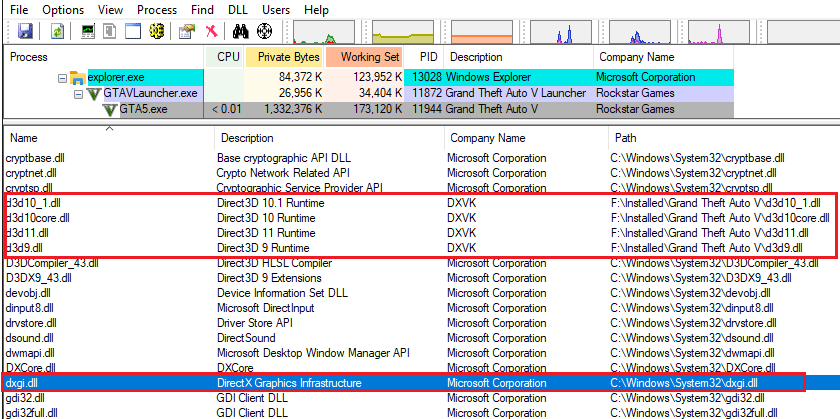
If you load the game in a debugger or simply used Sysinternals Process Explorer (while the error message is displayed) you can see that only Dxgi.dll from the Windows directory is loaded, the one that you copied from DXVK is never loaded.
This actually happens on Windows quite frequently than Linux for some reason.
Process Explorer
Regarding your second question on how to inject the .dll, this would be quite tricky without manipulating the imports table of any statically-linked dll. Most loaders/injectors relay/defer the "injection" part until their DlllMain() has completed execution to avoid an infamous loader lock, usually relayed to another thread or until one of their hooked APIs is called (simpledllloader by aap does this).
But that means the original Dxgi.dll will get loaded before the injector has done its job, so we're back at square one.
The most reliable way is modifying the imports of - for example - bink2w64.dll or GFSDK_ShadowLib.win64.dll since these are statically imported by GTA5.exe.
I'm sorry I won't get into the details of how to do this, since modifying game files is way far from the scope of DXVK, and I'm sure it won't be appreciated by the creators. Search for CFF explorer as a starter.
@Od1sseas I've had the exact same error message as the one in your picture with the same warning in the log file, but it's not because d3d11.dll is preventing the game from launching, it's because only d3d11.dll is injected without Dxgi.dll, and it cannot create a query via the DirectX interface, which - if I'm not totally off the rails - is provided by Dxgi.dll
If you load the game in a debugger or simply used Sysinternals Process Explorer (while the error message is displayed) you can see that only Dxgi.dll from the Windows directory is loaded, the one that you copied from DXVK is never loaded. This actually happens on Windows quite frequently than Linux for some reason.
Process Explorer
Regarding your second question on how to inject the .dll, this would be quite tricky without manipulating the imports table of any statically-linked dll. Most loaders/injectors relay/defer the "injection" part until their DlllMain() has completed execution to avoid an infamous loader lock, usually relayed to another thread or until one of their hooked APIs is called (simpledllloader by aap does this). But that means the original Dxgi.dll will get loaded before the injector has done its job, so we're back at square one. The most reliable way is modifying the imports of - for example - bink2w64.dll or GFSDK_ShadowLib.win64.dll since these are statically imported by GTA5.exe. I'm sorry I won't get into the details of how to do this, since modifying game files is way far from the scope of DXVK, and I'm sure it won't be appreciated by the creators. Search for CFF explorer as a starter.
Since the DXVK dev won't do it, can you modify the files to make it work since i'm not familiar with reverse engineering? It would be really appreciated
I know this issue is close but wanted to share a workaround for those googling the issue. The problem is that Dxgi.dll from Windows directory get loaded explicitly during the game's launch and the Dxgi.dll from DXVK get no chance to be loaded, either inject Dxgi.dll into the game via your favorite injector or modify for example the import table of one the .dlls that the game statically imports and add Dxgi.dll to it (import any function, won't matter).
Hey bro what injector do you recommend and the ine that is user friendly i guess
I know this issue is close but wanted to share a workaround for those googling the issue. The problem is that Dxgi.dll from Windows directory get loaded explicitly during the game's launch and the Dxgi.dll from DXVK get no chance to be loaded, either inject Dxgi.dll into the game via your favorite injector or modify for example the import table of one the .dlls that the game statically imports and add Dxgi.dll to it (import any function, won't matter).
Hey bro what injector do you recommend and the onr that is user friendly cause i dont understand a damn thing about all of this i saw your reply about a solution by downloading cff explorer.
Just a (very late) message to say that it is possible. It appears that GTAV loads d3d9.dll first (before explicitly loading dx10 or dx11 libraries. What we need to do is force GTAV to also load the dxgi.dll from the game directory and not the system32 dir.
- Copy d3d9.dll, d3d10core.dll, d3d11.dll, and dxgi.dll into the GTAV directory
- Right click on GTAV.exe -> properties -> compatibility -> windows 7
- Download CFF explorer from ntcore.com and run it
- open the d3d9.dll in the GTAV directory (we copied it there in 1)
- Select "Import Adder" in the tree view in CFF explorer
- Select the "Add" button (it's in the middle of the window, above the remove button)
- Open the dxgi.dll in the Select File... dialog box
- Select the 5 exported functions
- Click "Import By Name"
- Click "Rebuild Import Table"
- Then save the d3d9.dll (save icon in toolbar)
- Overwrite the original
You should now be able to launch GTAV and it will use the vulkan API. This can be tested by configuring dxvk to show the HUD, or you can install ReShade and select "Vulkan" instead of the default "Direct X"
You can then create a dxvk.conf file, test various settings and see what happens.
Note that with the introduction of Battleye, this needs to be turned off in the launcher - so no online support.
I hope this helps some folks.
DLLs
dxgi.dllx9 2025-02d3d11.dllx4 2025-02d3d10core.dllx1 2025-02d3d9.dllx1 2025-02bink2w64.dllx2 2022-01win64.dllx2 2022-01
System information
Apitrace file(s)
Log files
warn: D3D11CoreCreateDevice: Adapter is not a DXVK adapter
info: Game: GTA5.exe
info: DXVK: v1.9.2-async
info: Found config file: dxvk.conf
info: Effective configuration:
info: dxvk.enableAsync = true
info: Built-in extension providers:
info: Win32 WSI
info: OpenVR
info: OpenXR
info: OpenVR: could not open registry key, status 2
info: OpenVR: Failed to locate module
info: Enabled instance extensions:
info: VK_KHR_get_surface_capabilities2
info: VK_KHR_surface
info: VK_KHR_win32_surface
info: D3D11CoreCreateDevice: Probing D3D_FEATURE_LEVEL_11_0
info: D3D11CoreCreateDevice: Using feature level D3D_FEATURE_LEVEL_11_0
info: Device properties:
info: Device name: : NVIDIA GeForce GTX 1660 SUPER
info: Driver version : 497.9.0
info: Enabled device extensions:
info: VK_EXT_4444_formats
info: VK_EXT_conservative_rasterization
info: VK_EXT_custom_border_color
info: VK_EXT_depth_clip_enable
info: VK_EXT_extended_dynamic_state
info: VK_EXT_full_screen_exclusive
info: VK_EXT_host_query_reset
info: VK_EXT_memory_priority
info: VK_EXT_robustness2
info: VK_EXT_shader_demote_to_helper_invocation
info: VK_EXT_shader_viewport_index_layer
info: VK_EXT_transform_feedback
info: VK_EXT_vertex_attribute_divisor
info: VK_KHR_create_renderpass2
info: VK_KHR_depth_stencil_resolve
info: VK_KHR_draw_indirect_count
info: VK_KHR_driver_properties
info: VK_KHR_image_format_list
info: VK_KHR_sampler_mirror_clamp_to_edge
info: VK_KHR_shader_float_controls
info: VK_KHR_swapchain
info: Device features:
info: robustBufferAccess : 1
info: fullDrawIndexUint32 : 1
info: imageCubeArray : 1
info: independentBlend : 1
info: geometryShader : 1
info: tessellationShader : 1
info: sampleRateShading : 1
info: dualSrcBlend : 1
info: logicOp : 1
info: multiDrawIndirect : 1
info: drawIndirectFirstInstance : 1
info: depthClamp : 1
info: depthBiasClamp : 1
info: fillModeNonSolid : 1
info: depthBounds : 1
info: multiViewport : 1
info: samplerAnisotropy : 1
info: textureCompressionBC : 1
info: occlusionQueryPrecise : 1
info: pipelineStatisticsQuery : 1
info: vertexPipelineStoresAndAtomics : 0
info: fragmentStoresAndAtomics : 1
info: shaderImageGatherExtended : 1
info: shaderStorageImageExtendedFormats : 0
info: shaderStorageImageReadWithoutFormat : 1
info: shaderStorageImageWriteWithoutFormat : 1
info: shaderClipDistance : 1
info: shaderCullDistance : 1
info: shaderFloat64 : 1
info: shaderInt64 : 1
info: variableMultisampleRate : 1
info: VK_EXT_4444_formats
info: formatA4R4G4B4 : 1
info: formatA4B4G4R4 : 1
info: VK_EXT_custom_border_color
info: customBorderColors : 1
info: customBorderColorWithoutFormat : 1
info: VK_EXT_depth_clip_enable
info: depthClipEnable : 1
info: VK_EXT_extended_dynamic_state
info: extendedDynamicState : 1
info: VK_EXT_host_query_reset
info: hostQueryReset : 1
info: VK_EXT_memory_priority
info: memoryPriority : 1
info: VK_EXT_robustness2
info: robustBufferAccess2 : 1
info: robustImageAccess2 : 1
info: nullDescriptor : 1
info: VK_EXT_shader_demote_to_helper_invocation
info: shaderDemoteToHelperInvocation : 1
info: VK_EXT_transform_feedback
info: transformFeedback : 1
info: geometryStreams : 1
info: VK_EXT_vertex_attribute_divisor
info: vertexAttributeInstanceRateDivisor : 1
info: vertexAttributeInstanceRateZeroDivisor : 1
info: Queue families:
info: Graphics : 0
info: Transfer : 1
info: DXVK: Using 7 async compiler threads
info: DXVK: Read 0 valid state cache entries
info: DXVK: Using 7 compiler threads
warn: D3D11CoreCreateDevice: Adapter is not a DXVK adapter
info: Game: GTA5.exe
info: DXVK: v1.9.2-async
info: Found config file: dxvk.conf
info: Effective configuration:
info: dxvk.enableAsync = true
info: Built-in extension providers:
info: Win32 WSI
info: OpenVR
info: OpenXR
info: OpenVR: could not open registry key, status 2
info: OpenVR: Failed to locate module
info: Enabled instance extensions:
info: VK_KHR_get_surface_capabilities2
info: VK_KHR_surface
info: VK_KHR_win32_surface
info: D3D11CoreCreateDevice: Probing D3D_FEATURE_LEVEL_11_0
info: D3D11CoreCreateDevice: Using feature level D3D_FEATURE_LEVEL_11_0
info: Device properties:
info: Device name: : NVIDIA GeForce GTX 1660 SUPER
info: Driver version : 497.9.0
info: Enabled device extensions:
info: VK_EXT_4444_formats
info: VK_EXT_conservative_rasterization
info: VK_EXT_custom_border_color
info: VK_EXT_depth_clip_enable
info: VK_EXT_extended_dynamic_state
info: VK_EXT_full_screen_exclusive
info: VK_EXT_host_query_reset
info: VK_EXT_memory_priority
info: VK_EXT_robustness2
info: VK_EXT_shader_demote_to_helper_invocation
info: VK_EXT_shader_viewport_index_layer
info: VK_EXT_transform_feedback
info: VK_EXT_vertex_attribute_divisor
info: VK_KHR_create_renderpass2
info: VK_KHR_depth_stencil_resolve
info: VK_KHR_draw_indirect_count
info: VK_KHR_driver_properties
info: VK_KHR_image_format_list
info: VK_KHR_sampler_mirror_clamp_to_edge
info: VK_KHR_shader_float_controls
info: VK_KHR_swapchain
info: Device features:
info: robustBufferAccess : 1
info: fullDrawIndexUint32 : 1
info: imageCubeArray : 1
info: independentBlend : 1
info: geometryShader : 1
info: tessellationShader : 1
info: sampleRateShading : 1
info: dualSrcBlend : 1
info: logicOp : 1
info: multiDrawIndirect : 1
info: drawIndirectFirstInstance : 1
info: depthClamp : 1
info: depthBiasClamp : 1
info: fillModeNonSolid : 1
info: depthBounds : 1
info: multiViewport : 1
info: samplerAnisotropy : 1
info: textureCompressionBC : 1
info: occlusionQueryPrecise : 1
info: pipelineStatisticsQuery : 1
info: vertexPipelineStoresAndAtomics : 0
info: fragmentStoresAndAtomics : 1
info: shaderImageGatherExtended : 1
info: shaderStorageImageExtendedFormats : 0
info: shaderStorageImageReadWithoutFormat : 1
info: shaderStorageImageWriteWithoutFormat : 1
info: shaderClipDistance : 1
info: shaderCullDistance : 1
info: shaderFloat64 : 1
info: shaderInt64 : 1
info: variableMultisampleRate : 1
info: VK_EXT_4444_formats
info: formatA4R4G4B4 : 1
info: formatA4B4G4R4 : 1
info: VK_EXT_custom_border_color
info: customBorderColors : 1
info: customBorderColorWithoutFormat : 1
info: VK_EXT_depth_clip_enable
info: depthClipEnable : 1
info: VK_EXT_extended_dynamic_state
info: extendedDynamicState : 1
info: VK_EXT_host_query_reset
info: hostQueryReset : 1
info: VK_EXT_memory_priority
info: memoryPriority : 1
info: VK_EXT_robustness2
info: robustBufferAccess2 : 1
info: robustImageAccess2 : 1
info: nullDescriptor : 1
info: VK_EXT_shader_demote_to_helper_invocation
info: shaderDemoteToHelperInvocation : 1
info: VK_EXT_transform_feedback
info: transformFeedback : 1
info: geometryStreams : 1
info: VK_EXT_vertex_attribute_divisor
info: vertexAttributeInstanceRateDivisor : 1
info: vertexAttributeInstanceRateZeroDivisor : 1
info: Queue families:
info: Graphics : 0
info: Transfer : 1
info: DXVK: Using 7 async compiler threads
info: DXVK: Read 0 valid state cache entries
info: DXVK: Using 7 compiler threads
warn: D3D11DXGIDevice::QueryInterface: Unknown interface query
warn: 88399375-734f-4892-a95f-70dd42ce7cdd
warn: D3D11DXGIDevice::QueryInterface: Unknown interface query
warn: 72299288-2c68-4ad8-945d-2bfb5aa9c609
warn: D3D11DXGIDevice::QueryInterface: Unknown interface query
warn: 2c576d2a-0c1c-4d1d-ad7c-bc4faec15abc
warn: D3D11DXGIDevice::QueryInterface: Unknown interface query
warn: 189819f1-1db6-4b57-be54-1821339b85f7
warn: D3D11DXGIDevice::QueryInterface: Unknown interface query
warn: b898d4fd-b5b3-4ffc-8694-0259864ffcf8
warn: D3D11DXGIDevice::QueryInterface: Unknown interface query
warn: 9b7e4a00-342c-4106-a19f-4f2704f689f0
warn: D3D11DXGIDevice::QueryInterface: Unknown interface query
warn: c4fec28f-7966-4e95-9f94-f431cb56c3b8
warn: D3D11DXGIDevice::QueryInterface: Unknown interface query
warn: ffffffff-1bbe-4d12-afbf-8fdf7e0a87c7
warn: D3D11DXGIDevice::QueryInterface: Unknown interface query
warn: c4fec28f-7966-4e95-9f94-f431cb56c3b8
err: D3D11CreateDevice: Failed to create swap chain
GTA5_d3d11.log