God Of War - Black screen crash on 750ti
Most likely a driver problem. The game works fine on pretty much every other system. Could also be some external overlay like RivaTuner that messes with DXVK.
Can this somehow be fixed?
¯\_(ツ)_/¯
We still don't know what the problem is because you didn't provide the info that was in the issue template.
the directx error
That's not super detailed.
I'm so incredibly sorry, for some reason github didn't take me to the templates page when i submitted the issue. I will add all the required information in the original comment.
The directx error that i was talking about was this:
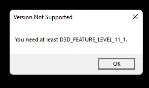
FYI that image is so small that I wouldn't be able to read it if I didnt know the error message already.
DXVK supports D3D11 feature level 11_1 (and higher) if your GPU and driver supports the necessary Vulkan features.
It should be supported. People have gotten this game running with the same gpu.
info: D3D11CoreCreateDevice: Using feature level D3D_FEATURE_LEVEL_11_1
DXVK reports that FL11_1 is supported. I don't know why it doesn't work.
Just play the game without DXVK, it's most likely gonna be a lot slower than regular D3D11 anyway.
I run into the D3D_FEATURE_LEVEL error when running without dxvk. I guess that i'll have to find a way to patch the executable so that it doesn't check for the feature level.
Thank you for your help.
I already tried the fix in that thread (disabled ansel using NvCameraConfig). It didn't work unfortunately :(
I also tried using different drivers.
No, that PR will not fix the problem.
It looks like that this is a problem isolated to my system configuration. Multiple people have gotten this game running (slowly) on my gpu, but i can't even get past the black screen.
Would the apitrace file help? I don't really know how to make it on windows, but i bet that i can figure it out.
Not really and you'd need to get the game to run to make one anyway.
Nothing extracted yet.
Hey,
I just got GoW and I'm trying to play it on my 750ti (feature level 11_0) and i keep running into a crash.
The game turns on, doesn't throw the directx error and just turns off.
Are there any known fixes for this problem? Buying a new gpu really isn't an option in this economy.
System information
Log files
GoW_dxgi.log
GoW_d3d11.log