World of Warcraft WotLK flickers
Not sure how to take an apitrace - doing it requires me to overwite all dxvk files, which means the game is rendered using regular d3d9.
Yes, please do it anyway. We'll be able to replay the recorded d3d9 commands of the apitrace file with DXVK and look into it.
Wouldn't that only work if you had my gpu? I use dxvk with this game without problems on an AMD card.
D3D9 calls are usually the same regardless of what GPU you're using. If the same game works on AMD with DXVK, then this is most likely a driver bug. Intels Windows Vulkan drivers have a poor reputation.
@wodim have you tried d3d9.dll from Vulkan 1.9.0 version? Here I have the same flicker issue with IntelHD520 with any version after 1.9.0 version (1.9.1-1.9.4). However, 1.9.0 and earlier releases work. If you would test 1.9.0 version and it works there also then it would give a clue that some commit in 1.9.1 causes issues with IntelHD.
Ah yes, 1.9 works fine, and 1.9.1 is broken.
I compared 1.9.0 vs 1.9.1 versions and carried over commits one by one. Turns out the following commit breaks IntelHD520/620 GPUs and causes the flickering shown in the video in the first post (ie. happens with numerous other d3d9 games here, so not a game specific issue).
https://github.com/doitsujin/dxvk/commit/2ff8b42fff05872c3ddd39c1b6e6b30c2a0d6f44
The commit enables robustBufferAccess2 thing, but looks like intelHD doesn't like it.
enabled.extRobustness2.robustBufferAccess2 = supported.extRobustness2.robustBufferAccess2;
I also tested the latest master branch and commented out this line. Surprise surprise, the latest DXVK works in IntelHD as long the code line above is commented out.
I couldn't figure out if there is dxvk.config option to disable this new robustBufferAccess2 feature (I guess not if this is taken as "supported by adapter" type of thing).
Is there any options to optionally disable this feature if the gpu is IntelHD? If not then would it possible to have such an option or should IntelHD adapters disable this by default?
I still need an apitrace.
EDIT: If it's indeed caused by that commit, it's almost certainly a driver bug.
Two files are generated even if the game is opened once.
At 5MB, the apitrace is almost certainly broken.
It's an apitrace of a few seconds, which is more than enough to show the problem. (What's displayed in the video is the login screen)
Here is another apitrace from a different game (RichardBurnsRally) where DXVK 1.9.1+ version causes flickering on IntelHD unless the "enabled.extRobustness2.robustBufferAccess2" code line is commented out.
https://drive.google.com/file/d/1cDz21kz7A6zumBJBypMxhYZb8YwBqpjx/view?usp=sharing
EDIT: If it's indeed caused by that commit, it's almost certainly a driver bug.
Indeed looks like a bug in older IntelHD gpu drivers (and many laptops with OEM intelHD drivers seem to ship with old buggy version). I updated to the latest intelHD driver versions (released by Intel some weeks ago) and there is no more flickering. Great, so dxvk works the way it should, only IntelHD had some weird bugs in their older driver version.
The latest version of the Intel 620 driver is 30.0.101.1191, dated 12/14/2021, and doesn't solve the issue. Perhaps my GPU is out of support or it will take them a bit more to release the driver for my GPU.
What's your GPU?
I have a laptop which originally had HP's OEM version of IntelHD gpu drivers. Those were out dated and lagged months and months behind the release cycle of Intel's own generic driver releases. I uninstalled the HP oem drivers and force installed Intel's driver version and boom! Things worked much better (some games even without Vulkan show better FPS also).
Intel HD 520 gpu (bolted inside of Intel Corei5-6300U mobile cpu). If you have IntelHD 620 gpu then it is one generation newer gpu (and integrated cpu) and one might think things work even better in the newer gpu. 520hd and 620hd are still supported by Intel and receive driver updates.
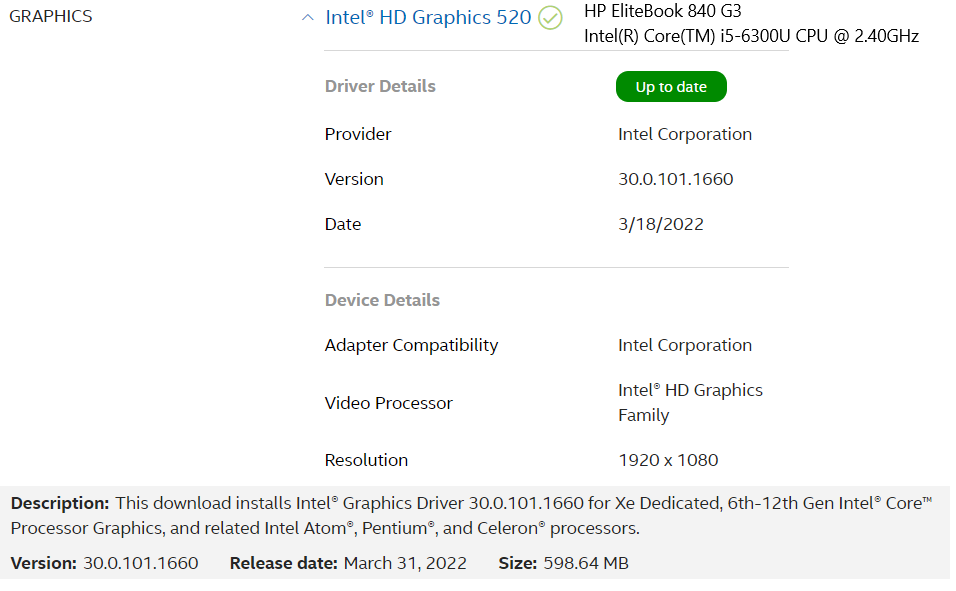
Where's that screenshot from? I don't see those drivers in Intel's website: https://www.intel.com/content/www/us/en/support/products/88355/graphics/graphics-for-6th-generation-intel-processors/intel-hd-graphics-520.html#drivers-software
Edit: nvm, found them here https://www.intel.com/content/www/us/en/download/19344/intel-graphics-windows-dch-drivers.html
I double clicked the "Intel" icon on the bottom right corner and it takes to IntelHD web site. The web app there scans through intel devices and shows version numbers and suggests driver updates if available:
https://www.intel.com/content/www/us/en/support/intel-driver-support-assistant.html
I confirm that upgrading to 30.0.101.1660 fixes the issue.
DLLs
d3d9.dllx1 2022-03
It's like all the layers to be rendered aren't painted together.
https://user-images.githubusercontent.com/1001553/156455780-4ccfad75-a377-4095-8a3a-c995afd8a338.mp4
Software information
World of Warcraft WotLK, D3D9
System information
Apitrace file(s)
Not sure how to take an apitrace - doing it requires me to overwite all dxvk files, which means the game is rendered using regular d3d9.
Log files
Wow_d3d9.log