Total War: Shogun 2 using DXVK DXGI bypass laucnher selector for directx API
So what's the actrual issue here? Does the game default to D3D9 or D3D11?
Also it reports a wrong VRAM size (2.9 G), different from the one reported with Wine DXGI (3.8G Still wrong)
This is not wrong. The game is 32-bit, and 32-bit DXGI does not support reporting ≥4GiB memory, so we decided to clamp the returned value to 3 GiB. Wine reports a bit more, but I don't think this will have any real impact on 32-bit games anyway.
Seems to be unable to generate one, and not even sure if it should
Make sure to use the 32-bit libraries here.
With DXVK DXGI the game default to D3D9
I can generate apitrace for other 32bit games fine (Oblivion for example). I will try again this evening
Hmmm. I tried installing through steam and then launching it through wine with and without dxvk installed through the setup script. It shows for me with both
R9 380, mesa 22.0.1, wine 7.5 both with dxvk 1.10.1 and latest master.
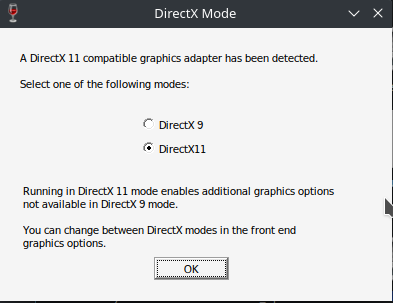
I'm not even able to launch the game when forced through proton (7.0-2rc dxvk 1.10.1) in dx11 mode. Only dx9 mode works.
In wine i can't get any of them working even after trying to install the deps included. But that probably more me being a newb at wine.
But that is another issue
When i launch it through proton the only way i can get it not to appear is if i launch the game and then exit without it crashing.
That is because on a regular exit it writes everything down into the preferences file.
When you do a regular exit without the game crashing it will put this line into there
gfx_dx11_checked true; # gfx_dx11_checked <bool>, Have we checked that user wants dx11? #
This tells the game i have already answered the dialog and it shouldn't appear at next launch. If i set it to false or delete this line it will show again.
It seems to me it is by design that it will only show it once unless something goes wrong. (As when the game crashes)
If you mean it doesn't show it at all even the first time then it's probably because it's detecting dx11 isn't supported.
If i delete the preference file and launch with PROTON_NO_D3D11=1 then it will boot straight into dx9 mode without a choice.
Ok this is strange, I retryed after compiling anew Wine Tkg (latest master + a couple of patches more on top), and DXVK and I'm not experiencing this anymore, the selector shows.
I'm puzzled, all'anima de li mejo mortacci loro
@llde Have this been a issue since?
Not sure, I cannot test these days.
No worries :+1:
The launcher shows up for me too.
Launch options
PROTON_NO_D3D11=1`x1 2022-04
Hi, When starting Total War : Shogun 2 using DXVK's DXGI skip the initial selector that allow to choose betwee DX9 and DX11 graphics
IT works on Wine DXGI
Also it reports a wrong VRAM size (2.9 G), different from the one reported with Wine DXGI (3.8G Still wrong)
Software information
Total War : Shogun 2, at the start, graphic settings are not important
System information
Apitrace file(s)
Log files
Shogun2_dxgi.log