Executable selection when multiple .exe are present
If you are using Linux, this can be done via winecfg, it allows to set different dll overrides for different applications.
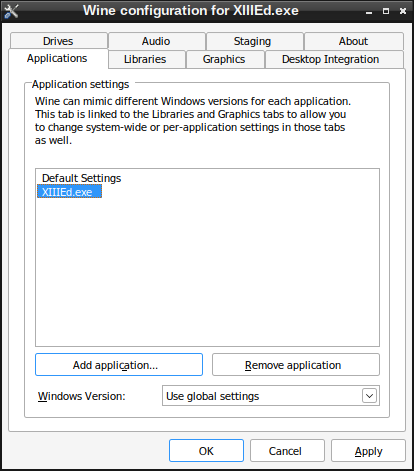
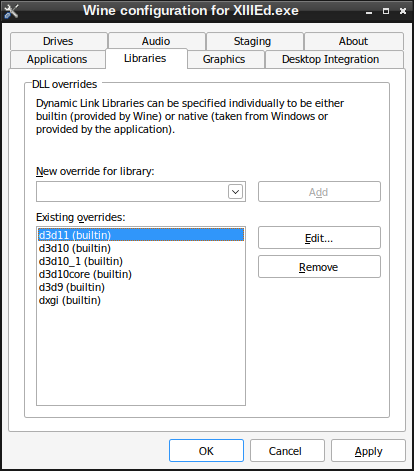
You can disable DXVK only for XIIIEd.exe. Run winecfg, on the Applications tab press "Add application" and add XIIIEd.exe, then in the Libraries tab add and override d3d11, d3d10, d3d10_1, d3d10core, d3d9, dxgi to builtin.
Screenshots
If you are using Linux, this can be done via winecfg, it allows to set different dll overrides for different applications.
You can disable DXVK only for XIIIEd.exe. Run winecfg, on the Applications tab press "Add application" and add XIIIEd.exe, then in the Libraries tab add and override d3d11, d3d10, d3d10_1, d3d10core, d3d9, dxgi to builtin.
Ah, sorry I should've mentioned that I'm on Windows 10. Never used Linux. Can you do something like this in Windows?
No, this is not possible on Windows. We don't intend to support anything like this since it's completely useless for our target platform.
Nothing extracted yet.
I was wondering if there's a way to make DXVK only work on 1 specific executable in the same directory instead of all of them.
I've been testing it with the game XIII, it works fine, but it also translates XIIIEd.exe (map editor) to Vulkan along with XIII.exe (main game) because they're both in the same directory. This breaks the object selection in XIIIEd for some reason, it doesn't happen when there's no DXVK translation.
I was thinking of some kind of .conf command like "dxvk.executable = XIII.exe" to point out which executables I want to use DXVK with and leave the others alone.
EDIT: I'm on Windows 10 Pro 64 bit, by the way.
Thank you in advance.