Warband Hangs While Loading Settings (d3d9.dll 32-bit)
It also crashed with default settings (no conf file)
Please put logs and such into a attached file or GitHub gist next time.
I will check it out on my AMD setup
Ok, thanks for checking it out
Just want to add that I was trying to play the Between Empires mod V1.0 with all max settings.
Hmm yes i see. Doesn't happen with regular warband on linux or windows. But it does freeze before main menu with that mod (installed through steam workshop), at least on windows. haven't tried linux with the mod yet.
The game sadly doesn't want to start when i try to make a apitrace, so will see if i can try to work around that with either the gog version or linux with WINED3D.
It seems to have do with some of the textures the mod uses as i am able to get to the main menu when i rename the "Textures" mod folder.
So i tried on linux through proton and dxvk and there the issue doesn't seem to happen. It does kinda halt in the same place and you can see the hud freeze. But after a few seconds it moves on to the main menu. On windows i just seems to stay hanging even after waiting a minute or so.
Ok. Did you manage to find out the culprit of the crashes on Windows?
I tried starting the game with the 64-bit version of DXVK but it does not seem to hook (no hud).
For added note, I have 4 GB of VRAM from the dGPU and 12 GB of VRAM from the iGPU. As far as I know, Proton only use the dGPU VRAM (?). I am not so sure because I am not that experienced with Proton or Linux-based OS.
The 12 GB from the iGPU adds up to the shared VRAM of Windows.
Update from my side. Tried to play A World Of Ice And Fire (another big overhaul mod) and it had the same issue.
So i am not sure after a lot more testing. I think the issue might be that the game on steam is not Large Address Aware? (which means it can't use more than 2GB system memory) and dxvk have a overhead that pushes it above that at that point during loading since that is where it spikes. But as i've said i am not completely sure since when i started playing with LAA patches on windows all of a sudden i had issues recreating it even when LAA was supposed to be off.
Can you try a LAA patcher on the exe and see if it solved the issue? Either this one or this one should do
Proton on linux patches applications to be LAA by default.
I tried the ntcore one and it was still the same.
Alt+tabbing while it hangs on the "Loading Setting Data..." process reveals
RGL ERROR
Error on creating shaders: Out of video memory!
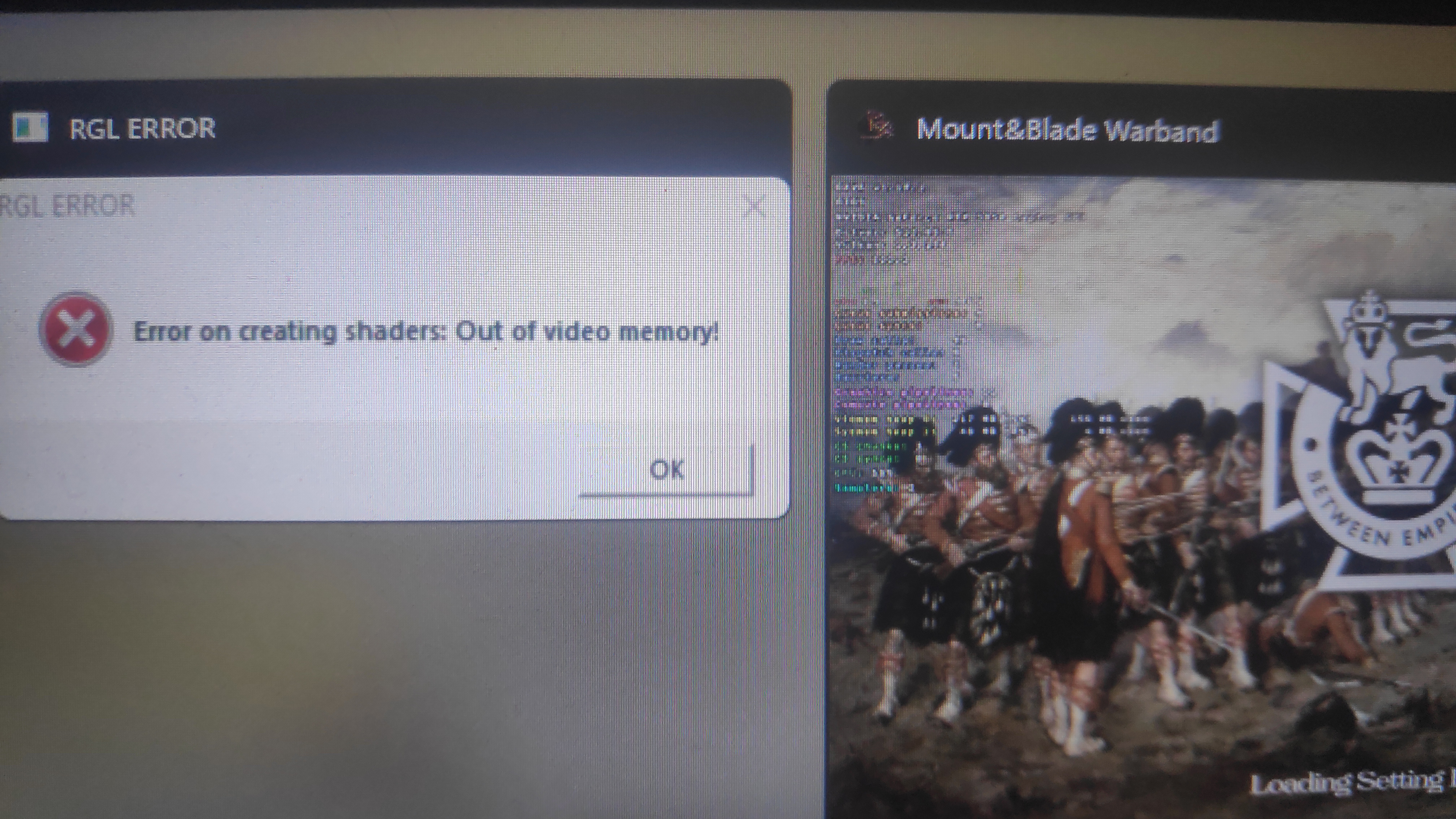
Does the shared VRAM on Win 11 get used by the dGPU? Maybe it does not but DXVK still recognized it as functional VRAM (?).
http://enbdev.com/patch_oblivion_enboost_v0259.htm I was looking for something like ENBoost but for Warband like this one.
Yes i did see that one time, tho that is a bit weird since i didn't notice that it was using alot of vram.
Can you try putting d3d9.memoryTrackTest = True in the conf file
Alternatively you can try limiting the max amount it can use.
d3d9.maxAvailableMemory = 2048
d3d9.memoryTrackTest = True
Got it working by: 1. Patching the exe with NTCore 2. Limiting mem usage via dxvk.conf to 4 gigs
I presume without the 4gig patch, we just have to set it at 2gigs.
Solved
Which conf option did you use

Got it working with more than 2gigs of mem usage. Cheers
Which conf option did you use
Ummm, how to git gist? It has been a while...
Which conf option did you use
https://gist.github.com/LeSmoothOperator/54b759f89578bc5c741a75f8244ee209
:+1:
Still a strange little problem. Not totally sure what was happening hehe.
If you run into anymore problems don't be afraid to open a new issue.
👍 Still a strange little problem. Not totally sure what was happening hehe.
If you run into anymore problems don't be afraid to open a new issue.
Ok, thanks for being helpful. I guess this opens up the chance for a new feature to ignore the Shared VRAM in the .conf file automatically.
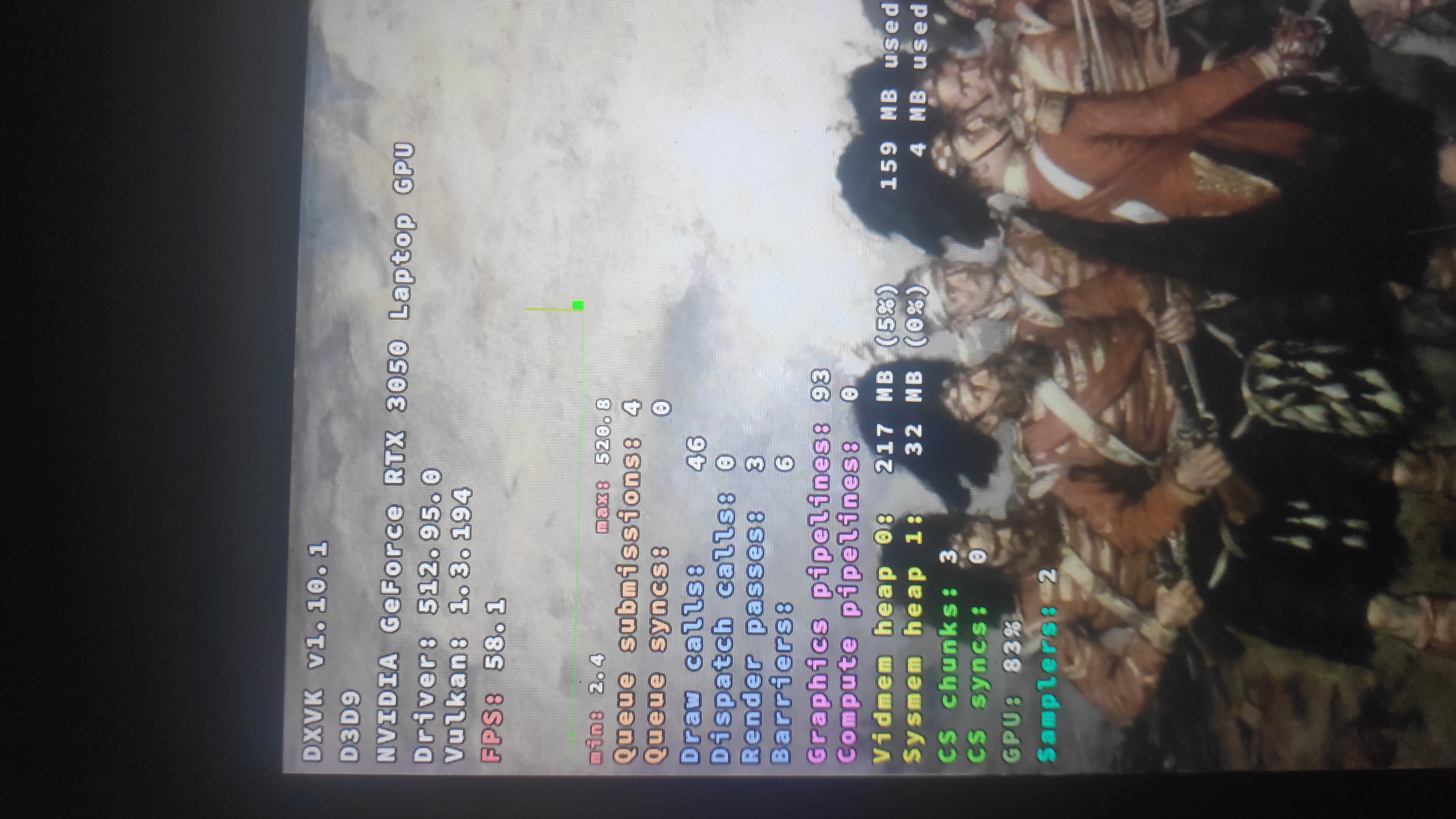
The issue resurfaced and I noticed that the vidmem heap is noticeably low. Is that normal?
👍 Still a strange little problem. Not totally sure what was happening hehe.
If you run into anymore problems don't be afraid to open a new issue.
The used video memory heap 0 increased as the textures got loaded but the allocated video memory heap 0 stayed the same.
👍 Still a strange little problem. Not totally sure what was happening hehe.
If you run into anymore problems don't be afraid to open a new issue.The used video memory heap 0 increased as the textures got loaded but the allocated video memory heap 0 stayed the same.
Not the problem, I was able to make the mod use more VRAM and DXVK handled it just fine by increasing the heap but the game still crashed.
I guess Warband memory management does not play well with DXVK's. I was able to get past the loading menu and the game just crashed after I loaded a save. It seems not to happen all the time but in high frequencies.
Or, it might be related to the heap size vs buffer size difference of DXVK and Warband. I was able to get the buffer size to 31-32 mb max-ish without Warband forcing the C++ Runtime to terminate which is low compared to the heap size from DXVK.
You can just edit the same message if you have a addition right after posting something lol.
The issue resurfaced and I noticed that the vidmem heap is noticeably low. Is that normal?
Doesn't sound totally wrong no. I would expect warband to load textures and such on demand.
Tho dunno why it complains about video memory then.
Some people's even have the issue on native. https://steamcommunity.com/app/48720/discussions/0/135510194251707355/?ctp=2
(Yes i know not warband. But same engine)
@Blisto91 Could you sum this up for me? Does the game just need memory track test or is it just another 32 bit address space crash?
I'm not totally sure tbh. At first i thought it was because it wasn't large address aware beacause the place it freezes matches exactly where there is a large memory spike going up in the area of 2GB, and it seemed to stop once i deleted enough texture files in the mod folder.
Tho a LAA patch didn't seem to solve it and the game itself complains about running out of video memory. Tho there's still plenty left on the system.
@Blisto91 Could you sum this up for me? Does the game just need memory track test or is it just another 32 bit address space crash?
I tried MTT and the LAA patcher and it still crash with the RGL ERROR
For now, I am switching games so if you want me to investigate further just say it and I will reinstall it
There shouldn't be LAA problems with the game now that i look again. I tried stopping proton from forcing it and when playing a battle with the mod it pulled 2.5GB without issue it seemed.
Still haven't been able to reproduce on linux.
Anyway i made apitraces on linux through proton 7.0-3RC
WINED3D
https://mega.nz/file/EtpWQKrI#FxzzMkmqEBIJOAKmDaEyw8dfEqa_Oy6H8ojUBYRR9IE
dxvk
https://mega.nz/file/44xhnDja#kXRQyHAfruw735UiuwC2RwRHcXwxvWXNZDty1E4cL0o
Both traces replay just fine.
All good, the original issue happened while playing Warband in Windows with a big total conversion mod and max settings. I suppose we can set this aside because it might be the engine that is problematic.
Both traces replay just fine.
have a nice day
DXVK hangs the application while/after it loads the setting (indicated by the loading screen). The issue was confirmed when I tried it without DXVK and it worked.
d3d9.log
info: Game: mb_warband.exe
info: DXVK: v1.10.1
info: Built-in extension providers:
info: Win32 WSI
info: OpenVR
info: OpenXR
info: OpenVR: could not open registry key, status 2
info: OpenVR: Failed to locate module
info: Enabled instance extensions:
info: VK_KHR_get_surface_capabilities2
info: VK_KHR_surface
info: VK_KHR_win32_surface
info: D3D9: VK_FORMAT_D16_UNORM_S8_UINT -> VK_FORMAT_D24_UNORM_S8_UINT
info: NVIDIA GeForce RTX 3050 Laptop GPU:
info: Driver: 512.95.0
info: Vulkan: 1.3.194
info: Memory Heap[0]:
info: Size: 3991 MiB
info: Flags: 0x1
info: Memory Type[1]: Property Flags = 0x1
info: Memory Type[4]: Property Flags = 0x7
info: Memory Heap[1]:
info: Size: 12138 MiB
info: Flags: 0x0
info: Memory Type[0]: Property Flags = 0x0
info: Memory Type[2]: Property Flags = 0x6
info: Memory Type[3]: Property Flags = 0xe
info: Process set as DPI aware
info: Device properties:
info: Device name: : NVIDIA GeForce RTX 3050 Laptop GPU
info: Driver version : 512.95.0
info: Enabled device extensions:
info: VK_EXT_4444_formats
info: VK_EXT_conservative_rasterization
info: VK_EXT_custom_border_color
info: VK_EXT_depth_clip_enable
info: VK_EXT_extended_dynamic_state
info: VK_EXT_full_screen_exclusive
info: VK_EXT_host_query_reset
info: VK_EXT_memory_priority
info: VK_EXT_robustness2
info: VK_EXT_shader_demote_to_helper_invocation
info: VK_EXT_shader_viewport_index_layer
info: VK_EXT_transform_feedback
info: VK_EXT_vertex_attribute_divisor
info: VK_KHR_create_renderpass2
info: VK_KHR_depth_stencil_resolve
info: VK_KHR_draw_indirect_count
info: VK_KHR_driver_properties
info: VK_KHR_external_memory_win32
info: VK_KHR_image_format_list
info: VK_KHR_sampler_mirror_clamp_to_edge
info: VK_KHR_shader_float_controls
info: VK_KHR_swapchain
info: Device features:
info: robustBufferAccess : 1
info: fullDrawIndexUint32 : 1
info: imageCubeArray : 1
info: independentBlend : 1
info: geometryShader : 1
info: tessellationShader : 0
info: sampleRateShading : 1
info: dualSrcBlend : 0
info: logicOp : 0
info: multiDrawIndirect : 0
info: drawIndirectFirstInstance : 0
info: depthClamp : 1
info: depthBiasClamp : 1
info: fillModeNonSolid : 1
info: depthBounds : 1
info: multiViewport : 1
info: samplerAnisotropy : 1
info: textureCompressionBC : 1
info: occlusionQueryPrecise : 1
info: pipelineStatisticsQuery : 1
info: vertexPipelineStoresAndAtomics : 1
info: fragmentStoresAndAtomics : 0
info: shaderImageGatherExtended : 0
info: shaderStorageImageExtendedFormats : 0
info: shaderStorageImageReadWithoutFormat : 0
info: shaderStorageImageWriteWithoutFormat : 1
info: shaderClipDistance : 1
info: shaderCullDistance : 1
info: shaderFloat64 : 0
info: shaderInt64 : 0
info: variableMultisampleRate : 0
info: VK_EXT_4444_formats
info: formatA4R4G4B4 : 1
info: formatA4B4G4R4 : 1
info: VK_EXT_custom_border_color
info: customBorderColors : 1
info: customBorderColorWithoutFormat : 1
info: VK_EXT_depth_clip_enable
info: depthClipEnable : 1
info: VK_EXT_extended_dynamic_state
info: extendedDynamicState : 1
info: VK_EXT_host_query_reset
info: hostQueryReset : 1
info: VK_EXT_memory_priority
info: memoryPriority : 1
info: VK_EXT_robustness2
info: robustBufferAccess2 : 1
info: robustImageAccess2 : 0
info: nullDescriptor : 1
info: VK_EXT_shader_demote_to_helper_invocation
info: shaderDemoteToHelperInvocation : 1
info: VK_EXT_transform_feedback
info: transformFeedback : 0
info: geometryStreams : 0
info: VK_EXT_vertex_attribute_divisor
info: vertexAttributeInstanceRateDivisor : 1
info: vertexAttributeInstanceRateZeroDivisor : 1
info: VK_KHR_buffer_device_address
info: bufferDeviceAddress : 0
info: Queue families:
info: Graphics : 0
info: Transfer : 1
info: DXVK: Read 7 valid state cache entries
info: DXVK: Using 10 compiler threads
info: D3D9DeviceEx::ResetSwapChain:
info: Requested Presentation Parameters
info: - Width: 1920
info: - Height: 1080
info: - Format: D3D9Format::X8R8G8B8
info: - Auto Depth Stencil: true
info: ^ Format: D3D9Format::D24X8
info: - Windowed: false
info: Presenter: Actual swap chain properties:
info: Format: VK_FORMAT_B8G8R8A8_UNORM
info: Present mode: VK_PRESENT_MODE_IMMEDIATE_KHR
info: Buffer size: 1920x1100
info: Image count: 2
info: Exclusive FS: 0
info: Setting display mode: 1920x1080@144
warn: D3D9DeviceEx::SetRenderState: Unhandled render state D3DRS_MULTISAMPLEANTIALIAS
info: Presenter: Actual swap chain properties:
info: Format: VK_FORMAT_B8G8R8A8_UNORM
info: Present mode: VK_PRESENT_MODE_IMMEDIATE_KHR
info: Buffer size: 1920x1080
info: Image count: 2
info: Exclusive FS: 0
info: D3D9DeviceEx::ResetSwapChain:
info: Requested Presentation Parameters
info: - Width: 1920
info: - Height: 1080
info: - Format: D3D9Format::X8R8G8B8
info: - Auto Depth Stencil: true
info: ^ Format: D3D9Format::D24X8
info: - Windowed: false
info: Setting display mode: 1920x1080@144
dxvk.conf
Create the VkSurface on the first call to IDXGISwapChain::Present,
rather than when creating the swap chain. Some games that start
rendering with a different graphics API may require this option,
or otherwise the window may stay black.
Supported values: True, False
dxgi.deferSurfaceCreation = False
d3d9.deferSurfaceCreation = True
Enforce a stricter maximum frame latency. Overrides the application
setting specified by calling IDXGIDevice::SetMaximumFrameLatency.
Setting this to 0 will have no effect.
Supported values : 0 - 16
dxgi.maxFrameLatency = 0
d3d9.maxFrameLatency = 0
Enables a frame rate limiter, unless the game is already
limited to the same refresh rate by vertical synchronization.
Supported values : Any non-negative integer
dxgi.maxFrameRate = 0
d3d9.maxFrameRate = 0
Override PCI vendor and device IDs reported to the application. Can
cause the app to adjust behaviour depending on the selected values.
Supported values: Any four-digit hex number.
dxgi.customDeviceId = 0000
dxgi.customVendorId = 0000
d3d9.customDeviceId = 0000
d3d9.customVendorId = 0000
Override the reported device description
Supported values: Any string.
dxgi.customDeviceDesc = ""
d3d9.customDeviceDesc = ""
Report Nvidia GPUs as AMD GPUs by default. This is enabled by default
to work around issues with NVAPI, but may cause issues in some games.
Supported values: True, False
dxgi.nvapiHack = True
Override maximum amount of device memory and shared system memory
reported to the application. This may fix texture streaming issues
in games that do not support cards with large amounts of VRAM.
Supported values: Any number in Megabytes.
dxgi.maxDeviceMemory = 0
dxgi.maxSharedMemory = 0
Some games think we are on Intel given a lack of NVAPI or
AGS/atiadlxx support. Report our device memory as shared memory,
and some small amount for a "carveout".
Supported values: True, False
dxgi.emulateUMA = False
Override back buffer count for the Vulkan swap chain.
Setting this to 0 or less will have no effect.
Supported values: Any number greater than or equal to 2.
dxgi.numBackBuffers = 0
d3d9.numBackBuffers = 0
Overrides synchronization interval (Vsync) for presentation.
Setting this to 0 disables vertical synchronization entirely.
A positive value 'n' will enable Vsync and repeat the same
image n times, and a negative value will have no effect.
Supported values: Any non-negative number
dxgi.syncInterval = -1
d3d9.presentInterval = 0
True enables the mailbox present mode in case regular Vsync is disabled.
This should avoid tearing, but may be unsupported on some systems
or require setting dxgi.numBackBuffers to a higher value in order
to work properly.
False enables the relaxed fifo present mode in case regular Vsync is enabled.
This should result in tearing but reduce stutter if FPS are too low,
but may be unsupported on some systems.
Please do not report issues with this option.
Supported values: Auto, True, False
dxgi.tearFree = Auto
d3d9.tearFree = False
Performs range check on dynamically indexed constant buffers in shaders.
This may be needed to work around a certain type of game bug, but may
also introduce incorrect behaviour.
Supported values: True, False
d3d11.constantBufferRangeCheck = False
Assume single-use mode for command lists created on deferred contexts.
This may need to be disabled for some applications to avoid rendering
issues, which may come at a significant performance cost.
Supported values: True, False
d3d11.dcSingleUseMode = True
Override the maximum feature level that a D3D11 device can be created
with. Setting this to a higher value may allow some applications to run
that would otherwise fail to create a D3D11 device.
Supported values: 9_1, 9_2, 9_3, 10_0, 10_1, 11_0, 11_1
d3d11.maxFeatureLevel = 11_1
Overrides the maximum allowed tessellation factor. This can be used to
improve performance in titles which overuse tessellation.
Supported values: Any number between 8 and 64
d3d11.maxTessFactor = 0
Enables relaxed pipeline barriers around UAV writes.
This may improve performance in some games, but may also introduce
rendering issues. Please don't report bugs with the option enabled.
Supported values: True, False
d3d11.relaxedBarriers = False
Ignores barriers around UAV writes from fragment shaders.
This may improve performance in some games, but may also introduce
rendering issues. Please don't report bugs with the option enabled.
Supported values: True, False
d3d11.ignoreGraphicsBarriers = False
Overrides anisotropic filtering for all samplers. Set this to a positive
value to enable AF for all samplers in the game, or to 0 in order to
disable AF entirely. Negative values will have no effect.
Supported values: Any number between 0 and 16
d3d11.samplerAnisotropy = -1
d3d9.samplerAnisotropy = 16
Declares vertex positions as invariant in order to solve
potential Z-fighting issues at a small performance cost.
Supported values: True, False
d3d11.invariantPosition = True
d3d9.invariantPosition = True
Forces the sample count of all textures to 1, and performs
the needed fixups in resolve operations and shaders.
Supported values: True, False
d3d11.disableMsaa = False
Clears workgroup memory in compute shaders to zero. Some games don't do
this and rely on undefined behaviour. Enabling may reduce performance.
Supported values: True, False
d3d11.zeroWorkgroupMemory = False
Resource size limit for implicit discards, in kilobytes. For small staging
resources mapped with MAP_WRITE, DXVK will sometimes allocate new backing
storage in order to avoid GPU synchronization, so setting this too high
may cause memory issues, setting it to -1 disables the feature.
d3d11.maxImplicitDiscardSize = 256
Resource size limit for buffer-mapped dynamic images, in kilobytes.
A higher threshold may reduce memory usage and PCI-E bandwidth in
some games, but may also increase GPU synchronizations. Setting it
to -1 disables the feature.
d3d11.maxDynamicImageBufferSize = -1
Allocates dynamic resources with the given set of bind flags in
cached system memory rather than uncached memory or host-visible
VRAM, in order to allow fast readback from the CPU. This is only
useful for buggy applications, and may reduce GPU-bound performance.
Supported values: Any combination of the following:
- v: Vertex buffers
- i: Index buffers
- c: Constant buffers
- r: Shader resources
- a: All dynamic resources
d3d11.cachedDynamicResources = ""
Sets number of pipeline compiler threads.
Supported values:
- 0 to automatically determine the number of threads to use
- any positive number to enforce the thread count
dxvk.numCompilerThreads = 0
Toggles raw SSBO usage.
Uses storage buffers to implement raw and structured buffer
views. Enabled by default on hardware which has a storage
buffer offset alignment requirement of 4 Bytes (e.g. AMD).
Enabling this may improve performance, but is not safe on
hardware with higher alignment requirements.
Supported values:
- Auto: Don't change the default
- True, False: Always enable / disable
dxvk.useRawSsbo = Auto
Controls Nvidia HVV behaviour.
Disables the host-visible, device-local heap on Nvidia drivers. This
is used to avoid NVIDIA driver bug 3114283 on affected drivers, as
well as in specific games on newer drivers.being enabled on all
affected drivers.
Supported values:
- Auto: Don't change the default
- True, False: Always enable / disable
dxvk.shrinkNvidiaHvvHeap = Auto
Sets enabled HUD elements
Behaves like the DXVK_HUD environment variable if the
environment variable is not set, otherwise it will be
ignored. The syntax is identical.
dxvk.hud = full
Reported shader model
The shader model to state that we support in the device
capabilities that the applicatation queries.
Supported values:
- 1: Shader Model 1
- 2: Shader Model 2
- 3: Shader Model 3
d3d9.shaderModel = 3
Evict Managed on Unlock
Decides whether we should evict managed resources from
system memory when they are unlocked entirely.
Supported values:
- True, False: Always enable / disable
d3d9.evictManagedOnUnlock = True
DPI Awareness
Decides whether we should call SetProcessDPIAware on device
creation. Helps avoid upscaling blur in modern Windows on
Hi-DPI screens/devices.
Supported values:
- True, False: Always enable / disable
d3d9.dpiAware = True
Strict Constant Copies
Decides whether we should always copy defined constants to
the UBO when relative addressing is used, or only when the
relative addressing starts a defined constant.
Supported values:
- True, False: Always enable / disable
d3d9.strictConstantCopies = True
Strict Pow
Decides whether we have an opSelect for handling pow(0,0) = 0
otherwise it becomes undefined.
Supported values:
- True, False: Always enable / disable
d3d9.strictPow = True
Lenient Clear
Decides whether or not we fastpath clear anyway if we are close enough to
clearing a full render target.
Supported values:
- True, False: Always enable / disable
d3d9.lenientClear = False
Max available memory
Changes the max initial value used in tracking and GetAvailableTextureMem
Value in Megabytes
Supported values:
- Max Available Memory: Any int32_t
- Memory Tracking Testing: True, False
d3d9.maxAvailableMemory = 4096
d3d9.memoryTrackTest = False
Force enable/disable floating point quirk emulation
Force toggle anything * 0 emulation
Setting it to True will use a faster but less accurate approach that works for most games.
Supported values:
- True: Use a faster but less accurate approach. Good enough for most games
- False: Disable float emulation completely
- Strict: Use a slower but more correct approach. Necessary for some games
- Auto: DXVK will pick automatically
d3d9.floatEmulation = Auto
Enable dialog box mode
Changes the default state of dialog box mode.
Disables exclusive fullscreen when enabled.
Supported values:
- True, False: Always enable / disable
d3d9.enableDialogMode = False
Overrides the application's MSAA level on the swapchain
Supported values: -1 (application) and 0 to 16 (user override)
d3d9.forceSwapchainMSAA = -1
Long Mad
Should we make our Mads a FFma or do it the long way with an FMul and an FAdd?
This solves some rendering bugs in games that have z-pass shaders which
don't match entirely to the regular vertex shader in this way.
Supported values:
- True/False
d3d9.longMad = True
Alpha Test Wiggle Room
Workaround for games using alpha test == 1.0, etc due to wonky interpolation or
misc. imprecision on some vendors
Supported values:
- True/False
d3d9.alphaTestWiggleRoom = True
Device Local Constant Buffers
Enables using device local, host accessible memory for constant buffers in D3D9.
This tends to actually be slower for some reason on AMD,
and the exact same performance on NVIDIA.
Supported values:
- True/False
d3d9.deviceLocalConstantBuffers = False
No Explicit Front Buffer
Disables the front buffer
Supported values:
- True/False
d3d9.noExplicitFrontBuffer = False
Support DF formats
Support the vendor extension DF floating point depth formats
Supported values:
- True/False
d3d9.supportDFFormats = True
Support X4R4G4B4
Support the X4R4G4B4 format.
The Sims 2 is a horrible game made by complete morons.
Supported values:
- True/False
d3d9.supportX4R4G4B4 = True
Support D32
Support the D32 format.
Supported values:
- True/False
d3d9.supportD32 = True
Disable A8 as a Render Target
Disable support for A8 format render targets
Once again, The Sims 2 is a horrible game made by complete morons.
Supported values:
- True/False
d3d9.disableA8RT = False
Support for VCache Query
Support for the vcache query
Not very important as a user config.
Used internally.
Supported values:
- True/False
Defaults to True if vendorId == 0x10de
d3d9.supportVCache = True
Force Sampler Type Spec Constants
Useful if games use the wrong image and sampler
type combo like Halo: CE or Spellforce.
Can fix rendering in older, broken games in some instances.
Supported values:
- True/False
d3d9.forceSamplerTypeSpecConstants = True
Force Aspect Ratio
Only exposes modes with a given aspect ratio.
Useful for titles that break if they see ultra-wide.
Supported values:
- Any ratio, ie. "16:9", "4:3"
d3d9.forceAspectRatio = ""
Allow Do Not Wait
Allow the do not wait lock flag to be used
Useful if some apps use this incorrectly.
Supported values:
- True/False
d3d9.allowDoNotWait = True
Allow Discard
Allow the discard lock flag to be used
Useful if some apps use this incorrectly.
Supported values:
- True/False
d3d9.allowDiscard = True
Enumerate by Displays
Whether we should enumerate D3D9 adapters by display (windows behaviour)
or by physical adapter.
May be useful in PRIME setups.
Supported values:
- True/False
d3d9.enumerateByDisplays = True
APITrace Mode
Makes all host visible buffers cached and coherent
Improves performance when apitracing, but also can impact
some dumb games.
Supported values:
- True/False
d3d9.apitraceMode = False
Debug Utils
Enables debug utils as this is off by default, this enables user annotations like BeginEvent()/EndEvent().
Alternatively could be enabled with DXVK_PERF_EVENTS=1 environment variable.
Supported values:
- True/False
dxvk.enableDebugUtils = False