F.E.A.R. Can't start a new game with DXVK in Wine
Sorry for the logs absence. I am a total newbie in Linux and don't know how to do it (just wanted to report a bug). Write the instruction and i'll do the log.
Hi there.
Out of memory issues is known for old 32 bit games since dxvk have a memory overhead compared to native. Especially ones that aren't large address aware by default. (They can only use 2GB ram) here's the tracker issue https://github.com/doitsujin/dxvk/issues/1318
There is some work ongoing to try and improve the situation. See K0bins PR
You can find a build of it here and see if it helps.
Tho i dont think it would necessarily help in the case of crashing while first time loading of a save or new game. More with games that crash after a while of playing. But worth a try.
Custom versions of wine such as proton and the ones that lutris and bottles provide can help alleviate it by being able to enable LAA automatically so the game can use a bit more memory.
Besides using those tools or non standard versions of wine you could try using a windows LAA patcher on the exe and see if that helps. https://ntcore.com/?page_id=371
Hi there.
Out of memory issues is known for old 32 bit games since dxvk have a memory overhead compared to native. Especially ones that aren't large address aware by default. (They can only use 2GB ram) here's the tracker issue #1318 There is some work ongoing to try and improve the situation. See K0bins PR You can find a build of it here and see if it helps.
Tho i dont think it would necessarily help in the case of crashing while first time loading of a save or new game. More with games that crash after a while of playing. But worth a try.
Custom versions of wine such as
protonand the ones thatlutrisandbottlesprovide can help alleviate it by being able to enable LAA automatically so the game can use a bit more memory. Besides using those tools or non standard versions of wine you could try using a windows LAA patcher on the exe and see if that helps. https://ntcore.com/?page_id=371
I see, thanks for the explanation. Is there a way to disable DXVK for this game only inside WINE? I have tried to set the overriding dx3d library for the game inside WINE config, but it didn't help... Only deleting the wine prefix and installing it from the scratch helps.
If you install dxvk into your wine prefix you can then afterwards go into winecfg and under the applications tab add the games exe as a new application. Then select the newly added application and go to the libraries tab and add d3d9 as a override set to builtin.
Builtin means that the application will use wines own versions of the dll if it ships with one.
You can also set it to (builtin, native) with means it would fall back to the native dll (dxvk in this case) if the builtin fails.
Screenshots
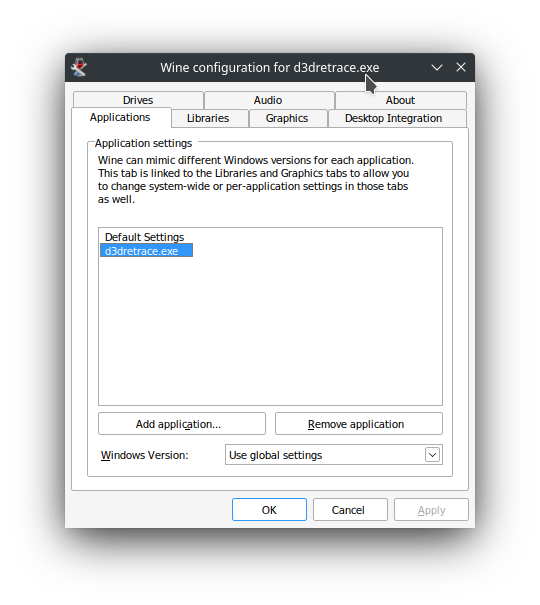
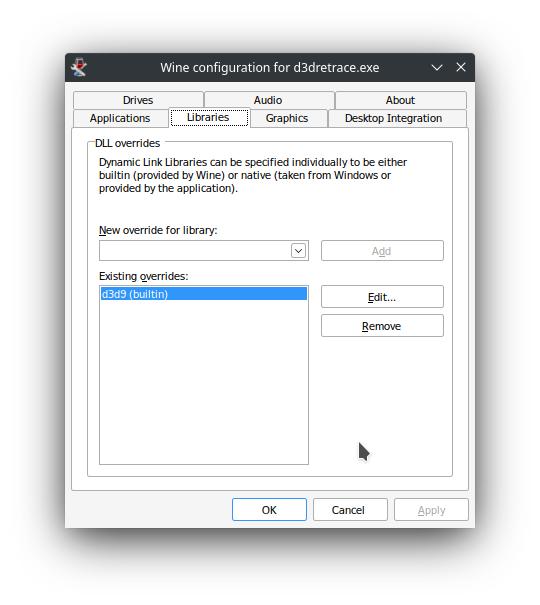
When you install dxvk you'll notice in winecfg under applications when you select Default Settings and go to the libraries tab that the dxvk setup script will have added d3d9, d3d10core, d3d11 & dxgi as native overrides.
This is because even tho dxvk puts the dlls into the wine prefixes windows system folders wine won't use them by default unless we tell it to. The files already present there in a fresh prefix aren't actually the ones wine use and are mostly put there so a application doesn't complain about missing dll's or other files.
When we tell wine to use a native version it means we tell it to use the dll's present in those folders. (And other folders as it looks for a corresponding dll in multiple places in order)
You can read a bit about wine dll overrides here
Using something like bottles or other tools makes it easier to manage individual wine prefixes and usually comes with built in switches to turn on or off things such as dxvk or LAA etc. If you ever wanted to try that.
Hmm i've not been able to reproduce a out of memory error or freeze with the steam version through proton. Even if i try to disable steam forcing on LAA. My system monitor says the app is only using 500-700MB.
Can you post the d3d9.log from a time it crashed? It should be located in the games folder next to the exe.
Hmm i've not been able to reproduce a out of memory error or freeze with the steam version through proton. Even if i try to disable steam forcing on LAA. My system monitor says the app is only using 500-700MB.
Can you post the d3d9.log from a time it crashed? It should be located in the games folder next to the exe.
Sorry for the delay. Here is the log of d3d9. Unfortunately, setting the native d3d9 as the override library doesn't work, the result is the same - when dxvk is installed - the game crashes (with or without overrides), when without it - the game works fine. In fact, setting it as the overriding library was the first thing I have done before reporting here. By the way, I use the DVD version of the game (if it has any importance)
Can you check if the newly updated version of K0bin's PR helps?
https://github.com/doitsujin/dxvk/actions/runs/2593419125
Edit: If you want to use wined3d btw the override should be builtin not native
This should be fixed now. Please reopen if it's not.
This should be fixed now. Please reopen if it's not
Excuse me for my newbieness, but how to install it?
The PR (now merged into master) have since i last wrote been updated to include changes that are incompatible with Kepler cards since they need at least the 510 drivers.
So you'll sadly have to either play with a large address aware enabled wine build with currently released dxvk or with wined3d
Upstream links
- doitsujin/dxvk/pull/2663x2 2022-06
- doitsujin/dxvk/issues/1318x1 2022-06
F.E.A.R can't start a new game or load the existing save file. The loading starts, but before the very end the game crashes to desktop with "Out of Memory" error (or without it, it depends). Works fine without DXVK though.
Software information
F.E.A.R. original game (version 1.08); max settings (antialiasing is off)
System information
Apitrace file(s)
Log files