World of Tanks - "Improved" graphics not working, unfinished/unloaded textures in the game
I know for a fact that this has worked on my system in the past.
Did the installation of the high-resolution texture pack actually finish successfully and can you please post DXVK logs (or ideally a full wine log)? Wine always logs messages to stderr unless you explicitly disable it, so capturing a full log into a file isn't hard (wine game.exe > ~/log.txt 2>&1).
If anything, I suspect that the game does not detect the amount of available VRAM properly, which is usually not a DXVK issue but rather happens because games use 20 different APIs for that that don't always work well together.
The dxvk logs should appear either next to the exe or in the games root folder. If they don't it's either because you've set DXVK_LOG_LEVEL=none or the game isn't using dxvk.
You can launch with DXVK_HUD=1 to verify it is using dxvk
I think I have set dxvk log level to none for another game but it was a long time ago and I can't be sure.
Which of these levels should I set dxvk to: DXVK_LOG_LEVEL=error|warn|info|debug ?
@doitsujin The game used to work fine about 2 years ago but it had no sound back then bc the game didn't recognize the linux audio systems.
Edit: I discovered that disabling triple buffering removes the unfinished textures and they appear normal but the improved graphics still doesn't work.
DXVK_LOG_LEVEL=info is good enough.
These are the only logs that contain something, the rest were just empty files.
DXVK_logs.zip
Edit: here's also a full wine log, as requested.
wot_wine-log.zip
looks like the wine log of the actually relevant application gets eaten by the wargaming game center garbage, so that doesn't contain anything interesting...
Guess I'm not getting around reinstalling the game, but not expecting it to be very useful given that it was working just fine here last time about a year ago.
Yeah, still works fine here. This is with the Lutris thing for Wargaming Game Center, using current dxvk master (but tested with 1.10.3 as well, same result). Enabling the option works fine and textures also load fine.
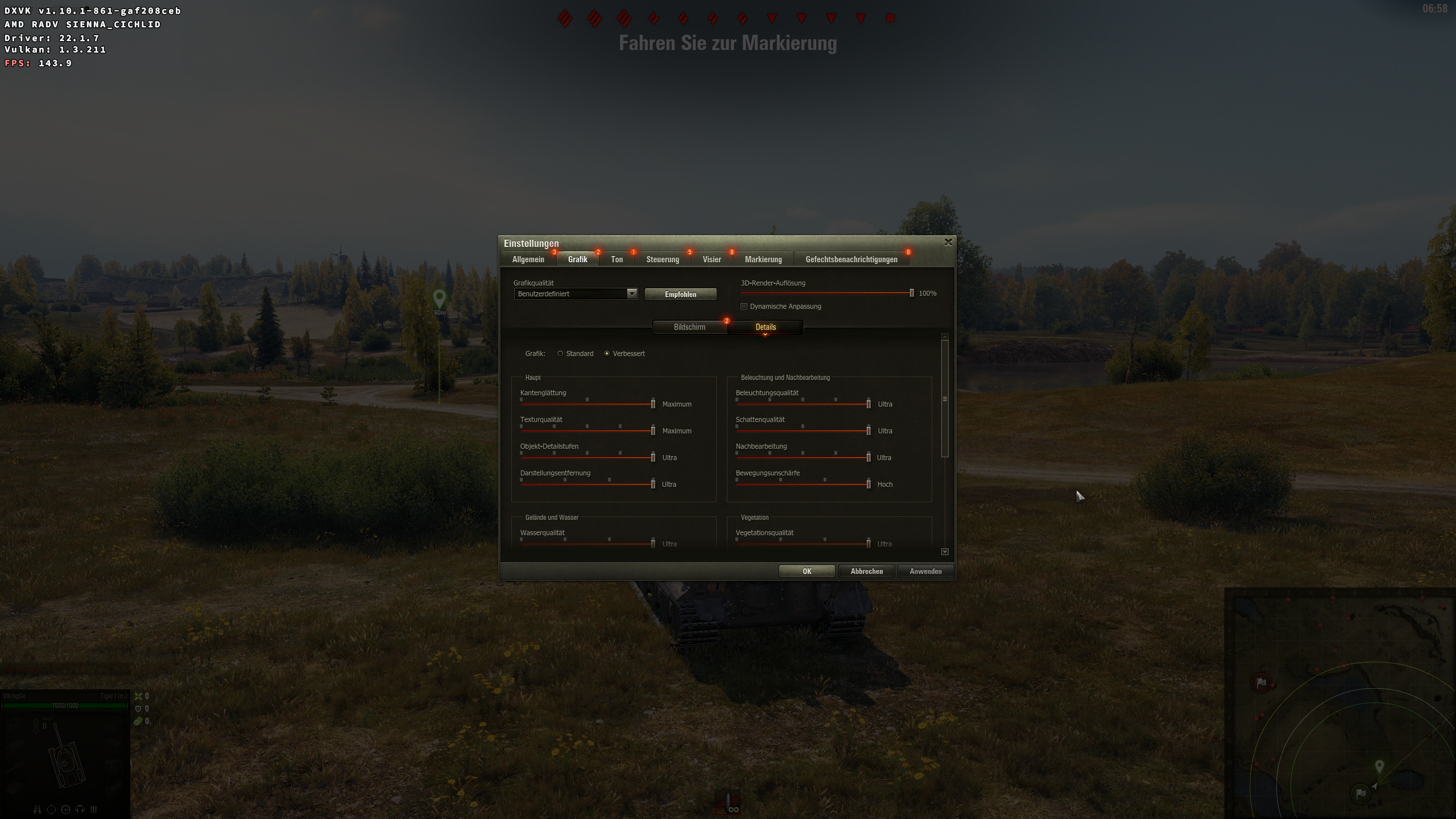
I will see if i can reproduce on any of ny setups here later
I found a way to run the game without the game center and I think this problem is a game bug which I'll have to report to WG. Until now every attempt to run the game without the game center by running /World_of_Tanks_EU/WorldOfTanks.exe has failed and the game says it needs to be run through the game center. But it turned out that this is the wrong exe. In order to run it the old fashioned way, one needs to run /World_of_Tanks_EU/win64/WorldOfTanks.exe. When ran with that exe, "Improved graphics" works just fine. I haven't tried to run the 32-bit exe but I suspect that this is the exe the game center has been set to run and that's why the improved graphics doesn't work.
Weird, but makes sense if it's actually launching the 32-bit exe. Closing as not our bug.
@doitsujin can you try your game on the map Fjords? IDK if it will work in a training battle, bu you could try. I just had a battle there and the frames were 25 the whole time. I reduced almost every setting to low or off but that didn't change anything.
If you can then post a screenshot with a full hud when it happens. DXVK_HUD=full
Also how does it compare to without dxvk (wined3d) at the same place.
OK, I'll give you a screenshot later.
I have dxvk-bin installed in the system (from AUR) but if I don't place the 1.10.3 d3d11 and dxgi in the exe directory, the whole game runs like a comic book even in the garage. If that's what you asked.
I have never tried to install dxvk from the aur but i'm pretty sure you still have to run the install script to install it into your wine prefix if you want to do it properly.
See comment here https://aur.archlinux.org/packages/dxvk-bin#comment-639617
Looks like they symlink the install script directly to the bin folder so you can call it from the terminal like a regular program.
The putting the dll's next to exe method is generally not the recommended way to do it on linux as the results can be iffy. Also some games want to load the files directly from wines windows system folder.
Launch options
DXVK_HUD=full`x1 2022-09DXVK_LOG_LEVEL=info`x1 2022-09DXVK_LOG_LEVEL=error|warn|info|debugx1 2022-09DXVK_HUD=1`x1 2022-09DXVK_LOG_LEVEL=none`x1 2022-09
Software information
World of Tanks
System information
Apitrace file(s)
Trying to use apitrace didn't work, if anyone else can do it, it would be great.
Log files
The game/wine didn't create any logs.
I've downloaded the HD client but when in game, the "Improved" graphics which is supposed to use the HD textures is disabled, thus it can't be used. IDK if the unfinished (unloaded?) textures are the result of the standard graphics or of DXVK, so I'm uploading both of the screenshots.
I have played the game at maximum graphics (Improved) on Windows, so the reason for the not working improved graphics is NOT my hardware.