As an additional note, it's in region two. There are a number of YouTube videos which show how the game should look, such as this one.
Unfortunately, game with api trace DLLs ran too slowly for me to make it to the point of my sceenshot.
We need the apitrace to debug this. You can try creating a config file and setting d3d9.apitraceMode = True. That could potentially speed it up a bit.
That's going to be very difficult to do on this machine, so this could be a problem. It was quite literally crawling along after I added the DLLs, and there's a whole room full of enemies after my save point. (I'm wondering if I'm Gamer enough to survive that kind of lag.) Moreover, I removed the game some time ago (but Steam's cloud save technology should still have my save file, and the whole game is maybe just a 100 MB download, so not as bad as it sounds).
Will d3d9.apitraceMode = True improve the frame rate, then? It felt as though it was rendering entirely on a single thread, and not very efficiently. I'm on a Ryzen 7 3700X. The documentation implies, but doesn't entirely specify, that it improves memory caching? If everything is being mismanaged without apitraceMode, it might explain the severe lagginess.
(Forgive me for being a total outsider to this project, I admit that I only barely understand what DXVK is, and its relationship to Proton and Wine. My comprehension of this isn't perfect.)
Thanks for the attention, I'll see what I can do.
Oh yes, should the config file go in the same directory as the game executable, or somewhere else? The file doesn't make that clear.
Will d3d9.apitraceMode = True improve the frame rate, then? It felt as though it was rendering entirely on a single thread, and not very efficiently. I'm on a Ryzen 7 3700X.
It can. Apitrace records every single d3d9 call the game makes and allows us to replay it later. If that ends up reading uncached memory, that will be extremely slow and that option will mitigate that. It'll probably still be slow because it's simply a lot of work to record all those calls.
Placing a file called dxvk.conf right next to the .exe file of the game and adding the option should do it.
As an update, that worked, and I've got the apitrace! I'm just waiting on an automatic apt-get autoremove -y to finish running after upgrading my kernel. (Evidently it runs sudo update-grub after every kernel modification, which is probably erring on the safe side, and that can take about fifteen minutes each time; still, I'd rather get it out of the way than interrupt it in the middle and have to worry about more problems later.)
Once that's finally complete, I can install apitrace, which I apparently don't have yet on this machine, and pack it down from 1.1 GB to a manageable size. Thanks for being so helpful @K0bin! I'll have it all up, soon enough.
That's great. You can just quickly zip the file and upload it. No need to do anything fancy.
Got it packed and zipped! Here's the link, at 76 MB it was still a little too fat for github so I threw it on Google Drive. Hopefully this helps.
Again, thank you for walking me through this, I'm usually more of a multimedia programmer and don't know much about how DXVK works under the hood. In the future I'll have a better idea how to report these.
Just noting that i see the issue in the trace :+1:
ge-proton7-31x1 2022-09
I was directed here by Glorious Eggroll, as he feels it is likely a dxvk issue.
//Please describe your issue as accurately as possible.
Software information
Blaster Master Zero 3, any settings
System information
Apitrace file(s)
PE32+ (64-bit) executable
Unfortunately, game with api trace DLLs ran too slowly for me to make it to the point of my sceenshot.
That said, I do have a screen shot.
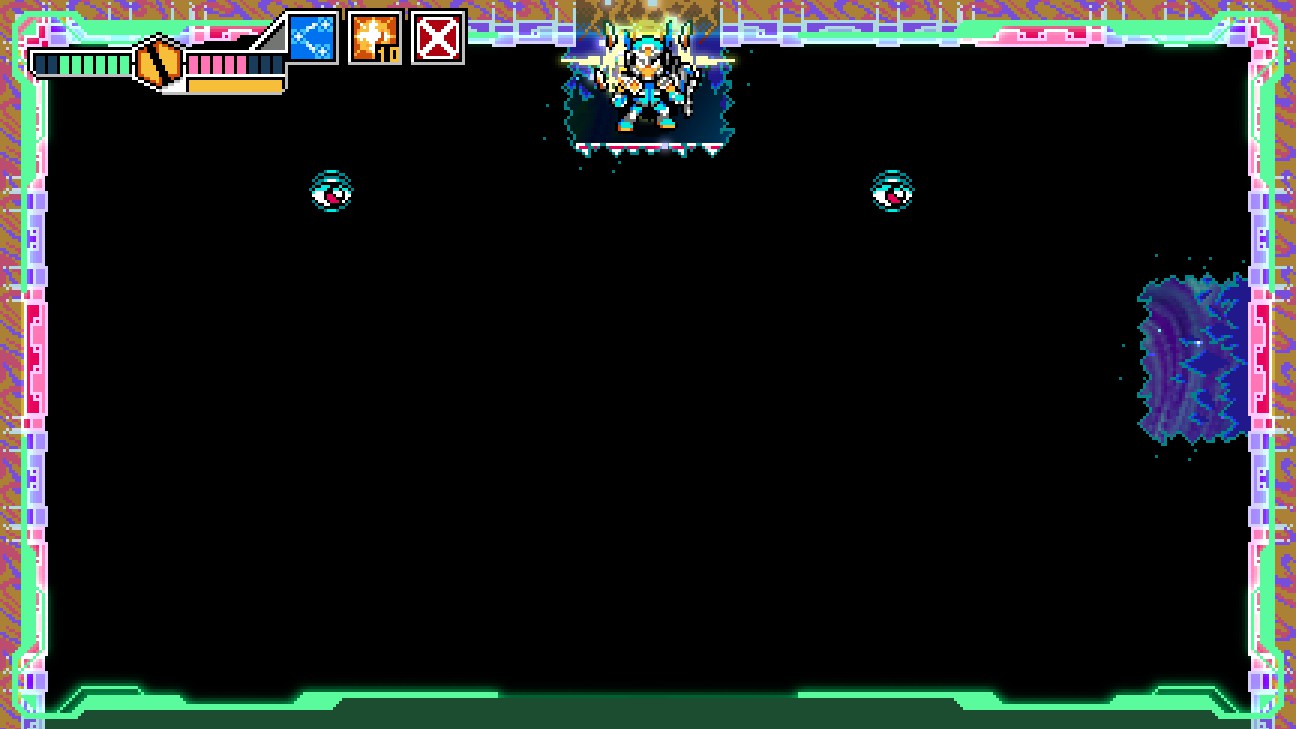
The region covered in black typically has pink platforms appearing on it, but in this instance they are apparently covered by another layer which is out-of-order. You can just barely see a sliver of it beneath the hero.
I hope this is enough information to give a lead on the problem. Using the DLLs appeared to result in software rendering and the game moved at a crawl.