Batman Arkham Knight black ladders on textures
Try with latest master. 🙂 https://github.com/doitsujin/dxvk/actions/runs/3268994708
If it's still an issue then please make a apitrace https://github.com/doitsujin/dxvk/wiki/Using-Apitrace
Try with latest master. 🙂 https://github.com/doitsujin/dxvk/actions/runs/3268994708
If it's still an issue then please make a apitrace https://github.com/doitsujin/dxvk/wiki/Using-Apitrace
OK, I downloaded the archive. dxgi.dll and d3d11.dll just drop it into the root folder of the game?
Yup just like with a regular release
Yup just like with a regular release
And what to do with the usr folder?
Ignore that one. That's a Linux thing.
Yup just like with a regular release
Unfortunately it didn't help, the problem is still here(
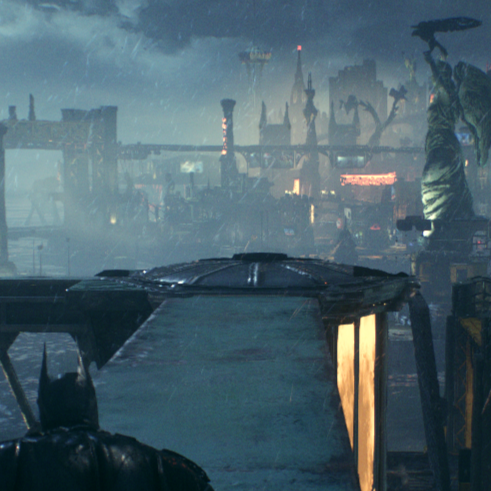
Could you circle the problematic part? Just so i'm sure i'm looking at the correct places.
Could you circle the problematic part? Just so i'm sure i'm looking at the correct places.
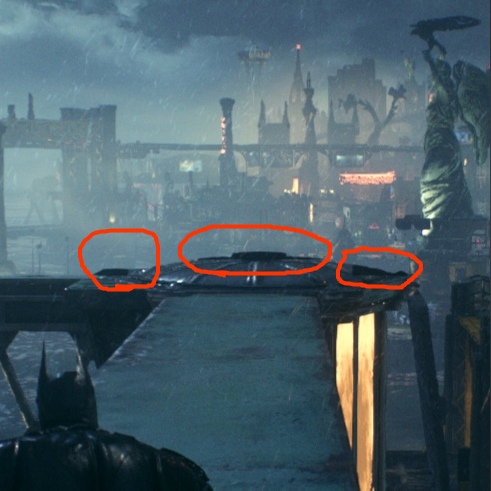
Thanks.
Try to make a apitrace. Note that by default apitrace doesn't go through dxvk on windows so it won't reproduce when you do, so just get ingame to a place where it usually reproduces and then the devs can replay it together with dxvk later.
Thanks. Try to make a apitrace. Note that by default apitrace doesn't go through dxvk on windows so it won't reproduce when you do, so just get ingame to a place where it usually reproduces and then the devs can replay it together with dxvk later.
I compressed Apitrace into a ZIP file and uploaded it, thank you for trying to help
The file you uploaded is 0 bytes.
In general, if it's small enough that you can upload it to github, it won't be long enough to show the issue. You need to play the game until you reach the section where the issue usually occurs with apitrace active and the resulting file should be about a gigabyte or more in size.
In general, if it's small enough that you can upload it to github, it won't be long enough to show the issue. You need to play the game until you reach the section where the issue usually occurs with apitrace active and the resulting file should be about a gigabyte or more in size.
The game started with a black screen, at first I tried to delete some files from the apitrace archive, but nothing helped, and then I decided that it should be so
It's possible that it would have progressed from the blackscreen into the game after a while, apitracing, especially on windows, can be very slow.
Did you extract d3d11.dll, dxgi.dll and dxgitrace.dll into the game folder next to the exe?
I moved the dll from the master archive to the root of the replacement game, I replaced 4 files from apitrace and it worked and I got a kind of normal file
apitrace updated
The apitrace is sadly still borked.
Would you be able to upload a save file from a location where it happens? I'll check it out in the game here later.
The apitrace is sadly still borked. Would you be able to upload a save file from a location where it happens? I'll check it out in the game here later.
It's easier to say where it doesn't happen. In closed locations, I did not notice this, especially these black bricks on the textures are visible if you climb higher. If you have them, then you won't miss them, because while moving or turning the camera, they start to flicker. The game version is 1.98, I tried to install the 1.6.2.0 steam version, but the same thing happens there.
SaveData.zip
Unless proven to also happen on Linux and Nvidia drivers, I'm going to strongly suspect just another AMD driver bug here.
Game is known to work fine at least with 1.10.3.
Unless proven to also happen on Linux and Nvidia drivers, I'm going to strongly suspect just another AMD driver bug here.
Game is known to work fine at least with 1.10.3.
I tried different AMD drivers, the FPS is much worse on some of them, but the problem is still present, I tried different versions of dxvk, it's the same here as with AMD drivers. My OS is Windows 11. Could it be that the problem is in Windows 11?
Just to make sure. It's not similar to this is it? https://youtu.be/5xE9pfGN_pc
I tried different AMD drivers, the FPS is much worse on some of them, but the problem is still present, I tried different versions of dxvk, it's the same here as with AMD drivers. My OS is Windows 11. Could it be that the problem is in Windows 11?
There's different AMD drivers on Linux which usually work better.
Just to make sure. It's not similar to this is it?
nope
I tried different AMD drivers, the FPS is much worse on some of them, but the problem is still present, I tried different versions of dxvk, it's the same here as with AMD drivers. My OS is Windows 11. Could it be that the problem is in Windows 11?
There's different AMD drivers on Linux which usually work better.
So I can't fix it?
I haven't tried on Windows yet. But i couldn't reproduce at least on Linux with radv or amdvlk. The former is the driver most commonly used for AMD Vulkan on Linux and the latter is AMD's own and closeish to the Windows driver. Tho i'm using a amdvlk version thats over a year old same as on Windows since my card isn't supported anymore.
This is on my R9 380.
Tho amdvlk had the weird issue i showed in the video above.
I was installing Manjaro, and I also couldn't reproduce this bug, and everything would be fine, only the fps in the game is significantly less, and I returned to windows. On a clean system, this bug is present, on all possible AMD drivers it is also present.
Sounds like the fix is to play on windows without dxvk. If this does not happen with the AMD drivers on linux it's most like a driver and not DXVK bug.
Sounds like the fix is to play on windows without dxvk. If this does not happen with the AMD drivers on linux it's most like a driver and not DXVK bug.
Or with dxvk on linux, because the fps on linux with dxvk is about the same as on windows without dxvk. But initially I decided to use dxvk to add fps in the game.
I noticed something, these black ladders appear at the junction of non-rendered LODes and rendered textures.
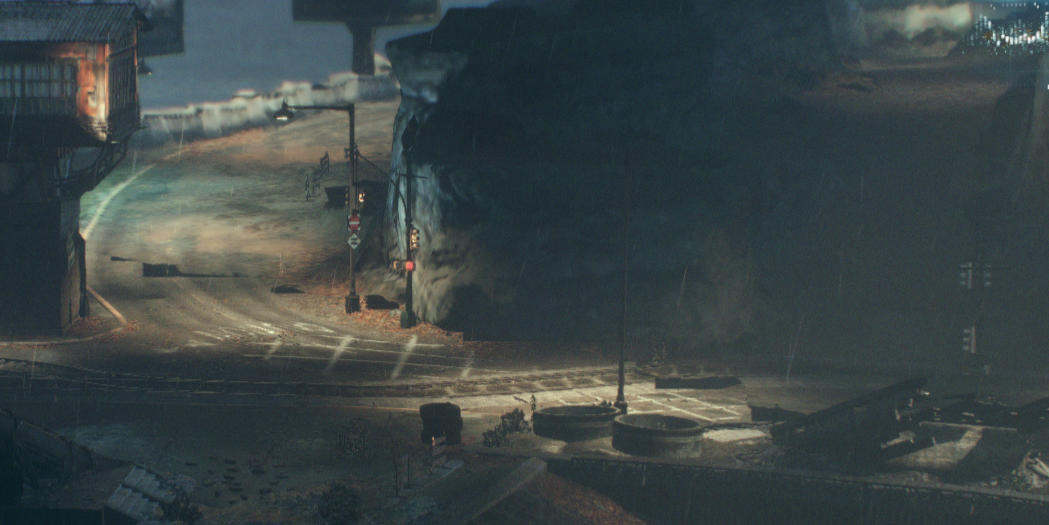
If this is actually a driver problem, does anyone know how I can fix it?
Report to AMD and hope that they care about dxvk on Windows.
Report to AMD and hope that they care about dxvk on Windows.
I sent the report yesterday, it's a pity that nothing more can be done :(
But by the way, dxvk works great in GTA 4
Lmao that's good to hear 😁
I don't think K0bin agrees if you look at all the issue reporter that game has hehe
If this is actually a driver problem, does anyone know how I can fix it?
Make sure you're not forcing any settings like anisotropic filtering in the driver. Reset those settings to default. If that doesn't help, there's nothing you can do.
@skeidGX Do you still have this issue with newest dxvk and drivers?
@skeidGX Do you still have this issue with newest dxvk and drivers?
@Blisto91 actually I do not know, but I have seen a list of changes in the new AMD driver related to Vulkan, as there will be an opportunity I will test it
@Blisto91 I decided to download and check today, now everything works really well :)
DLLs
d3d11.dllx2 2022-10dxgi.dllx2 2022-10dxgitrace.dllx1 2022-10
In the Batman Arkham Knight game, black squares appear on textures. I tried all possible graphics settings of the game, ran it in a window, full screen, tried different graphics card drivers, different versions of DXVK, including different versions of DXVK Async, but none of this helped me.
Software information
Batman Arkham Knight, Windows 11
System information
Apitrace
BatmanAK.zip