Fallout 3 requires PCI Override to launch on Intel Arc
These do not seem to be created unfortunately.
Did you launch with PROTON_LOG=1 %command% ? Proton disables dxvk logging by default
These do not seem to be created unfortunately.
Did you launch with
PROTON_LOG=1 %command%? Proton disables dxvk logging by default
Thank you, edited the original post with the logs for both scenarios
Does it crash during the loading screen or do you reach ingame?
Does it crash during the loading screen or do you reach ingame?
I get to the main menu and then when I try to load a save game it crashes on the loading screen.
Thanks for the report.
I'm amazed this haven't been brought up before here as this just seems to be Intel in general.
Should apply to Oblivion too.
Should apply to Oblivion too.
I at least cannot reproduce it on my A770, seems to load in fine
Hey guys, I have the same problem but I can't seem to find the dxvk.conf file. Where is this located?
Hey guys, I have the same problem but I can't seem to find the dxvk.conf file. Where is this located?
You create it yourself in the game's executable location.
@ashnair5335 What Evernow ninjaed above :grin:
Tho note sometimes it's not directly next to the executable. Usually where the dxvk logs appear if that is a different location
What game do you have this issue with?
I have the issue with the same game, Fallout 3 GOTY. I searched the folder where the executable is located, and there are no files with "dxvk" in its names. If I need to create it, could you please provide instructions on how?
Also, Evernow, you have an Intel Arc, but you put "NVIDIA RTX 3080" in the dxvk.conf file as the custom device description. Why is this? Or did I understand something wrong?
The workaround for this issue is already built in to dxvk 2.0 and 2.1 so there should be no need for a config file
Is there a way to check which dxvk I have? Also, I don't know if this makes any difference, but I am launching from the epic games launcher, and I have an Intel Arc 370M discrete graphics card.
If you have put the dxvk 32bit d3d9.dll next to the games exe a log called "Fallout3_d3d9.log" should appear either next to the exe or in the games root folder. The version should be at the top of the log when viewed in a text editor.
Also, Evernow, you have an Intel Arc, but you put "NVIDIA RTX 3080"
This was not needed, it was just added initially since I did not narrow down which of the options the game worked with.
The only option needed is d3d9.customVendorId = 10de
The thing is, I don't understand where the correct executable is. There are multiple folders for the epic games launcher, and multiple exe's for Fallout. Where would I add them? This is one folder (C:/Program Files/Epic Games/fallout3), and the Launcher.exe is the Fallout game (still crashes on this though):
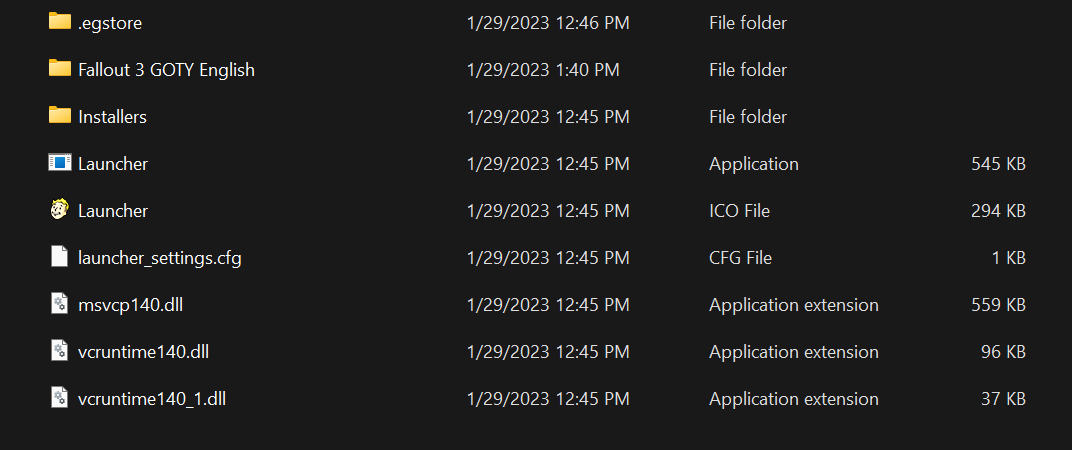
This is what is in the "Fallout 3 GOTY English" folder in the folder above (FalloutLauncherEpic.exe goes to the Fallout Launcher, Fallout3.exe goes straight to the game, and neither of them work):
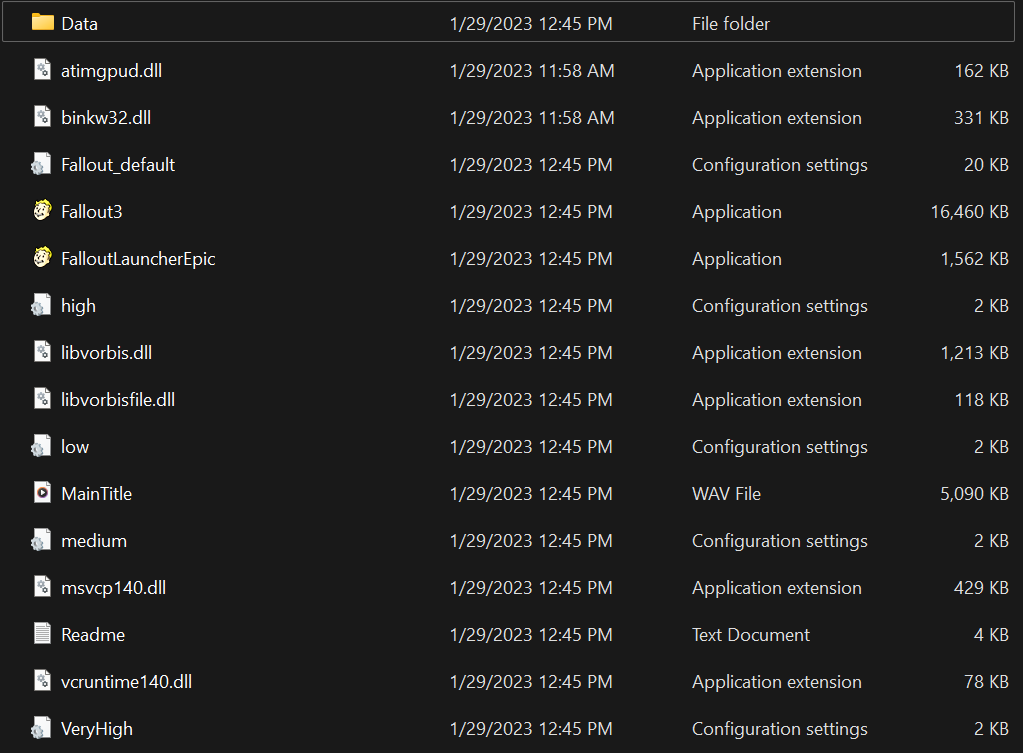
Where am I supposed to make the dxvk.conf? And where is the d3d9.dll file?
You put the d3d9.dll file there yourself if you use dxvk provided from here. If you don't know what dxvk is then it's a Direct3D to Vulkan translation layer created to be used to play Windows games on Linux. Intel uses a fork of it for specific games in their Arc drivers on Windows, but i don't know the details of that or which games they use it for besides CS:GO.
You can downloaded latest version here https://github.com/doitsujin/dxvk/releases/tag/v2.1. The asset called dxvk-2.1.tar.gz is the one you want and can be opened with a archive tool like 7zip. From the x32 folder put the d3d9.dll next to the executable called Fallout3
For the config file, which shouldn't be necessary in this case, it's just a file you create yourself called dxvk.conf and edit in a text editor notepad or similar.
Okay, I will try this and get back to you guys. Thanks for being so helpful!
Okay, I tried putting d3d9.dll in the folder. The game launches but before the title screen is visible, the game crashes. But two files, Fallout3_d3d9 and FalloutLauncherEpic_d3d9, are generated as .txt files with a bunch of lines that seem to be config options. Thoughts?
Those 2 files are log files.
Post them here
Fallout3_d3d9.log
FalloutLauncherEpic_d3d9.log
These are the two files.
Nothing sticks out.
Have you made sure your graphics drivers are up to date?
Also you could try with dxvk 2.0 instead https://github.com/doitsujin/dxvk/releases/tag/v2.0
Proton versions
proton experimentalx1 2022-11
Launch options
PROTON_LOG=1x2 2022-11
DLLs
d3d9.dllx4 2023-01
Explanation
If one launches Fallout 3 on at least my Arc A770 the game crashes shortly after trying to load a save. However if I set the following options in dxvk.conf the game loads correctly.
I have not tested if all of them are necessary, and can do that if desired.
Software information
Fallout 3: Game of the Year Edition, likely the normal version also suffers from this but I have not tested it.
System information
Apitrace file(s)
I do not believe this is relevant as this does not reproduce the issue, this API trace is captured on an RTX 3080 on Windows.
https://drive.google.com/file/d/1H8oFvE4t8mm1Mt1wEnnrhCg56k6T_K27/view?usp=sharing
Log files
Without the PCI Override options (resulting in crash as explained above):
Fallout3_d3d9.log
FalloutLauncherSteam_d3d9.log
With the aforementioned PCI Override options:
Fallout3_d3d9.log
FalloutLauncherSteam_d3d9.log