STALKER Lost Alpha DX11 (Windows/Linux) still won't work with DXVK but now there's an error message!
What's up @Deus-nsf, it works in Wine because they implemented CreateDXGIFactory1, have you tried using DXVK with Wine's DXGI?
The good thing is that Mingw has CreateDXGIFactory1@8 and even CreateDXGIFactory2@12 support, which will make it easier to integrate with DXGI from DXVK, I hope.
DXVK implements both of those too.
https://github.com/doitsujin/dxvk/blob/master/src/dxgi/dxgi_main.cpp#L30
But it looks like the game is looking for those functions in d3d11.dll instead of dxgi.dll.
DXVK implements both of those too.
Hey @K0bin, and D3D11CreateDevice stub support, does DXVK have it too?
D3D11CreateDevice accepts both IDXGIFactory and IDXGIFactory1.
Yes, DXVK also implement D3D11CreateDevice.
So this could be a problem with the game trying to load the D3D11.dll as if it were DXGI.dll
Here says this Steam user, he was having a similar problem and renaming dxgi.dll to d3d11.dll solved it for him, not sure if it would help in this case.
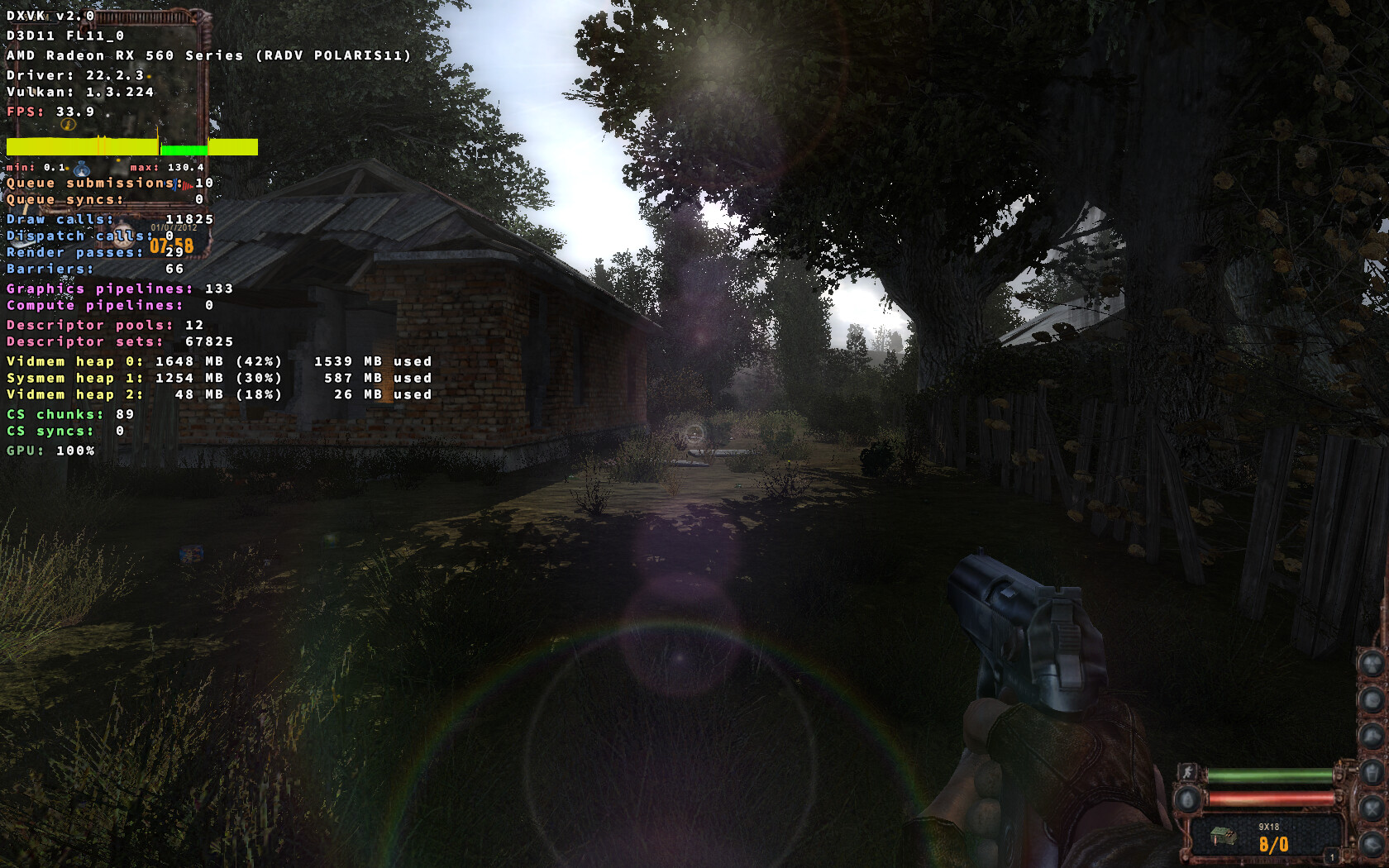
D3D11 renderer works fine for me in this game with Wine + DXVK. Not out of the box though, this set of libraries is required to get it working:
d3dx9 d3dcompiler_42 d3dcompiler_43 d3dcompiler_46 d3dcompiler_47 d3dx10_43 d3dx11_42 d3dx11_43
However, at least for me, with D3D11 the game opens in minimized mode, so it's necessary to unmimize it's window or switch to it via Alt+Tab.
Screenshots

Well thats... interesting. Where do you get those libraries? Do you just put them near the .exe?
They can be installed via winetricks, like:
$ WINEPREFIX="/path/to/your/prefix" winetricks d3dx9 d3dcompiler_42 d3dcompiler_43 d3dcompiler_46 d3dcompiler_47 d3dx10_43 d3dx11_42 d3dx11_43
Thanks, I suspect this is going to help many people who tries to enjoy this game, assuming google referencing does it's job right haha. Not sure if the issue should be closed then? It's not like dxvk can handle this kind of dependencies on it's own right?
dxvk will not handle those no 🙂
It not working on windows is probably because its looking at the system libraries for one of the DLLs instead of the ones put next to the exe
Yeah for science I tried to copy all the dlls in the winetrick list near the exe on Windows but no dice haha, I'll try Linux later, I must move soon.
They can be installed via winetricks, like:
$ WINEPREFIX="/path/to/your/prefix" winetricks d3dx9 d3dcompiler_42 d3dcompiler_43 d3dcompiler_46 d3dcompiler_47 d3dx10_43 d3dx11_42 d3dx11_43
Man, you're a legend, I have no idea how you figured this out, but it works, and to a surprisingly good level of performance by the way. Everything works perfectly with DXVK (not even 2.0 since Lutris has 1.10.3 max for the moment), including MSAA and MSAA Alphatest (to my uttermost surprise), only exception being water object reflections which has some weird graphical glitches (not the AMD thing, I run Nvidia hardware) but they look kind of ugly even when they work as intended anyways so it's not a huge deal to turn them off :)
The performance and smoothness of the few minutes I could play was remarkable, especially considering the beast that is the X-Ray Engine. I know shadow of chernobyl was one of the main games tested for proton, but lost alpha is super modified so it's even more impressive! Really good job on this guys! I wonder how Anomaly/Gamma works now!
Since it's about windows components, it can't be added to dxvk, but this could be something included natively in Proton right? Maybe I should create an issue in the Proton repo. I'm closing the issue now since there's none :)
Wine includes their own versions, but they might have issues or be incomplete still. Hopefully these issues will get solved over time.
If you use Lutris then enabling D3D Extras should already include the Windows version (afaik) of these dll's
They can be installed via winetricks, like:
$ WINEPREFIX="/path/to/your/prefix" winetricks d3dx9 d3dcompiler_42 d3dcompiler_43 d3dcompiler_46 d3dcompiler_47 d3dx10_43 d3dx11_42 d3dx11_43
I'm sorry to bother you, but I was wondering if the same was achievable with proton tricks, for some reason with proton tricks and Proton in general I can't seem to be able to install those libraries for the other 32 bit prefix I created, do i even need to create a 32 bit prefix? I'm kind of lost with all those prefix and missing components, it's kind of a mess to be honest...
The reason why I want to do it with Proton and not Wine is because for some reason it is impossible for me to get adaptive sync (Gsync) working with wine, but it works just fine with Proton.
I've never used protontricks, so can't say for sure. But since protontricks is just a wrapper around winetricks, i think there should be no problems.
do i even need to create a 32 bit prefix?
No. I mean you can if you want, but that's not necessary, a 64-bit prefix is fine.
then I'm really not sure what is going wrong, I can't use DX11 -> Vulkan, game boots fine in DX9 though, this is with Proton 7.0-5, I tried experimental and GE 7-42 but those won't even run the game at all
Post a full proton log
steam-14137401638167511040.log
What you want to look for are references to "r4" since it's the renderer r4 which is DX11, r2 is DX9
I manually added DXVK 2.0 from protontricks just in case, but it was the same as before (I'm not sure if proton 7.0-5 has dxvk 2.0 already)
there's also a
info: D3D11CoreCreateDevice: Probing D3D_FEATURE_LEVEL_11_0
err: D3D11CoreCreateDevice: Requested feature level not supported
slightly before, hope all that helps.
Edit: that's so weird, now I can't seem to be able to boot the game on Lutris anymore... it did work a couple of days ago. Lutris and Steam targets the same folder and exe, maybe that didn't happen well.
Edit 2: apparently older versions of GE can launch the game, just not the recent ones, there must be some kind of sneaky regression happening I'll try to pinpoint the version where things changed and inform GE on his discord. (it's the 38 one and onwards that has a problem)
hopefully having
d3d9.samplerAnisotropy = 16
doesn't break dx11 or something, I forgot to comment this in my dxvk.conf
It doesn't but it can break d3d9.
This is a super niche use case for a super niche game so feel free to ignore it if you don't feel like it.

STALKER Lost Alpha for some reason never worked with dxvk in D3D11 mode either on Linux or Windows.
With previous versions there was no indications on what could go wrong (maybe some obscure stuff in the logs), but with the 2.0 update there is now a displayed error message:
I wanted to share it in case it gave some sort of eureka moment of a fix that could be implemented to prevent this :)
Note that the game can be run in D3D9 mode and dxvk always worked with that, both in Linux and Windows, but the D3D9 mode of STALKER Lost Alpha is a severe visual downgrade compared to D3D10 or 11, with no antialiasing support and many rendering features completely unavailable.
EDIT: If that can help, STALKER LA DX11 does work on Linux under classic Wine (D3D11 -> OpenGL) but the performance is atrocious and there are some visual glitches.