Sonic Frontiers: Generally poor performance.
There's a few other issues in the game, like flickering, though due to the open nature of the game its very hard to document what causes it and when. Performance is always bad enough however to the point my whole system slows to a crawl when alt tabbed, not even games like RDR2 on high cause that for me.
GPU usage is basically glued to 100% on a 3080.
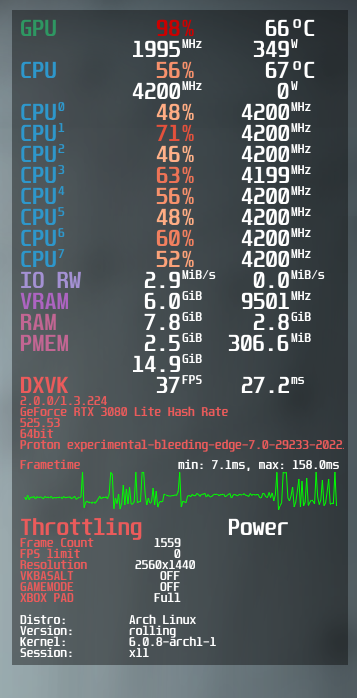
Remember to make a apitrace
If I had to guess, the game either requires NVAPI extensions to work well, or it creates high-traffic resources in system memory or something.
DXVK_HUD=full should show something.
Can't reproduce on my 6900XT, locked 60 FPS with fairly low utilization, which I guess is expected. Can't really find anything obvious that would make it run bad on Nvidia.
Nvidia's driver chokes really hard on one specific compute shader, it takes 34ms on my laptop RTX 2060 vs 32µs on the 6900XT, so more than a thousand times as long. A workaround that seems to fix this problem appears to be promoting temporary arrays to group-shared memory, cutting it down to 200µs (which is in line with what I'd expect given the difference in performance), which is something that DXVK could do under specific circumstances, but this really is something that should be looked at from the driver side.
Thanks for diagnosing the issue, shame that it seems to be a driver issue. In the meantime can you share how to apply the workaround you found so the game can be playable in the meantime?
It's not possible on the DXVK side without writing a bunch of code, I only did this by hand on a RenderDoc capture to work out what the problem is.
I might implement this as an actual workaround for the time being but it'll take some time.
Sounds great if you do, thank you. Wonder what the chances of NV fixing it are.
Just got to let them be aware if they aren't already.
Reported it in NVIDIA's Linux forum - https://forums.developer.nvidia.com/t/driver-bug-unplayable-performance-in-sonic-frontiers/234873
Reported it in NVIDIA's Linux forum - https://forums.developer.nvidia.com/t/driver-bug-unplayable-performance-in-sonic-frontiers/234873
Fwiw, if you also mail it to Nvidia you will most likely get a faster response.
Just a brief explanation mail that contains your forum post link should be enough.
Reported it in NVIDIA's Linux forum - https://forums.developer.nvidia.com/t/driver-bug-unplayable-performance-in-sonic-frontiers/234873
You mentioned it runs fine on your deck, what's that mean in your case? On my end at native res and everything low, it could hardly hold 30, and considering it's a Switch game, that doesn't feel right. No where near as bad as my 3080 of course, but i'm wondering if there's other performance blockers.
There's no obvious bottleneck when running the game on AMD, including the Deck. Unless someone proves that the game runs significantly faster on Windows with the same hardware, there's no reason to assume that something is wrong performance-wise (I'm aware of various bugs but those are very hard to debug due to the sheer randomness + apitrace not working with the game).
That being said, the game is hard-coded to run at 1920x1080 by default, regardless of your monitor resolution, so resolution needs to be set manually, and it's also just not very efficient, most of the frame time is being consumed by rendering ludicrously large shadow maps as well as various full-screen render passes. This isn't great when memory bandwidth is limited.
Reported it in NVIDIA's Linux forum - https://forums.developer.nvidia.com/t/driver-bug-unplayable-performance-in-sonic-frontiers/234873
You mentioned it runs fine on your deck, what's that mean in your case? On my end at native res and everything low, it could hardly hold 30, and considering it's a Switch game, that doesn't feel right. No where near as bad as my 3080 of course, but i'm wondering if there's other performance blockers.
the switch version runs graphics settings lower than what you can pick in the PC version, and even then it doesnt hit 30fps consistently.
The Switch is also underclocked mobile hardware from 2015...
On my new system with a Ryzen 3800X and RTX 3060, the game runs significantly worse on Linux compared to Windows, requiring the game to run at %50 resolution scale to get a stable 60 FPS.
This log was also generated after the game crashed. Neither the poor performance or the crashes during common gameplay happen on Windows.
Reported it in NVIDIA's Linux forum - https://forums.developer.nvidia.com/t/driver-bug-unplayable-performance-in-sonic-frontiers/234873
You mentioned it runs fine on your deck, what's that mean in your case? On my end at native res and everything low, it could hardly hold 30, and considering it's a Switch game, that doesn't feel right. No where near as bad as my 3080 of course, but i'm wondering if there's other performance blockers.
Deck doesn't run it at 60 fps native res on high. But with a mix to your preference of lowered settings, res scale and/or refresh rate it's easy to get it to run pretty smooth. Whereas on vastly more powerful NVIDIA hardware you get substantial slowdowns caused by things like JUMPING while standing still.
Have you tried setting DLLOVERRIDE for nvapi and nvapi64 to disabled?
I have observed a performance regression with nvapi in Star Citizen in some situations where setting dxgi.nvapiHack = false is not enough to completely disable nvapi.
You have to set dxgi.nvapiHack to true for nvapi not to be attempted to load. The Hack is that it tells the game you are using a AMD gpu.
Not true, some games (like the example I have given) will still call functions in nvapi even if you set dxgi.nvapiHack to true and you do not override nvapi and nvpai64.
For example if you do not override nvapi for Star Citizen with dxgi.nvapiHack = true, the game magically still calls nvapi because it was present and for example happily reports 10Gb of VRAM when you set dxgi.maxDeviceMemory to for example 8192. I assume the dxvk-nvapi implementation does not check if it is actually running on an nVidia GPU.
Well stupid games for calling nvapi when a AMD GPU is reported i would think :thinking:
Unless they check GPU vendor outside dxgi.
Well, I sometimes call some DLL function as well and then I simply check if there was null returned yes or no before using the return value... so if the call succeeded, I would not check if that was correct or expected I just assume it was correct because it executed at that point.
Hi @sfjuocekr DXVK-NVAPI on master now skips an NVIDIA adapter when DXVK reports a different vendor (thus when the DXVK NVAPI hack isn't disabled), see https://github.com/jp7677/dxvk-nvapi/commit/d4b137147d8cde4840fcf59fc19ba8175fbae6a8. This way you should still be able to keep the NVAPI DLL overrides to native, even when you want DXVK to spoof an AMD card. NVAPI initialization fails in that case and the game should just move on without NVAPI.
The memory reporting between DXVK and DXVK-NVAPI is already in sync with DXVK-NVAPI 0.6.2, as you had confirmed in another issue.
Driver update 535.98 has fixed the problem, closing issue.
Still doesn't run well but its for sure not choking on the textures anymore.
Proton versions
proton experimentalx1 2022-11
Launch options
DXVK_HUD=full`x1 2022-11
Upstream links
- ValveSoftware/Proton/issues/6303x1 2022-11
Please describe your issue as accurately as possible.
Software information
Sonic Frontiers, settings honestly don't change anything performance wise. Some claim it to be even worse on NV GPU's, which you can see here. https://github.com/ValveSoftware/Proton/issues/6303
Its at its worst when lots of effects are on screen, try grinding on a rail, or even just jumping.
System information
Log files
steam-1237320.log