Blade & Soul UE4 Close Client DXVK 2.0
Hello there.
Sadly it seems like the apitrace is empty.
Hello there. Sadly it seems like the apitrace is empty.
the apitrace (BNSR.1.trace) is a second test that I did only with the d3d11.dll, it may be the reason that it is empty.
I'll check it again
BNSR.trace.zip
BNSR_d3d11.log
BNSR_dxgi.log
@Blisto91
Thanks for trying again but sadly the trace is still empty. Usually they are several hundreds of MB if not a few GB.
I will try to install the game myself here when i have time and do a bisect.
Thanks for trying again but sadly the trace is still empty. Usually they are several hundreds of MB if not a few GB.
I will try to install the game myself here when i have time and do a bisect.
is what the trace returns before the game exits. Thank you very much, the game weighs 70GB and the installation is 160GB.
the game is a mmorpg you need to create an account to start SiteWeb BNS. You can start the game without the official launcher you can put the following launch options
C:/Program Files (x86)/NCSOFT/BnS_UE4/BNSR/Binaries/Win64/BNSR.exe /sesskey /launchbylauncher /Loginmode -FIXPROGRAMID -lang:English -region:0 -unattended
Sorry for the inconvenience. Have nice day.
Is the game also known to be broken on Linux specifically due to DXVK?
I don't really have too much of an incentive to look into it since pretty much all UE4 are fine witrh DXVK, and this being some F2P MMO means that there's probably some sort of anti-cheat involved.
I am using a bypass on any edition of the UE4. The problem is that it works perfectly in version 1.10.3 but not in v2.0
do we know for sure that this is a DXVK bug and not a problem elsewhere (third-party Vulkan layers fucking things up etc)?
Again, given that the game is not on Steam, and given that games based on the same engine are known to work fine with 2.0, and given that this is a Windows report where all sorts of things go wrong all the time, there's really not much of an incentive to put significant effort into this.
do we know for sure that this is a DXVK bug and not a problem elsewhere (third-party Vulkan layers fucking things up etc)?
Again, given that the game is not on Steam, and given that games based on the same engine are known to work fine with 2.0, and given that this is a Windows report where all sorts of things go wrong all the time, there's really not much of an incentive to put significant effort into this.
It's only in dxvk v2.0, minor versions works perfect, never crashes. I think it was the configuration of the DX12 with the functions that they integrated.
In the dxvk file reconfigure the d3d11.maxFeatureLevel = 12_1 to 11_1 as it is working in version 1.10.3 but still not working in v2.0
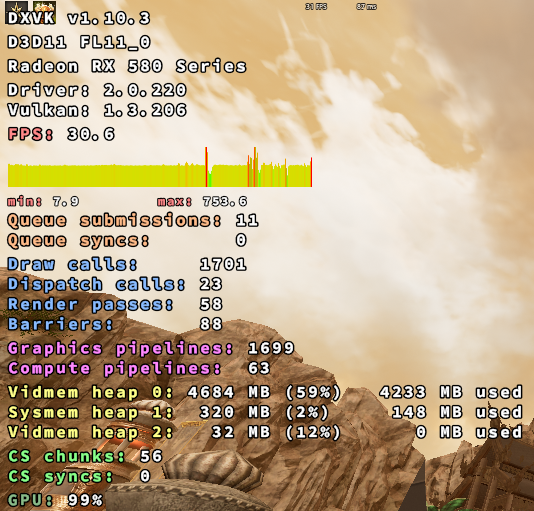
I get that it worked in an older version but that doesn't prove much. Feel free to to a git bisect to work out at which exact commit the issue started, if it's the Vulkan 1.3 thing then there's just not much we can really do.
I get that it worked in an older version but that doesn't prove much. Feel free to to a git bisect to work out at which exact commit the issue started, if it's the Vulkan 1.3 thing then there's just not much we can really do.
ok, I'll check the git actions builds
@roskiboy is this with specific graphical settings?
I didn't have issues launching the game with everything set to 2 or 1 on a Nvidia 960 and dxvk 2.0
If you haven't already then also make sure to update your GPU driver to the latest version.
@roskiboy is this with specific graphical settings? I didn't have issues launching the game with everything set to 2 or 1 on a Nvidia 960 and dxvk 2.0
If you haven't already then also make sure to update your GPU driver to the latest version.
oooohhh !!!
I have the latest version
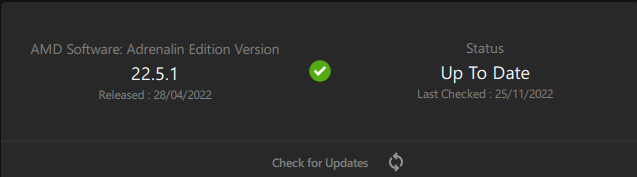 ..
..
I have tried up to the last build that is active from gitactions and it continues with the problem. I'm going to try resetting the default graphics settings.
@roskiboy Friendly ping. Did you figure something out?
@roskiboy Double friendly ping
I finally got around to testing this issue on Windows with my 7900XTX
Lastest driver, dxvk 2.0, every preset and window mode plus vsync on/off. Have still not been able to reproduce
Closing due to a lack of feedback. Feel free to reopen.
DLLs
d3d11.dllx1 2022-11
Please describe your issue as accurately as possible.
Hello, there is a problem with BNS, which when entering the selected character the game loads 20% after the client closes automatically.
PD: BNS UE4 Work in v1.10.3
Software information
Blade & Soul UE4
System information
Apitrace file(s)
Log files