2.0 and GRID 2
Hello.
Does that not happen with wined3d or dxvk 1.10.3?
Hello. Does that not happen with wined3d or dxvk 1.10.3?
IDK about wined3d cuz never tried it but it does happen with 1.10.3 and lower versions. 2 years ago I ran the game without any problem with wine 5.7 and DXVK 1.7 (I even have a video on YT about that). But now with ALL DXVK versions between 2.0.0 and 1.7.0 - this happens. I wonder if the problem is with Wine itself.
this happens. I wonder if the problem is with Wine itself.
Then something similar would probably show with wined3d. Maybe
this happens. I wonder if the problem is with Wine itself.
Then something similar would probably show with wined3d. Maybe
I'll try witn wined3d but the problem is everything I can find is for windows only. I can't find wined3d for linux, so I'd appreciate any suggestions how to run the game with it.
Uninstall dxvk, then it will use wined3d. It is a part of builtin wine 🙂
With wined3d it runs as poorly as on Steam with Proton - white artifacts during race which makes it unplayable.
So the loading screens are just as long?
Funny enough but no - they're almost instant. But the moment you get to the actual race, there are white artifacts and the whole HUD is broken, half of the screen is covered in these white artifacts.
Understood. I have tested the game myself a bit on Steam with my AMD setup but haven't reproduced so far.
But will continue to test some more.
white artifacts during race which makes it unplayable
@rado84-github for non-Proton build helps native Windows d3dcompilers (winetricks -q d3dcompiler_43 d3dcompiler_47 workaround)
I'll install them in the system for wine to use them but I already have these two files inside the game dir where grid2.exe is located. They don't seem to change anything.
Here are screenshots - this is what the game looks like with wined3d (the cracked game) and with Proton on Steam (purchased game): https://imgur.com/a/W8s9V6K
And here are my user_settings.py for GRID 2 on Steam:
if os.environ['STEAM_COMPAT_APP_ID'] == '44350': #GRID 2 user_settings['PROTON_ENABLE_NVAPI'] = '1' user_settings['DXVK_ASYNC'] = '0' user_settings['DXVK'] = '1' user_settings['DXVK_HUD'] = 'fps' user_settings['VKD3D'] = '0' user_settings['USE_WINED3D11'] = '0'
This isn't the first time I've made such settings for a game, so I know what I'm doing. My user_settings.py contains such settings for many other games and all of them run flawlessly.
I'll install them in the system for wine to use them but I already have these two files inside the game dir where grid2.exe is located. They don't seem to change anything.
The game does not shipping with these files. Delete them and try launching the game again (after winetricks -q d3dcompiler_43 d3dcompiler_47 workaround).
I know it doesn't. I put them there along with the DXVK files cuz I've noticed some games require them.
So far the best possible performance is using the 32-bit DXVK 2.0 and get patience about the Loading screen. Anything else is either artifacts or simply no game running. Well, I guess I'm in no hurry for anywhere, so I'll wait 30 to 60 seconds, LOL That's the price for abandoning Crapindows and I'll pay it.
it stays on a black screen with the reading "Loading" for far too long than it should. Sometimes it can stay at that screen for 30 seconds or longer.
kk, I did couple of tests and can reproduce this -> https://youtu.be/PI3RAOVfSoE?t=278 only without esync/fsync/ntsync.
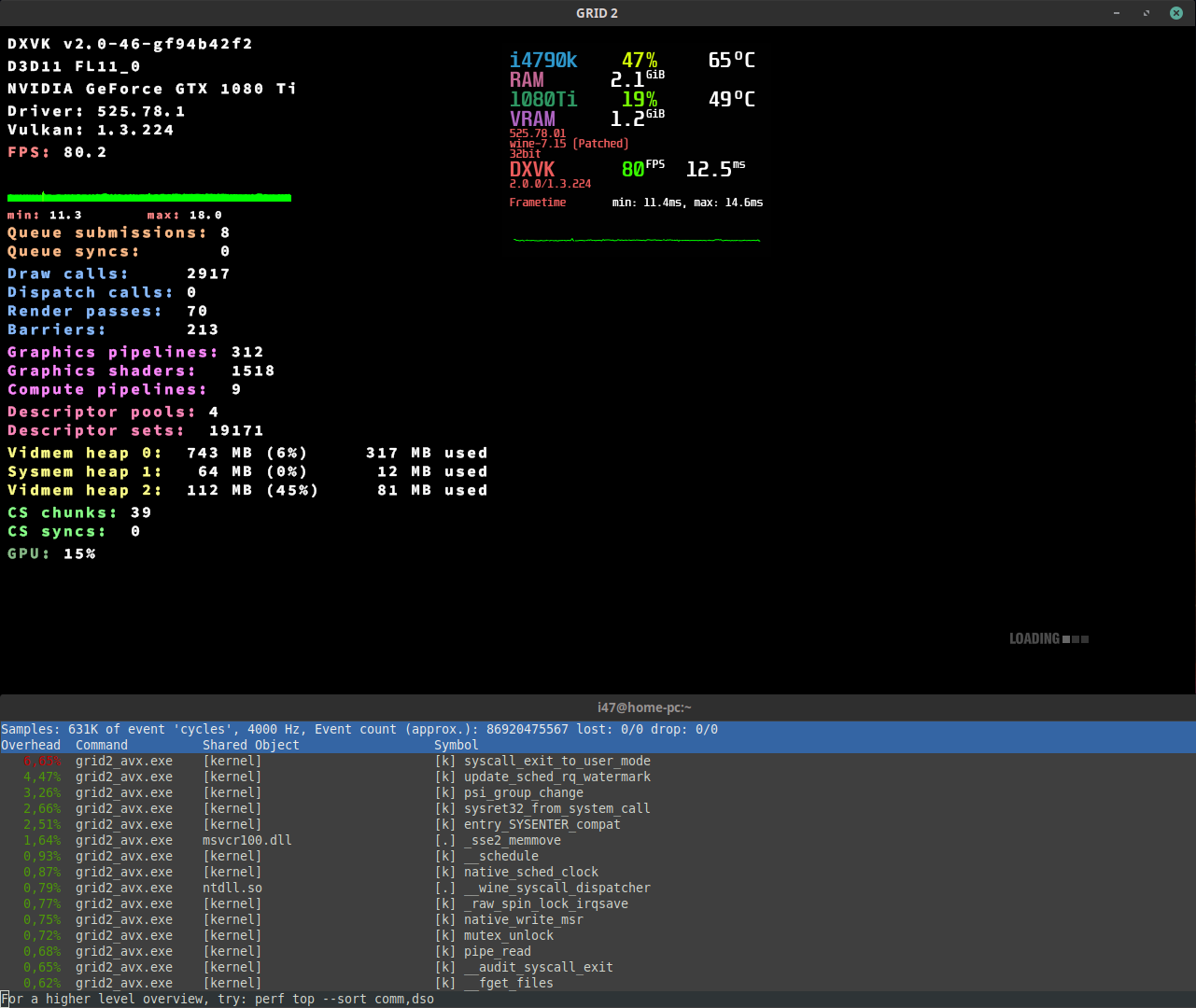
I haven't found anything yet other than it looks like the performance of this application is limited by Server-side synchronization primitives:
So make sure you use one of these^ patchsets to fix performance issues.
@rado84-github could you tell us how esync and fsync affect the long loading screen problem?
@rado84-github could you tell us how esync and fsync affect the long loading screen problem?
Esync is enabled by default systemwide by me (bc 98% of the games run better with it), so I'll have to figure out a way to tell DXVK to not use it for this game specifically. IDK what fsync is, so I've never enabled it but I will, if I have to.
OK, so I modified the start script to these two variants:
export WINEESYNC=0 export WINEFSYNC=1
and
export WINEESYNC=0 export WINEFSYNC=0
and the loading screen became somewhat quicker but it's still there. Now it's not 30 seconds (or longer), now it's maybe 6 or 7 seconds which is an improvement though not enough. For comparison on Windows 7 this loading screen was rarely seen bc the loading process between an end of race and a movie happened almost instantly. Also, when I first ran the game 2 years ago with the already mentioned DXVK 1.7 and Wine 5.7, that loading screen behaved like on Windows 7 - almost instant.
@Iglu47 I'm not that advanced linux user, thus I have no idea what to do with these patches and how to apply them to the kernel. My level of understanding linux is somewhere between "newbie" and "intermediate".
You can find out if Esync or Fsync is being used by the corresponding message, which can be found in the log or terminal output (will be written: esync: up and running. or fsync: up and running.).
All required patches are already in Proton 7.0+ and kernel 5.16+ and Steam Proton by default already usually tries to use this.
As I said above, I can't reproduce the issue. If there's a problem, then it is probably not related to DXVK.
video - Screen loading (on HDD, not SSD)
@rado84-github Are you still having issues with this?
No, seems to be OK with DXVK 2.2.
Woooooo!
Proton versions
proton 7.0x1 2023-01
Launch options
WINEESYNC=0x1 2023-01WINEFSYNC=0`x1 2023-01WINEFSYNC=1`x1 2023-01DXVK_ASYNCx1 2023-01DXVK_HUDx1 2023-01PROTON_ENABLE_NVAPIx1 2023-01STEAM_COMPAT_APP_IDx1 2023-01
Overall the performance is good, there's only small problem - when the game is loading either the next race or a cutscene, especially after ending a race, it stays on a black screen with the reading "Loading" for far too long than it should. Sometimes it can stay at that screen for 30 seconds or longer.
But other than that - no other problems found.
Software information
GRID 2, all "high" settings, only "advanced fog" was disabled (because I don't like it).
System information
Apitrace file(s)
Apitracing has never worked for me, no matter how many times I tried it - the game (no matter which one) always crashes. If anyone else is experiencing the same thing, maybe they can provide an apitrace.
Log files
grid2_avx_d3d11.log
grid2_avx_dxgi.log