Need For Speed The Run crashes at startup
It's the same with Wine 3.10 and latest DXVK build from today. Are there any chances to look at it soon? Thank you :)
It's not that I don't want to fix it, it's just that I have no idea why this happens. I doubt it'll ever work to be honest.
These are very sad news :( Thank you and keep up the good work.
@mozo78 are you sure there's nothing wrong with your driver / system? NFS The Run works well here with DXVK:

The log you posted uses an NVIDIA driver from the 390 series, maybe that's the issue? Or something wrong with your X11 install?
Thank you for yor replay :)
I try it on Arch Linux with 396.24 and on Mint with 396.18.11. It's may be a release related problem. I'll try another release and will inform you shortly.
@GabrielMajeri, the problem was Direct X wich I have installed previously. Now I tried it with clean prefix and the game started. Thank you, if wasn't you I can't manage to find it out. doitsujin I sincerely sorry for the false alarm and the inconvenience caused. Accept my apologies.
@doitsujin Since this wasn't an issue with DXVK, could the issue be closed?
@GabrielMajeri I am not sure if this is not an issue with DXVK. I am having the same issue as @mozo78 with 0.53 and 0.54, on Arch with the same card and drivers as you. I also tried the clean prefix that was mentioned above. What is even more interesting is that the game crashes on Windows too with DXVK. I saw somewhere a mention that the game can be run with DXVK only in 1280x720 resolution, that combined with the fact that the game crashes with a message from X about an invalid request concerning a window parameter, makes me think that something goes wrong when the game tries to switch resolutions. In my case, I have a 16:10 monitor, I am speculating that it has to do with the aspect ratio. If you think this should be re-opened, I can attach logs from both OSes. What settings did you use to make the game run?
Yes, the resolution cannot be changed. If you try even once, the game cannot be launched anymore. You talk about the 1280x720 resolution - this is description of my video on YouTube.
Anyway - you can run the game but you must begin in clean prefix again and when starting the game for the first time, you have to be on the max resoulution for your monitor. Do not use any lower resolution for the game will not start. When the game starts it will change the resolution to 1280x720 and you then can play. If you try to change the fullscreen mode or to change the resolution, it'll crash and will not run any more and you'll must begin again from start with clean prefix or with game's settings files deleted. It took me all day to figure it out. This however isn't a DXVK problem. I tried the game without DXVK and I again can't change the resolution or the screen mode. The game crashes immediately when I try to change to windowed mode. It fails with this message:
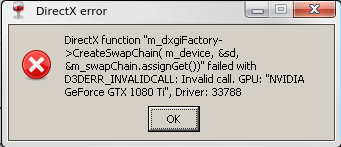
The wine error is:
https://pastebin.com/4XMEgM76
When you try to change the resolution nothing happens but once you close the game, it cannot be started again.
If you wish you can open a bug in winehq and I'll give logs there.
So, I just tried the procedure you described, and the result is the same, clean prefix with dxvk on top, and started the game. The game still crashes with BadWindow error from X. I actually tested the other thing you mentioned with Wine's d3d11, which in my case doesn't exhibit the same behaviour as yours. I was able to change resolution, change to windowed mode and start the game again with the new resolution just fine, which makes it not an exclusively Wine issue.
The one thing I noticed, is that in your case the game defaults to 1280x720 on the first start, where in my case it defaults to 1280x960. If my guess is correct, your monitor's aspect ratio is 16:9, where mine is 16:10, hence the difference in the default resolutions. I think there is something going on with the resolution changes and the aspect ratio but so far I can't be sure.
Strange...
Yes, my monitor is 16:9 1920x1080.
Pure prefix (3.10-staging) with DXVK - did not help.
I tried to change the resolution in three ways:
- By KDE.
- By Game (with D3D11).
- With Virtual desktop.
With 1920x1080 resolution - at the beginning of the game, I can see the counter at the top, but then the game tries to set the resolution to 1280x720 and crashes.
I also tried: 1280x720, 864x486, 640x360.
Debugger output before / after change resolution (with +x11drv):
0030:trace:x11drv:xinerama_init monitor 0x1: (0,0)-(1280,720) work (0,0)-(1280,720) (primary)
0030:trace:x11drv:xinerama_init virtual size: (0,0)-(1280,720) primary: (0,0)-(1280,720)
0029:trace:x11drv:xinerama_init monitor 0x1: (0,0)-(1280,720) work (0,0)-(1280,720) (primary)
0029:trace:x11drv:xinerama_init virtual size: (0,0)-(1280,720) primary: (0,0)-(1280,720)
0029:trace:x11drv:X11DRV_resize_desktop desktop 0x10020 change to (1280x720)
0029:trace:x11drv:X11DRV_WindowPosChanged win 0x10030 window (1280,720)-(1280,720) client (1280,720)-(1280,720) style 84000000 flags 0000181f
0029:trace:x11drv:set_mwm_hints 0x10030 setting mwm hints to 0,4 (style 84000000 exstyle 8000000)
0029:trace:x11drv:sync_window_position win 0x10030/4600002 pos 1280,720,0x0 after 23d4a0 changes=f serial=188
0030:trace:x11drv:update_net_wm_states setting wm state 0 for window 0x10058/4c00001 to 0 prev 1
0009:trace:x11drv:X11DRV_ExtEscape SET_DRAWABLE hdc 0x2005c drawable 4c00001 dc_rect (0,0)-(1280,720)
0009:trace:x11drv:X11DRV_WindowPosChanged win 0x10058 window (0,0)-(1280,720) client (0,0)-(1280,720) style 14000000 flags 00001030
0009:trace:x11drv:sync_client_position setting client win 4a00036 pos 0,0,1280x720 changes=c
0009:trace:x11drv:set_mwm_hints 0x10058 setting mwm hints to 0,6 (style 14000000 exstyle 8)
X Error of failed request:  BadWindow (invalid Window parameter)
  Major opcode of failed request:  12 (X_ConfigureWindow)
  Resource id in failed request:  0x4a00036
  Serial number of failed request:  93
  Current serial number in output stream:  97
The game won't run with virtual desktop. I tried it many times and it always crashes.
Nothing extracted yet.
Need For Speed The Run crashes at startup with the following error:
0031:fixme:d3dcompiler:d3dcompiler_shader_reflection_GetDesc iface 0x1457a0, desc 0x32cfd28 partial stub!
X Error of failed request: BadWindow (invalid Window parameter)
Major opcode of failed request: 12 (X_ConfigureWindow)
Resource id in failed request: 0x5800032
Serial number of failed request: 87
Current serial number in output stream: 91
The game runs with Wine and Wine-Staging without problems but with relativly low performance.
Software information
Need For Speed The Run
System information
Apitrace file(s)
apitrace.zip
Log files
https://pastebin.com/pg7M9Z9k
https://pastebin.com/DrgAeZTf
wine log.zip