err: D3D11CreateDevice: Failed to create a DXGI factory
If this is plain wine 7.0, then winevulkan is too old to run DXVK 2.0 and newer (see https://github.com/doitsujin/dxvk/wiki/Driver-support). Either update wine or use DXVK 1.10.3.
If this is plain wine 7.0, then winevulkan is too old to run DXVK 2.0 and newer (see https://github.com/doitsujin/dxvk/wiki/Driver-support). Either update wine or use DXVK 1.10.3.
2.0 and 1.10.3 doesn't work for me either
Then there must be some other setup issue going on. That error message you get pretty much means that there is no vulkan driver available.
15 Jan 2023, 16:46 by @.***:
If this is plain wine 7.0, then winevulkan is too old to run DXVK 2.0 and newer (see >> https://github.com/doitsujin/dxvk/wiki/Driver-support>> ). Either update wine or use DXVK 1.10.3.
2.0 and 1.10.3 doesn't work for me either
—
Reply to this email directly, > view it on GitHub https://github.com/doitsujin/dxvk/issues/3188#issuecomment-1383184108> , or > unsubscribe https://github.com/notifications/unsubscribe-auth/A3G6J6KWS4MDWXQAV34T7RLWSQLUZANCNFSM6AAAAAAT35MBOU> .
You are receiving this because you commented.> Message ID: > <doitsujin/dxvk/issues/3188/1383184108> @> github> .> com>
Yes as mbriar said according to your dxgi log it seems there is a driver issue. Make sure your vulkan drivers are installed and working correctly.
Depending on your distro the vulkan drivers might be seperate install from your main driver.
what is the package names of the vulkan drivers in ubuntu?, i'm pretty sure i have them installed
If you run this from flatpak somehow then I'd guess that the nvidia drivers from the flatpak runtime don't work with your host nvidia drivers or are broken for other reasons. And just to be clear DXVK 2.0 will not work with wine 7.0, so best try on DXVK 1.10.3.
15 Jan 2023, 17:02 by @.***:
what is the package names of the vulkan drivers in ubuntu?, i'm pretty sure i have them installed
—
Reply to this email directly, > view it on GitHub https://github.com/doitsujin/dxvk/issues/3188#issuecomment-1383187532> , or > unsubscribe https://github.com/notifications/unsubscribe-auth/A3G6J6JTSRQMOFBCTKOP6V3WSQNRRANCNFSM6AAAAAAT35MBOU> .
You are receiving this because you commented.> Message ID: > <doitsujin/dxvk/issues/3188/1383187532> @> github> .> com>
this bug is giving me a headache, i can't find the solution
I totally missed you are using bottles. I guess that means flatpak, so make sure that your system drivers and the flatpak drivers match each other. You can try updating your flatpaks flatpak update
I totally missed you are using bottles. I guess that means flatpak, so make sure that your system drivers and the flatpak drivers match each other. You can try updating your flatpaks
flatpak update
no update for flatpaks and nvidia drivers are working normally,
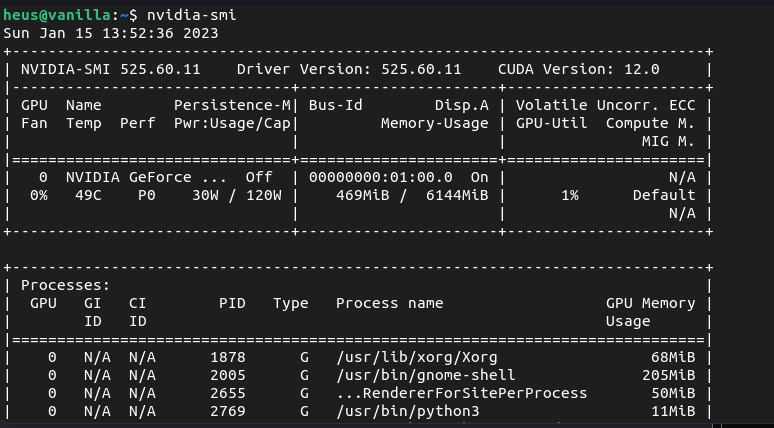
but it seems that dxvk is not finding what it needs

That was not about flatpak package update but rather for runtime. So make sure there is no mismatch in runtime and host.
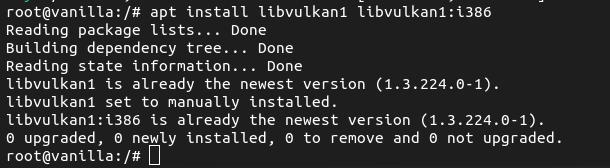
Also do you have Vulkan drivers installed?
sudo apt install libvulkan1 libvulkan1:i386
That was not about flatpak package update but rather for runtime. So make sure there is no mismatch in runtime and host.
Also do you have Vulkan drivers installed?
sudo apt install libvulkan1 libvulkan1:i386
shows that it is installed
That was not about flatpak package update but rather for runtime. So make sure there is no mismatch in runtime and host.
how do i see if there is runtime and host mismatch?
I don't use flatpak but i think you can probably find your flatpak installed version with flatpak list
I don't use flatpak but i think you can probably find your flatpak installed version with
flatpak list
i partially solved the error, it has to do with bottles not dxvk, thanks for the help
Upstream links
- doitsujin/dxvk/issues/3188x2 2023-01
Please describe your issue as accurately as possible.
If you use Windows, please check the following page: https://github.com/doitsujin/dxvk/wiki/Windows
Software information
Using Bottles to run DARK SOULS REMASTERED
System information
Apitrace file(s)
For instructions on how to use apitrace, see: https://github.com/doitsujin/dxvk/wiki/Using-Apitrace
Log files
DarkSoulsRemastered_d3d11.log
DarkSoulsRemastered_dxgi.log
I believe that this error occurs due to the lack of some dependency but I don't know which dependency that would be, I already tried to reinstall the driver but the error persists, what are the possible solutions for this?