[RFE] create a script to automatically install DXVK into a wine prefix
I can send a PR to fix that btw, unless there's opposition
IIRC the issue with the setup script was that it didn't fit the use cases of ALL people and that a lot of people had issues with it all the time when it worked fine for others. Just look up some issues.
Also people felt entitled to make a whole lot of PRs to "fix" issues regarding their own weird setups or shell ideals, which is also something that was just polluting the PR tracker for no good reason.
IMHO inexperienced users should use a tool like Lutris, Heroic, etc... so they don't need a setup script.
And on the other hand more experienced users can roll their own script to fit their special setups anyway.
The script is gone for good reasons and we should keep it that way.
IMHO inexperienced users should use a tool like Lutris, Heroic, etc... so they don't need a setup script.
I am not a gamer but a developer. However I do set up Linux configurations sometimes for friends, etc. So, I'm not really familiar with Lutris and Heroic, however I do know well that if I setup gaming environment for someone, latest WINE and DXVK is preferred.
With that said, count me in to the list of "inexperienced users" I guess, and please answer: given a latest tarball release and a WINEPREFIX with games, how to I use any of these tools to install DXVK into it? And while at it: can we replace the current text "copy/override" with that description?
Also people felt entitled to make a whole lot of PRs to "fix" issues regarding their own weird setups or shell ideals, which is also something that was just polluting the PR tracker for no good reason.
I see… Not sure what to suggest here other than marking such PRs with a special label, then ignoring if there's no resources moral or timewise. I mean, unless you have a solution through Lutris or whatever, the current state is worse from a user standpoint.
I'm almost certain it would have caused less friction to just immediately "won't fix" close the occasional PR/issue about weird non-bash setups and POSIX purists that came in once a year then it was to remove the script outright, but what is done is done.
Right. Can we just introduce a policy a là "no weird shell setups for setup_dxvk.sh"? Document that in a README, and just close any PR trying to fix weird setups as part of that policy.
I am even willing to help with formulating such policy if there's an agreement. I will probably need some links to related discussions to figure out what exactly are the problems we are trying to avoid and some spare time, but I can do that.
As far as I know Heroic can pull the latest DXVK releases automatically and it can use existing prefixes as far as I can tell.
Bottles also has a nice GUI for people to pull latest DXVK.
Lutris currently is in the weird situation that they ship their own DXVK due to some special configs, which is outdated... but they can also use existing prefixes.
The benefit of using such manager GUIs is also that its a nicer experience to interact and start added games.
Another solution would be to skip all that and simply add your game installs as non-steam games to steam and use proton instead.
With that said, count me in to the list of "inexperienced users" I guess, and please answer: given a latest tarball release and a WINEPREFIX with games, how to I use any of these tools to install DXVK into it? And while at it: can we replace the current text "copy/override" with that description?
I've always used the setup_dxvk.sh script without any issue, so I am a bit perplexed by it being removed. I guess I can just copy it over from an older release and it hopefully will continue to work. But I find the mindset of "since it was broken for a select few people, we break it for everyone" a bit indifferent to the, perhaps, silent majority of users that were happily enjoying the ease of use that script provided.
I understand the frustration of having something that's not perfect, especially if it's only tangential to the actual body of work, and when there are plenty working alternatives. But perhaps this could live on as a separate project for those of us that prefer the command line for basic tasks like installing software.
I use setup_dxvk.sh quite often to test applications/get around application incompatibility. It is much simpler for me, someone who maintains Wine AppDB entries, to work directly from the terminal rather than GUI managers that abstract away installation and management of Wine prefixes. So the removal of this script, which has never failed for me in any case, seems silly when the issues around it were about POSIX compliance
Well the script should continue working as long as nothing on the wine side changes.
So you can just use your working copy.
Winetricks also ships dxvk verbs if you dont want a GUI tool to install it.
One could argue that its out of this projects scope to setup your wine prefix or whatever. 🐸
setup script setup_dxvk.sh was no longer deemed useful and got removed
I used it all the time. Why?????
The script is gone for good reasons and we should keep it that way.
Well, thank you, now I have to move files by hand every time, and then configure dll libraries in winecfg for each new prefix. This is so inconvenient. This is what the installation script was created for.
So you can just use your working copy.
New users don't know how to move the libraries, you need to know exactly where to put and what to configure after that.
If someone is using Wine without any of the front ends like Lutris, Bottles and Heroic, figures out what is needed for a game to work from winedebug channel outputs, applies winetricks components, can handle manual installation of an app and needed components within Wine without screwing up the prefix , actually willing enough to use latest upstream Wine releases with the risk of regressions and also being content with upstream Wine releases that lacks patches from Proton etc etc can handle a manual installation or can spin their own scripts.
People that are not in that group are basically clueless about what DXVK is, what is a d3dcompiler, what is a dll override, what even "upstream Wine" means and they need those mentioned frontends for non Steam use cases for many of the reasons listed above.
So there is no benefit in pursuing a script in upstream release for general availability and arguing over that as if it would be a benefit for everyone is pointless.
So many times that people have tried to shape that script for their will/desire/use case/workflow , there was no way to satisfy anyone with the script so right now everyone can go wild with their own, specifially tailored for their use case scripts imo :)
So there is no benefit in pursuing a script in upstream release for general availability and arguing over that as if it would be a benefit for everyone is pointless.
I strongly disagree with this. I have a good understanding of how wine works, but it's not about that at all, it's about applying/removing dxvk to/from the prefix more conveniently. All of your arguments are out of thin air and I hope you will stop acting like a child and understand what I mean.
All sorts of frontends like winetricks, of course, are useful but don't know how to remove dxvk or reinstall it and it's better not to rely on them and always have a fallback solution.
So many times that people have tried to shape that script for their will/desire/use case/workflow , there was no way to satisfy anyone with the script so right now everyone can go wild with their own, specifially tailored for their use case scripts imo :)
All these years while there was dxvk setup script I was quite satisfied.
So, because some people were creating PR's to change a script, and the decision could not be made about what to change the script to.... the script was deleted, instead of just rejecting the PRs?
This seems like a nuclear solution... I can almost guarantee this will simply end up with people copying old versions of the script around or some other form of hackery... Lots of people use this functionality. Just reject the PR's to change it... don't remove it please.
EDIT: It is simply incorrect to state that everyone who knows what DXVK is and can manually setup a wine prefix also has the knowledge to write their own script for their own use case. I know next to nothing about bash scripting, but I have manually installed DXVK (with the previous script) a myriad of times.
The decision to drop the script was made due to multiple factors, not only the mass on PRs, so don't hang yourselves up on only that argument.
The old script will continue to work, because dxvk will continue to be a bunch of DLLs. Nothing more...
I don't understand the big drama of getting rid of a thing that simply didn't just work:tm: for all users and due to that created maintenance burden that was just not worth to deal with. It is out of the projects scope to handle setting stuff up. Why is this such a big problem
I get the feeling everybody here is fine with setting up their wine prefixes and managing them by hand, but using the old script or other tools to properly install dxkv is too much work.
This is a work flow that imho an inexperienced user should not have to deal with, so an upstream install script would simply lure them into it. Instead of them using managers that are aimed to such users.
Alright, so to give some decision: how about changing the README.md so it would refer to multiple ways of installing the DXVK, including the old script being inside the last commit it existed at, and would add that the script is no longer maintained due to the difficulties it brought to the project.
I think it's a nice compromise that would allow DXVK to no longer maintain the script, but at the same time would document some way people may use it.
Seems a bit abrupt to nuke an end-user point of entry like this. I can understand it from the developer's perspective, but as a user I haven't had problems with the script. The way the manual installation process is currently described in the README does beg the question of whether there couldn't be an automated way.
I understand the importance of helping newcomers, but as it stands this change now makes the project less accessible overall. The readme does not state in anyway how to use DXVK with one of the various GUI managers, or that it is even integrated into Proton. Providing manual install instructions first will only lead to further confusion on this front, and if this was meant to be a change for clarity then the readme should be reflected to show this. Manual install instructions as the first header is not the way to go
IIRC the issue with the setup script was that it didn't fit the use cases of ALL people and that a lot of people had issues with it all the time when it worked fine for others. Just look up some issues.
Also people felt entitled to make a whole lot of PRs to "fix" issues regarding their own weird setups or shell ideals, which is also something that was just polluting the PR tracker for no good reason.
IMHO inexperienced users should use a tool like Lutris, Heroic, etc... so they don't need a setup script. And on the other hand more experienced users can roll their own script to fit their special setups anyway.
The script is gone for good reasons and we should keep it that way.
Show a warning when the script runs and ask for the user input. Everyone's happy.
echo "This script is potentially dangerous and can break stuff. Are you sure you want to continue (y/n)? "
read answer
test "$answer" != "y" && echo "Goodbye" && exit
I'm not an expert on shell scripts, and the one we had just clearly didn't meet the quality standards that were expected of it.
And in a world where literally the first line causes controversy I just don't see myself qualified to maintain that kind of script anymore (and yes, if it's in this repository I am responsible for maintaining it even if it's originally a third-party contribution). I'm also just tired of the back and forth of some people wanting one thing and others wanting the opposite.
If you were using the old script and it worked for you - great, grab a copy of it from 2.0, maybe modify it in such a way that you can point it to a DXVK directory without having to move the entire script around and keep using it I guess. At least that's what I've done locally. Might as well put it up here: https://gist.github.com/doitsujin/1652e0e3382f0e0ff611e70142684d01
Our README/Wiki could be improved, arguably, but I'm just not going to have a script in the repo again, that ship has sailed.
@doitsujin so, how about the compromise I suggested here? You don't have to maintain the script.
Thats what Doitsujin meant with:
Our README/Wiki could be improved
Thats what Doitsujin meant with:
Our README/Wiki could be improved
Cool. Just wanted to make sure there's no misunderstanding or anything. Unless someone else is willing to do that (which I would be totally fine with), I'll carve up some time in the next few days and will send a PR to update README per the comment referred above.
I created a PR #3216 to cover the concerns listed here.
Please comment there if I missed something important.
The script is gone for good reasons and we should keep it that way.
Well, thank you, now I have to move files by hand every time, and then configure dll libraries in winecfg for each new prefix. This is so inconvenient. This is what the installation script was created for.
Jesus...
sudo gedit /bin/dxvk
export WINEPREFIX=path to your wineprefix
export DXVK_FOLDER=path to the folder where you extracted the archive (it contains x64 and x32 folders)
cp -v $DXVK_FOLDER/x64/* $WINEPREFIX/drive_c/windows/system32
cp -v $DXVK_FOLDER/x32/* $WINEPREFIX/drive_c/windows/syswow64
Now give the script the appropriate permission with sudo chmod +x /bin/dxvk
Then winecfg
-Libraries -> dxvk (native); d3d9 (native); d3d10core (native); d3d11 (native);
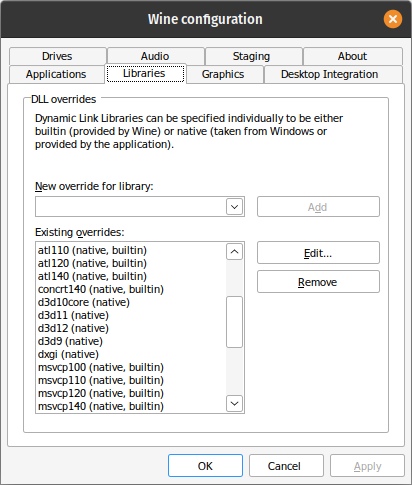
The script allowed easy uninstallation of DXVK, which was the far more important issue for someone like me who tests applications (for Wine's AppDB) and needs to do this very often. This is only a solution for people who just need to install DXVK and never uninstall it
Libraries -> dxvk (native); d3d9 (native); d3d10core (native); d3d11 (native);
@gabriele2000
It's possible to make a Windows registry file to add these entries without going into winecfg, but it is better to use a ready-made shell script.
Now it's gone. The Valve overlords are satisfied. (C)
@katawful Exactly. Have you ever seen a Windows user treated like: setup.exe is not standardized and it's a clusterfuck, install programs in Program Files manually!
@gabriele2000
It's possible to make a Windows registry file to add these entries without going into winecfg, but it is better to use a ready-made shell script.
Now it's gone. The Valve overlords are satisfied. (C)
Sure it's an inconvenience not having it anymore, but most users won't need to manually install DXVK, plus those who can do it are able to write a basic script like mine...
Disclaimer: this is my second script of my lifetime, the first one is to compile obs-vkcapture both for 32-bit and 64-bit, it's like: 12 lines long.
@katawful Exactly. Have you ever seen a Windows user treated like: setup.exe is not standardized and it's a clusterfuck, install programs in Program Files manually!
Actually I used Windows most of my life, until I was 20 so until 2020: I shit you not, most installers don't even know how to install stuff in a proper way and their uninstaller can't uninstall stuff properly and you'll have to use "Advanced Uninstaller PRO" or similar crapware.
Then
winecfg-Libraries -> dxvk (native); d3d9 (native); d3d10core (native); d3d11 (native);
This can also be easily automated, just looking through the install script:
/path/to/wine reg add 'HKEY_CURRENT_USER\Software\Wine\DllOverrides' /v {dxgi,d3d9,d3d10core,d3d11} /d native /f
It can even be improved because by exporting these variables you can use any wine version completely portably, (this is optional):
PATH="$winepath/bin:$PATH" LD_LIBRARY_PATH="$winepath/lib:$LD_LIBRARY_PATH" WINEDLLOVERRIDES="winemenubuilder.exe=d" WINESERVER="$winepath/bin/wineserver" WINELOADER="$winepath/bin/wine" WINEDLLPATH="$winepath/lib/wine"
(winepath being the root of the wine directory, basically what lutris used to do before the fancy wrapper business)
>_< now i have to kick this script around or diy. who tf doesnt have bash installed!??!?!
anyway =/ thx for saving gaming on linux
_< now i have to kick this script around or diy. who tf doesnt have bash installed!??!?!
anyway =/ thx for saving gaming on linux
I'll create an install script as soon as possible for you, if you want.
Tomorrow I'll write everything and you'll be free to do what you want with it.
I suppose that your ".wine" folder is in your home, right?
By the way "bash" is what you use everytime you open the terminal, you have it, everyone has it.
I'm working on a drop in replacement for setup_dxvk.sh.
When it is ready I will let you know.
Here's the replacement: dxvk-installer
Launch options
WINEDLLOVERRIDES="winemenubuilder.exe=d"x1 2023-01WINEPREFIXx3 2023-01DXVK_FOLDERx1 2023-01DXVK_FOLDER=pathx1 2023-01WINEPREFIX=pathx1 2023-01
Upstream links
- doitsujin/dxvk/issues/3211x1 2023-01
Having to copy dlls into wine prefix and then starting
winecfgmanually and adding overrides is tedious and error-prone. Would be great if there was some script that automate that effort.Release 2.1 mentions at the bottom
Sounds like a usecase was found! ☺
System information