Devil May Cry 5: enviorment bugging in and out
It really doesn't explain the problem. I don't know what the game normally looks like. Please post some comparison screenshots of what it should look like.
You've also left out all the necessary information that the issue template asked for as well as the logs and the apitrace.
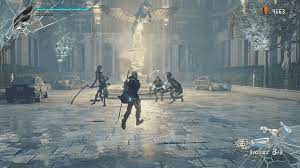
this is what it is supposed to look like
there is supposed to be buildings and some times the floor glitches in and out
here is a bunch of random stuff that can possibly help
dxgi.log
cant get the configs
Does this also happen without reshade?
You're not even using DXVK, are you? DXVK isn't compatible with ReShade on Windows.
You need to post more information...
Are you on Windows or Linux?
If on linux are you using proton?
What proton version?
what GPU is that? AMD, NVIDIA or Intel?
what driver are you using?
Also the game defaults to Directx 12, are you on 12 or 11?
check the dmc5config.ini file in the game main folder and show what is in the line that says "TargetPlatform="
Also what kobin said above, DXVK and reshade on windows is messy if not completely broken.
If the game is running on directx 12 you are likely not even using DXVK at all since it supports only DX 9/10/11
Windows, Intel, idk what driver, Direct 11,
but it is automatticly direct 12 but I changed it
I strongly suspect youre not even using DXVK and even if you are, this is most likely an Intel driver bug. If you can't even be bothered to find out what driver version you're using and provide actual DXVK logs, I don't see the point of this.
where can I see what driver I have?
In the DXVK logs for example
yeah cant find them could you explain more?
[Render]
PCTargetAPIFallback=Enable
Capability=DirectX11
TargetPlatform=DirectX11
UseOptimizeShader=Enable
LastCrashReport=
[RenderConfig]
FovHackEnable=false
RenderingMethod=Interlaced
ImageQualityRate=0.5
Fov=40
FullScreenDisplayMode=177
FullScreenMode=true
WindowMode=FullScreen
VSync=false
FramerateSetting=VARIABLE
AntiAliasing=FXAA_TAA
MotionBlurEnable=false
DepthOfFiledEnable=true
ShadowQuality=LOW
ContactShadowSetting=CUSTOM
DynamicShadowEnable=true
ShadowCacheEnable=false
TransparentBufferQuality=NONE
MeshQuality=LOW
TextureQuality=LOWEST
StreamingTextureLoadLevelBias=1
SamplerQuality=Trilinear
AOSetting=NONE
SSRSetting=OFF
SSSSSetting=OFF
BloomEnable=false
LensFlareEnable=false
ChromaticAberration=false
EffectVolume=0.300000012
ColorSpace=SRGB
here are my configs
The config file of the game is completely useless to us.
DXVK creates files called DMC5_d3d11.log and DMC5_dxgi.log right next to the exe or your game. If those files don't exist, you aren't using DXVK to begin with.
there is only one called amd_ags_x64.dll but no I do not have DMC5_d3d11.log or DMC5_dxgi.log
If those log files are not created next to the .exe then you're not even using DXVK.
how do i use them
Before that, do you know what dxvk is and what it does? There's usually not alot of reason to use it for Nvidia on Windows (or maybe even in general on Windows nowadays).
You need to get rid of reshade and place the 64bit dxgi.dll and d3d11.dll from DXVK next to the .exe. But yes, usually there is rarely a good reason to use it on windows.
where do i get it also i dont use nvidia
https://github.com/doitsujin/dxvk/releases
also i dont use nvidia.
Oh sorry I'm probably mixing issues in my head.
Missed you said Intel
k hope this works
but do I just place it into the dmc5 file?
Next to the exe
did not work should I just give up?
You should at least look for help elsewhere since this isn't dxvk. What ever is the cause of the issue.
dxvk also isn't meant to "fix games"
DLLs
d3d11.dllx1 2023-02dxgi.dllx1 2023-02amd_ags_x64.dllx1 2023-02
these should explain my problem my pc is a pretty strong pc with 20 gbs of storage so please help I love dmc5 and cant play