Hunt Showdown LOD issue
Hello there.
I was made aware of this issue some days ago a did a bit of testing. I think vram shenanigan's might be true as i was not able to reproduce on my main testing GPU (7900xtx) which have 24GB. I could try connecting my other rig with a R9 380 4GB at some point.
A sad part about gaming on Linux is that vram management is nowhere near as good as on Windows. Dxvk itself also isn't very sophisticated in this area afaik so vram requirements are usually higher than on Windows.
@Blisto91
vram requirements are usually higher than on Windows.
Yes, it's true. But in the case of Hunt Showdown no any not enough vram issue or something. Actually, as I understand, the problem is very artificial. Game engine think that there is no free VRAM but in reality more than enough.
P.S. The used part of the dxvk heap is very comparable with values I see on windows. A bit higher maybe but not so much to be a problem.
Fair enough hehe. I don't know any of the technical stuff so I'll let the devs comment on that.
As a quick extra note. During my testing i also tried making the game think i only had 4GB vram instead of 24 (tho all 24 was still available) , but it didn't seem to change anything.
A sad part about gaming on Linux is that vram management is nowhere near as good as on Windows.
I guess this could be true for the open source stack.
Nvidia has been providing big Hollywood VFX studios (that have high VRAM requirements for their huge assets) with Linux drivers for over 20 years now. At this point I would assume they have optimized the VRAM management in their stack pretty well.
Using the workaround here seemingly fixed the issue for me, at least to the point where it's not egregiously bad looking. Edit: It eventually does start to happen again, just not as fast as before.
Another issue is the game's gamma slider does not work. Unsure if that's a DXVK thing.
Issue started to be much worse after the 4faa598e099260398e0507383db84ae5fd637bce (probably). As I understand this commit was intended to solve the issue by reporting used memory instead of allocated which is the right idea. Just as I understand the value it reports is wrong. Likely Hunt Showdown show it in graphics settings:
See the screenshot

Also this value becomes bigger and bigger during the time.
The change was not intended to affect this game at all, it was meant to fix something else, but yeah, there was a bug either way.
Another issue is the game's gamma slider does not work. Unsure if that's a DXVK thing.
DXVK implements DXGI gamma control, so if the gamma slider does not work then the game almost certainly tries to change gamma on a system level for no good reason.
The change was not intended to affect this game at all, it was meant to fix something else, but yeah, there was a bug either way.
@doitsujin , but it fixed exactly the source (you can read in the bottom of the initial issue description inside 'My thoughts about the reasons') of the initial problem :) Thank you!
So, I am happy to report that with the latest commit (687d32cac53b0d41b52df4956c1767268674dd49) it works perfectly fine for me and probably the only issue the game has now is the gamma slider.
The change was not intended to affect this game at all, it was meant to fix something else, but yeah, there was a bug either way.
@doitsujin , but it fixed exactly the source (you can read in the bottom of the initial issue description inside 'My thoughts about the reasons') of the initial problem :) Thank you! So, I am happy to report that with the latest commit (687d32c) it works perfectly fine for me and probably the only issue the game has now is the gamma slider.
Great news!! Can't wait to ditch Windows for playing this game on Linux!
But I guess I have to wait until the fixes go into GE-Proton or compile it myself, right? (which I don't know how to)
You can use Proton Experimental Bleeding Edge (look at the beta tab for Proton Experiemental), which automatically pulls in dxvk/vkd3d-proton git every few hours.
You can use Proton Experimental Bleeding Edge (look at the beta tab for Proton Experiemental), which automatically pulls in dxvk/vkd3d-proton git every few hours.
Thx! Already been using bleeding edge. This also explains why I had that reported memory reporting bug inside Hunt - and I thought it was a thing of the test server version =D
You can use Proton Experimental Bleeding Edge (look at the beta tab for Proton Experiemental), which automatically pulls in dxvk/vkd3d-proton git every few hours.
(Proton Experimental Bleeding Edge) worked for me. All the textures are loading correctly and on the highest settings.
Thank you
You can use Proton Experimental Bleeding Edge (look at the beta tab for Proton Experiemental), which automatically pulls in dxvk/vkd3d-proton git every few hours.
(Proton Experimental Bleeding Edge) worked for me. All the textures are loading correctly and on the highest settings. Thank you
@MarcoWilli I switched to linux last year and came back to windows because Hunt didn't work on it. Now I switched for good.
I'm not sure, but to me it seems, there is still something wrong if I compare reported vram usage ingame vs. system report. I was wondering what else uses vram and did a comparison.
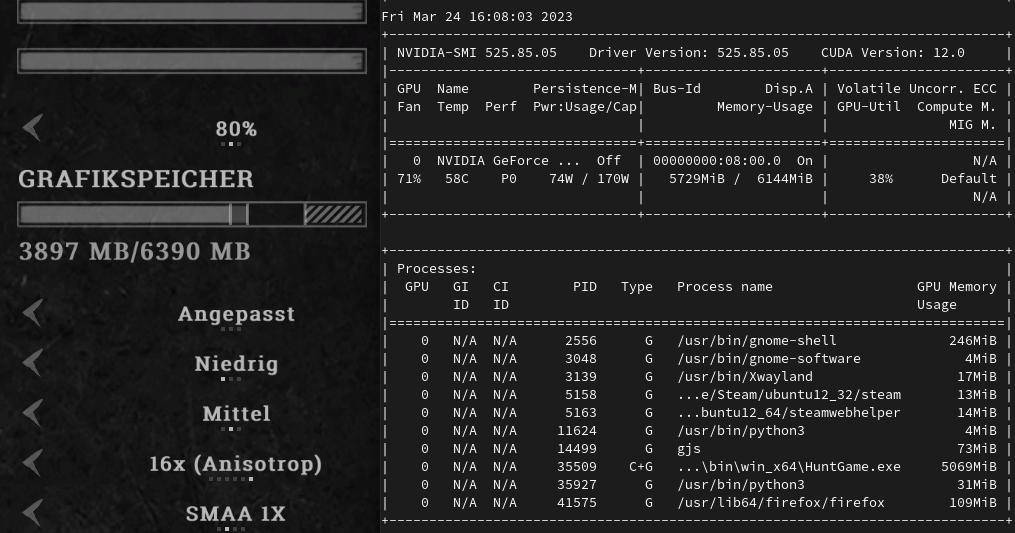
I'm not sure, but to me it seems, there is still something wrong if I compare reported vram usage ingame vs. system report. I was wondering what else uses vram and did a comparison.
@MarcoWilli It's ok. Main reason of the initial problem was the difference between size of allocated by dxvk and used vram. Look at the initial post for the details. Also you can enable dxvk hud memory to look at what I am talking about.
I also see some strange things, maybe @doitsujin can tell if it is ok or not. For some reason used VRAM values I see on mangohud and nvidia-settings are much bigger (~20%) than dxvk allocated heap size and look like sum of vram heap and system memory heap (even a bit bigger). I use the nVidia hybrid setup and game the only app that uses nvidia gpu.
Proton versions
proton experimentalx4 2023-03
Software information
Hunt Showdown
Steam AppID: 594650
Settings: everything on low
System information
Apitrace file(s)
I couldn't create a trace file because the game started to be very very slow and crashed during the boot with some CryEngine error. Maybe I did something wrong.
Log files
I was able to create log with info loglevel only. With debug game unplayble.
HuntGame_d3d11.log
HuntGame_dxgi.log
Symptoms
After a few minutes of running through the map all objects become very low detail in one moment and never recover.
Image
Reproduction
Run through the map. Teaching mission is enough. Issue reproduced on low VRAM GPUs (less than 8GB, 4GB is the best example). On linux it easily reproduced on my 4Gb gpu with low textures. On windows it works fine even with high textures.
My thoughts about the reasons
Probably the issue is caused by the in-game VRAM control. It has a setting how much VRAM can be used and the game never goes beyond this limitation. I was watching the VRAM usage by DXVK hud. I saw that when I ran through the map DXVK heap was growing until its size reached a limit from settings. Then the engine was trying to unload something (_used_ part of dxvk heap become much less, for example _heap size_ = 3.8gb, _used_ = 1gb) and clean out space for new objects. But VRAM usage is still 90% (because of whole heap size) and the engine can't load new objects. Engine probably doesn't know that there is a lot of free space inside the DXVK heap and looks at the whole VRAM usage. But the heap never becomes less even if it has a lot of free space inside and the game stuck at this point (everything unloaded, can't load anything new).