Deep Rock Galactic
If no logs are present, the game does not even load the D3D11 DLLs.
That seems quite odd, they advertise as DirectX11, what on earth could be going on here? Maybe its a matter of getting it to run correctly under DX11. It's Unreal Engine 4 so I don't see why that isn't the default.
Hopefully someone else who has it can chime in as perhaps my test setup is wrong somehow.
I discovered something with this game, under windows if I go -opengl argument it pops up with the EXACT same error, so for some reason it looks like to be switching to opengl under wine by default instead of dx11. Not sure if there is a DX11 flag yet, testing required.
UPDATE: So if you use -d3d11 argument the game mostly loads in d3d11, sometimes it won't load however and will sit in process tree at 16% CPU cycle, this is a failed launch and you need to retry until it comes up with DEEP ROCK logo and then eventually falls over producing DXVK log files in the 'Deep Rock Galactic/FSD/Binaries/Win64' folder
Wine errors on launch that MAY be of some interest (could be nothing)
Some general WINE errors: (in order of appearance)
[0503/112247:ERROR:network_change_notifier_win.cc(170)] WSALookupServiceBegin failed with: 8
006a:err:dc:CreateDCW no driver found for L"\\\\.\\DISPLAY2\\Monitor0"
003c:err:winediag:wined3d_dll_init Setting multithreaded command stream to 0.
003c:err:ole:CoGetClassObject class {294935ce-f637-4e7c-a41b-ab255460b862} not registered
003c:err:ole:CoGetClassObject class {294935ce-f637-4e7c-a41b-ab255460b862} not registered
003c:err:ole:create_server class {294935ce-f637-4e7c-a41b-ab255460b862} not registered
003c:err:ole:CoGetClassObject no class object {294935ce-f637-4e7c-a41b-ab255460b862} could be created for context 0x17
0075:err:winediag:wined3d_dll_init Setting multithreaded command stream to 0.
Assert( Assertion Failed: Attempting to use a Windows-Vista+ only path root on an older version of Windows for game 379430 ):c:\buildslave\steam_rel_client_win32\build\src\clientdll\userremotestorage.cpp:2270
D3D related errors related errors : Likely cause of crash.
(appeared alongside DXVK readouts but is not related)
0105:err:d3dcompiler:compile_shader HLSL shader parsing failed.
0105:err:d3dcompiler:compile_shader HLSL shader parsing failed.
Those errors are not directly related to DXVK. Make sure to use native d3dcompiler DLLs (not sure which version, if them game is older then you probably need _42 and _43).
ok, I just assumed they were DXVK related because they appeared directly in the middle of the DXVK debug read out. Will try _42 and _43
Ok installed _42 and _43, didn't launch at first, went and deleted log files and then it launched (not sure if related or just coincidence). And you also need -d3d11, althought I think it sometimes detects D3D itself, it's a bit finicky to get it to launch.
Will be testing it further, looks like there could be performance issues.
I will post some updated log files to see if anything new is revealed.
EDIT Game just crashes allot at start, some wine asseration fail and crashed renderer process. It does work but can take a few tries.
UPDATE Performance is quite low atm, around 10-15 fps, looking into resolving this. And yes, it can be finicky to get launching, not sure why.
Ok I have this game working 60+ fps now, turns out it doesn't like __GL_YIELD (NVIDIA) so be sure to not set that (I had NOTHING set). You do need dx 42/43 files and probably -d3d11 argument set.
I run at 4k as usual and have settings on HIGH-EPIC with low FSAA and get 60-80fps area (its quite variable), when I set the MAX fps cap to anything I notice frame skipping so keep that in mind.
If anyone else has this game please feel free to comment, it be great to hear from AMD users about its performance.
PS. I have not tested a online match yet or long term stability.
UPDATE: So the game runs reasonably well except there is a graphics glitch that happens on a few of the biomes.
I included a image of what happens, basically it looks like polygon stretching going on. Not sure how to get a log of any kind for this type of error but the most common issues happen on crystal type missions and only once you go downward a little bit does it start to intensify.
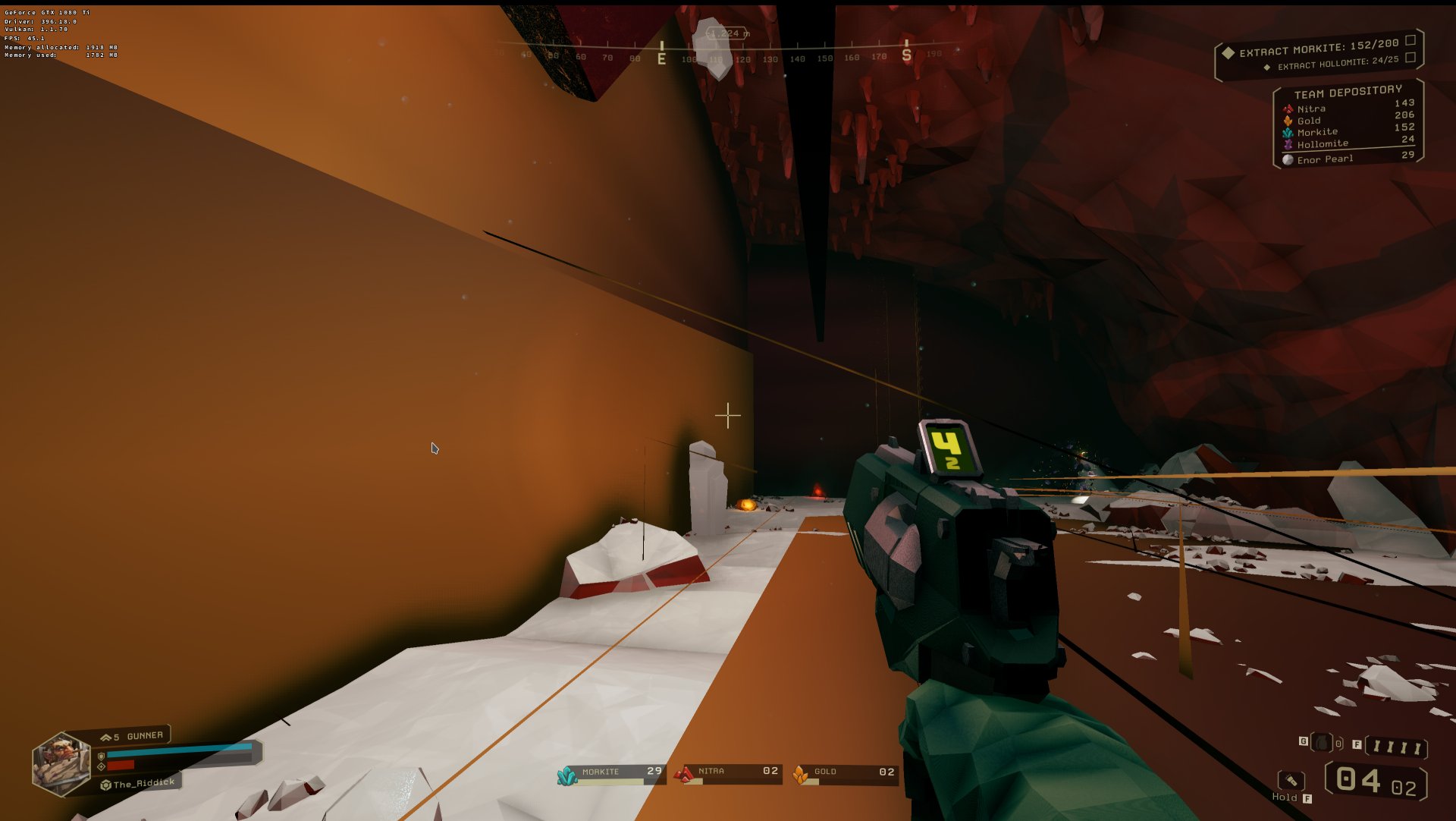
and another example

Can you record an apitrace?
I will certainly look into it. But the issue isn't normally present at the start of a mission, starts happening as you move further down, and when you return back to the drop pod to exit the mission, the issues start subsiding etc... In fact sometimes when you look in a certain direction the artifacts go away.
I just updated to 396.24 Nvidia drivers and will do some more testing, might also try the new compiler and see what happens. If the problems still persist I will look into exactly howto do a apitrace.,
I discovered I was running with the new nvidia compiler and that is why there were graphics glitches, with it off everything seems quite fine. So I guess this game has no major issues provided everything is configured correctly.
You might want to keep an eye on #267 in that case, there's some discussion going on about the new shader compiler. I'll close this since there seem to be no bugs here, although I would like you to submit an apitrace for me to be able to test the game on different GPUs and drivers.
About apitrace, seems you can do this under windows? well silly me. I will get right too that today sometime, I'm a bit thicc at times!
I recorded a trace file of 1 mission where the graphics glitching occurs, and well its 14gb...
There is no way to instantly spawn at the problem level and exit to create a small trace file. Sorry
This no longer appears to work properly. Get 1-4fps now. Shame
Hi. Not sure if I'm in entirely the right place, but maybe somebody can help. Disclaimer: I'm pretty new to running games using DXVK, I only just discovered that it comes bundled with CrossOver 20.
I have a M1 MacBook Air and CrossOver 20.0.4 (which appears to bundle dxvk-v1.5.1-8-g7443ead4_x86_64.tar.bz2). After setting FSD-Win64-Shipping.exe to use »native« versions of d3d11.dll and dxgi.dll I was able to launch the game and move around with more than ~1 FPS, and use the settings menu properly.
However, everything is really dark. There appears to be a lighting source missing (?). I turned the Gamma value all the way up to be able to see anything at all. See screenshots, I don't really know how to describe it.
Any pointers to how this could be resolved? The logs appear not to contain anything out of the ordinary, I've attached them here. Am I in the right place anyway? Should I go complain to CrossOver instead? Is this a M1 limitation?
I'm happy to help trace this if you're interested. Let me know what I can do :)


I have a M1 MacBook Air and CrossOver 20.0.4 (which appears to bundle dxvk-v1.5.1-8-g7443ead4_x86_64.tar.bz2). After setting FSD-Win64-Shipping.exe to use »native« versions of d3d11.dll and dxgi.dll I was able to launch the game and move around with more than ~1 FPS, and use the settings menu properly.
Sorry, but this is the wrong place. That version of DXVK was modified. If you're having issues with CrossOver, I encourage you to file a bug and/or support ticket with CodeWeavers. Also, I'm pretty sure neither Phillip nor Joshua provide support for Mac OS at all, let alone Apple Silicon.
Thanks, I'll try my luck with CodeWeavers.
Ok, ahora tengo este juego funcionando a más de 60 fps. Resulta que no le gusta __GL_YIELD (NVIDIA), así que asegúrate de no configurarlo (no tenía NADA configurado). Necesitas archivos dx 42/43 y probablemente el argumento -d3d11 configurado.
Corro a 4k como siempre y tengo configuraciones en HIGH-EPIC con FSAA bajo y obtengo un área de 60-80 fps (es bastante variable), cuando configuro el límite de fps MÁXIMO en cualquier cosa, noto saltos de cuadros, así que tenlo en cuenta.
Si alguien más tiene este juego, no dude en comentarlo. Sería genial escuchar a los usuarios de AMD hablar sobre su rendimiento.
PD: Aún no he probado ninguna partida en línea ni la estabilidad a largo plazo.
ACTUALIZACIÓN: El juego funciona razonablemente bien, excepto que hay una falla gráfica que ocurre en algunos de los biomas.
Incluí una imagen de lo que sucede. Básicamente, parece que se está produciendo un estiramiento de polígonos. No estoy seguro de cómo obtener un registro de ningún tipo para este tipo de error, pero los problemas más comunes ocurren en misiones de tipo cristal y solo cuando desciendes un poco comienza a intensificarse.
y otro ejemplo
Ok espera, ¿cómo hago todo eso? o mejor dicho que hiciste para llegar a ese punto, he tratado de resolver ese problema, realmente no se mucho de programación y quisiera comprobar si me puede funcionar a mi tambien, de paso lo ando probando en lethal company pero nada de nada
cuando voy a jugar el deep rock me aparece esto:
info: Game: FSD-Win64-Shipping.exe
info: DXVK: v1.9.1
info: Built-in extension providers:
info: Win32 WSI
info: OpenVR
info: OpenXR
info: OpenVR: could not open registry key, status 2
warn: OpenVR: Failed to initialize OpenVR
info: Required Vulkan extension VK_KHR_surface not supported
err: DxvkInstance: Failed to create instance
REFER TO LAST POST FOR CURRENT STATUS
Just wanting to open this issue up to see if fellow DXVK afiliarnos can chime in on getting this title working under DXVK. Its based off Unreal4 like ARK is and has no COOKED content (for opengl mode, use d3d11).
You get a message that shows up saying global shader cache file missing GlobalShaderCache-GLSL_150.bin and the application is built to load COOKED content but that is not provided. I tried using -game argument and the error message goes away, however title sits at 16% CPU usage indefinitely so perhaps it can't run uncooked (-game) mode.
(this is because its running in opengl mode, use argument -d3d11)
EDIT: Game claims to be DX11 but I'm not so certain its running in that mode because DXVK logs are not made, could be running opengl.
(USE -d3d11 argument on game exe, game often defaults to opengl and will half the time not launch correctly and CPU cycle at 16% forever)
Software information
Deep Rock Galactic
System information
Apitrace file(s)
Log files