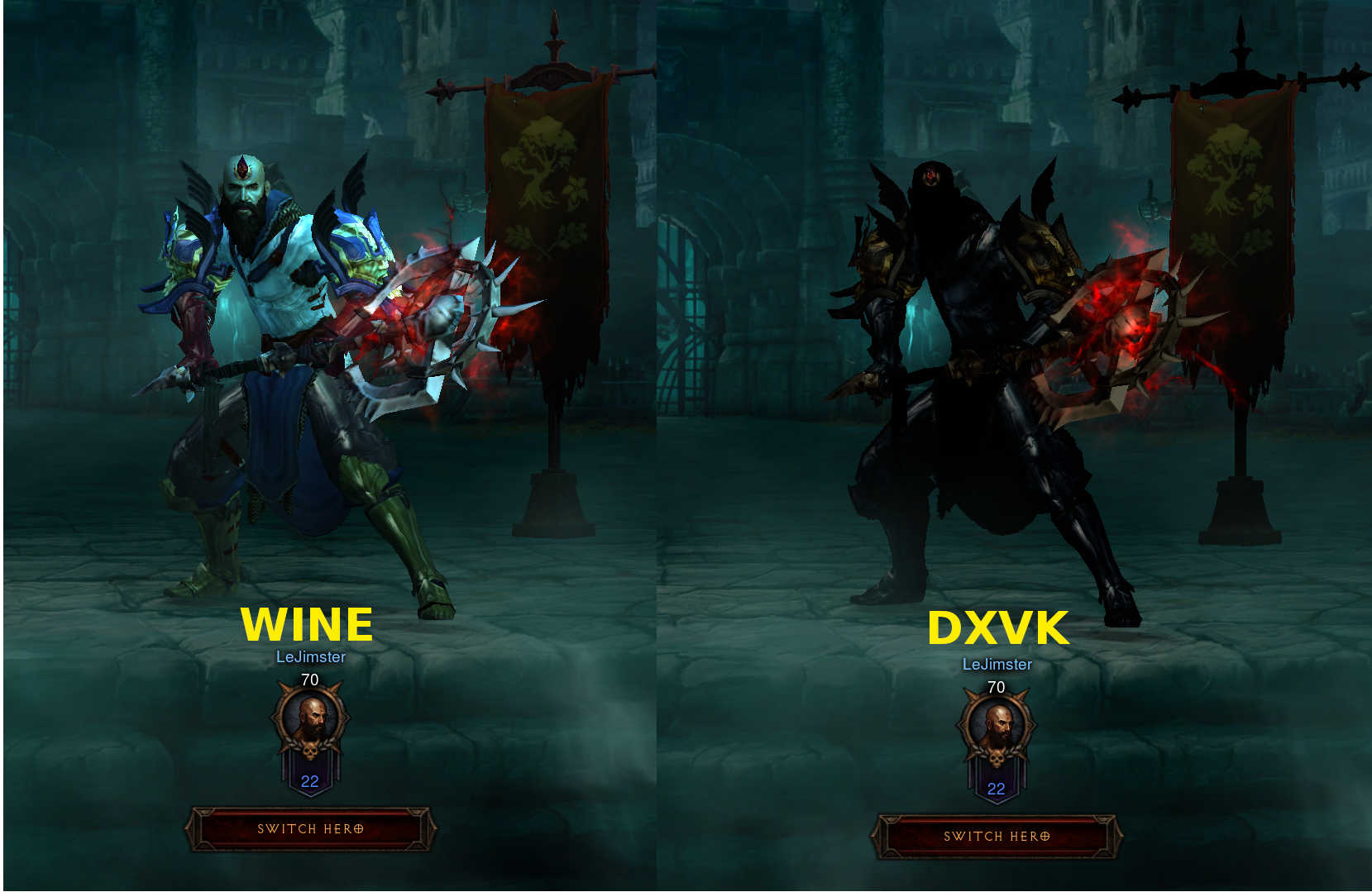
Diablo III characters dark/unlit
@LeJimster, as I see it is in Wine that does not work the shadow mapping at all, but in works in DXVK.
@Kerrung - Wine looks correct to me, it's consistent with how it looked when I used to play it on Windows and it looks the same in d3d9 mode. Maybe my screenshot wasn't clear enough. Here's a side by side from the menu.
I'm aware of this bug but I won't be able to fix it without an apitrace, sorry.
I try to get an apitrace for a few hours last night but it just makes small 2.5k trace files with unhandled exceptions in the log window. Anybody got a clue how I can get a trace?
I try to get an apitrace for a few hours last night but it just makes small 2.5k trace files with unhandled exceptions in the log window. Anybody got a clue how I can get a trace?
@LeJimster, try it on Windows, but you need to do this without using DXVK.
@Kerrung I tried it on windows, but it doesn't write any trace files at all! I did manage to get a wine trace when I used apitrace trace wine "Diablo III64.exe" -launch, but I'm not sure thats helpful.
I tried it on windows, but it doesn't write any trace files at all! I did manage to get a wine trace when I used apitrace trace wine "Diablo III64.exe" -launch, but I'm not sure thats helpful.
@LeJimster, in order to create a trace, run "wine apitrace.exe trace -a dxgi YOURGAME.exe".
DO NOT use DXVK together with apitrace! You need the Windows version of apitrace, not GNU/Linux native version.
@Kerrung Sorry for the confusion once again, yes I have been doing that for the last 2 days. I used the apitrace windows binaries from the official site and run them through wine exactly how you wrote it, but with -launch at the end to skip the launcher and go directly to the game. I tried this on Windows 10 as well but it doesn't produce any trace files. I am not the only person to attempt this, another user opened bug #37 but struggled to get a trace aswell.
I've tried tracing the 32-bit Diablo III.exe with the 32-bit apitrace and 64-bit Diablo III64.exe with the 64-bit apitrace windows binaries, the same issue. I'm using a clean wine prefix with no DXVK installed for the trace.
The problem with this game is that it tries to bind a VK_IMAGE_VIEW_TYPE_2D_ARRAY in to a binding slot that expects a VK_IMAGE_VIEW_TYPE_CUBE_ARRAY. Fixing this issue will require a large rewrite on how image views are handled and won't be fixing this (for now) since we can't get a working apitrace yet.
I use to have Diablo III, then blizzard revoked my copy because it was Russian with English language files (apparently I'm an illegal hacker). Otherwise I'd do a trace, then again I'm Nvidia hardware atm.
What I would suggest is booting into windows and attempting a apitrace from there.
This branch should fix the issue: https://github.com/doitsujin/dxvk/tree/image-view-fixes
Tested that branch and it appears to have fixed the issue from the testing I've just done. Many Thanks =)
Launch options
DXVK_LOG_LEVELx1 2018-05
All characters appear dark/unlit in the menus and in-game.
Software information
Diablo III x64
Everything on high/1440p
System information
Apitrace file(s)
Log files
DXVK_LOG_LEVELwas set todebugScreenshots