Dll override causes Final Fantasy XIV game launcher to fallback to directx9c
Maybe the game is refusing to load non-MS directx dlls in order to prevent cheating?
Please make sure that you can run 32-bit Vulkan applications on your system, and enable the 32-bit DXVK DLLs. The game itself should work.
It's probably a 32 bit problem like doitsujin said, the dx11 client is 64 bit, but the launcher is 32 bit and checks for 32 bit dx11 support. Either way I suggest using https://github.com/mclark4386/FF14Launcher which allows you to circumvent the official game launcher altogether unless there is an update in which case you have to use the official launcher to update the game.
I tried that python launcher but there is a string error when I try to launch the game with it so I was looking for a manual workaround. I don't think I can open an issue about that since that is a modified launcher the author found on pastebin. He is offering it for convenience but I don't think he's planning bug fixing or support in general..
edit: I tried using the 32 bit override but same result
edit2: I tried to use the FF14Launcher once more but
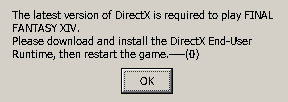
is this a dll issue or a launcher issue? I can't tell.
maybe I need to use the 32 bit vulkan alongside the custom launcher?
edit3: using the 32 bit vulkan dll override didn't help
I found the problem. The game needs a folder containing all the directx files inside its game folder otherwise it will think the launcher didn't download directx at all when first launching. To do that you need to create a folder called ffxivinstaller where the boot and game folders are use the directx_Jun2010_redist.exe to extract everything inside it. Then just launch the game. The game will launch in A Realm Reborn mode (I have stormblood and heavensword installed and it launched in stormblood mode at first) but after a login my LVL 70 character is still there.
@leewdch if you got the game launched in ARR mode from the python launcher, you need to fix the expansion level in the config file.
I tried putting the directx files where you said, but I still get the same error about "the latest version of directx" being required. Mind showing me what your folder structure looks like?
@mkaito To resolve the error "the latest version of directx is required to play ...", try to install directx_Jun2010_redist.exe with Wine. This file should be located in your "SquareEnix" folder.
$ WINEPREFIX="/the_path_to_your_wine_prefix/" wine "/the_path_to/directx_Jun2010_redist.exe"
Then you have to install xact with winetricks:
$ WINEPREFIX="/the_path_to_your_wine_prefix/" winetricks xact
The game now launches normally.
To play directx11 version at decent framerate, you have to install DXVK for Wine <= 3.21
It's probably a 32 bit problem like doitsujin said, the dx11 client is 64 bit, but the launcher is 32 bit and checks for 32 bit dx11 support. Either way I suggest using https://github.com/mclark4386/FF14Launcher which allows you to circumvent the official game launcher altogether unless there is an update in which case you have to use the official launcher to update the game.
Ran into this a bit ago with Wine Staging 4.8 and DXVK 1.21; launcher wouldn't let me enable DX11 until I installed the 32-bit Mesa Vulkan drivers for AMD (for openSUSE its the libvulkan_radeon-32bit package)
Software information
Final Fantasy XIV: Stormblood
System information
I don't own log files because the game launcher refuses to use directx 11 and fallbacks to directx 9. I know this is the issue because I tried launching the game client once before applying the dll override and the game client correctly found the native directx 11 binary (it was flagged as on in the game client config). Once I applied the overrides the toggle was gone and it started using directx 9. I tried launching the game with directx 9 just in case and it correctly opens.
I'm asking here because I found people in closed issue using this tool and the same game as well. Maybe there is a registry hack I don't know of that can help me launching the game with dxvk support.