@Amosar update drivers nvidia :https://developer.nvidia.com/vulkan-driver
I tried replaying your trace on Windows with native D3D11 but there just are no such elements. Did you record the trace with Wine/DXVK or on Windows?
Which hero has the missing spells? I play Heroes and have not seen this issue before
Sorry, I opened this problem too quickly
It's a wine problem, not a dxvk problem.
I'm so sorry because someone sent the fix on a wine problem and I did not try it because I thought it was related to another problem.
https://bugs.winehq.org/show_bug.cgi?id=43775
(the game contain this dll but wine is not able to load it because it is in another folder)
@Amosar Which dll do you mean exactly? I've got no icons for the majority of spells and talents as well after the latest update
@simonvanderveldt
Copy /${YOURFULLPATH}//Heroes of the Storm/Support64/d3dcompiler_47.dll to ~/.HotSPREFIX/drive_c/windows/system32/
Copy /${YOURFULLPATH}/Heroes of the Storm/Support64/d3dx11_42.dll to ~/.HotSPREFIX/drive_c/windows/system32
@MeissnerEffect copying d3dx11_42.dll seems to have done the trick :) Thanks!
d3dx11_42.dllx2 2018-05d3dcompiler_47.dllx1 2018-05
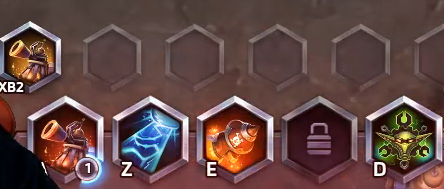
Some spells have no picture and the profile picture is not displayed if the player is not in-game. The problem occurs with wine directx 11 dll too.

Example with dxvk:
How it look on windows or with directx 9 on wine:
Software information
Heroes of the storm
System information
Apitrace file(s)
Log files