Performance regression
Just do a git bisect?
That said, this is a small regression and might very well be a side effect of a much needed bug fix, in which case this is #wontfix. Re-adding bugs for 4% more performance is not an option.
I was thinking a regression might have happen because KCD intro section use to get near 50fps now its in the high 30s, low 40s.
Not that it matters much I guess since it crashes at that intro scene still (I provided a trace). Also might have noticed some performance dip with Deep Rock Galactic.
It should be noted I'm on 396.24 atm. (396.18.11 has a xorg bug or something)
@jarrard
Hi,
dropping from near 50 to high 30 in KDC is something which matters. For doitsujin it is important to know when the issue started exactly, so a git bisect would be absolutely helpful.
Same applies for the valley regression @SveSop , a git bisect should show where it broke.
Many thanks !
Christian
I'll retest it again sometime soon with 0.42 just to confirm (what I first used with KCD back then). Sometimes games get patches that affect performance.
@doitsujin I have not looked into git bisect that much i must admit, but is it not kind of hard to do that from the master tree with random merges inside it?
Ie. i KNOW that https://github.com/doitsujin/dxvk/commit/f42f7cc74364c1829fe293e5f141e4923da02a93 is "GOOD", and that https://github.com/doitsujin/dxvk/commit/516d7f091e367a30fd6f08ee02c5a86c2026a89d is "BAD".
Probably stupid, but should i just compile all commits back to a certain date and "tag" all that does not work as "BAD"? I will try to see if i can figure out how to compare the trees before the merges, and figure out what commits was in the master branch pre-merge with "disable-opt-bit" perhaps? Doing a bisect from the top latest commit, will just end with me marking https://github.com/doitsujin/dxvk/commit/f42f7cc74364c1829fe293e5f141e4923da02a93 and im where i am now...
Ill look into how bisect works as it probably is the more "correct" way to do this, than just picking commits and compile as i have done so far :) I just need to figure out how i can work my way backwards before the merge, and test those commits that was NOT in "disable-opt-bit" tree :)
If you know a good commit and a bad commit, git-bisect automatically chooses a commit between them, for you to test. Then you label it either good or bad, then git bisect picks another commit for you to tes,t and so on, until git bisect finds the first bad commit.
So it doesn't matter how many "random" merges there, because you do not have to pick commits, git-bisect will do it for you.
@ssorgatem Yeah, kind of like what i have been doing manually :) I just got slightly sidetracked and confused by the tree merges when i was fiddling with this yesterday evening...
But, took a new look at it today, and figured i would compare trees and ended up with 6 commits i wanted to test.. and VIOLA!
@doitsujin @pingubot Seems as once again nVidia gets "prodded deep in the behind" by some AMD bug-fix. https://github.com/doitsujin/dxvk/commit/3fc9466a07b053dbd37fbad564367416c5801791
Reverted that and i got the 4 fps back..
Hopefully the bug can be fixed in a different manner that won't cause performance issues for nVidia. Assuming there is no change for AMD performance? @jarrard Could you perhaps test differences with KCD with that patch reverted?
interesting find, cause for me git bisect showed another bad commit. Thanks for the info, will try if that helps here.
@SveSop that's not an AMD bug fix, that's a fix for a straight violation of some Vulkan rules. Not going to revert that change.
Anyway, thanks for testing.
@jarrard I'm testing KC:D regularly and there is no regression on my end.
@pingubot What commit did you end up with?
@doitsujin Oh, i must have misunderstood the commit label then.. sorry.
@SveSop , @doitsujin : I can confirm that reverting that change gives back the mentioned performance.
But i am a little bit surprised, cause for me builds from 04.05 are already affected by the bad perf and the reverted commit is from 12.05....
My bisect showed 5d5be87402f35ae7a1afd3e6219b7a4c5cd923df is the first bad commit.
By 04.05 I assume you mean 0.45? That sounds about right, as I noticed a dip in performance after 0.42
@doitsujin the regression may only affect NVIDIA cards. I will do some testing later (12:33AM here).
i mean a build from 04.05.2018
@pingubot That is strange.. https://github.com/doitsujin/dxvk/commit/5d5be87402f35ae7a1afd3e6219b7a4c5cd923df is from 30.april no? Did you test builds that far back?
@jarrard Release 0.42 is from 14 april, and even older than the above commit.
The only other performance regression i know about is between when the source was switched from 24bit depthbuffers to 32bit depthbuffers since AMD does not support 24bit. Then this was fixed with https://github.com/doitsujin/dxvk/commit/757be61b700c56c49f7ba32545a3b1f464e2d2bd (although it is slightly slower than it was with the previous 24bit depthformats).
So.. Yes, there WILL be a bit of a regression between 6. may and 12 april https://github.com/doitsujin/dxvk/commit/db541d188f28fc1a6f76e7c1f00fdec387e1ad0f. This is however not the same issue, as it has been fixed. Maybe that is whats happening when you bisect?
@SveSop : i had a working build from 01.05 which included all commits from 30.04 at that time. Then the clearops branch was merged, that change is also showing up as 30.04. I did i git bisect for my know n good and know bad commit an the outcome of the testing was the commit i mentioned. Sadly i can't revert it to test if perf improves any further or not :(.
@pingubot Oki, it is kinda hard to keep track of the commit ID's belonging to what "tree", as when you merge, all commits gets "flattened". So going by dates when bisect'ing is confusing really.
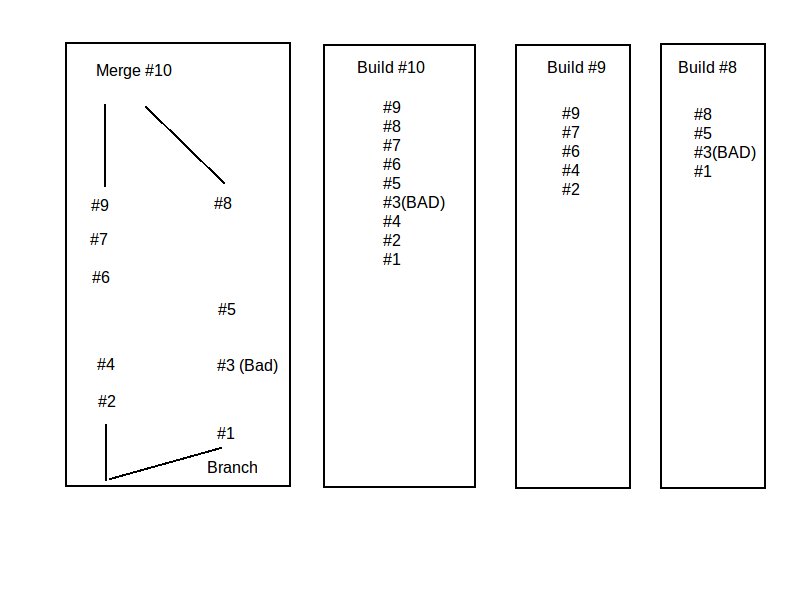
I must admit i don't really know the internal logic of git enough to fully understand how merges between two trees happen, so ill try to make a little illustration, and if ppl wanna chime in and explain my errors, ill be happy to learn something :)
I have named commits as increasing number for simplicity, and it is KIND of just a theory in my head on how i understand things.. I may be TOTALLY off tho, so bare that in mind :)
Meaning: If i manually build commit 10, i will build all INCLUDING the "bad" commit 3. If i build commit 9, i will be in the "master" branch, NOT containing the off-branch commits. If i build commit 8, i will be in the off-branch, and will build the "bad" commit 3.
So, if i do a bisect from commit 10, and work my way towards commit 1 it seems as there is more to it than just a "simple" bisect?
Hey, i am probably being a stupid tool here, and the solution is most likely so easy as to write some lengthy script to do this.. But i'n not smart enough. It has been answered, and talked about.. like https://stackoverflow.com/questions/17267816/git-bisect-with-merged-commits
git-bisect will evaluate all commits from the merged trees, too.
They even say so in the link you provided.
Maybe gitk can help you get the "picture" of the commit tree.
Nothing extracted yet.
For ref:
I have a slight performance regression i cannot really figure out from the commits.
If i pull commit: https://github.com/doitsujin/dxvk/commit/f42f7cc74364c1829fe293e5f141e4923da02a93 i get:
However, if i pull commit: https://github.com/doitsujin/dxvk/commit/516d7f091e367a30fd6f08ee02c5a86c2026a89d i get:
Now.. I have been trying to pin-point the exact commit by recompiling god knows how many.. but i cant really keep heads and tails of the commits when things merge. There was a "Master" merge with https://github.com/doitsujin/dxvk/commit/32631caf9631f22bfdfeb3cf0464ea44d2580091, and another with that branch merge https://github.com/doitsujin/dxvk/commit/516d7f091e367a30fd6f08ee02c5a86c2026a89d. Pulling directly from the branch "disable-opt-bit" does not have the performance regression.
The thing FOR ME atleast, is that the commits are not really listed in a linear fashion when a merge happens. So eg. pulling from a commit 10 mai that "works", and then pulling from a commit 11 mai that does not work, may contain commits from several days back since that is a "branche merge". How am i supposed to keep track of this?
Let me know how i can go about troubleshooting this.