Inexplicable performance differences between various versions in GTA IV
Not sure what to make of these numbers, "benchmarking" with an FPS cap in place provides next to no useful information because power management exists.
It's certainly possible that it regressed at some point because this game is known to hit edge cases that force us onto slow code paths in general (or otherwise it just doesn't render properly on some GPUs), but I swear to god, keeping this game alone in a working order is a full-time job all of its own.
but I swear to god, keeping this game alone in a working order is a full-time job all of its own.
Yeah I can imagine...That's how it is with crappy low budget console ports.
Has anybody ever addressed this issue? Or am I the first one? I wonder if this problem might just be with me.
Not sure what to make of these numbers, "benchmarking" with an FPS cap in place provides next to no useful information because power management exists.
I set that FPS cap cause omitting it and thus having an FPS over 60 would cause some bugs, including messed up handling. So I thought it would be better to benchmark with the cap cause that's just the way I usually play that game. But if it helps, I can gladly add some pics without the FPS cap. Should I?
Whatever, I did it now anyway. And also added pics of the in-game benchmark mode for every version. So, here are the pics without an FPS cap and with VSync disabled (so commented out presentInterval and numBackBuffers):
2.1
2.6.2
2.7.1
So at your test spot 2.1 and 2.6 perform the same and in the benchmark 2.1 is faster than 2.6. As far as I know, the benchmark of GTA IV isn't perfectly identical every time, so I'd just put that down to randomness.
I guess it's possible that the game does something weird at that very particular spot where you're standing which causes the large slow down in 2.7.
Has anybody ever addressed this issue? Or am I the first one? I wonder if this problem might just be with me.
No, this is the first time we've heard of any problems with GTA IV in ages.
If i could insert any pennies, on my server people (mainly on RTX gpus, i think) have been reporting increasingly worse performance over time despite playing on very capable GPUs. I know how little this narrows down, but nonetheless.
I should probably also note that FusionFix may or may not be additionally at play
So at your test spot 2.1 and 2.6 perform the same and in the benchmark 2.1 is faster than 2.6. As far as I know, the benchmark of GTA IV isn't perfectly identical every time, so I'd just put that down to randomness.
I guess it's possible that the game does something weird at that very particular spot where you're standing which causes the large slow down in 2.7.
Like I said, I've tested these four versions not just at a single spot and also not just with the in-game benchmark. I have tested these "in the last couple of days" for many hours each and have made a bunch of these photos of different locations as well as performing individual benchmarks under differing circumstances, including time, weather and activities.
Therefore, I can very confidently say that, at least in GTA IV and at least on my setup, 2.1 provides a bit higher framerate than 2.6.2 on average, whereas 2.7.1 is very far off from those performance-wise. So this one spot is not just an exception and also not picked randomly. I specifically chose it because I thought that it was kinda average in many ways, namely in terms of what is being rendered, the performance and the performance difference to the other versions (at least when the FPS cap was still active).
But since I've already completely reinstalled the game just to get 2.7.1 working with a good performance, I think that the problem can't be the game itself. Either that's just the performance you get with this version in GTA IV or I have some driver problems (though I just recently updated them).
No, this is the first time we've heard of any problems with GTA IV in ages.
Well maybe that's because 2.7.1 is still pretty new at 3 weeks since release and because I can imagine that DXVK might be a kind of mod you usually wouldn't update. I think most people would probably just install it once and if it's okay, they would soon forget about it. So maybe it needs a bit more time for people to notice it. Or, like I said, maybe the problem is just on my side.
I wanted to open the same issue. You beat me to it.
Can confirm. The game took massive hit to performance in versions 2.7/2.7.1. We are talking about ~20-30% loss in framerates everywhere in game (not just few select hotspots) compared to dxvk 2.6.2.
Btw, thanks for the tip. I should give 2.1 a try.
Does the config option dxvk.enableDescriptorBuffer=False help?
Does the config option
dxvk.enableDescriptorBuffer=Falsehelp?
Just tried it and couldn't see much of a difference in terms of FPS.
Then please find the exact commit that caused the problem.
That shouldn't take too long with git bisect.
It's either this one (the performance is heavily reduced compared to v2.6.2): https://github.com/doitsujin/dxvk/actions/runs/15562775941
Or one of these two (sorry, I don't know how to create artifacts from pull requests, so I can't check the performance there):
https://github.com/doitsujin/dxvk/actions/runs/15562481700
https://github.com/doitsujin/dxvk/actions/runs/15562128424
Here the performance is comparable to 2.6.2: https://github.com/doitsujin/dxvk/actions/runs/15562087424
Performance appears to be the same for me between 2.3.1 and master.
Does this only happen with any GTA mods? My game is 100% vanilla.
and because I can imagine that DXVK might be a kind of mod you usually wouldn't update. I think most people would probably just install it once and if it's okay, they would soon forget about it.
Most people don't install DXVK at all, they launch a game on Steam on Linux and DXVK makes it run.
Performance appears to be the same for me between 2.3.1 and master.
Does this only happen with any GTA mods? My game is 100% vanilla.
Tbh I don't know if it would work better in the vanilla state. After I reinstalled the game, I only tested it with FusionFix.
Most people who have DXVK installed on GTA 4 have most likely also this installed, as it's basically the main mod for GTA 4. Therefore, it would make sense to ensure that DXVK works well with this mod (if you guys don't already do that). Since v4.0.0 it even gets shipped along with DXVK.
And with it, you should then notice an FPS decrease of approx. 20% compared to v2.1 and 15% compared to v2.6.2 (at least according to my tests).
It's either this one (the performance is heavily reduced compared to v2.6.2): https://github.com/doitsujin/dxvk/actions/runs/15562775941
Or one of these two (sorry, I don't know how to create artifacts from pull requests, so I can't check the performance there): https://github.com/doitsujin/dxvk/actions/runs/15562481700 https://github.com/doitsujin/dxvk/actions/runs/15562128424
Here the performance is comparable to 2.6.2: https://github.com/doitsujin/dxvk/actions/runs/15562087424
How did you even manage to create artifacts from the 2 commits when they're already expired? I thought you had to compile every commit whose artifacts are expired. Sorry, I'm not that experienced with coding...
Performance appears to be the same for me between 2.3.1 and master.
Does this only happen with any GTA mods? My game is 100% vanilla.
Vanilla Complete Edition version of the game: https://youtu.be/cIzNBEhgtK0
How did you even manage to create artifacts from the 2 commits when they're already expired? I thought you had to compile every commit whose artifacts are expired. Sorry, I'm not that experienced with coding...
I cloned dxvk repository to a temporary repo, git reset to the desired commit, and then manually ran workflows via the actions tab. Takes around 20 minutes for the workflow to create an artifact, so if you don't have free time, don't bother. :>
I cloned dxvk repository to a temporary repo, git reset to the desired commit, and then manually ran workflows via the actions tab. > Takes around 20 minutes for the workflow to create an artifact, so if you don't have free time, don't bother. :>
Thx that helped a lot actually.
Vanilla Complete Edition version of the game: https://youtu.be/cIzNBEhgtK0
Man in your case the difference between master and 2.1 is even more extreme. Like, that was almost an FPS decrease of 50%. I wonder why that is... Is your GPU slower than my RTX 3080? I know this game is very CPU-dependent, but pretty much always when I don't get the 60 FPS (where my FPS is capped) with master, the GPU usage is at 100%, so it's probably not because of more load on the CPU, right?
I guess this is a Windows thing then? I get almost identical performance from both versions with the built-in benchmark.
What hardware are you using @rrPKrr?
Can you record comparison videos with the environment variable DXVK_HUD set to full?
https://superuser.com/questions/949560/how-do-i-set-system-environment-variables-in-windows-10
Man in your case the difference between master and 2.1 is even more extreme. Like, that was almost an FPS decrease of 50%. I wonder why that is... Is your GPU slower than my RTX 3080? I know this game is very CPU-dependent, but pretty much always when I don't get the 60 FPS (where my FPS is capped) with master, the GPU usage is at 100%, so it's probably not because of more load on the CPU, right?
I have an older hardware compared to yours.
I guess this is a Windows thing then? I get almost identical performance from both versions with the built-in benchmark.
Forget about built-in benchmark. It's completely useless. I also get similar results between different versions of dxvk there:
What hardware are you using @rrPKrr?
i7-3930k running at 4.4GHz
32GB ddr3 1600MHz (quad channel)
GTX 1080
Can you record comparison videos with the environment variable
DXVK_HUDset tofull?
I didn't understand your method of testing the performance with capped fps at all. I suspect if you uncap fps and get to
the same location` shown in the video, you will also get very similar results.
I did not only benchmark with a capped FPS, I did both. With a capped FPS in order to see how much low-peaks and GPU usage differ from version to version, and without for testing the overall performance. But it's true that when I opened this issue, I only benchmarked with a capped FPS cause I was only interested in the former since that's the performance I'll get in the end of the day (I always play with a cap at 60 to reduce physics bugs).
But after that, I actually went to that location and to some more - without a cap and VSync - and also benchmarked while driving on a fixed route. And that were the results I was referring to when I said that for me, the FPS difference between 2.7.1 and 2.1 were 20% on average, but regarding to the 1% and 0.1% lows, it's actually a bit higher (30-35%).
However, a nearly 50% difference was never reached. But maybe that's because I mostly benchmarked at locations and with non-vanilla graphic settings that were rather demanding, where the FPS was just 50-80 - in v2.1 - and not around 100 like in your case.
They run roughly the same, the FPS fluctuates by 10 FPS so it's kinda margin of error.
How is it in more demanding scenarios, like when driving at the location and in direction shown below for example?
Also same performance (within margin of error).
Well that sucks...So how do we proceed now? I know you guys officially don't support Windows, but considering the other issues (on GitHub), you still got a good amount of people who use it and so far it's not even clear if it's specifically related to Windows and if every Windows user is affected by it or just a small amount of people. But would you guys even fix it if it's only a Windows-related problem?
I can test it on Windows. And you surely don't have any mods installed?
At the moment, I have a bunch of mods installed. But after I reinstalled the game a few days ago, I tested v2.7.1 only along with FusionFix, that's it. And I mean @rrPKrr showed that it even occurs in the vanilla version, so I guess it's fair to say that this isn't due to any mod.
@rrPKrr is using a Nvidia Pascal (GTX 1000) GPU. Those are on the brink of losing driver support. We don't really care about performance on those, Turing (RTX 2000) was a large architecture overhaul that fixed a lot of the issues of Pascal. So it's possible that recent DXVK versions do some things that Pascal GPUs really can't stand but that's not something we'd change if that turns out to be the case.
So I'm generally more interested to find any performance difference on modern GPUs.
There you go, I've also made a comparison video now: https://www.youtube.com/watch?v=e-7AsiNJrMY (100% vanilla, no FPS cap, no VSync)
This pretty much just reinforces my previous benchmark results: 2.1 > 2.6.2 >> 2.7.1
As I tested every version of DXVK since 2.0 yesterday, I can also confirm what @rrPKrr said at the beginning, namely that the biggest performance decrease already started at v2.7 and is comparable to v2.7.1.
DXVK settings: dxvk.hud = full
Steam launch options: -availablevidmem 4096.0
Graphics settings:
I also want to note that the performance problem with 2.7/2.7.1 was already there before I recently updated my GPU driver, which was almost a year old.
@K0bin Btw did you already test the performance on Windows?
No.
Does running the game in exclusive fullscreen mode make a difference?
dxvk.allowFse = True
Does turning off the Afterburner Hud make a difference?
@rrPKrr is using a Nvidia Pascal (GTX 1000) GPU. Those are on the brink of losing driver support. We don't really care about performance on those, Turing (RTX 2000) was a large architecture overhaul that fixed a lot of the issues of Pascal. So it's possible that recent DXVK versions do some things that Pascal GPUs really can't stand but that's not something we'd change if that turns out to be the case.
So I'm generally more interested to find any performance difference on modern GPUs.
I have a spare RTX 4060 laying around. Paired it with i7-9700k and 16GB of ddr4 (dual channel, 2666MHz).
Not sure what is going on, but the results are even weirder on 40 series: https://youtu.be/T8SGH1kFZn8
Are they? Frame rates look pretty similar in your video.
EDIT: Didn't realize the video repeated the same section with 3 different versions. 2.7.1 is indeed crazy bad. Here's a screenshot of that:
@rrPKrr Does the config option dxvk.enableDescriptorBuffer=False make a difference for you?
Besides that, try the config option d3d9.cachedDynamicBuffers=True.
If you enable it correctly, the red text in the HUD should say something like Descriptor pools rather than Descriptor heaps. A screenshot with that option with the DXVK HUD enabled would be useful for us to confirm that the option is indeed enabled correctly.
And after testing that:
Your system does not have resizable heap enabled. That's something you should really have with a modern system, not just for DXVK but for modern games in general. There's no downside to having that enabled with a modern GPU.
Go to your bios and enable resizable heap (sometimes tied to a setting named 'Above 4G decoding').
@Mofkos That advice about rebar applies to you too.
@rrPKrr Does the config option
dxvk.enableDescriptorBuffer=Falsemake a difference for you? Besides that, try the config optiond3d9.cachedDynamicBuffers=True.If you enable it correctly, the red text in the HUD should say something like
Descriptor poolsrather thanDescriptor heaps. A screenshot with that option with the DXVK HUD enabled would be useful for us to confirm that the option is indeed enabled correctly.
I am afraid outside of changing the red text to "Descriptor pools" it has no visible effect on performance whatsoever.
And after testing that:
Your system does not have resizable heap enabled. That's something you should really have with a modern system, not just for DXVK but for modern games in general. There's no downside to having that enabled with a modern GPU.
Go to your bios and enable resizable heap (sometimes tied to a setting named 'Above 4G decoding').
Thanks for the tip. I have just built this system for the sake of testing stuff, so I didn't have much time tweaking it yet. The option was disabled in the bios indeed. The performance in gta 4 with dxvk 2.7.1 seems to be unchanged with enabled resizable heap though.
P.S. Missed your edit about d3d9.cachedDynamicBuffers=True. Will give it a try.
I am afraid outside of changing the red text to "Descriptor pools" it has no visible effect on performance whatsoever.
If it doesn't do that, then you didn't do it correctly. You need a file called dxvk.conf inside the directory of the game right next to the exe file (and the d3d9.dll of DXVK).
The performance in gta 4 with dxvk 2.7.1 seems to be unchanged with enabled resizable heap though.
Please post a screenshot with the DXVK HUD after you've enabled it so we can check that rebar is working as expected.
Besides that, try the config option
d3d9.cachedDynamicBuffers=True.
Ok, this is the first option out of the bunch that affects the performance of the game.
Please post a screenshot with the DXVK HUD after you've enabled it so we can check that rebar is working as expected.
Here is another video instead of a screenshot (I made it to show the effect of the d3d9.cachedDynamicBuffers=True): https://youtu.be/kPqRzvHdBTw
I guess you should see there if dxvk.enableDescriptorBuffer=False and resizable heap work properly as well.
Your video shows that the DXVK options are enabled successfully but ReBar is not.
Hmmm... I can only see "Above 4G Decoding" option in the bios. And it is most certainly enabled.
Could there be any other settings that I'd need to change to enable resizable heap?
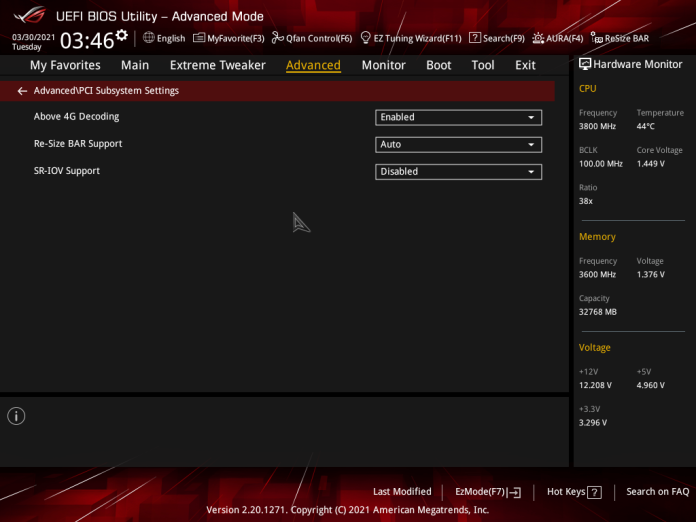
To Be Continued:
I should probably update BIOS and see if other rebar related options will appear, because other than "Above 4G Decoding" there is none. But for now I am done troubleshooting. :>
@rrPKrr Did you check with dxvk.allowFse = True?
@rrPKrr Did you check with
dxvk.allowFse = True?
Yeah, no luck. I mean, dxvk.allowFse works properly on my end, and I use it on my gsync monitor all the time, but regarding the 2.7.1 issues I have on both of my gpus it doesn't really do anything.
P.S. Self-reminder https://www.intel.com/content/www/us/en/support/articles/000090831/graphics.html
@Mofkos That advice about rebar applies to you too.
Unfortunately, my mainboard doesn't support ReBAR.
EDIT: Sorry, I forgot that it was added later via an update. It is enabled by default.
I also wrote dxvk.allowFse = True and d3d9.cachedDynamicBuffers = True in the config file. Performance seems to be even worse. However, it doesn't say Descriptor pools in the HUD for some reason, don't know why...
EDIT2: Didn't see that I also had to add dxvk.enableDescriptorBuffer = False. Performance-wise still no difference.
Here is the updated pic:
Okay so we know that disabling descriptor buffers doesn't fix it. Rebar is still disabled on your screenshots.
Rebar is still disabled on your screenshots.
Don't know why though, in the BIOS it said it was enabled. It's even explicitly called "Re-Size BAR" and not some vague paraphrase of it.
EDIT: Forgot to update the VBios, now it works, still no performance difference (at least in GTA 4 with v2.7.1).
Btw I just tested v2.7.1 with another game, Need for Speed Most Wanted (2005), also utilizes D3D9, and there the performance gap between v2.1 seems not to be present. NFS MW even runs a bit better with v2.7.1. So this could mean that this bug is actually only related to GTA IV.
Right, sorry for the slight hiccup yesterday. I got really tired of driving the same route in GTA 4 over and over again, and I had to take a break.
Anyway. I have updated the bios, the resizable bar appeared in the settings afterwards. After activating the resizable bar (and removing d3d9.cachedDynamicBuffers = True which massacres performance in the game) the framerate in 2.7.1 is now comparable to previous versions of DXVK: https://youtu.be/2y3IkH_zS-w
Now, the question is, does DXVK 2.7+ rely purely on resizable bar functionality? Is that an expected behavior?
@Mofkos have you disabled d3d9.cachedDynamicBuffers = True option after enabling the resizable bar?
Now, the question is, does DXVK 2.7+ rely purely on resizable bar functionality? Is that an expected behavior?
DXVK has always benefitted from ReBAR, and we changed the memory allocation logic to strictly respect the driver-reported budget at some point because over-allocating VRAM (and especially host-visible VRAM, where the driver also needs to put stuff) has been causing all sorts of issues in the past. Adding descriptor buffers and BDA usage into the mix also means that the driver can no longer do any heroics to figure out which of our allocations are actually needed,
So yeah, this is somewhat expected, what's not really expected is that your driver only really seems to give us ~100MB to work with if ReBAR is disabled, I'd expect roughly twice that amount, but the allocation budget also depends on background apps etc and isn't something we can influence in DXVK.
@doitsujin is there anything else that could influence allocation budget and not the background apps? Because there are practically no other apps running during the game session (other than Steam/Rockstar Launcher).
@rrPKrr This is a non-issue for you anyway because your video shows that you've successfully enabled resizable bar. So before that the amount of cpu accessible VRAM was a fraction of 256 MB (~100 MB in your screenshots), now it's a fraction of all VRAM. Your video shows that the game uses 1105 MB of VRAM and that is 15% of the budget, so the entire budget comes out at ~7350 MB.
@Mofkos have you disabled d3d9.cachedDynamicBuffers = True option after enabling the resizable bar?
Just tried that as well as removing dxvk.enableDescriptorBuffer = False and that actually did the trick. The performance with v2.7.1 is now good in GTA IV. This could also be the reason why it worked well in NFS MW yesterday as I didn't wrote that in my config there. However, v2.7.1 seems to cause a bit more CPU-bottlenecking than v2.1. It's not much, but it's noticeable. Therefore, I guess I will still stick with v2.1 ¯_(ツ)_/¯
So in conclusion:
The game creates almost every buffer with D3DPOOL_DEFAULT and D3DUSAGE_DYNAMIC | D3DUSAGE_WRITEONLY or just D3DUSAGE_WRITEONLY. This makes us put them into host visible VRAM and map it directly. On systems without rebar, we run out of host visible VRAM so the GPU has to read geometry from system memory which is slow.
DXVK 2.7 had a memory management rewrite and I assume it worked out before that due to simple luck. The important allocations were early enough that those would end up in host visible VRAM rather than falling back to regular system memory.
In the last couple of days, I tested the performance of versions 2.0, 2.1, 2.6.2 and 2.7.1 in GTA IV (Complete Edition, latest version). From my testings at least, I couldn't tell much of a difference between 2.0 and 2.1, but between those and 2.6.2, the performance is noticeably worse with the latter. However, 2.7.1 has definitely by far the worst performance in GTA IV. The performance is so bad that it's actually comparable to the standard D3D9 API, with the only exception that you won't get the D3D9-typical frame pacing bugs.
Here are some example pictures:
2.1

2.6.2

2.7.1

In order to get as equal pics as possible, I've frozen the time as well as the weather and deactivated all kinds of NPCs (though the hot dog seller can't be removed). And of course, graphic settings and the DXVK config stayed the same.
DXVK config:
d3d9.maxFrameLatency = 1
d3d9.presentInterval = 1
d3d9.numBackBuffers = 3
Most noticeable is the GPU usage I think. The difference between 2.1 and 2.7.1 in this regard and example is a whopping 23%, leading to a generally way lower frame rate with 2.7.1. That kind of flabbergasted me cause, you know, usually when you update something, it gets better, not worse, though I'm sure it would probably work better with other games or setups. I even reinstalled the whole game, but that didn't do anything unfortunately.
Anyway, can someone explain to me why that is? And is this performance of 2.7.1 normal in GTA IV? If not, how can I improve it?
PC setup:
Windows 10
RTX 3080 (driver: 581.29, Vulkan version: 1.4.309)
Ryzen 7 3700X
32 GB RAM (DDR4, 3200 MHz)
Playing on a resolution of 4587 x 1920, downscaled to 3440 x 1440 via DLDSR.