Direct3D 10 support
Does that means that i can create bug reports for DX10 games?
If it's actually DXVK that prevents them from working and not something else, and if you can provide required debugging info (read: an apitrace), then yes.
@doitsujin That might be somewhat hard to know i guess.. As most/many d3d10 titles does not work with wined3d as it is.
On a slightly better note, Unigine Tropics in d3d10 mode went further with dxvk d3d10 than in regular wined3d :) Still got a page fault tho. It is a 32-bit program, so might also be a problem :)
If things don't work with wined3d, then the only chance to get anything useful out of them is by using Windows. I understand that this is a problem for some users, but at the same time it's the only way for me to actually reproduce issues with games that I can't otherwise test.
I can try the older Unigine benchmarks though.
Its a small 60MB install, so it's not that horrible to have around :) It also supports dx9/10/11 (dxvk w/dx11 works with some minor texture flashing.. havent bothered to dig into that tho)
Was somewhat finnicky to get it to launch, as wine does not pick up the shortcuts in a usable manner to me.. But it launches with the following:
wine Tropics.exe -video_app direct3d10 -sound_app openal -video_fullscreen 1 -video_mode -1 -video_width 1920 -video_height 1080 -data_path ./ -engine_config data/unigine.cfg -system_script tropics/unigine.cpp -extern_define RELEASE
I launch it from a script that first cd into the install folder usually /Program Files (x86)/Unigine/Tropics and run it from there. (Possibly better ways to do it?)
I know this is early, but this is fucking awesome! Thank you DXVK devs so much! You're seriously uplifting Linux Gaming in such massive ways. We all love the work you're doing! Seriously.
@doitsujin
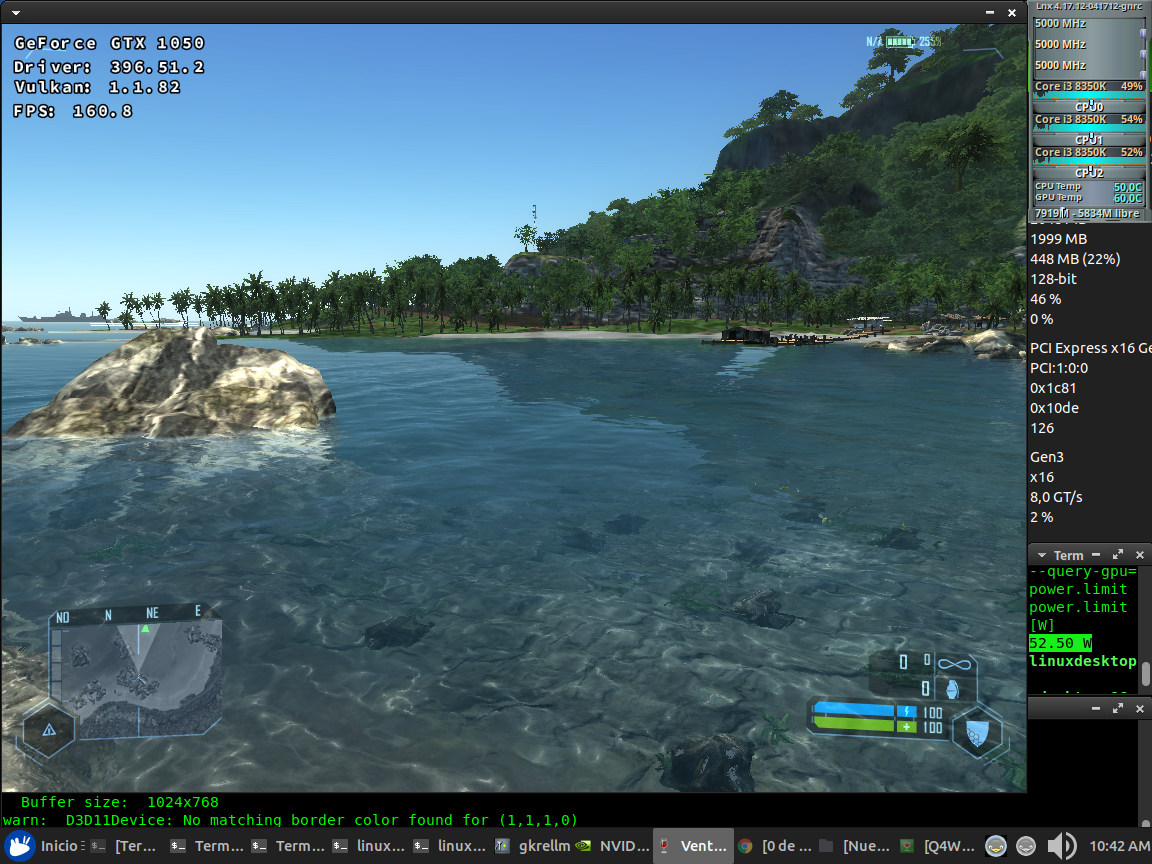
In my case crysis steam version works
Hi @doitsujin,
just wanted to test DX10 with Crysis demo which ships both 32bit and 64bit binaries on Windows..
using dlls up to https://haagch.frickel.club/files/dxvk/r1449.dad015b
I get missing d3d10coregetversion call:
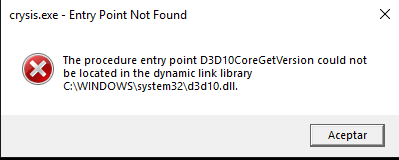
altough it says this entrypoint is missing in d3d10.dll with dependency walker shows is expected to be in d3d10core:
DXVK d3d10core.dll entrypoints:
D3D10CoreCreateDevice
D3D10CreateDevice
D3D10CreateDevice1
D3D10CreateDeviceAndSwapChain
D3D10CreateDeviceAndSwapChain1
Windows RS6 d3d10core.dll (omitting lots of D3DKMT* entrypoints OpenAdapter10,OpenAdapter10_2):
D3D10CoreCreateDevice
D3D10CoreGetSupportedVersions
D3D10CoreGetVersion
D3D10CoreRegisterLayers
don't know but perhaps creating simple stubs for D3D10CoreGetSupportedVersions,
D3D10CoreGetVersion should fix the problem..
are you willing to support that using D3D10 DXVK dlls on Windows platform?
thanks..
There is no documentation for that function. There's not even a signature for it, so I can't even implement a simple stub.
I think the only public resources available for d3d10core.dll is wine's implementation of it, and wine only exports D3D10CoreCreateDevice and D3D10CoreRegisterLayers.
just wanted to test DX10 with Crysis demo which ships both 32bit and 64bit binaries on Windows..
The problem is that Crysis loads dxgi.dll from C:\Windows\{System32|SysWOW64}\.
So it is hard to get it running on Windows with DXVK and it requires advanced techniques like CryRenderD3D10.dll patching or LoadLibraryW() hooking.
Do not even try to replace system's dxgi.dll with DXVK one. It will break your system.
There's not even a signature for it, so I can't even implement a simple stub.
it should be something like
int64 __stdcall D3D10{Core}GetVersion();
HRESULT __stdcall D3D10{Core}GetSupportedVersions(DWORD, DWORD, DWORD);
But it is unrelated to oscarbg's problem.
thanks @Mixaill for explaining the trickery needed, I edited the dll to point to dxgz.dll and copied that to windows system folder and it's working!
so @doitsujin your d3d10 implementation as you said works on Crysis demo too!
I must be doing something wrong, I can get crysis warhead working on dx10 mode
but crysis 1 crashes shortly after loading
wine-3.13 staging
0.70dxvk
new wineprefix, I just installed dxvk and the d3dcompiler_43
copied over the game files.
Gog version, 64bit
what am I missing?
I open the game, and load the first level, when it gets to the white screen after the cave deal it crashes.
and by crash I mean like nothing else happens.
also I am on Nvidia GTX 970, 396.51
I am not able to find winetricks d3dcompiler_43 in lutris, anyone else have this issue?
Out of curiosity. If we see the following error:
Unimplemented function d3dx10_43.dll.D3DX10CreateThreadPump
Is it wine that has not got the function implemented or DXVK?
D3DX10 is a library that builds on top of D3D10. Wine does implement it but from what I know, you can just use the original Microsoft one.
Install via Winetricks:
winetricks d3dx10
more precisely, d3dx10_43. It should run fine on top of DXVK.
Hey guys , did you also experience that Exit menu bug as well on Assasins Creed 1?
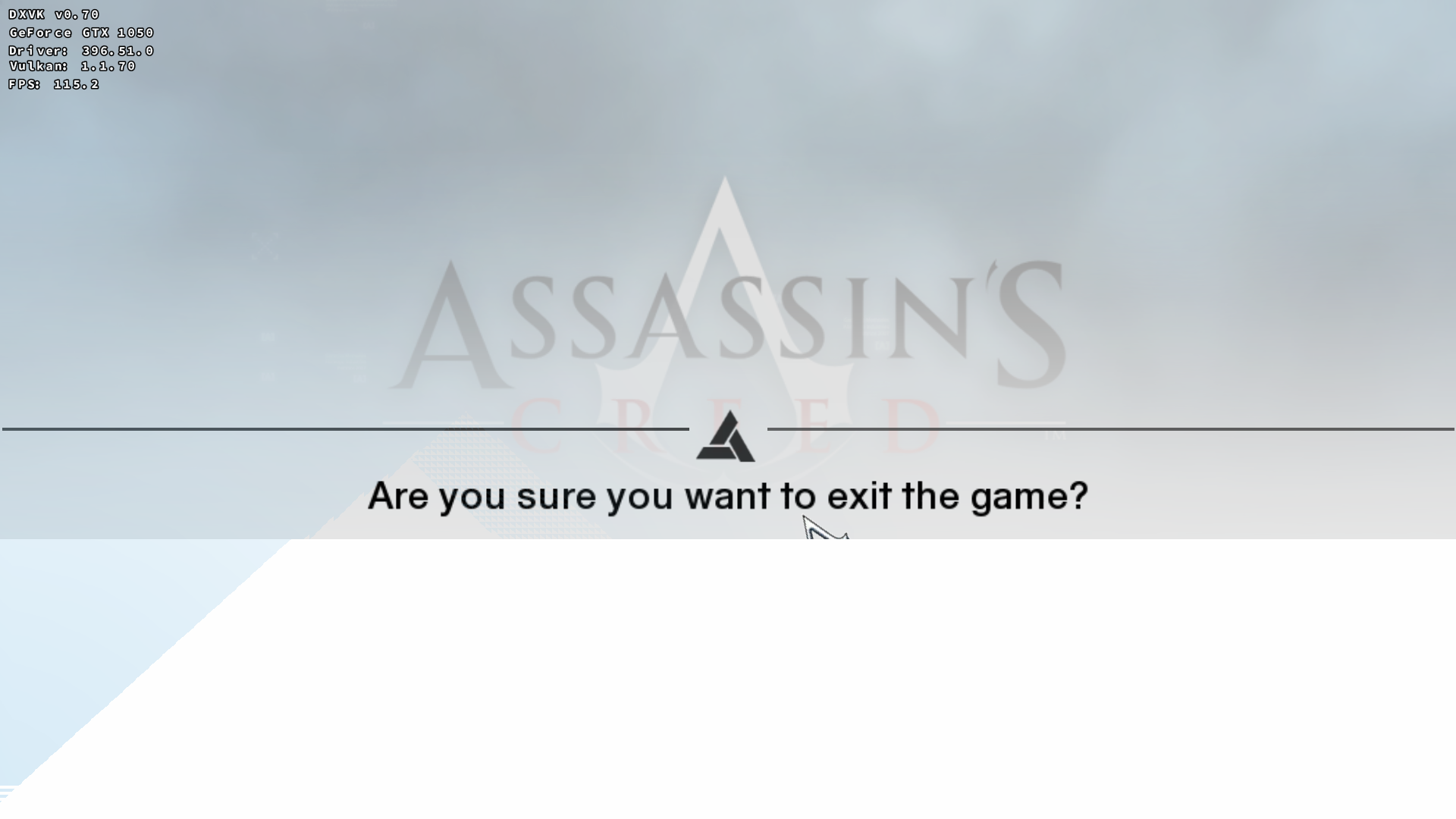
I'm asking this because i'm not sure if this issue specific to Nvidia or happens on AMD as well.
It was working as expected on RADV when I tested the game.
Thanks , so as another user ( Rotscha ) noted he has same issue on his GTX 680 as well , it is an Nvidia bug.
https://github.com/doitsujin/dxvk/issues/577#issuecomment-414069120
Apologies in advance if this is not the proper place to comment, but I wanted to note that on RADV, I have found that Crysis locks up when enabling the weapon flashlight with the following error:
002e:fixme:d3dcompiler:compile_shader Compilation target "gs_4_0" not yet supported
I am on Mesa 18.3.1, kernel 4.20.3 and running the game via wine with DXVK 0.95 in DX10, 64-bit executable and on the lowest possible graphics settings.
Just after the opening sequence, I use the weapon customization option (C) to enable the flashlight and the game immediately freezes.
Any suggestions for further debugging?
You need Microsofts D3DCompiler.
winetricks d3dcompiler_43
You needs Microsofts D3DCompiler.
winetricks d3dcompiler_43
Thank you for your suggestion. I did neglect to add it in my initial comment, but it had already been installed as you describe. Trying to reinstall it once more just now does not seem to resolve the problem, so back to square one, I suppose :)
That log line you posted comes from the Wine implementation of D3DCompiler so you didnt install it correctly. Make sure to install it in the correct prefix.
That log line you posted comes from the Wine implementation of D3DCompiler so you didnt install it correctly. Make sure to install it in the correct prefix.
I did the following:
export WINEPREFIX=/home/[redacted]/.PlayOnLinux/wineprefix/Crysis/
winetricks d3dcompiler_43
It seems to have been installed already without any errors and I have "*d3dcompiler_43 (native)" listed in winecfg "Libraries" tab for that prefix.
Dunno how winetricks keeps tabs on what is installed or not tho, but perhaps double-check that /home/[redacted]/.PlayOnLinux/wineprefix/Crysis/drive_c/windows/system32/d3dcompiler_43.dll (and probably syswow64) is something useful? It should not be a "fakedll", but a "real" dll.
I suspect if winetricks finds a dll-override, its "already installed"? Might be wrong, as i have not used winetricks overly much :) Just a thought.
Dunno how winetricks keeps tabs on what is installed or not tho, but perhaps double-check that
/home/[redacted]/.PlayOnLinux/wineprefix/Crysis/drive_c/windows/system32/d3dcompiler_43.dll(and probably syswow64) is something useful? It should not be a "fakedll", but a "real" dll.I suspect if winetricks finds a dll-override, its "already installed"? Might be wrong, as i have not used winetricks overly much :) Just a thought.
Thank you for the suggestion.
I checked both 32 and 64-bit versions of the dlls and they seem to me be to be "genuine". Just to be on the safe side, I removed them both along with the winecfg dll-override and used winetricks again as stated above. I got the following output:
------------------------------------------------------
You are using a 64-bit WINEPREFIX. Note that many verbs only install 32-bit versions of packages. If you encounter problems, please retest in a clean 32-bit WINEPREFIX before reporting a bug.
------------------------------------------------------
Using winetricks 20180217 - sha256sum: 1b156c616174f41df79d72a90c52eb2b110c63a6e8ecb865d303a8f9f0908924 with wine-3.0 (Ubuntu 3.0-1ubuntu1) and WINEARCH=win64
Executing w_do_call d3dcompiler_43
Executing load_d3dcompiler_43
Executing cabextract -q -d /home/[redacted]/.PlayOnLinux/wineprefix/Crysis//dosdevices/c:/windows/temp/_d3dcompiler_43 -L -F *d3dcompiler_43*x86* /home/[redacted]/.cache/winetricks/directx9/directx_Jun2010_redist.exe
Executing cabextract -q -d /home/[redacted]/.PlayOnLinux/wineprefix/Crysis//dosdevices/c:/windows/syswow64 -L -F d3dcompiler_43.dll /home/[redacted]/.PlayOnLinux/wineprefix/Crysis//dosdevices/c:/windows/temp/_d3dcompiler_43/jun2010_d3dcompiler_43_x86.cab
/home/[redacted]/.PlayOnLinux/wineprefix/Crysis//dosdevices/c:/windows/temp/_d3dcompiler_43/jun2010_d3dcompiler_43_x86.cab: WARNING; possible 5960 extra bytes at end of file.
Executing cabextract -q -d /home/[redacted]/.PlayOnLinux/wineprefix/Crysis//dosdevices/c:/windows/temp/_d3dcompiler_43 -L -F *d3dcompiler_43*x64* /home/[redacted]/.cache/winetricks/directx9/directx_Jun2010_redist.exe
Executing cabextract -q -d /home/[redacted]/.PlayOnLinux/wineprefix/Crysis//dosdevices/c:/windows/system32 -L -F d3dcompiler_43.dll /home/[redacted]/.PlayOnLinux/wineprefix/Crysis//dosdevices/c:/windows/temp/_d3dcompiler_43/jun2010_d3dcompiler_43_x64.cab
/home/[redacted]/.PlayOnLinux/wineprefix/Crysis//dosdevices/c:/windows/temp/_d3dcompiler_43/jun2010_d3dcompiler_43_x64.cab: WARNING; possible 5960 extra bytes at end of file.
Using native override for following DLLs: d3dcompiler_43
Executing wine regedit C:\windows\Temp\_d3dcompiler_43\override-dll.reg
Executing wine64 regedit C:\windows\Temp\_d3dcompiler_43\override-dll.reg
Any additional suggestions for further debugging would greatly appreciated!
@bwyan86 maybe game uses d3dcompiler other than 43. Winetricks installs version 43 only, so you need to find other versions of d3dcompiler somewhere, place them to system32 (64-bit versions) and syswow64 (32-bit versions) and override them in winecfg.
@doitsujin Is support for the Effects API possible at some point?
Anno 1404 offers better transparency AA with DX10, which has a huge impact on the vegetation rendering. Also, Gallium Nine shows artifacts and wined3d10 doesn't work either, so there is only slow wined3d9 with reduced visuals left. :(
The Effects framework is an insanely complex and convoluted mess with bad documentation; on the other hand it's not tied to the core API directly so it can (and should) be implemented outside of DXVK, if at all.
wined3d has a partial implementation of it, and I suppose a possible way to support it in DXVK would be to load the system's d3d10{_1}.dll and forward any Effects-related functions to that, but I have no intention to support it directly.
Just to mention it once: "New" Anno 1404 History Edition doesn't offer D3D9 anymore with recent updates (only D3D10) and doesn't work with either DXVK or WineD3D, hangs with black window content after epilepsy warning.
Edit: I once again made the mistake to believe what ComputerBase writes, D3D9 is still available via config tweak. Though it doesn't work with DXVK either, while wined3d does.
Would be interesting to know if D3D10 works with DXVK on Windows. Usually it's stuff like the Effects framework missing or being incomplete that prevents D3D10 apps from running, and we have no plans to implement this (since wine already does, partially). Some problem with the core API implementation is extremely unlikely at this point since it's a subset of D3D11.
Note that only d3d10core.dll is needed (at least on wine), d3d10.dll is not, and wine's version should be used.
Also, what does "does not work" mean for D3D9?
There doesn't seem to be a difference between D3D9 and 10 regarding game compatibility with DXVK for this game, both end up with black window content after the epilepsy warning. wined3d10 btw. does the same, only wined3d9 works (and probably gallium nine, at least it did with the original version of the game).
Don't know about D3D9 -> DXVK on Windows, but D3D10 -> DXVK on Windows crashes the game at start. Probably some DLL loading issue.
Launch options
WINEARCH=win64x1 2019-01WINEPREFIXx1 2019-01WINEPREFIX=/home/[redacted]/.PlayOnLinux/wineprefix/Crysis/x1 2019-01RADV_DEBUG=nohiz`x1 2018-08
Upstream links
- doitsujin/dxvk/issues/577x1 2018-08
DLLs
d3d10core.dllx3 2020-08d3d10.dllx2 2020-08d3dcompiler_43.dllx3 2019-01d3dx10_43.dllx1 2018-08dxgz.dllx1 2018-08cryrenderd3d10.dllx1 2018-08dxgi.dllx1 2018-08
As was discussed in #424, DXVK now supports D3D10 in addition to D3D11. Like DXUP, the D3D10 implementation is a very thin wrapper around the existing D3D11 interfaces, while allowing for better interoperability between the two APIs.
Requirements
D3D10 support is currently available in the
masterbranch, Version 0.65 does not yet support it. Binaries will be shipped with the next release, probably in ~a week or so.In order to run D3D10 games, native d3dcompiler_43.dll is required. You can obtain it by running
The reason for this is because the D3D10 shader reflection API is implemented as a thin wrapper around the corresponding D3D11 APIs, which, unlike in D3D10, are not part of the D3D11 core DLLs and are therefore not implemented by DXVK.
Feature support
The new code implements most of the Direct3D 10.1 core API and the shader reflection API.
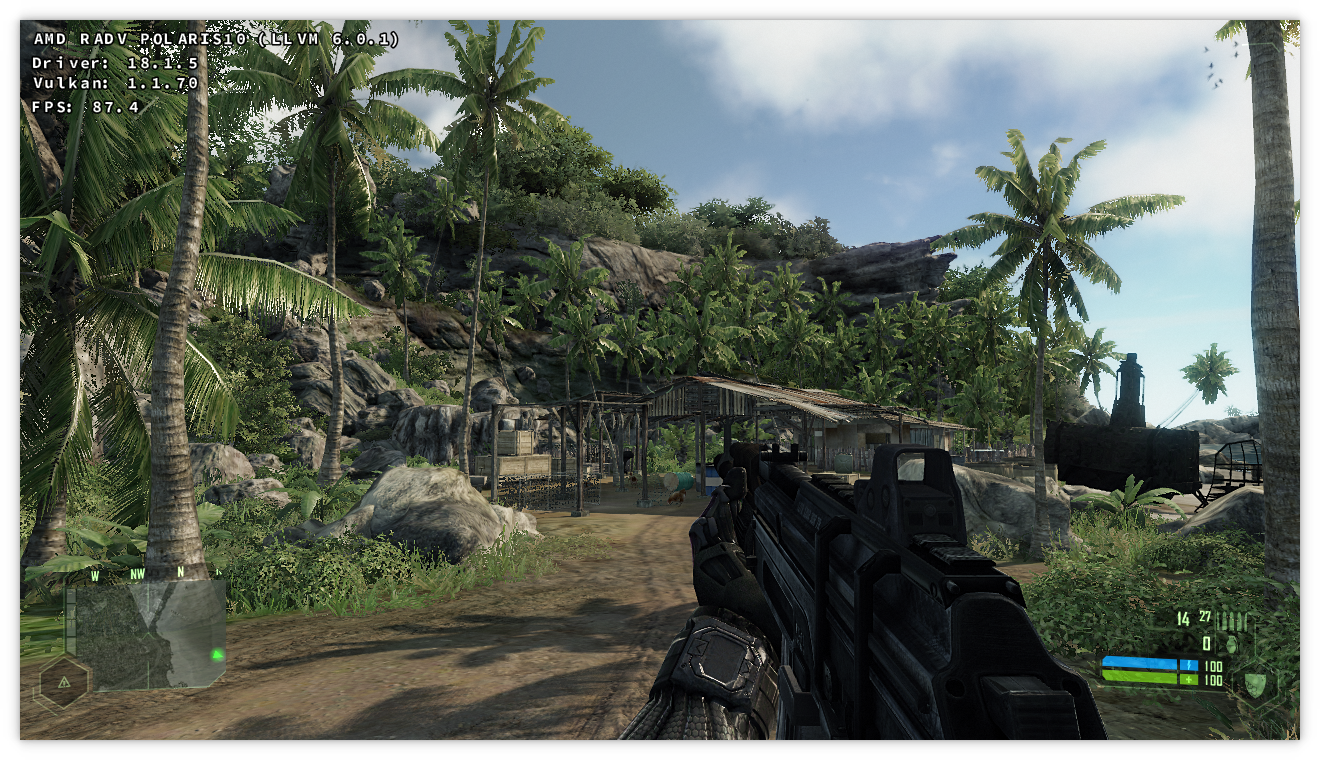
DXGI_FORMAT_R1_UNORMimage format are not supported.But can it run Crysis?
Provided you are running the 64-bit GOG version of the game, yes. Other versions of the game, particularly the 32-bit Steam version, will probably not run.
Games tested
Assassin's Creed 1
Should run fine. The MSAA option not available in-game.
Crysis 1
The 64-bit version should run fine, as noted above. On Mesa 18.1, enabling
RADV_DEBUG=nohizmay be necessary in order to avoid corrupted shadows. This issue is fixed in Mesa 18.2.Just Cause 2
Enabling SSAO may reportedly crash the game.