Can't do anything without an apitrace. If apitrace doesn't work, this issue cannot be fixed.
Please test if it works with older DXVK and/or Nvidia drivers. Also, I'd appreciate if someone could test it on RADV and check whether the issue is present on AMD cards as well or if it's maybe a driver bug.
First missions are OK or graphic error are less visible. It was the first time where it is so clearly visible, but I found problems in other areas too.
I tested it on Windows on the latest drivers (398.82). With DXVK there is exactly the same issue (performance is also similar). It still can be a driver bug, Nvidia uses the same common code on all platforms.
Anyway, I was able to create apitrace on Windows:
https://www.dropbox.com/sh/ziy9sku1qn8c8kn/AACFTdVDah0SSzgYaPld2WbDa?dl=0
There are two traces:
I also uploaded save from that moment, if you wish to test using it you need to put it in:
~/.wine/drive_c/users/$USER/Local Settings/Application Data/QuantumBreak
Thanks for uploading trace files. Unfortunately I cannot debug the problem because replaying the traces causes a GPU hang. I don't have access to the game, so I cannot use your save files.
I finally managed to grab a renderdoc capture of a frame. There are small lighting artifacts, but it's not nearly as bad on my RX 480 as it is on your screenshot. The problem might be related though.
Unfortunately it also appears that the buffer that seems to contain faulty data is only updated once while loading the game/level, which makes this exceptionally hard to debug.
This can be closed, issue was fixed with version 0.72. I've checked 0.71 (still rendering issues), 0.72 and all newer are fine. Thanks!
Oh cool, thanks for reporting back. I never had too much luck debugging this game, so this is good to hear.
WINEDLLOVERRIDES="d3d11,dxgi=b"x1 2018-08
Quantum Break renders incorrectly in some situations. Some shadows/lighting are incorrect, sometimes in the shape of black rectangles:
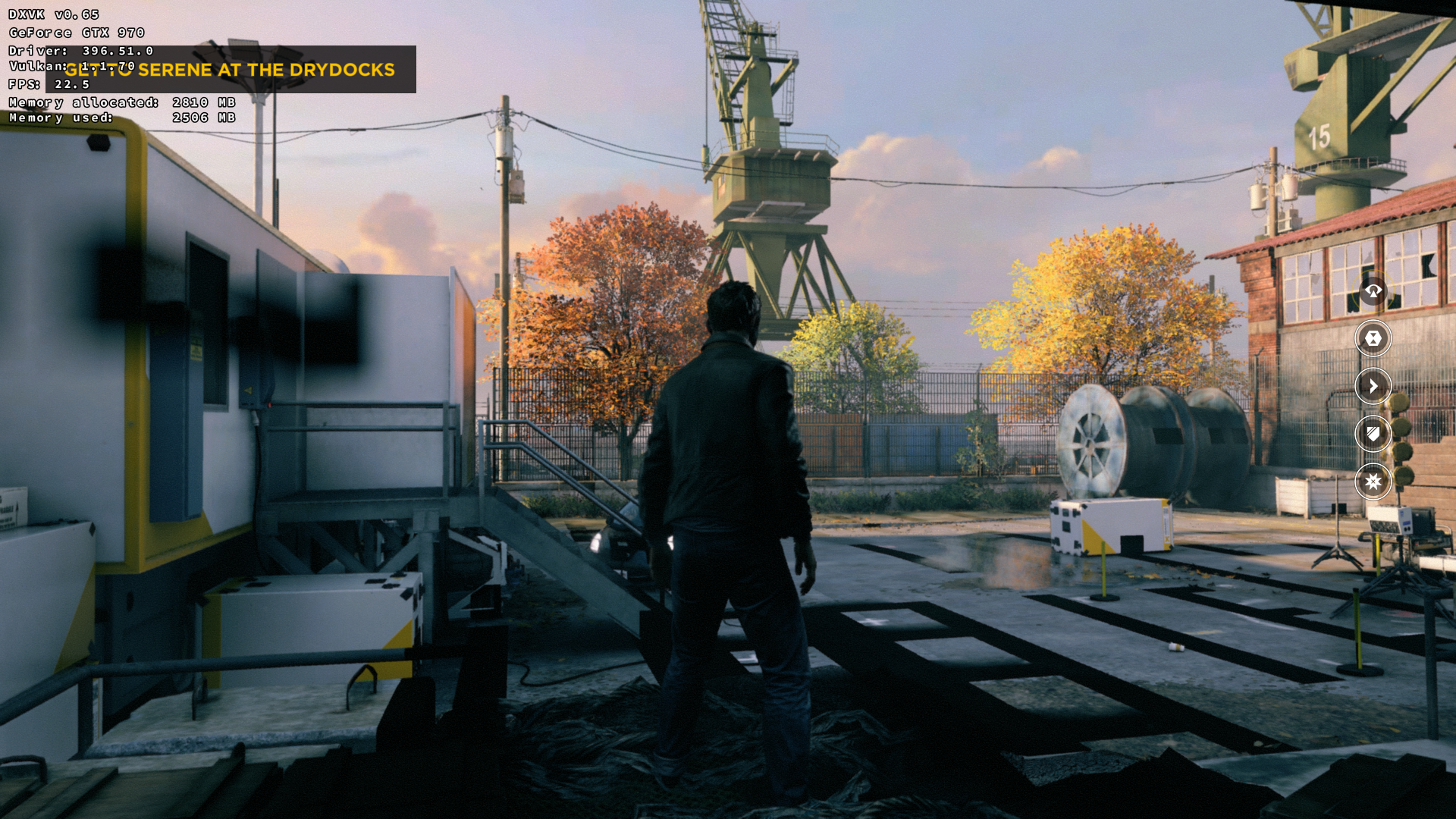


Software information
Quantum Break: https://pcgamingwiki.com/wiki/Quantum_Break
Problem occurs on all settings: from low to ultra.
System information
Apitrace file(s)
Without DXVK game crashes when save finisehs loading (menu works). I tried:
WINEDLLOVERRIDES="d3d11,dxgi=b" wine /home/konrad/Pobrane/apitrace-msvc/x64/bin/apitrace.exe trace --api dxgi -v QuantumBreak.exe
But no trace was generated and game crashed.
With these DLLs game crashed on start, but trace file was generated (useless I guess).
Log files
QuantumBreak_d3d11.log
QuantumBreak_dxgi.log