Only with Winelib DXVK build World of Warcraft don't run without dxgi override, but works fine with it.
dxgi.log: for some unknown reason it was not created during the launch of the game.
dxgi.log doesn't get created because you're not even using DXVK's DXGI implementation.
In theory this should work fine for most games, no idea why it doesn't work for WoW. Your terminal output doesn't even mention a crash so it's basically impossible to figure out where it crashes based on that.
Please record an apitrace with a working DXVK setup (i.e. with the override enabled), or possibly even better, with plain wined3d.
@doitsujin Sadly, I can't do apitrace for WoW. It is possible that I am doing something wrong, but it seems to me that I did everything according to your instructions. I can't do apitrace for WoW even on Windows.At the output, I do not get a trace file. How else can I help you?
I have WoW working on Nvidia 415.22.05, Arch linux 4.20.3 and there is no DXGI override present. Using dxvk-git-0.95.r12.g8cc4497f-1.
Perhaps this is just an issue on AMD / mesa, though I suspect others would be reporting this by now if that were the case.
@Kerrung can you please test this with latest master? #878 fixes an issue with DXVK when using wine's DXGI, I wonder if this is the same problem.
@Kerrung Could you post a snippit of the WoW/_retail_/Logs/gx.log file?
@doitsujin unfortunately nothing has changed for me with b1540a1:
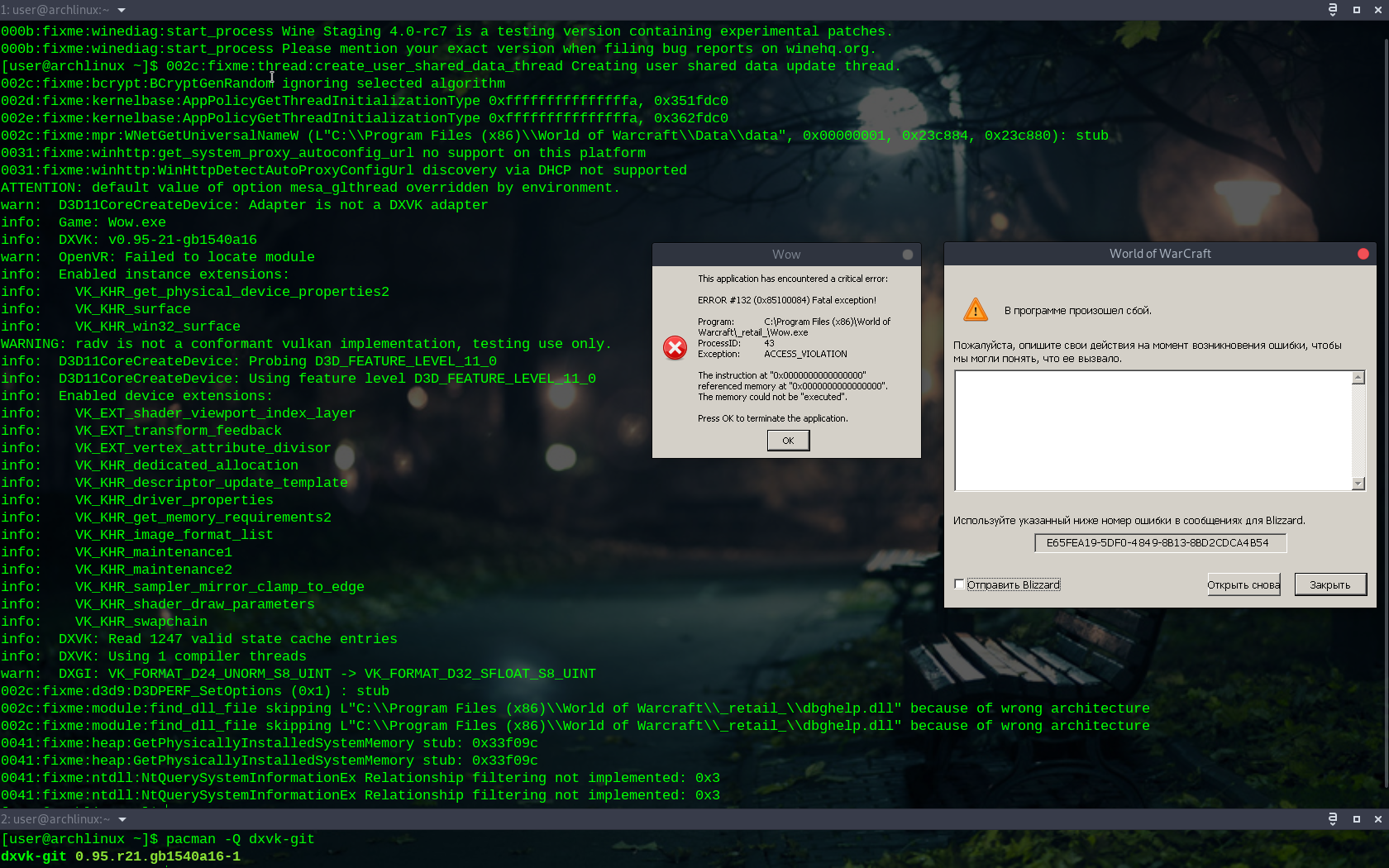
Can you run it with WINEDEBUG=dxgi and post the output?
Would not happen to have built this as a winelib by any chance @Kerrung ?
Would not happen to have built this as a winelib by any chance @Kerrung ?
@SveSop but I already using the AUR winelib version

WoW does not work with a winelib build i am afraid.
https://github.com/doitsujin/dxvk/issues/706#issuecomment-442926314
I kinda gave up on getting that working with WoW. Not sure why it doesnt, but i suscpect one of two things: 1. Possibly some "warden" (hack protection thing), or 2. Some strange thing with msvcrt missing when you cant build as a "static library" (winegcc does not support -static flag).
GxDeviceD3d11::ILoadD3dLib(): unable to LoadLibrary("d3d11.dll")
From WoW log indicates that wow cant load d3d11.dll (but loads dxgi.dll). Look on the linked thread and see if you get any wiser :)
WoW does not work with a winelib build i am afraid.
@SveSop WoW works fine with this winelib DXVK build when DXVK's dxgi overridden.
Please try a mingw build anyway. WoW does have some weird behaviour related to loading the D3D11/DXGI libraries.
Please try a mingw build anyway. WoW does have some weird behavior related to loading the D3D11/DXGI libraries.
I am not able to build a mingw git master build by myself because in AUR there is only a winelib dxvk-git package. Any ideas?
@Kerrung Well.. have you verified that you actually are using dxvk when doing that? With eg. export DXVK_HUD=fps or something? So that it is not some strange fallback to winelib d3d11 or some shit :)
I have not tested this in a while tho, but will do just for lulz and giggles, cos there has been quite a few updates to dxvk since i did this last. (Been using vkd3d w/D3D12). Gimme a few min, and ill double check that it works for me then.
@Kerrung just download the 0.95 release.
just download the 0.95 release.
Ok. Just give me time to do it, please...
Same problem with winelib and WoW still. Fatal exeption and GxDeviceD3d11::ILoadD3dLib(): unable to LoadLibrary("dxgi.dll") in the WoW gx.log.
With dxvk-bin (0.95 release) just this:
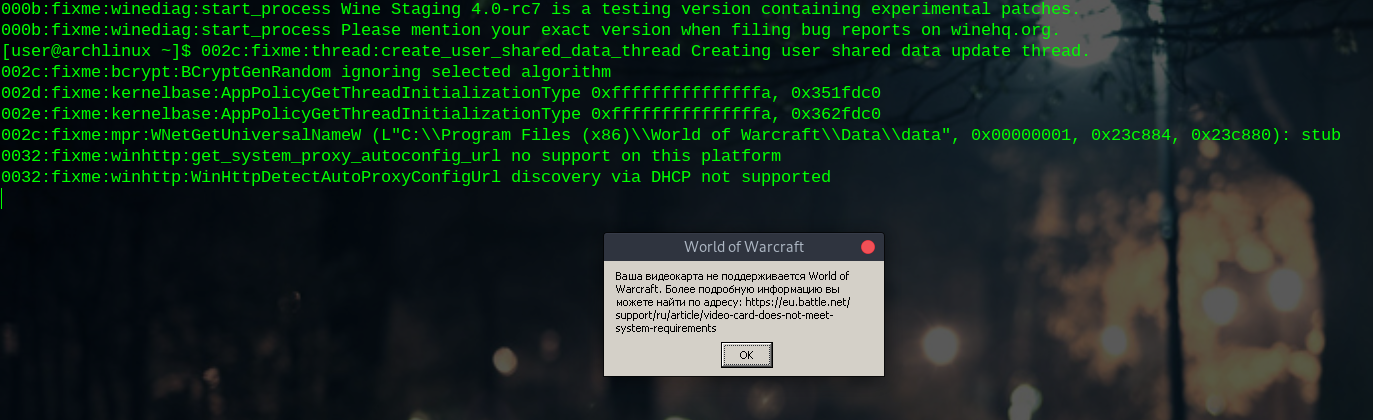
It is written here:
"Your video card is not supported in World of Warcraft."
@SveSop I have restarted the script supplied with this package, which automatically creates links or overwrites them if they previously existed. But if you want, then I can completely delete the WINEPREFIX/windows folder to re-create it and re-run this script.
Nah, its enough that you do a ls -asl d3d1* inside the prefix/drive_c/windows/system32 folder. You will see what the links are then :)
@SveSop
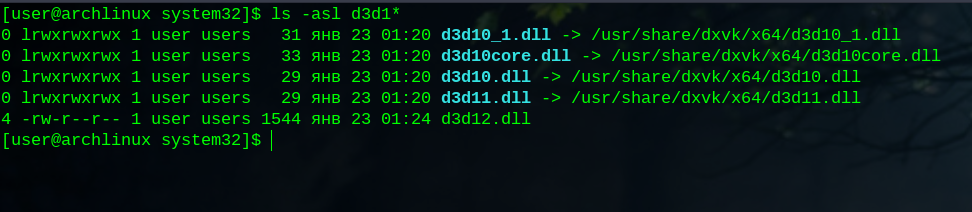
Looks right to me @Kerrung . Guess its up to @doitsujin to figure out more once you post some logs from dxgi/d3d11 for him with the working mingw-w64 build of dxvk. (Cos it IS working for most ppl)
Looks right to me @Kerrung . Guess its up to @doitsujin to figure out more once you post some logs from dxgi/d3d11 for him with the working mingw-w64 build of dxvk.
@SveSop but unfortunately, during such an attempt to start the game, no logs are created in the folder with Wow.exe. I remind you that I still use the dxvk 0.95 release version .

export DXVK_LOG_LEVEL=debug ?
@SveSop with DXVK_LOG_LEVEL=debug
DXVK_LOG_LEVEL-debug_WoW.txt
Gonna go to bed soon tho, and dont have a clue what launch script you use for wow or anything.
Quick simple launch script:
export mywine='$HOME/wineinstall_dir/bin/wine64' "$@"
export WINEPREFIX="$HOME/wine/wow"
export WINEDEBUG="-all"
export DXVK_LOG_LEVEL=debug
export DXVK_HUD=devinfo,fps
cd "$HOME/wine/wow/drive_c/Program Files (x86)/World of Warcraft/"
$mywine "./World of Warcraft Launcher.exe"
Ofc replace these paths with your ACTUAL folders.. and if wine-staging-4.0-rc7 is your systemwide wine, you dont have to do the export mywine= line at all, and just run wine "./World of Warcraft Launcher.exe"
This should bring up the battle.net window WITH the DXVK "hud" info if dxvk is correctly installed. This also should create a file called Agent_dxgi.log in the WoW folder.
If THAT happens, but WoW crash when you press the big blue "launch" button, hopefully you will have some logs in the retail folder :)
Too tired tho, so hopefully you figure it out, or else we pick up the thread tomorrow :) G'night.
@SveSop I use the setup_dxvk_aur.verb script to automatically create symlinks and Wine overrides. This script ships with the AUR dxvk-bin package
Hmm.. I wonder how dependent the winelib d3d11.dll.so is of d3dcompiler_47.dll?
005a:trace:loaddll:load_builtin_dll Loaded L"C:\\windows\\system32\\d3dcompiler_47.dll" at 0x6bb50000: builtin
005a:trace:loaddll:free_modref Unloaded module L"C:\\windows\\system32\\d3dcompiler_47.dll" : builtin
005a:trace:loaddll:load_native_dll Loaded L"C:\\Program Files (x86)\\Blizzard App\\Battle.net.10904\\d3dcompiler_47.dll" at 0x15810000: native
005a:trace:loaddll:free_modref Unloaded module L"C:\\Program Files (x86)\\Blizzard App\\Battle.net.10904\\d3dcompiler_47.dll" : native
lib_d3dcompiler_43 = declare_dependency(link_args: [ '-L'+dxvk_library_path, '-ld3dcompiler_43' ])
  lib_d3dcompiler_47 = declare_dependency(link_args: [ '-ld3dcompiler' ])
vs. mingw-w64 build:
lib_d3dcompiler_43 = dxvk_compiler.find_library('d3dcompiler_43', dirs : dxvk_library_path)

  if dxvk_compiler.get_id() == 'msvc'
    lib_d3dcompiler_47 = dxvk_compiler.find_library('d3dcompiler')
  else
    lib_d3dcompiler_47 = dxvk_compiler.find_library('d3dcompiler_47')
  endif
Nah.. ill go to bed now :) (Before i toss out any more ramblings that makes no sense...)
@Kerrung The script i posted is for actually starting World of Warcraft...
@SveSop but I don't use any script to start WoW. I just enter the command:
env WINEPREFIX=/home/user/.wine wine64 start /unix '/home/user/.wine/drive_c/Program Files (x86)/World of Warcraft/retail/Wow.exe'
@Kerrung So, you write this by hand each time you are going to play wow?
You know.. you could put that oneliner in a startwow.sh script? :) (You see where i am going?).
Nevermind... But BEFORE you use that 1-line of code (by NOT using a script), you can type:
export DXVK_LOG_LEVEL=debug (press enter)
then
export DXVK_HUD=devinfo,fps (press enter)
THEN you can use
`env WINEPREFIX=/home/user/.wine wine64 start /unix '/home/user/.wine/drive_c/Program Files (x86)/World of Warcraft/retail/World of Warcraft Launcher.exe'
to check battle.net and the things i asked above :)
Yesterday I was unable to launch the game in the same configuration because I did not create DXVK symlinks to 32bit libraries, but today I was able to run WoW using the official 0.95 release build, without dxgi override.
But with the winelib version of DXVK WoW is still not working.
@Kerrung Great! :)
I have worked/tried this on and off for some time with winelib, but so far i do not know why this does not work with WoW particularly. As i before, its either some missing library/something, or Blizzards anti-cheat that does something weird with this.
The "loadlibrary" error indicates either that 1. the actual .dll is NOT available (it is), or one of its required .dll's could not be loaded (eg. if d3d11.dll requires d3dcompiler_47.dll, and the current wine version of d3dcompiler_47.dll does not work with dxvk d3d11.dll). There is some weirdness not experienced in most other games/apps tho.
I also suspect that if you do not override dxgi.dll with a winelib build there will be some sort of fallback to wined3d d3d11. Unless ofc you have verified that DXVK_HUD works with this (I will probably test this some more).
Tested winelib build with no dxgi.dll override, and the problem is the same (for me). But i might have found something weird with vulkan-1.dll perhaps?
What happens is that with DXVK_HUD=fps is that the hud is shown on the battle.net client window, but it HAS crashed, cos the fps counter does not update until you move the mouse over buttons or similar. The comparison between a non-working winelib build and a working mingw-w64 build with +loaddll wine debug option is this:
cat winelog.log | grep -i vulkan
0039:trace:loaddll:load_builtin_dll Loaded L"C:\\windows\\system32\\winevulkan.dll" at 0x7c450000: builtin
info:    Vulkan: 1.1.96
info:    Vulkan: 1.1.96
005b:trace:loaddll:load_builtin_dll Loaded L"C:\\windows\\system32\\winevulkan.dll" at 0x7b950000: builtin
info:    Vulkan: 1.1.96
00a1:trace:loaddll:load_builtin_dll Loaded L"C:\\windows\\system32\\winevulkan.dll" at 0x7bda0000: builtin
00a6:trace:loaddll:load_builtin_dll Loaded L"C:\\windows\\system32\\winevulkan.dll" at 0x7c430000: builtin
0097:trace:loaddll:load_builtin_dll Loaded L"C:\\windows\\system32\\winevulkan.dll" at 0x7be40000: builtin
info:    Vulkan: 1.1.96
info:    Vulkan: 1.1.96
info:    Vulkan: 1.1.96
00fa:trace:loaddll:load_builtin_dll Loaded L"C:\\windows\\system32\\winevulkan.dll" at 0x7c060000: builtin
0112:trace:loaddll:load_builtin_dll Loaded L"C:\\windows\\system32\\winevulkan.dll" at 0x7c060000: builtin
info:    Vulkan: 1.1.96
0112:trace:loaddll:load_builtin_dll Loaded L"C:\\windows\\system32\\vulkan-1.dll" at 0x7a6b0000: builtin
0112:trace:loaddll:free_modref Unloaded module L"C:\\windows\\system32\\vulkan-1.dll" : builtin
012c:trace:loaddll:load_builtin_dll Loaded L"C:\\windows\\system32\\winevulkan.dll" at 0x7fc119830000: builtin
info:    Vulkan: 1.1.96
012c:trace:loaddll:free_modref Unloaded module L"C:\\windows\\system32\\winevulkan.dll" : builtin
The lines with Vulkan: 1.1.96 is from dxvk, but to ME it seems they indicate some sort of crash/unable to actually load. In correlation with this, i also get:
warn:  D3D11DeviceContext::QueryInterface: Unknown interface query
warn:  D3D11DeviceContext::QueryInterface: Unknown interface query
warn:  D3D11Texture2D::QueryInterface: Unknown interface query
warn:  D3D11Texture2D::QueryInterface: Unknown interface query
warn:  D3D11Texture2D::QueryInterface: Unknown interface query
warn:  D3D11Texture2D::QueryInterface: Unknown interface query
warn:  D3D11Texture2D::QueryInterface: Unknown interface query
warn:  D3D11Texture2D::QueryInterface: Unknown interface query
Clearly dxvk is not loaded/active, ref the "Unknown interface query".
This is a working mingw-w64 snippit:
cat winelog.log | grep -i vulkan
0038:trace:loaddll:load_builtin_dll Loaded L"C:\\windows\\system32\\vulkan-1.dll" at 0x7c6b0000: builtin
0038:trace:loaddll:load_builtin_dll Loaded L"C:\\windows\\system32\\winevulkan.dll" at 0x7c440000: builtin
005a:trace:loaddll:load_builtin_dll Loaded L"C:\\windows\\system32\\vulkan-1.dll" at 0x7bd80000: builtin
005a:trace:loaddll:load_builtin_dll Loaded L"C:\\windows\\system32\\winevulkan.dll" at 0x7bb50000: builtin
005a:fixme:vulkan:wine_vk_device_convert_create_info Application requested a linked structure of type 0x3b9db032.
005a:fixme:vulkan:wine_vk_device_convert_create_info Application requested a linked structure of type 0x3b9b3760.
00a1:trace:loaddll:load_builtin_dll Loaded L"C:\\windows\\system32\\vulkan-1.dll" at 0x7bec0000: builtin
00a1:trace:loaddll:load_builtin_dll Loaded L"C:\\windows\\system32\\winevulkan.dll" at 0x7be80000: builtin
"Application requested a linked..." indicates to ME that dxvk is loaded and "responding". Notice that it is no dxvk log-info here (no info: Vulkan: 1.1.96). There is no "Unknown interface query" either.
Anyone wanna give another stab at this with a tracelog from wine perhaps? Seeing of there is something crashing?
- Winelib build works with loads of d3d11 games, so it cant be a "general fault".
- Winelib build of dxvk does NOT support the "static" linking you can do to libraries in a mingw-w64 build. Is vulkan-1.lib linked more "correctly" vs. the wine version of libvulkan-1? Dunno.. See 1 above, cos one would think other games would fail aswell..
- Winelib build of d3d11/d3d12 works fine with WoW if you use wined3d/vkd3d, so its not a general "winelib" problem with WoW.
The solution is probably some simple crap.. something missing. I have tried to do some adding of lib_vulkan = declare_dependency(link_args: [ '-lvulkan-1', '-lwinevulkan' ]) and stuff like that to perhaps try to link something that is missing.. Even tried creating a d3dcompiler_47.def file and linking that in the same way d3dcompiler_43 is linked.. to no avail.
Someone with WoW and some idea are welcome to try :)
Someone with WoW and some idea are welcome to try :)
I do not have any new ideas, but I am very interested to know what @doitsujin will say to this.
Not much, WoW is essentially a black box to me and I just don't know how to debug something like this.
I think its bound to be some kind of library that is needed, that most other stuff do not require.. For all i know WoW could have its own c++ library baked in somewhere, and since we cant just like the needed c++ library statically like the mingw-w64 build seems to do, it goes tits up on some weird function?
Plenty of
005b:fixme:msvcp:_Mtx_init_in_situ unknown flags ignored: 2
00fa:fixme:msvcp:_Mtx_init_in_situ unknown flags ignored: 2
00fa:fixme:msvcp:_Mtx_init_in_situ unknown flags ignored: 1
stuff in that WoW log aswell (this is obviously non-implemented things in wine's msvcp tho). Just tossing ideas around, since the most glaring difference between the mingw-w64 and the winelib build is '-static-libgcc', '-static-libstdc++'. And as mentioned before: winelib/winegcc does not seem to support the --static flag when linking. (For all i know, might be outdated info on the winehq man pages tho?)
Building dxvk without '-static-libgcc', '-static-libstdc++' gives no errors, but then the mingw-w64 version does not work. So it is obviously required.
It is mentioned someplace that mingw-w64 builds with the '-mno-cygwin' flag by default? But does it do that?
Adding this makes the winelib version not compile, and i would guess it is due to some headers that wine uses is not compatible with dxvk. (cpp). So, since you cannot build with '-mno-cygwin', and winegcc does not support '-static' linking the libs the mingw-w64 version does.. Could this be something problematic perhaps?
Please try a mingw build anyway. WoW does have some weird behavior related to loading the D3D11/DXGI libraries.
I am not able to build a mingw git master build by myself because in AUR there is only a winelib dxvk-git package. Any ideas?
There is a MingW AUR package: https://aur.archlinux.org/packages/dxvk-win64-git/
Have you all dependencis installed ? https://github.com/lutris/lutris/wiki/How-to:-DXVK
Have you all dependencis installed ? https://github.com/lutris/lutris/wiki/How-to:-DXVK
@davvvve1 look here: https://github.com/lutris/lutris/wiki/How-to:-DXVK#arch--antergos--manjaro--other-arch-derivatives
I still use Arch Linux and Radeon GPU with Mesa RADV, and yes, all dependencies are installed, thank you.
This seems to work with WoW 8.1.5 and the "new" d3d11 engine.
From the /World of Warcraft/retail/Logs/gx.log it seems to use D3D11.1
3/16 17:35:33.486  Format 1920 x 1080 Fullscreen, ArgbX888, vsync 0
3/16 17:35:33.545  Taking Adapter by name:"NVIDIA GeForce GTX 970"
3/16 17:35:33.548  Detected NvAPI and checking if it's valid...
3/16 17:35:33.578  Created 11.1 Device
I tested this with installing ./setup_dxvk.sh install --without-dxgi --symlink and wine-4.4 with staging-
6c37563f924b8b268f779725322ebe387c65b8cf
If anyone want to revisit this test for WoW 8.1.5 and confirm that would be nice.
Thank you! It woks fine now! So, I close this issue.
Launch options
DXVK_HUD=fps`x2 2019-01DXVK_HUDx1 2019-01DXVK_LOG_LEVEL=debug`x2 2019-01WINEPREFIX=/home/user/.winex2 2019-01DXVK_HUD=devinfo,fps`x1 2019-01DXVK_LOG_LEVEL=debugx2 2019-01DXVK_HUD=devinfo,fpsx1 2019-01WINEDEBUG="-all"x1 2019-01WINEPREFIX="$HOME/wine/wow"x1 2019-01DXVK_LOG_LEVELx1 2019-01WINEPREFIXx1 2019-01WINEDEBUGx1 2019-01WINEDEBUG=dxgix1 2019-01WINEDEBUG=dxgi`x1 2019-01
Upstream links
- doitsujin/dxvk/issues/706x1 2019-01
DLLs
dxgi.dllx4 2019-01vulkan-1.dllx1 2019-01winevulkan.dllx1 2019-01d3d11.dllx4 2019-01d3dcompiler_47.dllx2 2019-01
Hi, @doitsujin ! Thank you for your the great work!
An attempt to run the game ends in a game crash.
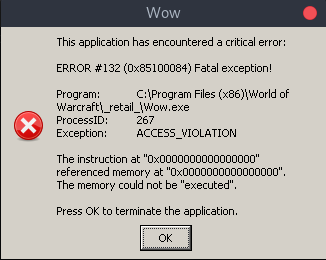
But the game works well if I add the dxgi override.
Software information
World of Warcraft
System information
Apitrace file(s)
Log files
wow-wine-dxvk-terminal-output.txt
d3d11.log: Wow_d3d11.log
dxgi.log: for some unknown reason it was not created during the launch of the game.