There is no system information posted here.
There is no system information posted here.
Totally forgot it, I'm sincerely sorry.
Arch Linux up to date
Intel 9900K
X11 and GTX 1080Ti, driver version 520.56.06
The whole log:
https://pastebin.com/JYnGJkGN
There is nothing d3d12 related in the log at all, can you get another log with WINEDEBUG=+loaddll VKD3D_DEBUG=trace set?
Game doesn't even load d3d12.dll or vkd3d-proton, no idea what's wrong but probably not a vkd3d-proton bug directly.
Yep, I can see it but I don't why. The game doesn't see it at all and doesn't call it in any way.
@dreamhunt What does winecfg -v say? If not win10 then try setting it to that with winecfg -v win10 and try launching the game again.
I already tried it. It's on win10. Thank you for your suggestion.
@dreamhunt Are you still having issues with this?
Now with latest git the game just crashes so this issue is fixed I think.
VKD3D_DEBUG=trace`x1 2022-11WINEDEBUG=+loaddllx1 2022-11VKD3D_FEATURE_LEVEL=12_0`x1 2022-10VKD3D_FEATURE_LEVEL=12_2`x1 2022-10d3d12.dllx1 2022-11
Hello,
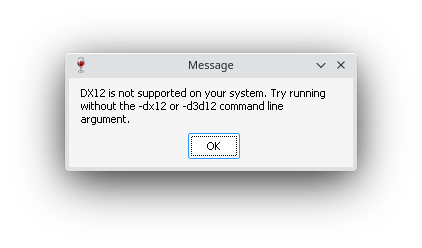
Ghostbusters: Spirits Unleashed persists DX12 is not supported on my system and I get this message:
I can play all DX12 games but this. I tried with -dx11 and -d3d11 flags, with
VKD3D_FEATURE_LEVEL=12_0andVKD3D_FEATURE_LEVEL=12_2to no avail. Ofc I have VKD3D-Proton's d3d12 set to native. I even tried VKD3D-Proton's installer - no dice.